Search Archive

Abb's NAV Mod V2.75 for 'Chrome Theme' - Upd. July 7 '10

By abb1 · Mar 23, 2010in Completed Mods/Themes💬 719 posts👁️ 85,531 views
Page 17 of 29
Posted May 22, 2010 · 14:04 UTC#401
Ok, I downloaded winrar, re-downloaded you nav mod 1.65, extracted the data.zip, put it on clear sd card, booted into testmode, deleted old data.zip and pasted new, deleted contents of save folder, shut down, removed sd, restarted, and...........still have the startup message on the menu.........won't go away. What next?? :(


What firmware are you on?

Posted May 22, 2010 · 14:12 UTC#402

What happened when you hit the 'map' button while in startup mode? what was the error message?

Posted May 22, 2010 · 14:17 UTC#403
Ok, I downloaded winrar, re-downloaded you nav mod 1.65, extracted the data.zip, put it on clear sd card, booted into testmode, deleted old data.zip and pasted new, deleted contents of save folder, shut down, removed sd, restarted, and...........still have the startup message on the menu.........won't go away. What next?? :(


What firmware are you on?

Yes, you have to have firmware 3.0 installed on your Avic (which is what everyone pretty much has) as all the latest mods are based on IGO 8.3 whereas Firmware 2.0 is based on IGO 8.0.

Posted May 22, 2010 · 14:24 UTC#404

When I hit the map button on startup mode, it switches to the nav warning screen with the startup message covering the ok button. There is no error message, but the unit seems to freeze then, cannot go back or get off the screen.

As far as my firmware, uhh I have not done any kind of upgrading myself since I got it on that. I do know that when I got it, I went to the pioneer website and was going to get the latest upgrade that they supply, but the version that was in my unit was already a later version than theirs that was available. I dont think it was 3.0 though, maybe 2.06, is that a correct version?


So what to do?

Posted May 22, 2010 · 14:41 UTC#405
When I hit the map button on startup mode, it switches to the nav warning screen with the startup message covering the ok button. There is no error message, but the unit seems to freeze then, cannot go back or get off the screen.

As far as my firmware, uhh I have not done any kind of upgrading myself since I got it on that. I do know that when I got it, I went to the pioneer website and was going to get the latest upgrade that they supply, but the version that was in my unit was already a later version than theirs that was available. I dont think it was 3.0 though, maybe 2.06, is that a correct version?


So what to do?

You have to get the 3.0 firmware. It is a huge download which you should be able to get here http://www.avic411.com/forum/viewtopic.php?f=34&t=25751 or you can get the legit update through pioneer which will cost you about $65 because it has the latest map updates. I have purchased the legit update but because of mods had to get the version from above anyways. Version 3.0 is initially for the x series, but is used for the F series as well. Pioneer charges for this update for. the F series because it has a major map update besides the firmware update. I would suggest that you get this if you plan on doing ANY mods in the future.

Posted May 22, 2010 · 15:00 UTC#406

None of the links on the page you referenced me to work. Do you know where else to get it without having to pay, I really have the moolah for that right now? Can you make me a copy since you have it?


Do I absolutely have to have 3.0 to run your nav mod v1.65? Is that what my problem is?

Posted May 22, 2010 · 16:31 UTC#407
None of the links on the page you referenced me to work. Do you know where else to get it without having to pay, I really have the moolah for that right now? Can you make me a copy since you have it?


Do I absolutely have to have 3.0 to run your nav mod v1.65? Is that what my problem is?

I believe that there are a few that work, you just have to do a search. I dont know which ones work as the one that I got, I got when it first came out. The file is close to 2 GB in size as it has all the new map data, so I cannot host it as there is a limit, nor can I mail it as it is too big.

Do you need 3.0 to run my mod? I believe so, but I dont know for sure as I dont know anybody with 2.0 that has tried it. Regardless, with the quicker response time, and IGO 8.3, I wouldn't even hesitate to updating it.

Posted May 22, 2010 · 17:17 UTC#408

Abb, I would change you rtitle to reflect this is for FW 3.0+ since this is the second time I have seen this issue.

Posted May 22, 2010 · 18:43 UTC#409
Abb, I would change you rtitle to reflect this is for FW 3.0+ since this is the second time I have seen this issue.

I think that you are right, I didnt think it was necessary as ALL NAV mods are made for 3.0. Even the ones that weren't, were updated to 3.0. I will make the change once I put up the updates which should be soon

Posted May 22, 2010 · 20:55 UTC#410
Abb, I would change you rtitle to reflect this is for FW 3.0+ since this is the second time I have seen this issue.

I think that you are right, I didnt think it was necessary as ALL NAV mods are made for 3.0. Even the ones that weren't, were updated to 3.0. I will make the change once I put up the updates which should be soon


To be honest, and not a knock on the new guys coming here, but I am surprised everyone is not on 3.0 already :D

Posted May 22, 2010 · 21:22 UTC#411

I have been modding this unit since I joined this site over a year now and I am positive that you will need to upgrade to 3.0. All the new mods are using this version. 2.0 is horrible and 3.0 is a huge improvement especially the 2d north up which is hot available in 2.0. Also it uses igo 8.3 which allows you to have sky and without 3.0 most of the schemes won't work either. So bottom line upgrade to 3.0

Posted May 23, 2010 · 03:02 UTC#412

Abb,


Can you trim the GFX BMP just for your schemes? For thoses of your fans that only like to install your schemes will not need all those huge BMP from LeSScro and Xerses. Don't get me wrong, they also have very nice schemes but we cannot keep all in the unit, given the limited space.


Thanks.

Posted May 23, 2010 · 14:13 UTC#413

Hey Abb

your new images look really good from the preview. Can't wait to pull out the images from your mod and add to my blue theme. Just trying to finish some bugs in my mod and once you release those files, will be looking forward to adjusting my mod to suit.

Posted May 23, 2010 · 15:40 UTC#414
Abb,


Can you trim the GFX BMP just for your schemes? For thoses of your fans that only like to install your schemes will not need all those huge BMP from LeSScro and Xerses. Don't get me wrong, they also have very nice schemes but we cannot keep all in the unit, given the limited space.


Thanks.

The whole point is that my mod has the capability of using ALL schemes including those from IGO Amigo. My mod is the only one capable of that (I think DPDursts mod has that capability as well). If I deleted all that in the GFX folder, them the only schemes that would be possible would be mine and nobody elses. My new GFX folder is only slightly bigger than my last and again, it is too easy to delete some maps that are not required or POI that are not required. I mean like, who travels to Alaska anyways? lol, who would want to? If that still is a problem for space, you can always delete the Lesscro and Xerses folders yourself from the GFX folder, or just the bmp's in them

Posted May 23, 2010 · 15:46 UTC#415

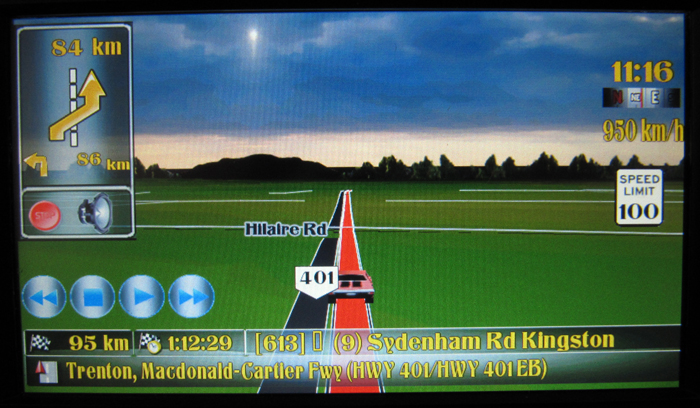
Here is another new scheme that I have put in. It is my pollution scheme. These pics dont do it just as the contrast is too high on this camera and the background images look black when in reality there are not. I now have a total of 16 unique schemes that should all be ready tonight to download with everything else. I just have to find the time today to change all the threads to add the new files, Damn, 5 new files!

post-32106-12872762464932_thumb.jpg

post-32106-12872762466298_thumb.jpg

Posted May 23, 2010 · 19:53 UTC#416

Hi Abb,

Where is your code for the splitscreen? i can't find it in your nav 800_480 file.

Posted May 23, 2010 · 22:10 UTC#417
Hi Abb,

Where is your code for the splitscreen? i can't find it in your nav 800_480 file.

It is in the 'Common/UI folder' named 'infoscreen.ui'

Posted May 23, 2010 · 23:32 UTC#418

Well guy's, the new update is up! along with a new GFX folder, new schemes and a new 'Main Chrome theme V1.5'. When installing the schemes, please delete ALL schemes presently in the folder except the original pioneer ones and then add my new schemes. If you do not do this, they will duplicate! This was a lot of work, so please give me your comments, and let me know of any problems! Thanks

Posted May 23, 2010 · 23:42 UTC#419

I am trying to add a delete route button to my splitscreen and not sure how it is done. i have seen it on your mod and was just wondering if this is what I need to add to my mod from your codes, while changing the infoscreen to whatever mine is called:

INITMESSAGEBOX 1 "Route will be deleted." 'vDeleteRoute.set 1,run sc_DeleteSavedRouteConfirmed_infoscreen'

vStartModeTmp.set 0

run sc_freshRouteInfo


DELETEROUTE


btnARMsnd_Delete.DISABLE

btnARMsnd_Delete_EW.DISABLE

btnARMsnd_Delete_AU.DISABLE

btnARMsnd_Delete_RE.DISABLE

btnARM_Info.DISABLE

btnARM_Itineary.DISABLE

btnARM_Edit.DISABLE

btnARM_Save.DISABLE

btnARM_FlyOver.DISABLE

btnARM_Simulate.DISABLE

btnNMB_Pause.Hide

btnNMB_Faster.Hide

btnNMB_Slower.Hide

btnNMB_Resume.Hide

run sc_RefreshRouteInfo

run sc_HideRI_mh

5 NEXTSTATE st_navigatemap

Posted May 23, 2010 · 23:56 UTC#420
I am trying to add a delete route button to my splitscreen and not sure how it is done. i have seen it on your mod and was just wondering if this is what I need to add to my mod from your codes, while changing the infoscreen to whatever mine is called:

INITMESSAGEBOX 1 "Route will be deleted." 'vDeleteRoute.set 1,run sc_DeleteSavedRouteConfirmed_infoscreen'

vStartModeTmp.set 0

run sc_freshRouteInfo


DELETEROUTE


btnARMsnd_Delete.DISABLE

btnARMsnd_Delete_EW.DISABLE

btnARMsnd_Delete_AU.DISABLE

btnARMsnd_Delete_RE.DISABLE

btnARM_Info.DISABLE

btnARM_Itineary.DISABLE

btnARM_Edit.DISABLE

btnARM_Save.DISABLE

btnARM_FlyOver.DISABLE

btnARM_Simulate.DISABLE

btnNMB_Pause.Hide

btnNMB_Faster.Hide

btnNMB_Slower.Hide

btnNMB_Resume.Hide

run sc_RefreshRouteInfo

run sc_HideRI_mh

5 NEXTSTATE st_navigatemap

I cant really answer that as I dont know the coding that is involved in your mod. The only thing that I can say is to try it out. Just make sure that ypou have everything backed up

Posted May 24, 2010 · 01:25 UTC#421
Hi Abb,

Where is your code for the splitscreen? i can't find it in your nav 800_480 file.

It is in the 'Common/UI folder' named 'infoscreen.ui'


Hi Abb1:

Do I just copy over the infoscreen.ui and the bmp files to my data file and then it should work?

Jimbo

Posted May 24, 2010 · 01:29 UTC#422
Hi Abb,

Where is your code for the splitscreen? i can't find it in your nav 800_480 file.

It is in the 'Common/UI folder' named 'infoscreen.ui'


Hi Abb1:

Do I just copy over the infoscreen.ui and the bmp files to my data file and then it should work?

Jimbo

I cant answer that, I dont know the coding in that mod. All I can say is try it out and go by the error messages if there are any. The error message will incicate which part od the code is in error, then you just fix it.

Posted May 24, 2010 · 03:27 UTC#423

Hey abb.....thanks for all of the info and help that you gave me. Sorry I was unaware about the need for FW 3.0, I could have saved us both some time and effort lol. But at least I have you to thank for pointing me in the right direction.


I finally got the links to work on the page you referenced me to for the firmware update once I schooled myself in torrents, however they are the update files from the pioneer cnsd-100fm update that is only for other f-series avics. The avic I have is the F500bt and it seems that I need the cnsd-150fm update made just for my model. Would you happen to know where I could find THAT update at on here?? If not, I guess I'll have to break down and order it from Pioneer, since it is on sale for $59. Thanks for all of your advice.

Posted May 24, 2010 · 12:18 UTC#424
Hey abb.....thanks for all of the info and help that you gave me. Sorry I was unaware about the need for FW 3.0, I could have saved us both some time and effort lol. But at least I have you to thank for pointing me in the right direction.


I finally got the links to work on the page you referenced me to for the firmware update once I schooled myself in torrents, however they are the update files from the pioneer cnsd-100fm update that is only for other f-series avics. The avic I have is the F500bt and it seems that I need the cnsd-150fm update made just for my model. Would you happen to know where I could find THAT update at on here?? If not, I guess I'll have to break down and order it from Pioneer, since it is on sale for $59. Thanks for all of your advice.

If you get the legit update from Piuoneer, just make sure that you revert any updates and put the stock files back in. The problem is that Pioneers update changes the firmware and just overwrites the files. It does NOT format the drive. I purchased the legit update and it would be stuck at startup mode because it was looking for files that were now changed, as I had my system fully modded before I updated it. I had to download the file from the thread that I gave you and that got it working, but those files DO reformat the drive.If all you have done is put in the Nav mod, that should not be a problem, just delete all the files that were in my download and install the original ones

Posted May 24, 2010 · 16:40 UTC#425

abb, another great job on this and schemes. Ran it quickly for about 20 minutes today, as always, best work yet. I haven't been through all the screens yet though.

Page 17 of 29