Search Archive

mod MB-IDT3.0-3b

By misterblue · Apr 25, 2010in Completed Mods/Themes💬 67 posts👁️ 23,010 views
Page 1 of 3
Posted Apr 25, 2010 · 14:21 UTC#1

Hello all,

After more than three months of change and with the agreement of ille.dy.trying, I offer my modified version of the mod IDT3.0 Seeing me served basis.

The change are as many visually (correction / modification / creation of buttons, icons and other images) at the level of certain options may well be unprecedented and asked me several weeks of development for some ( here I have no training in programming or even scripting in Computer Science)

This is the revision of my mod b. The release of MB-IDT3.0-3 and the revision has been distributed only in France and Europe.


What is new :

- Smart zoom does not suit me (given the closest too far away etc.) so I partly "reprogrammed" I also added two sliders to adjust the angle of view, I also cee the option to disable the camera roundabout.

- For Speedcams, I created a slider "Warn Distance" which lets you choose the maximum distance from which the alerts are triggered (voice and display the alert).

- Change in operating tones:

Added a new mod "Overspeed Limit (Live), beep from the overspeed warning once activated

The two other types of beeps (Overspeed Limit and When Approaching) depend on the slider "Beep Distance"

- The pace of the beeps "When Approaching" varies depending on the distance of approach speedcam

- New option for Overspeed Limit when speeding (integration and personal modification from a Gurjon mod)

- Fix a "mistake" when the pioneer Smart zoom was activated, the display of a Lane Info, a camera movement occurs but never returned to normal. Now after the disbanding of the Lane Info, back view as you will have it set in the menu Smart Zoom.

- The distance Poi search around the cursor has been increased (thank you to Marlyse, a member of my small forum French)

- If no GPS signal when you started to roll, once the signal OK, the card begins to move with the vehicle position, normally no need to click on the button "MAP"

- Fixed a mod "Multiplan" and Changing the mod "Multicalc"

- Modification audio option, "Key" has been changed. Now when this option is Off, the sound of warning speedcam (voice and beeps) and overspeed alerts (beeps) work always.

- Auto down/up Speedcam Alert windows position when the Big Lane Info appear/desappear

- Spécific 2D car by "Martin83" (member of my forum)

- New car position on 3D/2Dheadup for to allow the display of the new position of trip statistics. In Route mode, if it does not appear, the progression navigation and lane info displayed in the same place.

- Creating a quick menu available from the map, it can be closed manually or automatically depending on the setting chosen.

The quick menu includes various options, including the activation/deactivation:

Smart-Zoom

RoundAboutCam (depends on Smar-Zoom)

Mobil Speedcams

Overspeed Limit

Change direct auto/day/night mod

Spécific option for building (This option existed in the data.zip (with the basis of a basic and quick menu without much interest) but was not used. I changed it because it did not keep his distance setting appartition of the buildings, now it's ok)

and Other ....


etc. the list is too long


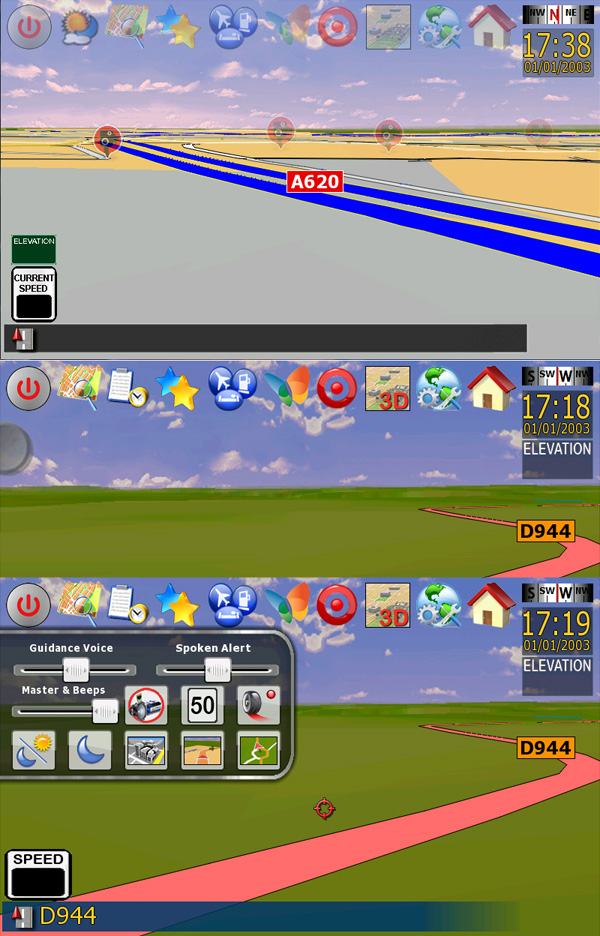
- Many visual aspects and options have been amended (see attached pictures)


Use:

- Most of the buttons at the top card are dual function (short or long click click)

- In the pages displaying a green arrow, it skips directly to the page of similar function (Multicalc <-> Multiplan, ditto for Cruise Dial).

The red arrow, allows a direct return to the map, while the gray arrow in the top right allows most of the time to return to the previous page.

- Short clic on "Elevation" info for GPS status

- Statistic = Short Trip click on the speedometer

- Trip The Computer = long click on the speedometer

- Menu = short phone calls click on the icon LV

- Direct call to the number in the home (the map is displayed) = Long click

- Operation Display and Hiding num street and trip statistic is the same as before, but now increasingly it is possible to select via the Map Menu, these data are displayed by default.


The pictures that follow are not meant to crtiquer the excellent work of IDT. They are there to show you quickly change between the mod IDT3.0 and my version MB-IDT3.0-3b.

When there are two superimposed images, the first is the mod IDT3.0 and the next mod MB-IDT3.0-3b


Please, read the instructions for intallation available in the archive downloaded.

F500 users must edit the file sys.txt to activate the line "type =" PIONEER749xx "and off the line" type = "PIONEER746xx"


If you wish donate:

Donate


MB-IDT3.0-3b_US

MB-IDT3.0-3b_US-MSN

MB-IDT3.0-3b_CAFr-MSN translate file for CA-Fr user (Quebec)

MB-IDT3.0-3b_EuroUK

MB-IDT3.0-3b_EuroUK-TMC

MB-IDT3.0-3b_EuroFr-TMC translate file for Fr user


my little forum

post-31631-12872762296407_thumb.jpg

post-31631-12872762297572_thumb.jpg

post-31631-12872762298602_thumb.jpg

post-31631-12872762299439_thumb.jpg

post-31631-12872762300262_thumb.jpg

post-31631-12872762301088_thumb.jpg

post-31631-12872762302076_thumb.jpg

post-31631-12872762302998_thumb.jpg

post-31631-12872762303707_thumb.jpg

Posted Apr 25, 2010 · 14:22 UTC#2


post-31631-12872762304186_thumb.jpg

post-31631-12872762304894_thumb.jpg

post-31631-12872762305603_thumb.jpg

post-31631-12872762306314_thumb.jpg

post-31631-12872762307028_thumb.jpg

post-31631-12872762307908_thumb.jpg

post-31631-12872762308638_thumb.jpg

post-31631-1287276230939_thumb.jpg

post-31631-12872762310301_thumb.jpg

post-31631-12872762311251_thumb.jpg

Posted Apr 25, 2010 · 14:22 UTC#3


post-31631-1287276231203_thumb.jpg

post-31631-12872762312903_thumb.jpg

post-31631-12872762313689_thumb.jpg

post-31631-12872762314623_thumb.jpg

post-31631-12872762315603_thumb.jpg

post-31631-12872762316967_thumb.jpg

Posted Apr 27, 2010 · 14:26 UTC#4

hello all, I forgot to post the picture showing the new option (Warn Distance) in this configuration page.

post-31631-12872762327716_thumb.jpg

Posted Apr 27, 2010 · 15:23 UTC#5

Screen shots look good. May give it a shot sometime to to check it out.

Posted Apr 27, 2010 · 15:40 UTC#6

Thanks for your contribution ... another modder in this community to keep the forum alive. :D

Posted Apr 27, 2010 · 18:20 UTC#7

Looks like you've put a lot of work into this.Great to see another modder coming to the fore.

Posted Apr 27, 2010 · 19:33 UTC#8

Indeed, for this version "international" I spent more than three months for a little over 600 hours. Amendments to existing bitmap button and my own creations also took me quite some time. Many of my nights have been really short short!

It took me quite some time because I have no training in programming and scripting I had to learn a lot by myself :wink:

Posted Apr 28, 2010 · 00:01 UTC#9

It took me quite some time because I have no training in programming and scripting I had to learn a lot by myself :wink:

lol, me too!! I came into this forum not knowing anything about modding. I always had the graphics edge, but everything that I have learned, I learned right here from members like Julius (IDT), Alex (Diaftia), Dave (DpDurst), and some from BorisM. Without these members, I would not be able to do what I do now :). Welcome aboard to the modding field! I hope that we see a lot more from you!

Posted Apr 28, 2010 · 16:25 UTC#10

Hello,


message of Ovalball

I.I love your mod but can you please tell me what


distance view carpos and roundabout cam is please.


Thank You.

member contacted me by PM and I was asked a interesting question. I can resume his message here before all the readers of this topic can read my response which may also be useful.


After extensive testing the Smart Zoom, I realized that the designation of certain options were not very clear.

I renamed "Limit Zoom Out" and "Limit Zoom In."

"Distance carpos view" carpos = position, this slider is used to select the distance light of the position of our vehicle.

"Roundaboutcam" I created a separate optional sub-options to choose from Smart Zoom enable or disable the camera roundabout. I do not know about the US but in Europe we have many interection type "roundabout". This option allows zooming (in or out) and change of angle view to better see the passage in this type of intersection.

This option is always enabled by default normaly when the Smart Zoom is used.

I created that option (also available from the Quick Menu) allows you to disable this change of view.

Posted Apr 28, 2010 · 17:50 UTC#11

Bonjour MisterBlue,


The following question is not only with your mod but all mods in general ...


First question: I don't know why, I was unable to control the tilt-up/tilt-down correctly. After bringing the tilt control arrow up in the screen (by touching the map), if I press once the down arrow, no more sky but only the ground. Idem for the up arrow. The stepping is too big. Where can I control this?


Second question: When I browse the map, with route or without route mode, most of the time it automatically reverts to the current position after about 10 seconds, time during which I actively browse the map for location. Can I disable this behavior?


Merci. :P

Posted Apr 28, 2010 · 18:16 UTC#12
...

First question: I don't know why, I was unable to control the tilt-up/tilt-down correctly. After bringing the tilt control arrow up in the screen (by touching the map), if I press once the down arrow, no more sky but only the ground. Idem for the up arrow. The stepping is too big. Where can I control this?

In my mod the tilt up and down works correctly and is linked to activation of the Smart Zoom (you must adjust the tilt in the sub-options).

For this to work well, it is necessary to use my sys.txt (I've set a max horizon not to touch).

More generally, the only way we can set the tilt up/down is to use the Smart Zoom (especially mine ;-) or that of any other mod with sliders tilt)

Second question: When I browse the map, with route or without route mode, most of the time it automatically reverts to the current position after about 10 seconds, time during which I actively browse the map for location. Can I disable this behavior?

This behavior is probably switched off but I'm not interested in me. Ideally, it should add an option to let the user choose whether to activate this repositioning self.

Merci. :P

Il n'y a pas de quoi ami Francophone :wink:

Posted Apr 28, 2010 · 18:41 UTC#13

Merci mon ami français! Merci d'avoir pensé aux Québecois(es) dans ta MOD. :D


So I will try the Smart Zoom with your Mod and I will also try posting my questions to another active Mod thread, such that of Diaftia and Abb's, as I really want to understand how.


BTW, what are the differences between the US and the CA-Fr versions?


Thanks for your support!

Posted Apr 28, 2010 · 19:26 UTC#14

We must especially thank your fellow "Labgate" member of my forum that I decided to make a version "special Quebec"

If users want to use the CA mod with US/UK voices speedcam in kilometer, I will put online a version for them.


The differences between the US versions and CA-Fr?

- 2 versions with their own bitmap "speed limit" on map

- The speedometer and elevation are bitmap Fr

- Quick Menu Button "Warn When speeding" is special to each (US, CA and Euro)

- Speedcam voices kilometric are in French for Euro-Fr and CA-Fr


I think I have forgotten nothing

Posted Apr 28, 2010 · 21:37 UTC#15

A small problem: when you are navigating with route and get into the MultiPlan (Route Functions), the navigation directive keeps repeating at least 4 or 5 times, which is very annoying ... anybody sees this problem :?: And during related screens, the voice repeats all the time!!!


Also, can someone show me how to select one of the 5 routes (Fast, Short, Eco, Scenic, etc)? What that means when the selection box is checked, opaque or box with hole? It doesn't seem to work properly or I don't understand its behavior.


Thanks.

Posted Apr 28, 2010 · 22:35 UTC#16

@ chuck88

I will be testing for the problem you are experiencing.


Multiplan mode works like this:

- short click on a selection box of route permits to display the route on the map (checked= displayed, unchecked=hidden)

- Each selection/deselection route recovery calculating all distances

- If there is no path except the lying route type (eg mode Short) displayed color on the map will always be red. As soon as there are several cons path is selected, each will be displayed on the map with color. When several routes overlap, a single color can be displayed.

- To exit Multiplan mode you can do in a long click on the type of route you want to use or if the type of course is already ok in this case, use this red arrow in the lower right.

- Green arrow in lower left can go directly to Multicalc page.

Posted Apr 29, 2010 · 03:08 UTC#17
@ chuck88


- short click on a selection box of route permits to display the route on the map (checked= displayed, unchecked=hidden)


Thanks for the details ...


Checked and unlchecked OK but how about a solid box?


I have experimented that I cannot unchecked the Short Route, even when other types of route are presented and checked. Any clue?

Posted Apr 29, 2010 · 07:23 UTC#18

the route type valid is checked by a small square. In this case it can not be un-checked because it is one that serves as a reference on the map.

I guess that's where your type "short".

Another thing, have you followed my instructions to "clean up" the "save" folder ?

Posted Apr 29, 2010 · 12:57 UTC#19

So I guess my preferred route type must be set to "Short", that is why I cannot uncheck it, right? I will verity that because I rather have it "Fast" instead.


No I didn't delete the 3x .SAV files and 1x system.ini :oops: , because I thought my previous mod is Abb's excellent modified version of IDT Skin #3, the latter is where your mod is built upon, and they should be compatible. Do I have to delete them?


And yes, this morning I still have the annoying many many voice prompts when I have route, and get into the Multiplan screen. Please check! :wink:

Posted Apr 29, 2010 · 13:08 UTC#20

For the problem of voice repetition between the route mode and access to multiplane mode, I can test tomorrow (right now I drive a motorbike :wink: )


To delete files, even if my version is based on IDT3.0, given the new options that I created myself and there are a lot of changes, it is better to "clean" the folder "save" as I have indicated. This is the best way to avoid problems in use between mod's. This procedure will not erase your bookmarks or saved routes etc, only your preferences GPS will reset.

Posted Apr 29, 2010 · 13:53 UTC#21

I will do the cleanup today. It is nice to know which file to delete. Thank you for the efforts of sorting this out for all of us :P .

Posted Apr 29, 2010 · 14:11 UTC#22

good job on the mod, 2 thumbs up misterblue

Posted Apr 29, 2010 · 14:33 UTC#23
good job on the mod, 2 thumbs up misterblue


Hey Welcome back IDT. Hope that all is well with you :D . Your excellent mods have been served as fundation for so many other fine pieces of work.


Just passing by or else? :?:

Posted Apr 29, 2010 · 15:03 UTC#24
good job on the mod, 2 thumbs up misterblue

IDT hello I'm glad to see you on the forum and thank you for your message :wink:

Posted Apr 29, 2010 · 19:54 UTC#25

Hey Welcome back IDT. Hope that all is well with you :D . Your excellent mods have been served as fundation for so many other fine pieces of work.


Just passing by or else? :?:


IDT hello I'm glad to see you on the forum and thank you for your message :wink:


just passing by, i've seen so much improvement from all the mods here, i have this big interview coming up and hopefully if i get the job i'll be able to go home and have some time to mod again,

Page 1 of 3