Search Archive

MB-3DCars1.0 Add-On up to 1.1a -07/14/10 UP-

By misterblue · Jun 22, 2010in Hacks/Mods💬 108 posts👁️ 22,078 views
Page 1 of 5
Posted Jun 22, 2010 · 10:07 UTC#1

hello,

As I am not the type to imitate other modder, I do not know if this add-on has already been adapted in AVIC.

Since the release of the mod MB-IDT3.0-4 had planned to use this add-on.

My work had begun in the month of March 2010, then dropped the case because I had to adapt our AVIC this add-on Gurjon (the creator, unless I am mistaken) had created many problems .

Let's say that visual adaptation in itself took me less than an hour, but the adaptation "functional" I asked a lot of problem due to some peculiarity "Pioneer" and script error of the author.

In May, I decided to try again experience, not without difficulty because I had to find solutions to various problems (correction, modification and creation of scripts).

Eventually I had put myself in a new scripting language and as I have no training in this area, I got a fair bit of reading doc :wink:


This is my version of the ADD-ON 3DCars compatible with MB-IDT3.0-4x (3.0-4 also possible, but further adjustments have been included in version 3.0-4x)

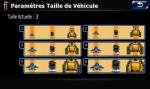
The 3D models are available as not all the same starting size and this does not satisfy me, I worked for over a week on the creation of an option to choose different sizes (6 in all). Let me tell you I have not seen this type of option also for this add-on.


Enabling the option of choice in vehicle-MB-IDT3.0 4x version to follow, is made when the add-on is in the right place in your AVIC (see installation procedure!


original version 400x272

3DCars.jpg


my first "test" version 800x480 (translate FR screen)

3dcars-1d146cc.jpg


definitive version MB-3DCars 1.0 (translate FR screen)

1) initoption-1d83f12.jpg 2)choixvehicule-1d83f22.jpg

3) selectvehicule-1d83f2a.jpg 4)choixtaille3dcars-1d83f35.jpg

1) Available option if add-on is properly stored in the AVIC

2) List of available vehicles (2 pages, slightly more than 80 models)

3) Once a model chosen, can apply immediately to modify or change its size (useful insofar as we already know that one size x will be better suited than a size depending on models)

4) Available size


pictures result (translate FR screen)

mario-1d1b96f.jpgmario2-1d1b989.jpg

mario3-1d1b9a5.jpgmario4-1d1b9bb.jpg


sport-1d1b9d5.jpgsport2-1d1b9e5.jpg

sport3-1d1b9fa.jpgsport4-1d1ba06.jpg


pack Install_MB-3DCars 1.0 (Installation and first use detailed) reactived files 06/25/10 -old version-

pack Install_MB-3DCars 1.1 (Installation and first use detailed) READ AT FIRST !!! UPDATE 06/27/10 for details, read post page 4


Self-extraction archives (Do not contain Trojan !!!)

pack Install_MB-3DCars 1.0 reactived files 06/25/10 -old version-

pack Install_MB-3DCars 1.1 UPDATE 06/27/10 for details, read post page 4 -old version-

pack Install_MB-3DCars1.1a-AddOn.exe UPDATE 07/14/10 for details, read post page 6

This archive contains a new file sys.txt allowing better positioning on 3D/2D map (improved responsiveness, more or little hesitation system when several roads close)


new translate file (all term of MB-IDT3.0-xx en MB-3DCars 1.0)

pack Install_MB_Lang_FR-3DCars1.0 reactived files 06/25/10

pack Install_MB_Lang_Can-FR-3DCars1.0 reactived files 06/25/10

(see this procedure for the installation of one of these 2 packs) reactived files 06/25/10


Standard-extraction archives (If you use these files, put yourself on your SD card main folder for each archive and follow the installation instructions)

pack Install_MB-3DCars 1.0 reactived files 06/25/10 -old version-

pack Install_MB-3DCars 1.1 UPDATE 06/27/10 for details, read post page 4

This archive contains a new file sys.txt allowing better positioning on 3D map (improved responsiveness, more or little hesitation system when several roads close)


pack Install_MB_Lang_FR-3DCars1.0 reactived files 06/25/10

pack Install_MB_Lang_Can-FR-3DCars1.0 reactived files 06/25/10

(see this procedure for the installation of one of these 2 packs) reactived files 06/25/10


UPDATE 07/02/10

How to add this add-on in your mod UPDATE 07/14/10


DELETED Files : 06/24/10 littel explain

Reactived Files 06/25/10


If you want me to continue modification :

Donate

Posted Jun 22, 2010 · 12:15 UTC#2

Why are the 3d cars an .exe file instead of just files where you can pick and choose which car you want? this is really hesitant as withan exe, you have no control or knowledge on where the files are being installed. To install a 3d car manually, it is so simple that you do not need an exe file. Can you please put this in a standard file that you can manually install?

* I tried to go to your site that had the info for the 3D cars by pressing the link and my PC Cillon antivirus told me that it was a dangerous site. Keep in mind that .exe files often have hidden trojans in them. I would not recommend installing this as it is! PLEASE CONVERT THIS TO STANDARD FILES THAT CAN BE MANUALLY INSTALLED! Thank you

Posted Jun 22, 2010 · 12:33 UTC#3

Hello, you have not read my file installation instructions. I advise you to read.

Then, to facilitate SD card copying folders/files, I decided (since my mod MB-IDT3.0-4) to offer my version in xxxx.exe (self-extractor 7zip format) instead of xxx.zip. or .rar

If your antivirus is a trojan in my file is probably that it is too sensitive!


No member of my forum not told me that his PC had been infected with my files.

My antivirus is updated and is still active (norton internet security 2009 with license)

Posted Jun 22, 2010 · 12:47 UTC#4
Hello, you have not read my file installation instructions. I advise you to read.

Then, to facilitate SD card copying folders/files, I decided (since my mod MB-IDT3.0-4) to offer my version in xxxx.exe (self-extractor 7zip format) instead of xxx.zip. or .rar

If your antivirus is a trojan in my file is probably that it is too sensitive!


No member of my forum not told me that his PC had been infected with my files.

My antivirus is updated and is still active (norton internet security 2009 with license)

I did read, which makes me even more curious as to why an exe file is necessary. Viruses are not the problem, but trojans are, which does not affect your computer, and somebody having one would not notice. PLEASE, just put this in file format, like IDT has done. It is so simple like that and risk free

Posted Jun 22, 2010 · 13:16 UTC#5

I understand your worry. I chose to create my archive in self-extactor to simplify the copying of files on SD card.

I am really surprised that there is a trojan in my archives .exe. I already struggling to build scripts, so I can say I am really unable to create a trojan hidden in my archives.


Before you insist, I will redo all my archives in "standard" format (include my mod).

They will row in a few hours :wink:

Posted Jun 22, 2010 · 14:12 UTC#6
I understand your worry. I chose to create my archive in self-extactor to simplify the copying of files on SD card.

I am really surprised that there is a trojan in my archives .exe. I already struggling to build scripts, so I can say I am really unable to create a trojan hidden in my archives.


Before you insist, I will redo all my archives in "standard" format (include my mod).

They will row in a few hours :wink:

Thank you! Lol, most trojans on the web are not made by the creators of the web site, they are just put there afterwards by idiots, that in my point of view should be executed, but none the less , the same can be said with programs

Posted Jun 22, 2010 · 14:24 UTC#7

One other question that I have as well regarding to your mod. You have a 'Restart' button in the Navi settings. Is this a 'restart' button or 'Restore' button? The difference is that both will restart your Avic, but the 'restore' will reset all your settings which sucks, and a 'Restart' will just restart your Avic and leave all your settings intact.

Posted Jun 22, 2010 · 15:18 UTC#8

We are not in the right topic to talk about it, but I'll answer

"restart" button in my mode, will restart the AVIC so software. This is not a reset settings but an easy way to restart the AVIC without having to cut contact with his car, if it necessary :wink:


I'm uploading the "Standard" version from my archives.

Posted Jun 22, 2010 · 16:07 UTC#9

UPDATE 06/22/10


Standard-extracting archives available in my first topic

Posted Jun 22, 2010 · 16:33 UTC#10

These can be added to your mod abb1, correct? Theses are the true 3d cars as well, right?

Posted Jun 22, 2010 · 16:56 UTC#11

You have to read my first post, I corrected and amended this add-on for my mod MB-IDT3.0-4x and my future versions.

The other modder of this forum will decide themselves whether they want to add management in their mod of my add-on.

Posted Jun 22, 2010 · 17:51 UTC#12
These can be added to your mod abb1, correct? Theses are the true 3d cars as well, right?

yes, this can be added providing that the files are ok. You just add the .mdl and .tex file of the car that you want in the GFX folder in your DATA.zip NOT THE GFX FOLDER IN THE IGO FOLDER(as this one just deals with schemes). And then you make the revisions in your SYS.txt file. I will try some out later

Posted Jun 22, 2010 · 18:04 UTC#13

One thing is sure: abb1 you do not know all the functioning of iGo, what you said about the GFX folder is completely untrue!


You do not understand the operation of this add-on and the option to choose the size of vehicles. The add-on is just not to have to change the data.zip and sys.txt.

The principle of this add-on is having the freedom to choose the vehicle of his choice anytime ;-) and without changing the data.zip/sys.txt every time.


This is not a problem since I adapted and personalized this add-on for users of my mod.


I leave it free to each modder to integrate the management of this add-on in their mod (it's easy), as they think to quote the author.

Posted Jun 23, 2010 · 11:57 UTC#14

is this something new with 3d cars. I have had a 3d car since like december of 2009 and wanted to know if this was different than what everyone has been doing with the 3d cars. Also is there a 3d pickup in your collection? thanks

Posted Jun 23, 2010 · 14:49 UTC#15

I tried some out. VERY NICE JOB AND ADD ON!! Here is a pic of the sports car. The detail and shading is excellent, better in reality than it is in this picture.

post-32106-12872762650015_thumb.jpg

Posted Jun 23, 2010 · 15:58 UTC#16

You'll also see that the option of resizing is really handy :wink::mrgreen:

Posted Jun 23, 2010 · 17:05 UTC#17

OK I think I am a little confused. Is this any different than the previous 3d cars that IDT had started to implement into the mods?

Posted Jun 23, 2010 · 17:32 UTC#18

In first post I explain that this add-on used with my mod (MB-IDT3.0-4, the link is dedicated to the topic indicated).

Read the details of my mod MB-IDT3.0-4 and MB-IDT3.0-3.

I'm not satisfied I just change the visual aspects of the mod IDT3.0, I adjusted, I've modified the options and set the options in short I am not simply copy what was already :wink:


As I mentioned earlier, this add-on can be fully supported by other mods. Suffice it to modder to add a few lines of code in their data.zip to use it. It will be easy for them, I made the most of the work (making this add-on functional AVIC), modification, creation of new scripts and new option to choose different sizes of vehicles.


Everything is detailed in the dedicated subjects

Posted Jun 23, 2010 · 17:38 UTC#19

Where do you get the 3D cars from? I am looking for a pickup truck and can't find one.

Posted Jun 23, 2010 · 20:15 UTC#20

What is really new is this issue:


The 3D models are available as not all the same starting size and this does not satisfy me, I worked for over a week on the creation of an option to choose different sizes (6 in all). Let me tell you I have not seen this type of option also for this add-on.


choixtaille3dcars-1d83f35.jpg


With the MOD MB-IDT 3.04x and this addon, you can choose your car and the size you prefer for your 3D car just by a clic (and not with a custumize sys.txt).

Posted Jun 23, 2010 · 21:00 UTC#21

lol, get going!

Marlysa, thank you for your help but it is sometimes difficult to change habits.


je m'y attendais ! et dire qu'il y a ici des "modder" qui croient savoir comment iGo fonctionne, tu as surement lu le passage à propos du dossier GFX.

Posted Jun 23, 2010 · 22:12 UTC#22

Either way, I didn't use the installer but I just extracted the file and installed them manually. This worked in my mod and it will work in any mod. It is well worth it as these are really awesome cars with amazing realism. One question though, did you make these yourself or did you get these somewheres else?

Posted Jun 23, 2010 · 23:51 UTC#23
Either way, I didn't use the installer but I just extracted the file and installed them manually. This worked in my mod and it will work in any mod. It is well worth it as these are really awesome cars with amazing realism. One question though, did you make these yourself or did you get these somewheres else?

Ok Abb1, is there any chance that you can give us idiots a step by step instructions to add this to our mods manually. I am not even sure which file to download, is it a matter of just putting in the bitmaps and the ui files in the 800_480 folder?

Posted Jun 24, 2010 · 00:58 UTC#24

Ok Abb1, is there any chance that you can give us idiots a step by step instructions to add this to our mods manually. I am not even sure which file to download, is it a matter of just putting in the bitmaps and the ui files in the 800_480 folder?

Just download the 'Install_MB-3DCars1.0-AddOn.7z' file, extract it and pick out the car you want by viewing the bmp's. Then pick the .mdl and .tex file of the car that you want. Exact step by step operations after that, you can find in IDT's mods in the first post. It is easy! In a nutshell, just take the .mdl and .tex file of the car that you want and put them in the GFX folder in your DATA.zip (yes, you have to extract your Data.zip and then rezip it when you are done). Then make the changes as described in IDT's thread to your SYS.txt and that is it.

Posted Jun 24, 2010 · 01:03 UTC#25

Ok Abb1, is there any chance that you can give us idiots a step by step instructions to add this to our mods manually. I am not even sure which file to download, is it a matter of just putting in the bitmaps and the ui files in the 800_480 folder?

Just download the 'Install_MB-3DCars1.0-AddOn.7z' file, extract it and pick out the car you want by viewing the bmp's. Then pick the .mdl and .tex file of the car that you want. Exact step by step operations after that, you can find in IDT's mods in the first post. It is easy! In a nutshell, just take the .mdl and .tex file of the car that you want and put them in the GFX folder in your DATA.zip (yes, you have to extract your Data.zip and then rezip it when you are done). Then make the changes as described in IDT's thread to your SYS.txt and that is it.

Sorry for being vague. I have 3d cars working, I am talking about how to add this add on so that i can adjust the car settings. I just basically am looking at where the ui files go and those images. dont mean to be a pain.

Page 1 of 5