Search Archive

Abb's Chrome NAV Mod V3.25 - Aug 30th '10

By abb1 · Jul 23, 2010in Completed Mods/Themes💬 571 posts👁️ 80,104 views
Page 10 of 23
Posted Aug 18, 2010 · 14:57 UTC#226
Sorry man, it is against forum rules to post outside links. I got dinged for that in another forum. Just go to NaviTotal and register. They have All the latest maps. I also got the Q4 for Navteq. Their improvements are not that impressive over the new TeleAtlas maps


So I guess NavTeq's maps still don't have speed limits for Canada. Do they?

Posted Aug 18, 2010 · 14:58 UTC#227
crap 8.3 wont work?


The new maps will work with iGo 8.3.x.

Posted Aug 18, 2010 · 15:31 UTC#228

I just downloaded the IGO8.3 maps for the f900bt and could not get it to work? I deleted my old maps and put in the new ones and nothing?

Posted Aug 18, 2010 · 16:09 UTC#229

For some reasons my download away stops at 247 MB for both files at NaviTotal.com?


Any clue hanibal?

Posted Aug 18, 2010 · 16:43 UTC#230

nope, i don't know if theses are the right ones as i did not see a base map?

Posted Aug 18, 2010 · 16:55 UTC#231
nope, i don't know if theses are the right ones as i did not see a base map?

Use your old basemap. You need a basemap or it won't load

Posted Aug 18, 2010 · 17:06 UTC#232

i put that in and when i went to see waht maps are installed in the navi menu only the basemap showed up? Where do u put the building usa zip?

Posted Aug 18, 2010 · 20:20 UTC#233

Well I guess I screwed up my avic. All was going fine worked awesome then I wanted to show my buddy the 3d cars and I changed it to what I think is a imprenza or somthing. Now my avic just keeps rebooting. I was moving at the time I changed the car. Could that be it? I tried deleting the user data and reinstalling every thing over(overrighting everything) and it's still the same. Damn what do I do now ???? Should have left well alone geeze!!

Posted Aug 18, 2010 · 20:32 UTC#234
Well I guess I screwed up my avic. All was going fine worked awesome then I wanted to show my buddy the 3d cars and I changed it to what I think is a imprenza or somthing. Now my avic just keeps rebooting. I was moving at the time I changed the car. Could that be it? I tried deleting the user data and reinstalling every thing over(overrighting everything) and it's still the same. Damn what do I do now ???? Should have left well alone geeze!!


Your SYS.TXT might be empty at this time. Just replace it with the one from V3. Works or not, please let me know.

Posted Aug 18, 2010 · 20:34 UTC#235
Well I guess I screwed up my avic. All was going fine worked awesome then I wanted to show my buddy the 3d cars and I changed it to what I think is a imprenza or somthing. Now my avic just keeps rebooting. I was moving at the time I changed the car. Could that be it? I tried deleting the user data and reinstalling every thing over(overrighting everything) and it's still the same. Damn what do I do now ???? Should have left well alone geeze!!

Hmm, it is not the car because the impreza works fine in my system. Do you have ALL MY FILES properly installed?? Everything that is in my .rar file has tio be installed....EVERYTHING, even if you think that you alreeady have it! Try reinstalling it all in again and then delete your 'igo' folder in 'MyFlashDisk/user/userdata'

Posted Aug 18, 2010 · 20:38 UTC#236

No did not work. Thanks anyways I'm gonna look over my backups and see what I can do.

Posted Aug 18, 2010 · 20:47 UTC#237
No did not work. Thanks anyways I'm gonna look over my backups and see what I can do.


I had a similar problem when i tried to change cars.I solved it by reinstalling Abbs 3d cars folder.There was no logic to why it had happened but its been fine ever since!I tend not to change cars now :D

Posted Aug 18, 2010 · 21:20 UTC#238
No did not work. Thanks anyways I'm gonna look over my backups and see what I can do.


I had a similar problem when i tried to change cars.I solved it by reinstalling Abbs 3d cars folder.There was no logic to why it had happened but its been fine ever since!I tend not to change cars now :D


I think that I read something from Misterblue. He was saying that the timing to save your change after selecting a car, before the restarting of AVIC was too tight, so it might screw up some files or something.


In his newer update of the 3DCars, I see some timing are changed within the *.UI files. I replaced the one from Abb since then and didn't have problem changing car ... fingers crossed!

Posted Aug 19, 2010 · 00:04 UTC#239

ok fixed it... I tried first to delete the 3d cars folder and reinstall it.. and that didnt work... so I just went and deleted the whole GFX folder.. restarted the avic.. same problem.. back in testmode.. reinstalled the gfx folder.. then volia.... all is ok now.. I left the triangale as my car but all the schemes work.. so I guess it was reinstalling the GFX folder....

Posted Aug 19, 2010 · 00:15 UTC#240
Well I guess I screwed up my avic. All was going fine worked awesome then I wanted to show my buddy the 3d cars and I changed it to what I think is a imprenza or somthing. Now my avic just keeps rebooting. I was moving at the time I changed the car. Could that be it? I tried deleting the user data and reinstalling every thing over(overrighting everything) and it's still the same. Damn what do I do now ???? Should have left well alone geeze!!

Hmm, it is not the car because the impreza works fine in my system. Do you have ALL MY FILES properly installed?? Everything that is in my .rar file has tio be installed....EVERYTHING, even if you think that you alreeady have it! Try reinstalling it all in again and then delete your 'igo' folder in 'MyFlashDisk/user/userdata'


dude it worked fine before too,,,, and yes I installed it the way you say,, EVERYTHING went in..... but just reinstalling the GFX folder did it for me.....your mod rocks man...


Now.. u say for the new maps, for sign posts,i s just delete the old ones(ill back them up) and just install the new ones that I get from that site? and If I want to install navteq maps too and use the switcher... will I have enough space? will it still work if I just use Canada , and the border northern states of both maps.. cause if it is THAT simple than this is gonna be some awsome unit....

Posted Aug 19, 2010 · 00:32 UTC#241

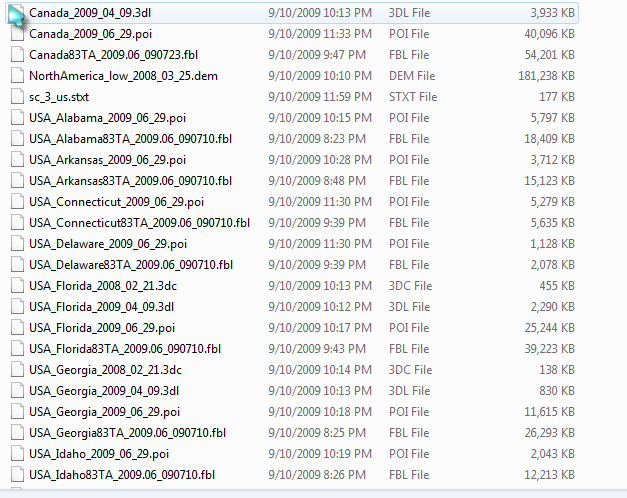
its not that simple cause i put in the new maps and got nothing. Stuck on reboot. So i put the base map back with the new maps and all i get is green landscape. When i check the version of maps it only shows the old base map? Abb what is the way to load and get these maps to work?


These are the maps that i have:

Capture.png

Posted Aug 19, 2010 · 00:53 UTC#242

yes yes please do tell us EXACTLY what you did.... here is my favorite spoon... PLEASE feed me.... hahaha it would be the best mod ever to have BOTH maps, AND have them all NEW.....or at least just the new TA maps..

Posted Aug 19, 2010 · 01:12 UTC#243

geeze that navitotal is a pain in the ass.... everything you try to dl is with rapid share or other crap like it... and I cant find a working link for the new TA maps.... see what you started abb... lol

Posted Aug 19, 2010 · 01:47 UTC#244
its not that simple cause i put in the new maps and got nothing. Stuck on reboot. So i put the base map back with the new maps and all i get is green landscape. When i check the version of maps it only shows the old base map? Abb what is the way to load and get these maps to work?


These are the maps that i have:

Capture.png

Holy crap, you have POI's, building files mixed in with map files and god knows what else. The only files that are map files are .fbl files and nothing else should be in there. WHY WOULD YOU PUT ALL THOSE FILES IN THERE? You need a 'basmap.fbl', and whatever maps you want to install. Those are all older maps though, none of those are the newer maps. Sort it out though and only have map files in there

Posted Aug 19, 2010 · 01:54 UTC#245

thats what was in the map folder of the download. no base map

Posted Aug 19, 2010 · 01:59 UTC#246

Here is a quick guide to which files go where:


'map' folder --- .fbl

'POI' folder ---- .poi

'DEM' folder --- .dem

'building' folder --- .3dc , .3dl

Posted Aug 19, 2010 · 02:00 UTC#247
thats what was in the map folder of the download. no base map

use the 'basmap.fbl' file from before. This file really does not need to be updated. Also, all those map files you have are the older maps, not the newer ones. The newer ones are '2009.12', NOT '2009.06'

Posted Aug 19, 2010 · 02:05 UTC#248

i have 2009.12, i put them in withe base map and still have nothing base of gps is all one colour.

Posted Aug 19, 2010 · 02:18 UTC#249
i have 2009.12, i put them in withe base map and still have nothing base of gps is all one colour.

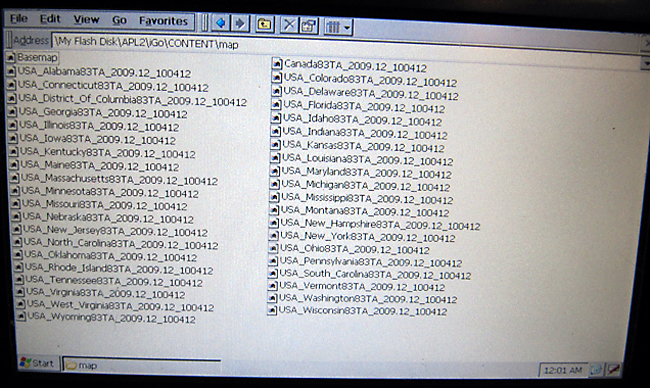
These are the files that you have in your map folder. These are all TA maps with the .fbl file extension. You may have a few more because I deleted some that I do not use to save space.

post-32106-12872763112496_thumb.jpg

Posted Aug 19, 2010 · 02:23 UTC#250

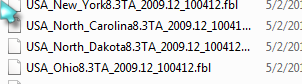
here is the new ones:


200612.png

Page 10 of 23