i noticed that u have no decimal after the8 where mine is 8.3? does that matter?
Posted Aug 19, 2010 · 02:29 UTC#251
i noticed that u have no decimal after the8 where mine is 8.3? does that matter?
i noticed that u have no decimal after the8 where mine is 8.3? does that matter?
The file names don't matter!
You might miss a valid license to use those map. Abb check your LICENSES folder, you might have a punch of them but hanibal has only one!
Hanibal, just put the basemap.fbl and Canada_xxxxxx.fbl in the map folder to simplify.
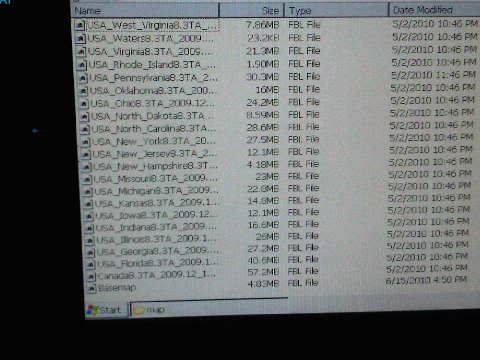
it all looks right i never got any extra licence? again it only shows basemap when i gointo settings to see what maps i have.
do u have to put in the new buildings and poi as well in appropriate folders?
do u have to put in the new buildings and poi as well in appropriate folders?
yes, and the DEM files.
The license has to do with the EZRider file and nothing else. The map files should be interchangeable. Which maps did you have prior? the 2009.06?
2009.6 i believe but never got a new licence with the new map?
2009.6 i believe but never got a new licence with the new map?
That does not make sense as you need a licence for the ez rider file not the maps. If you had the 2009.06 maps working, then the same ezrider with the same licence works with the new maps, at least they do for me.
I just put in the hacked easy rider and licence for giggles and it works now!! I can see all the new maps in the info screen.
I just put in the hacked easy rider and licence for giggles and it works now!! I can see all the new maps in the info screen.
Great!!! But nobody seems to understand what had happened in the process though.

Me neither?
I don't have a gfx folder and the one you have is too big for me to install. How do I do it or what can Idelete??
My GFX folder is about 130 mb. You will have to delete some maps and POI's that are not used. Also, delete the old GFX folder before you install mine
The only gfx folder in my x910bt is part of the data.zip file. Should I take that out?
The only gfx folder in my x910bt is part of the data.zip file. Should I take that out?
No. Don't modify the data.zip file. That GFX folder is the baseline and should be kept.
ABB.
I installed your mod and it looks great. I do have a problem with Map change, as I have some TA maps on the unit and the rest on a SD card with the following structure: in the root: IGO folder and POI folder with TA poi's. In the IGO folder I have CONTENT/MAP (with some TA maps) folder. I tried to add a MAP_NT folder to the SD card and put some Navteq maps in. When I change to Navteq maps it works on the unit, but not on the SD card. Is it too much to ask for a fix? 
By the way, what Schemes are you using to get the screen look like the pictures on page 1?
One last thing. I don't think the UK image should have MSN.
Thank's in advance
ABB.I installed your mod and it looks great. I do have a problem with Map change, as I have some TA maps on the unit and the rest on a SD card with the following structure: in the root: IGO folder and POI folder with TA poi's. In the IGO folder I have CONTENT/MAP (with some TA maps) folder. I tried to add a MAP_NT folder to the SD card and put some Navteq maps in. When I change to Navteq maps it works on the unit, but not on the SD card. Is it too much to ask for a fix?
i did not know that i could store maps on my sd card? How do i set up to my navteq on the sd card?
i did not know that i could store maps on my sd card? How do i set up to my navteq on the sd card?
You have to play with SYS.txt for map location. Search the forum for that. It has been discussed in various places.
ABB.I installed your mod and it looks great. I do have a problem with Map change, as I have some TA maps on the unit and the rest on a SD card with the following structure: in the root: IGO folder and POI folder with TA poi's. In the IGO folder I have CONTENT/MAP (with some TA maps) folder. I tried to add a MAP_NT folder to the SD card and put some Navteq maps in. When I change to Navteq maps it works on the unit, but not on the SD card. Is it too much to ask for a fix?
Do this!!!!Nothing else will work unless you want problems:
1- Keep all Navteq maps except ones that are not used or ever required in your 'map' folder DO NOT PUT THEM IN SD CARD as it is a pain in the ass because the file location has to be changed!!!!
2- Make a seperate folder in 'MyFlashDisk/APL2/iGo/Content' folder labled 'map_nt'
3-Install your Navteq maps in the 'map_nt' folder. You can only put in the maps according to your area, such as Canada, and maybe one US state (if you live in Canada) as you will not have the space to add them all.
4- make sure that you have the 'basemap.fbl' file in with the navteq maps, If tou do not have it, use the one with your TA maps. Just copy it over as both map folders have to have a basemap.fbl file.
5- To switch to Navteq maps, just click on the mapchanger button, click on Navteq, and the system will reboot with the Navteq maps.
By the way, what Schemes are you using to get the screen look like the pictures on page 1?
One last thing. I don't think the UK image should have MSN.
Thank's in advance
That is a scheme that I have made up that I have not released yet. I am going to add more schemes eventually and then I will add this one. It is kinda pointless just to add one or two schemes as the GFX folder will have to be updated as well
Well, I have been looking through my mod for graphical improvements and I found a whole bunch of problems that should have caught my eye at the beginning:
1-The top bar in the background was not switched over and does not follow this theme. Here is a pic and the fix:
A lot of the buttons did not match this theme. They were either all black or were in 24 bit with a black border around them. This is now fixed
Here are the buttons that are in 24b image-
Some older buttons that were not really suited were replaced
This will be with the AV version and the other improvements listed on pg 12


Abb.Any time scale on your next update?Did you have chance to look at the add push pin option yet?Do you think you will ever reach the stage when you are happy with V3 or will it continue to evolve
Abb.Any time scale on your next update?Did you have chance to look at the add push pin option yet?Do you think you will ever reach the stage when you are happy with V3 or will it continue to evolve
I like the idea about a pushpin, however, I have no place to put it. I can put it in by long-clicking the speedsign, but here in NA, there are not to many speed signs present, so it is kinda pointless. I am hoping that the next update will be ready within a week. That will give me enough time to see if anything else can be added.
As far as this mod evolving, I will continue to update it providing that there is an interest, as uploading these files, putting them up, troubleshooting, and the actual creation is a lot of work. If the interest dies, then so will the updates!
Abb.I think long press on the speed camera sign would be perfect for adding a push pin  I have yet to add a speed camera myself but i am sure lots of others have!
Abb.I think long press on the speed camera sign would be perfect for adding a push pin
Ok, thanks Colin, I will definately take that into account!
Well, I have just downloaded the new 2009.12 TeleAtlas maps and for the record, they now have signposts galore!! They even have signs that were not present with Navteq maps.
Damn, I just installed those new TA 2009.12 maps, still no lucks for signposts in my area, I still have to use NT as a matter of fact.
Abb, Do you know whether speed limits for Canada have been added to the newest NT maps?
Well, I have just downloaded the new 2009.12 TeleAtlas maps and for the record, they now have signposts galore!! They even have signs that were not present with Navteq maps.
Damn, I just installed those new TA 2009.12 maps, still no lucks for signposts in my area, I still have to use NT as a matter of fact.
Abb, Do you know whether speed limits for Canada have been added to the newest NT maps?
The signposts are now on all major highways identifying the exits. Every exit now on the 401 has a highway sign identifying the exit. No, speedlimit signs for NT. Not much has changed for those maps
Here some suggestions for the UK / EU version
1) Change the color of the freeway signs into blue ( RGB= 32,40,96)
2) Change the traffic alarm signs in Europe signs (red-white instead of yellow) bmp in common 746_32_OM_506_24.bmp and 746_32_OM_507_24.bmp.
3) Bring position of the speed limit sign lower (15-20 pnts) Now is almost against the elevation sign.
4) Central the numbers of the speed limit better. Now they are left of the center.
5) Change the white color of the text in the traffic information events. The background at this place is almost white so this text is very difficult to read. The Road number is also white but this one is ok, so you can leave it for what is.
6) For so far I know in Europe we don’t have the MSN version. So you can change that button for the TMC / traffic information button
Well, I have just downloaded the new 2009.12 TeleAtlas maps and for the record, they now have signposts galore!! They even have signs that were not present with Navteq maps.
Damn, I just installed those new TA 2009.12 maps, still no lucks for signposts in my area, I still have to use NT as a matter of fact.
Abb, Do you know whether speed limits for Canada have been added to the newest NT maps?
Where can I get the latest maps (TeleAtlas and Navteg)?. I have the 2009 version.
Jimbo