Where can I get the latest maps (TeleAtlas and Navteg)?. I have the 2009 version.
Jimbo
Look at page 15 dude!
Where can I get the latest maps (TeleAtlas and Navteg)?. I have the 2009 version.
Jimbo
Look at page 15 dude!
Here some suggestions for the UK / EU version
2) Change the traffic alarm signs in Europe signs (red-white instead of yellow) bmp in common 746_32_OM_506_24.bmp and 746_32_OM_507_24.bmp.
Red background with white or white bacground with red icons?
6) For so far I know in Europe we don’t have the MSN version. So you can change that button for the TMC / traffic information button
When you click on the MSN button, does it link you to the TMC info? In other words, is all I have to do is change the name from MSN to TMC?
Here some suggestions for the UK / EU version
2) Change the traffic alarm signs in Europe signs (red-white instead of yellow) bmp in common 746_32_OM_506_24.bmp and 746_32_OM_507_24.bmp.
Red background with white or white bacground with red icons?
6) For so far I know in Europe we don’t have the MSN version. So you can change that button for the TMC / traffic information button
When you click on the MSN button, does it link you to the TMC info? In other words, is all I have to do is change the name from MSN to TMC?
Abb i think you can select the traffic icons in sys.txt.(i just deleted the 2 at the end of the following:
tmc_events_icon_set="$tmc.spr"
small_tmc_events_icon_set="$smalltmc2.spr"
ref the MSN icon ,this takes you to a sub menu which then has a traffic icon. pressing this brings up the TMC information.
Here some suggestions for the UK / EU version
2) Change the traffic alarm signs in Europe signs (red-white instead of yellow) bmp in common 746_32_OM_506_24.bmp and 746_32_OM_507_24.bmp.
Red background with white or white bacground with red icons?
6) For so far I know in Europe we don’t have the MSN version. So you can change that button for the TMC / traffic information button
When you click on the MSN button, does it link you to the TMC info? In other words, is all I have to do is change the name from MSN to TMC?
Abb i think you can select the traffic icons in sys.txt.(i just deleted the 2 at the end of the following:
tmc_events_icon_set="$tmc.spr"
small_tmc_events_icon_set="$smalltmc2.spr"
ref the MSN icon ,this takes you to a sub menu which then has a traffic icon. pressing this brings up the TMC information.
2) Probably you can do also on that way, I used BMP : 746_32_OM_501_24.bmp and 746_32_OM_505_24.bmp and rename them.
6) Exactly as Overball described.
Well, thats easy, so the icons just have to be renamed and the MSN icon just needs to be renamed TMC, and all is good with those. It baffles me though that the MSN button will take you to TMC because the coding is direct for MSN. Oh well, if it works, it works 
ok just got the new TA maps and the Navteq maps... now this is what Im gonna do... let me know if this correct ok?
first NT maps.. im gonna create a folder called map_nt then im gonna put the Canada file and the base map file in that folder.. and probably the new york Vermont and Maine states if I have room(if I dont Ill delete some southern states from my TA maps) so that should do it for the NT maps,
now on to the NEW TA maps.. first I save all my older maps as is on a sd card.... now I just overwrite the Canada one and the states that I want... or do I have to do the whole thing.. can new TA maps work with older maps...at the same time?or is it better to just delete all the maps and just copy all the new ones in...???
will the easyrider that is in your mod work abb(3.0) work with all this new stuff? and do I have to do something to the license file?
I remember putting a new easyrider in a few mods back but I forget what one it is... if I need a new one is there a special one I need?
thanks,,
ok just got the new TA maps and the Navteq maps... now this is what Im gonna do... let me know if this correct ok?
first NT maps.. im gonna create a folder called maps_nt then im gonna put the Canada file and the base map file in that folder.. and probably the new york Vermont and Maine states if I have room(if I dont Ill delete some southern states from my TA maps) so that should do it for the NT maps,
Correct, but I would stick with just Canada, ny, and vermont
now on to the NEW TA maps.. first I save all my older maps as is on a sd card.... now I just overwrite the Canada one and the states that I want... or do I have to do the whole thing.. can new TA maps work with older maps...at the same time?or is it better to just delete all the maps and just copy all the new ones in...???,
To avoid getting a 'out of space' error, I would back up what you need, then delete them, and then add your new TA maps that are required. Dont forget to have your basemap.fbl file in there.
will the easyrider that is in your mod work abb(3.0) work with all this new stuff? and do I have to do something to the license file?
I remember putting a new easyrider in a few mods back but I forget what one it is... if I need a new one is there a special one I need?
thanks,,
The latest ezrider with the latest license file will work
ok thanks.. how do I know if the easyrider and licence file I have will work.. I did a serch for them here and I cant find a file listed that I can DL..
I cant see how a mod or the guy who runs this site would not think of puting up nice how too,, and a location to find all the files .... it could help save alot of usless posts like this...
thanks for your help abb AND chuck....
So that is it? Nobody else want to vote for smartzoom? Looks like that Abb's mods has been downloaded far more than 6 or 7 times ...
Please do so, whether you like it or not. Your opinion counts to make this forum better
.
The link is here: http://avic411.com/forum/viewtopic.php?f=64&t=33698&p=227277#p227277
Sorry I'm a little late on this, but I prefer the smart zoom. I turn it on when I'm navigating and then turn it back off when I'm not so I can see the sky.
ok THANKS to ABB, chuck and ovalball for the help.... I can now switch to Navteq, AND TeleAtlas maps fine(bit of a long reboot though) and I am happy..... I didnt fubar my avic.... I too cant get the TA maps to show freeway signs for Montreal , BUT they do for Ontario, the Navteq maps do for both provinces it was cool seeing them pop up on my flyover to New Brunswick.....(NT maps)with the TA maps they only show up in the Prov of Ont. go figure...... anyways thanks again...
now.....I got the NEW Premium POI's 2009_12 from navi total, and is it only just putting them in as is in my POI folder on the avic (after saving my other ones and deleting them....???
Nice to know that basstoy, I just PM you the files you need ... guess you don't need them anymore 
TA maps 2010.xx is coming up (European version are already out), just hoping that we will see signposts for other provinces than Ontariio.
Cheers!
Hmmmm, it doesn't make sense that they would do the signs just for OntarioNice to know that basstoy, I just PM you the files you need ... guess you don't need them anymore
TA maps 2010.xx is coming up (European version are already out), just hoping that we will see signposts for other provinces than Ontariio.
Cheers!

Hmmmm, it doesn't make sense that they would do the signs just for Ontario
They are racist 

Check it out Ann you will see. Do a sim to Montreal and as as soon as you enter Quebec the signposts stop. With NT they still work right to NB.
Check it out Ann you will see. Do a sim to Montreal and as as soon as you enter Quebec the signposts stop. With NT they still work right to NB.
Yes it is true. TA maps are nonetheless more detailed than NT's. When you pass through those complicated over-passes in 3D mode with TA maps, you can actually see they are one on top of others and not flat, as some in NT are.
Well, all this (except #5) has been done for the Uk. It is just undergoing some testing and then it, as well as the V3.1 will be posted. I have reduced the file size, as well as slightly increased the text of the signboards as I thought it was too small beforeHere some suggestions for the UK / EU version1) Change the color of the freeway signs into blue ( RGB= 32,40,96)
2) Change the traffic alarm signs in Europe signs (red-white instead of yellow) bmp in common 746_32_OM_506_24.bmp and 746_32_OM_507_24.bmp.
3) Bring position of the speed limit sign lower (15-20 pnts) Now is almost against the elevation sign.
4) Central the numbers of the speed limit better. Now they are left of the center.
5) Change the white color of the text in the traffic information events. The background at this place is almost white so this text is very difficult to read. The Road number is also white but this one is ok, so you can leave it for what is.
6) For so far I know in Europe we don’t have the MSN version. So you can change that button for the TMC / traffic information button
I don't have V3.0 in my AVIC so I don't know exactly how the menu icons look like, but just by looking on the snapshots of the first post, I realize that all the icon texts are a bit too large and all of them overlapped on to of the graphic underneath them.
It might be probably neater if the font size is smaller, and/or the starting point of the texts is lower to avoid overlap.
Just a suggestion  I won't use it without smartzoom anyway
I don't have V3.0 in my AVIC so I don't know exactly how the menu icons look like, but just by looking on the snapshots of the first post, I realize that all the icon texts are a bit too large and all of them overlapped on to of the graphic underneath them.
It might be probably neater if the font size is smaller, and/or the starting point of the texts is lower to avoid overlap.
Hmmm, you were one of my testers and it wasn't mentioned then as this is the same menu as in the beta version that you tested. When I made the icons, I tried a smaller font at the start and this size just seemed better
Just a suggestion
Actually, it DOES have smartzoom, it just works differently as in IDT's mod, Diaftia had it so that the tilt can be controlled which in reality most people preferred so that they can see the sky. I am assuming that this is why he did that. All his previous versions had the same smartzoom and this was never a problem with anybody. if he ever puts out a V3, it will have the same smartzoom as in his previous. The way it is in my V2.75 is the reason that everyone shuts it off, because you cannot see the sky. Remember that the smartzoom that you are referring to was designed to work with mods in the 2.0 era, where there was no sky and then this smartzoom was worthwhile. Now with the sky, it is more graphically beneficial to have a smartzoom where the sky remains. You will find that any future mods (except ones based on IDT's) will have this form of smartzoom.
Personally, I have tried both smartzooms and I like the one in my V3.0 better and it is definately more suited to todays mods
I guess I will get used of that one day, since I am really too busy to mess with code ...
I guess I will get used of that one day, since I am really too busy to mess with code ...
That is too bad. You would probably be pretty good at it and we can use more modders
I guess I will get used of that one day, since I am really too busy to mess with code ...That is too bad. You would probably be pretty good at it and we can use more modders
Thanks Abb. A little family with two pre-teens, both parents "living" a professional life and working like crazy, so even if AVIC is my hobby since beginning of 2010, but you get the picture ...
I will live with V2.75 for the months to come, unless your upcoming V3.0 can get me acquainted.
With thanks to you and all modders of this forum  .
.
Cheers!!!
Well, I have added a few more additions to the update. This update will be V3.25 as it has a new 'Application Menu' accessible in the Top Menu. I will also add a folder for easy installation for these programs. We have all had system reboots when the cache gets overloaded, well now all you have to do to see if it is the memory is to go to the application menu and click on RES Info and it will give you the memory usage during route or other memory hogging application. Now you will always know how your resources are. Also, I will have a full version of total Commander available to use during navigation. Here are some pics:

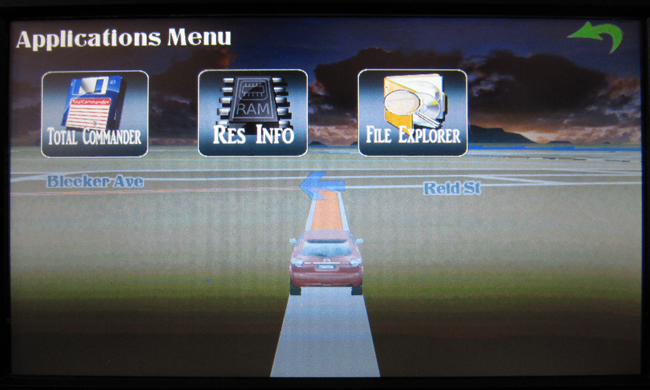
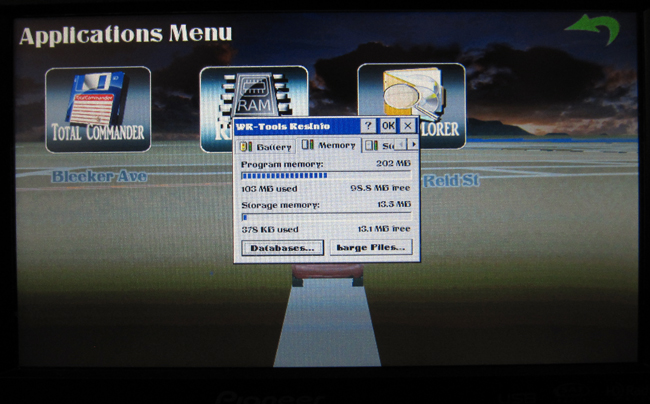

I have also made the text in the menus crisper and easier to read as well as reducing the file size down from 20.5 mb to 19.5 which will improve efficiency as well
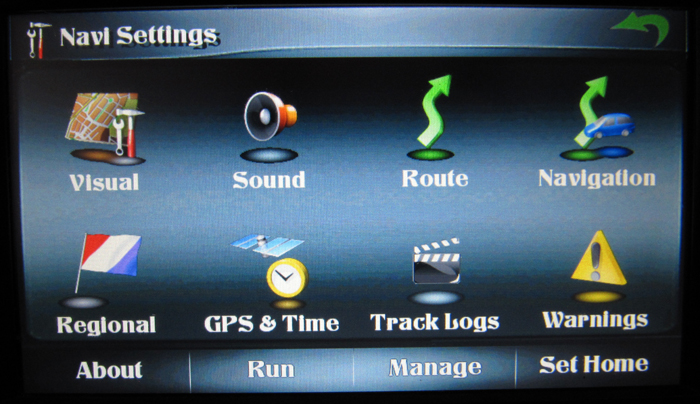

Abb.Will you be offering a UK version with all future update...please!
Abb.Will you be offering a UK version with all future update...please!
Yes, I will have a UK version, a non-AV version and an AV version which will hopefully be ready Sunday night