Search Archive

Abb's Chrome NAV Mod V3.25 - Aug 30th '10

By abb1 · Jul 23, 2010in Completed Mods/Themes💬 571 posts👁️ 80,104 views
Page 15 of 23
Posted Sep 03, 2010 · 02:26 UTC#351

he abb,

first off this mod is amazing! thank you for your time and sharing this with all of us. my question is about speedcams... i have them enabled but none have popped up so far. i used to see them all the time on my old ui. am i missing something or do i possibly need to adjust another setting? :D

Posted Sep 03, 2010 · 02:51 UTC#352
Hi abb....the new update is owsome. I want to pont out 3 problems with it. Firs the scrolling street name is not working I put it on and it gets stuck not moving (on previous update V3.0 was working perfect).

Second the tilt screen is stuck either on 70% without text.sys and 90% with the text.sys. Is there anyway to change it my self at 80% on the text.sys file? And last is the speed camera is not working for Toronto, Mississauga area.

Abb let me know when u get in Toronto...I would love to give you 1..2..4...7..... Beers.. :roll::mrgreen:

Abb is it safe to do this?....

From

[smartzoom]

speedzoom=6

speedangle=8

minzoom=30

maxzoom=80

minangle=90

maxangle=90


This

[smartzoom]

speedzoom=6

speedangle=8

minzoom=30

maxzoom=80

minangle=82

maxangle=82

Yes, it is safe, and that would fix it. lol, I try to stay away from toronto, You can always get me beers through paypal :D

Done... I'll try to mail you some beers throught paypal... :D:D lol

PS please PM me your paypal address

Posted Sep 03, 2010 · 04:25 UTC#353

Done... I'll try to mail you some beers throught paypal... :D:D lol

PS please PM me your paypal address

It is in the first post. It is at [email protected], Thank you :)!

Posted Sep 03, 2010 · 06:26 UTC#354

Great mod Abb, very thorough!


Since I installed v3 I can't get into the system with testmode. I've tried several different versions of testmode, but it keeps cycling through the splash screen in an endless loop. Can I use Total Cmdr or File Explorer from your menu to copy files over from the SD?

Posted Sep 03, 2010 · 09:44 UTC#355

Abb and anyone else who can.How about generating a bit more interest in the forum by starting a"how to"thread.For example..how to move the speed limit sign over by 5mm or so,or up 5mm or so.Start off with really basic things like changing sys.txt and gradually take little steps forward.Just a thought because we need to keep this place alive.Shoot me down if you wish. :lol:

Posted Sep 03, 2010 · 12:01 UTC#356
Great mod Abb, very thorough!


Since I installed v3 I can't get into the system with testmode. I've tried several different versions of testmode, but it keeps cycling through the splash screen in an endless loop. Can I use Total Cmdr or File Explorer from your menu to copy files over from the SD?

Yes, if you have my mod installed, you can transfer data over through total commander. The only thing that you cannot transfer is the Data.zip file because it is obviously in use

Posted Sep 03, 2010 · 12:19 UTC#357
Abb and anyone else who can.How about generating a bit more interest in the forum by starting a"how to"thread.For example..how to move the speed limit sign over by 5mm or so,or up 5mm or so.Start off with really basic things like changing sys.txt and gradually take little steps forward.Just a thought because we need to keep this place alive.Shoot me down if you wish. :lol:

Hmmmm,....... ' A How To.. On coding'. That is a good idea, but there is only about two or three guys in this forum that can actually do that and they are not here anymore, or make rare appearances. Unfortunately, my skills in coding are good, but i am still learning on a daily basis and by no means an expert. Try PM'ing Boris or Diaftia and see if they can put-up a one page guide with the basics. I think that is a great idea.

Posted Sep 03, 2010 · 13:10 UTC#358

I second that, as more modders will come their ways with some tutorial.

Posted Sep 03, 2010 · 13:44 UTC#359

anybody have an answer to my speed cam question posted above? i am in ny. do i have to place all the speed cams in myself or is there a database file i need to add? does this information that i found in dafita's post pertain to this mod also?

Here's an official description of the mod:


* "Guidance superiority" in "Sound Setting" - force camera sounds off if it overlaps routing directions. There's a bug/feature in iGO 8: cameras turn route directions off, author chooses to sacrifice cameras instead.


- Camera settings:

Any camera type can be turned off separately (no yellow border). There will be neither visual nor sound warning when approaching a camera.

Custom Audio Warnings:

For every camera type you can select audio behaviour


* Off: No audio notice.

* Alarm: If not going faster than camera speed, there will be no audio alarm. If speed is within acceptable range: In 1000, 450 and 250 meters there will be one warning sound for attention. If going faster than limit + overspeed: In 1000 meters there will be a single alarm, then, starting with Alarm distance there will be constant alarm sound, increasing in frequency as you approach the camera. In 150 meters there will be last attempt to bring you to your senses. After that, warnings are useless anyway.

* Warning: If not going over camera speed: no sound. If speeding (no overspeed applied): From specified alarm distance until the camera there will be constant audio warning of the dangerous zone.

* Reminder: In 800 meters there will be a single reminder, independent of speed.


Usage samples: Alarm – Speed Camera, Warning – speed bump, Reminder – POI.

* Verification beep - Always do a single beep 150 meters before camera. Used for testing camera locations.

------

* Distance cameras (average speed?) not checked

* Diaftia added voice warnings.


Re: Speedcam Warning settings:


Stanislavovich wrote:"Full" and "On" are the standard behavior of iGo speedcam warning system. "On" warns only if you are overspeed, "Full" - forever. The way how to warn, sound etc are managed by exe and sys.txt.

"Custom" is fully mod-designed warning completely substituting standard one. In fact "custom" switch off standard speedcam warning and the mod produces own logic and mod-determined sounds.


Posted Sep 03, 2010 · 14:08 UTC#360

This mod is based on Diaftias mod, so the speedcam info will be the same. You will have to add the data for the speedcams in 'MyFlashDisk/APL2/IGO/Content/SPEEDCAM' folder, and then you have to adjust the settings under 'Warnings'

Posted Sep 03, 2010 · 14:56 UTC#361
[if I was doing any more updates to it, I would actually make the smartzoom like the 3.0 version, sorry!


Well, you don't have to remove the smartzoom in V2.75 since this feature is already there. If anyone does not like it, all they have to do is to disable it in the setting, like you do all the time, or slide the bars all the way to the right at 90 to achieve the same effect.


You can't really make it the same as in V3.0 since there is no operable smartzoom in V3.0. I think that in Diaftia's mod, although it is TRULY a great mod given the number of followers, in my humble opinion, the work was not properly finished in the smartzoom area when comparing to IDT's smartzoom. If he really wants to see only the sky, then all he has to do is fixing the smartzoom settings and delete the smartzoom from the menu selection altogether.


Anyway, you don't have to be sorry for that, it is your mod after all, so you are free to do whatever suits your taste. And I can understand that.


Cheers!

Posted Sep 04, 2010 · 13:23 UTC#363

I'm still somewhat of a nubee with the mods. I have a question about my disk size. Has anyone got the message telling them the disk size is too low to finish coping all the files needed for ABB's v3.25? I searched around and didn't see any mention of the message. I did notice some of the members talking about removing POIs & maps they won't be using. Is this the best way to get disk space back to complete loading this mod :?:

Posted Sep 04, 2010 · 15:35 UTC#364
I did notice some of the members talking about removing POIs & maps they won't be using. Is this the best way to get disk space back to complete loading this mod :?:

Make space first, then load the data, and yes, that is the way to gain space for these mods

Posted Sep 04, 2010 · 16:58 UTC#365

Thanks for the quick reply ABB1. I look forward to loading your mod, it looks awesome.

Posted Sep 05, 2010 · 14:03 UTC#366
Thanks for the reply Abb, I found the files for speed cams here, http://avic411.com/forum/viewtopic.php?f=34&t=25846&p=198426&hilit=3+0+speedcam+data#p198426. I will install them in a little while. Thanks Again!

I went to load these files and found out that they are all ready there, so i am thinking the speed traps and such are just something that was available for 2.0. Does anybody know if there are anymore databases we can add. If so let me know, in the mean time the search continues. Abb, again your mod is truly unbelievable. The more I mess with it the more features i find. Thanks!

Posted Sep 06, 2010 · 12:36 UTC#367
Thanks for the reply Abb, I found the files for speed cams here, http://avic411.com/forum/viewtopic.php?f=34&t=25846&p=198426&hilit=3+0+speedcam+data#p198426. I will install them in a little while. Thanks Again!

I went to load these files and found out that they are all ready there, so i am thinking the speed traps and such are just something that was available for 2.0. Does anybody know if there are anymore databases we can add. If so let me know, in the mean time the search continues. Abb, again your mod is truly unbelievable. The more I mess with it the more features i find. Thanks!


They are definitely available. I have them running with my 3.25 mod. They must be enabled in the settings, I believe they are called warnings. once you turn them on, you have to press on the settings (wrench) and pick how they will act and which warnings you want. Do a search on warnings, or if you knew how to set them up in 2.0, it is the same.

Posted Sep 07, 2010 · 01:06 UTC#368

Hi, I just updated to firmware 3.x successfully using: viewtopic.php?f=34&t=32351

but now unable to copy this mod to the Flash drive due to size limitation.


Flash drive is now listed as 1.8 gig in properties and dont see why I cant copy over all the files(~35mb). I have also tried deleting the existing User files first (M Flash Disk\User\Userdata\IGO)

Any other folder that are safe to delete ? (temp) ?


My method for getting into testmode is placing the non-AV mod files and testmode folder on my SD card letting it boot into testmode. Is this the correct ?


appreciate any advice. Thanks.

Posted Sep 07, 2010 · 01:23 UTC#369
Hi, I just updated to firmware 3.x successfully using: viewtopic.php?f=34&t=32351

but now unable to copy this mod to the Flash drive due to size limitation.


Flash drive is now listed as 1.8 gig in properties and dont see why I cant copy over all the files(~35mb). I have also tried deleting the existing User files first (M Flash Disk\User\Userdata\IGO)

Any other folder that are safe to delete ? (temp) ?


My method for getting into testmode is placing the non-AV mod files and testmode folder on my SD card letting it boot into testmode. Is this the correct ?


appreciate any advice. Thanks.

This is nothing, just wait until you want to install my GFX folder with new schemes. They total about 150 mb. To make space, I would suggest going into 'MyFlashDisk/APL2/IGO/Content/map' and then start deleting maps and poi's (in the POI folder), that you will never use, such as Alaska. If you delete Alaska, and it's POI, you should have enough space to install the mod.

Posted Sep 07, 2010 · 03:04 UTC#370

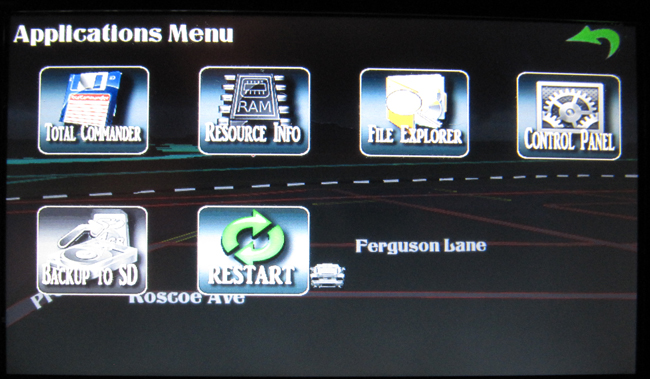
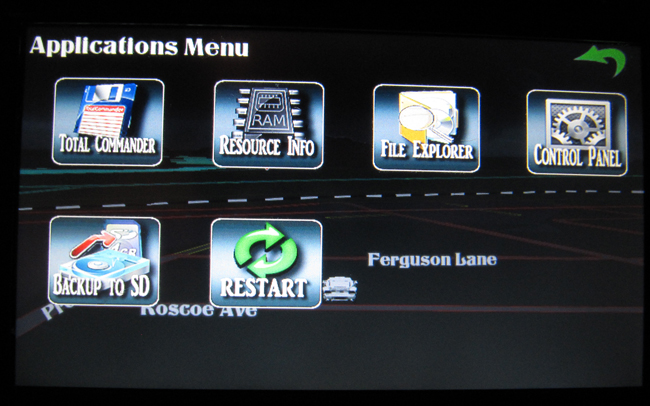
Well guys, again, I need your thoughts. I am having a rough time as to what I can add or improve on this version. I am looking at putting up a couple more items in the 'Applications' menu. The main new one is to be able to backup your Data, yes, your entire 'Flash Disk' with the press of a button in your NAV program. I am testing this out now and so far it works great. keep in mind though that since your Data is 1.5 GB in size, it will take an hour to back it up, but at least it will be flawlesly backed up. Here are some pics with whats new:


This is for a total backup which should only be done before installing major updates or firmware revisions as this backs up EVERYTHING! Let me know what your thoughts are!

post-32106-1287276323497_thumb.jpg

post-32106-12872763235873_thumb.jpg

post-32106-12872763236795_thumb.jpg

post-32106-1287276323736_thumb.jpg

post-32106-12872763238238_thumb.jpg

Posted Sep 07, 2010 · 15:18 UTC#371

hey abb, back up to sd will be a great addition to this mod. you have really thought of everything! this is the best mod so far. is there a way you would be able to change the all the text, the turning arrows and the speed on the navi to white? this would just match my and i am sure others interior better than the yellow, especially those of us that have red cars! i have already tried to make the changes to the navigateui800_400 file myself but i keep getting errors when i install it. i guess it is something only true modders can do. IDT helped me last time but he isn't around right now. if you have time a lot of us would appreciate it! thanks

Posted Sep 07, 2010 · 15:30 UTC#372

Looks good!!

Posted Sep 07, 2010 · 16:01 UTC#373
is there a way you would be able to change the all the text, the turning arrows and the speed on the navi to white?

Can you post a pic with the everything circled. There is text all over, and most of it is white, and there is multiple turning signals. I tried to put the currect speed to white initially at first, and even with a high glowsize, it was still washed out in most 'day' schemes. That is why I went with the yellow

Posted Sep 07, 2010 · 16:48 UTC#374

Abb....Everything works great. I love this mod.... Best one that I have tried so far....

Posted Sep 07, 2010 · 17:01 UTC#375
Abb....Everything works great. I love this mod.... Best one that I have tried so far....

Excellent! That is what I need....... Feedback! :)

Page 15 of 23