Hi there again, So i am only trying to update the firmware and when I insert the sd card, nothing updates... it says it will update on it's own but it doesn't. Any help would be great.
thanks,
Hi there again, So i am only trying to update the firmware and when I insert the sd card, nothing updates... it says it will update on it's own but it doesn't. Any help would be great.
thanks,
Me again! Success!! Got this down and it is AWESOME! a huge thanks for the people who found this solution!
Regards,
This is some great info..just picked up a unit and will have to install it onto my car and do this...I may have some questions. Thanks
Hey everyone! I'm trying to download the torrent and there aren't any seeds that I can see. It sounds like this has been posted before but I haven't seen any results.
Ideas??
Thanks in advance!
torrent not downloading CNSD-110FM.rar
Don't waste your time. Get CNSD-210FM or wait for the next upgrade.torrent not downloading CNSD-110FM.rar
I have a Z110BT that I will try to update tonight. Which torrent should I download? For what I can tell, that has been the only issue lately. Thanks for posting the step-by-step guide, guys.
Wow.. finally got this to work... Ok folks with all the folder this and that just make sure you move over the BTfolder in SD2 to the new hacked file and do both... works great and I Have a Z120BT.... Now on to EU maps Give thnxs guys...
I've followed the instructions to upgrade to 1.001, but nothing happened. I checked my system info and the pic I've attached is what I'm seeing. Since nothing happened, does this mean I am ready to install update 2.0?
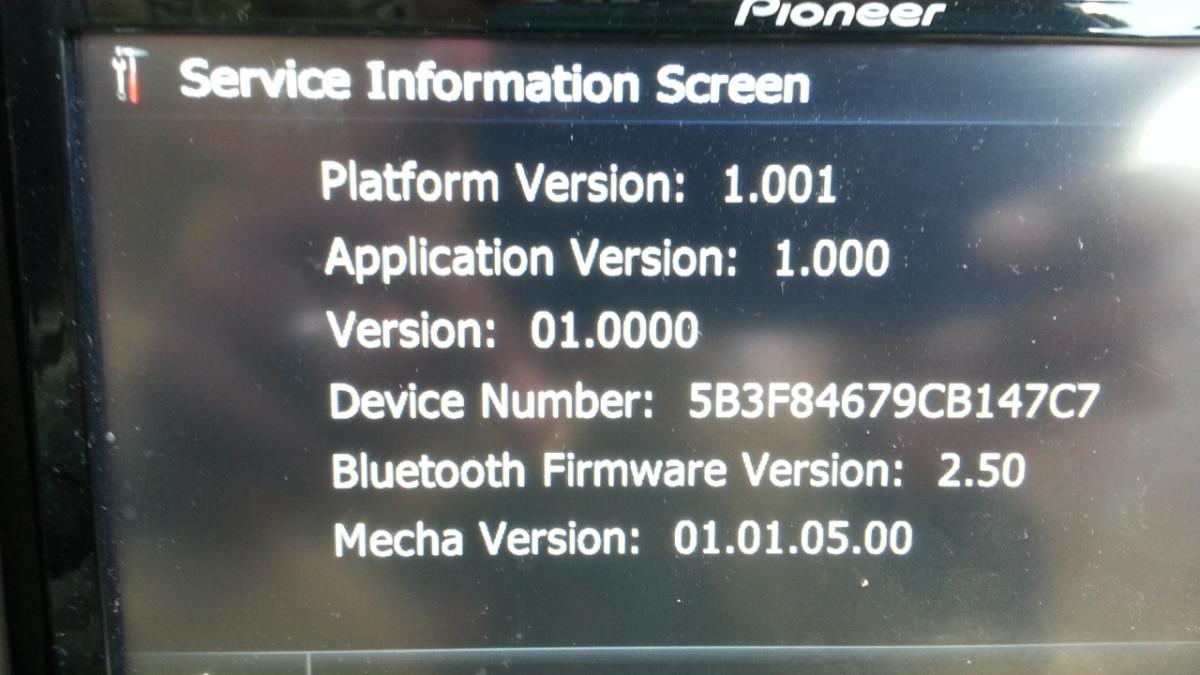
I guess you where already @ 1.001. BTW, not sure why you did 1.001, not necessary. Anyway, install the ShortFuse hack (I think that will make the version 1.003 IIRC). But then you can go directly to any version - 2,3, or 4. Not sure why you'd bother with 2 (CNSD110FM). I'd do either CNSD210FM or CNSD310FM. (Z130 or Z140).
Man I'm so far behind that it's not funny. I've just been using my Z110BT without any upgrades since I got it. I logged in to see if anything new was out and I saw that you could upgrade from the Z110 to the Z120. If I can go all the way to the Z140, then that's what I"ll do. I can only assume that the procedures to do this are the same as they are to upgrade from the Z110 to Z120? Could you direct me to the proper files and guide because I don't see any thread titles listed for the upgrade to Z140.
Man I'm so far behind that it's not funny. I've just been using my Z110BT without any upgrades since I got it. I logged in to see if anything new was out and I saw that you could upgrade from the Z110 to the Z120. If I can go all the way to the Z140, then that's what I"ll do. I can only assume that the procedures to do this are the same as they are to upgrade from the Z110 to Z120? Could you direct me to the proper files and guide because I don't see any thread titles listed for the upgrade to Z140.
Enjoy reading: http://avic411.com/index.php?/topic/35230-2012-uscan-maps-cnsd-310fmuc-upgrade/
I don't think I'm going fo upgrade to Z140 because nav isn't working just yet. I don't see anything about it here, but will I have trouble with the nav for the z120 upgrade?
Hi all, I am extremely new to all this but used the step by step instructions and all went smoothly! Thanks to those who posted it. Next question is now that my Z110 is upgraded to 120 I've noticed there are more mods to be done, which is the latest greates to use from here and can someone point me in the right direction to do it?! I'd love to have the lates maps and firmware possible.
seed cnsd-110fm plz
Why??? That would put you to version 2.0. We currently are 5.1. Just install the latest.seed cnsd-110fm plz
Need Help. I bought my Z110 on ebay. After I properly installed it, I noticed that it keeps saying that the paring brake wire not connected. However I connected light green wire to the parking brake. All the feature are active like address search and system setting when I'm on parking break. After I inserted Miscro SD it tried to start update and then falls into a test mode. No matter what I pressed it stuck there and nothing happens.

fly169, on 31 Aug 2014 - 10:35 PM, said:fly169, on 31 Aug 2014 - 10:35 PM, said:fly169, on 31 Aug 2014 - 10:35 PM, said:Need Help. I bought my Z110 on ebay. After I properly installed it, I noticed that it keeps saying that the paring brake wire not connected. However I connected light green wire to the parking brake. All the feature are active like address search and system setting when I'm on parking break. After I inserted Miscro SD it tried to start update and then falls into a test mode. No matter what I pressed it stuck there and nothing happens.
You've got me confused. What version(s)are you talking about. This thread is for the CNSD-110FM upgrade. I hope you didn't bother with that.
AFA being stuck, eject the SD and reboot.
Also, are you attempting to do the PB bypass? If so - sounds like you didn't do it correctly. Or did you try the software bypass hack? I wouldn't bother with that - just trying to figure out your PB problem.
Edit: another possibility - since you bought it used, your harness might of already been modified for the bypass. In that case you just need to ground that green wire, not hook to the parking brake. See threads about doing the bypass for more info.
Thanks for your reply. Yes, I bought Z110 and just wanted to update the software and maps. I wasn't going to bypass the unit and really confused why it's saying that parking brake is not connected and why it falls into a test mode.

fly169, on 01 Sept 2014 - 3:38 PM, said:fly169, on 01 Sept 2014 - 3:38 PM, said:Thanks for your reply. Yes, I bought Z110 and just wanted to update the software and maps. I wasn't going to bypass the unit and really confused why it's saying that parking brake is not connected and why it falls into a test mode.
Again, what are you trying to install (and maybe state where you got it)? You are in a CNSD-110FM thread. That is very old upgrade from 2010 and there is no reason to install CNSD-110-FM. The only way to get into testmode is to have a version of Testmode.key in the root of SD. None of the upgrades (CNSD110-FM, CNSD-210-FM, CNSD310-FM, or the 2013 upgrade to V5.0) have Testmode.key as part of the release. AFAIK, only the 5.1 patch update from Pioneer comes with a Testmode.key and that is only to allow manuallly updating file that is not necessary for the Z110 hardware. In any case, if you remove the SD it should not go into testmode. I should also mention that there are custom versions of Testmode.Key that limit the functionalities of Testmode (such as the one in the 5.1 update).
So I ask again, what are you trying to install? I have a feeling you might be trying to install v5.1 update on your v1.0 unit. That won't work until you install the 2013 upgrade to v5.0. Note that I differentiate between the terms Update and Upgrade. An update is a minor patch released for free by Pioneer. An Upgrade is a major release (usually annually and includes new maps). This is not free from Pioneer - but bootlegs are easily found.
And once again, the previous owner probably already modified the harness to bypass the Parking Brake lockout. If so, and you wire it normally as in the installation manual, it may behave like that. If the harness has not been modified, then you don't have it wired to the PB correctly. So see the Youtube video which shows how todo the parking brake bypass hack (move the light-green wire over one pin-position). If your harness has that pin moved, you can either follow the rest of the bypass instructions or move the light green wire back to the original position. Or buy a new harness on ebay.
Just getting around to doing this all file still work torren ta bit slow but getting this. The question I have is doe this still work or is there something better out there for this old Deck? thank you great work.
I know this is an old thread, but is there any way that I can get this downloaded any help would helpful thanks in advance