Hey, ABB,
How do you get the fuel calculator to display GALLON and not liter?
Thanx,
Bud
Hey, ABB,
How do you get the fuel calculator to display GALLON and not liter?
Thanx,
Bud
Hey Abb, I just started using V4. Looks good. But I was wondering if there was anyway of removing the MPH units associated with "your speed" from the map screen. I don't like advertising my speed to the rest of the car and so I turn that option off. We discussed this with your old version. I would love to try doing it if I new what file to edit (and I have the right program).
Thanks,
Jkdog
Open up your sys.txt file and put this into the [iNTERFACE] section:
defaulttilt3d=8300And adjust this number till you get your best horizon view.So it should look something like so:
[interface]
skin="ui_pioneer"
default_day_color="COLORSCHEME~Pioneer Blue Day"
default_night_color="COLORSCHEME~Pioneer Blue Night"
tmc_events_icon_set="$tmc2.spr"
small_tmc_events_icon_set="$smalltmc2.spr"
show_kml_type=0
mapfontscale=200
show_exit=1
defaultzoom2d=1000
defaultzoom3d=1000
defaulttilt3d=8300
You can play with all of the defaults to your liking.
Bud
I tried that then i get that tilt icon show up so another nag! And it still did not show sky? Where is the setting in the text to adjust the tilt like in the menu 88 and 88 or something? Why would;nt it save the tilt settings in the menu to begin with?
Where and on which lines in the "navigatemap_800_480.ui" file is this text located? I need to change the "Y" dimension so I can drop it down a bit so that I can see it better. My Toyota truck has the unit at about a 5-degree downward tilt which makes this very hard to read.
Thanx,
Bud


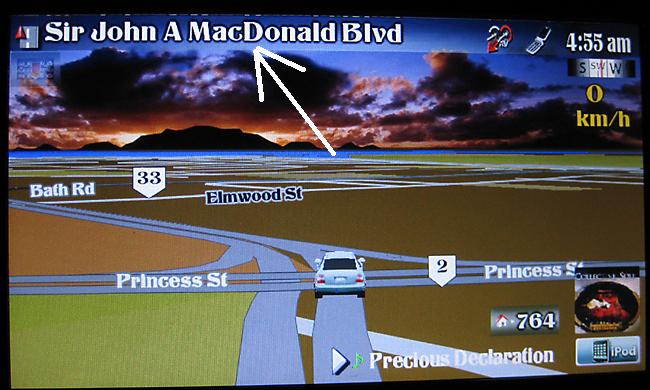
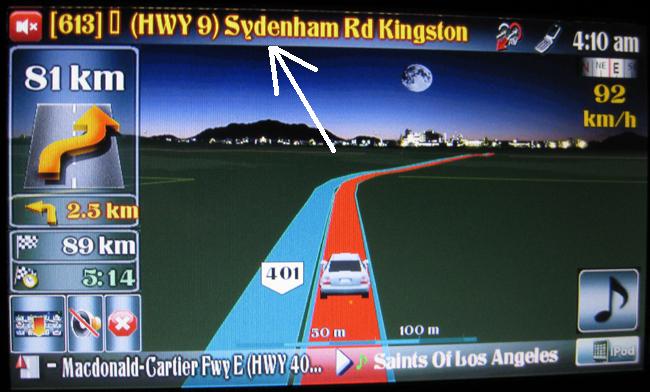
Where and on which lines in the "navigatemap_800_480.ui" file is this text located? I need to change the "Y" dimension so I can drop it down a bit so that I can see it better. My Toyota truck has the unit at about a 5-degree downward tilt which makes this very hard to read.
Thanx,
Bud
Damn, you caught me when I am out of town. I need to get to my files to tell you exactly where it is. I will be back home Thursday night, I will have an answer for you then
Hey Abb, I just started using V4. Looks good. But I was wondering if there was anyway of removing the MPH units associated with "your speed" from the map screen. I don't like advertising my speed to the rest of the car and so I turn that option off. We discussed this with your old version. I would love to try doing it if I new what file to edit (and I have the right program).
Thanks,
Jkdog
Yes, this is very easy to do. When I get back home, I will tell exactly which code to delete
Damn, you caught me when I am out of town. I need to get to my files to tell you exactly where it is. I will be back home Thursday night, I will have an answer for you then
Thanx, bro!
Hmm, I can´t find how to disable the "Bing" before voice prompt. Could yo be more specific how to do that?
I also can´t find any settings to reduce the voice prompts, again, I don´t like that much talking, there was a possibility to edit a voice package to talk much, much less.
Again, thanks for any help.
Hi
I've just installed the mod as well - a great improvement thank you. I too would like to reduce the voice prompt intervals but can't seem to find an option. I will happily mod some files if anybody knows where they are.
Thanks
Adam
Hi
I've just installed the mod as well - a great improvement thank you. I too would like to reduce the voice prompt intervals but can't seem to find an option. I will happily mod some files if anybody knows where they are.
Thanks
Adam
Actually, I never use voice! All the directions and distances are right on the screen. I would rather just look on the screen to see that my next turn is 300 m, rather than have a voice tell me that. The first thing that I do when I pick a route is turn off the voice 
Abb1....great new mod!!
Can you explain how to change 2d arrow cursor to other graphic (arrow with circle around it). I have searched but only found how to change 3d cursor.
Thanks for your great work....
I first installed FX3.1 perfect zero problems. Then i installed this v.4 mod to the T perfectly, i then had to delete about 10 states to make enough room though and also installed the New GFX folder as well as the New Schemes folder overwriting the schemes and what needed overwriting of course. For me though there was no existing GFX folder to be deleted so didn't need to do that step as in the instructions. I then turn car off, screen goes off, take out sd card, turn car back on. Now after the Pioneer splash screen it goes to the main menu but right away i get a grey windows window Error saying, "Program application database cannot be found." What is this all about? I hit ok, it goes away but the screen stays stuck on "System startup in progress please wait." Any advice people? Thank you.
I first installed FX3.1 perfect zero problems. Then i installed this v.4 mod to the T perfectly, i then had to delete about 10 states to make enough room though and also installed the New GFX folder as well as the New Schemes folder overwriting the schemes and what needed overwriting of course. For me though there was no existing GFX folder to be deleted so didn't need to do that step as in the instructions. I then turn car off, screen goes off, take out sd card, turn car back on. Now after the Pioneer splash screen it goes to the main menu but right away i get a grey windows window Error saying, "Program application database cannot be found." What is this all about? I hit ok, it goes away but the screen stays stuck on "System startup in progress please wait." Any advice people? Thank you.
Nevermind, i did it all from scratch and now it works perfect! Must have missed something somewhere the first time, oh well.
Now the real question, what are all the options in the map screen? I see on the top theres two hard to see icons, one with what looks like 2 arrows pointing to an upright angle and one to the right of it looking like a flip cellphone with a red X. What do these do? Anyway to get the map to always face North? Maybe a tutorial when you get a chance of how to actually use this Mod would be amazing for someone not so navi savvy as myself. Of course ill play with it all day at work tomorrow but still. Thank you and will send a donation soon for your hard work!!!
Nevermind, i did it all from scratch and now it works perfect! Must have missed something somewhere the first time, oh well.
Now the real question, what are all the options in the map screen? I see on the top theres two hard to see icons, one with what looks like 2 arrows pointing to an upright angle and one to the right of it looking like a flip cellphone with a red X. What do these do? Anyway to get the map to always face North? Maybe a tutorial when you get a chance of how to actually use this Mod would be amazing for someone not so navi savvy as myself. Of course ill play with it all day at work tomorrow but still. Thank you and will send a donation soon for your hard work!!!
The cell phone on top shows when your phone is connected and pressing this button will bring you to the phone menu. Long pressing this button will automatically call home or the number that you associated with your address. Your phone needs to be connected for this to work, otherwise you will see a red X through it meaning that your phone is not connected. The first button with the arrows is the AV hide button. If you want to hide the AV detail at the bottom of the screen, you can do so. Just tap it again to bring it back up.
Another great job Abb1, especially the transparent AV bar and skipping the warning nag screen.Perfect!
Some questions /remarks for the UK version.
1) when I start the Avic I receive a pop screen "Tripcomputer is accessible", how can I disable this?
2) For the TMC event you use image 746_32_OM-507_24b.bmp. This are small icons can you change it equal as 746_32_OM-506_24b.bmp. Now I see 1.5 icon in the TMC event list.
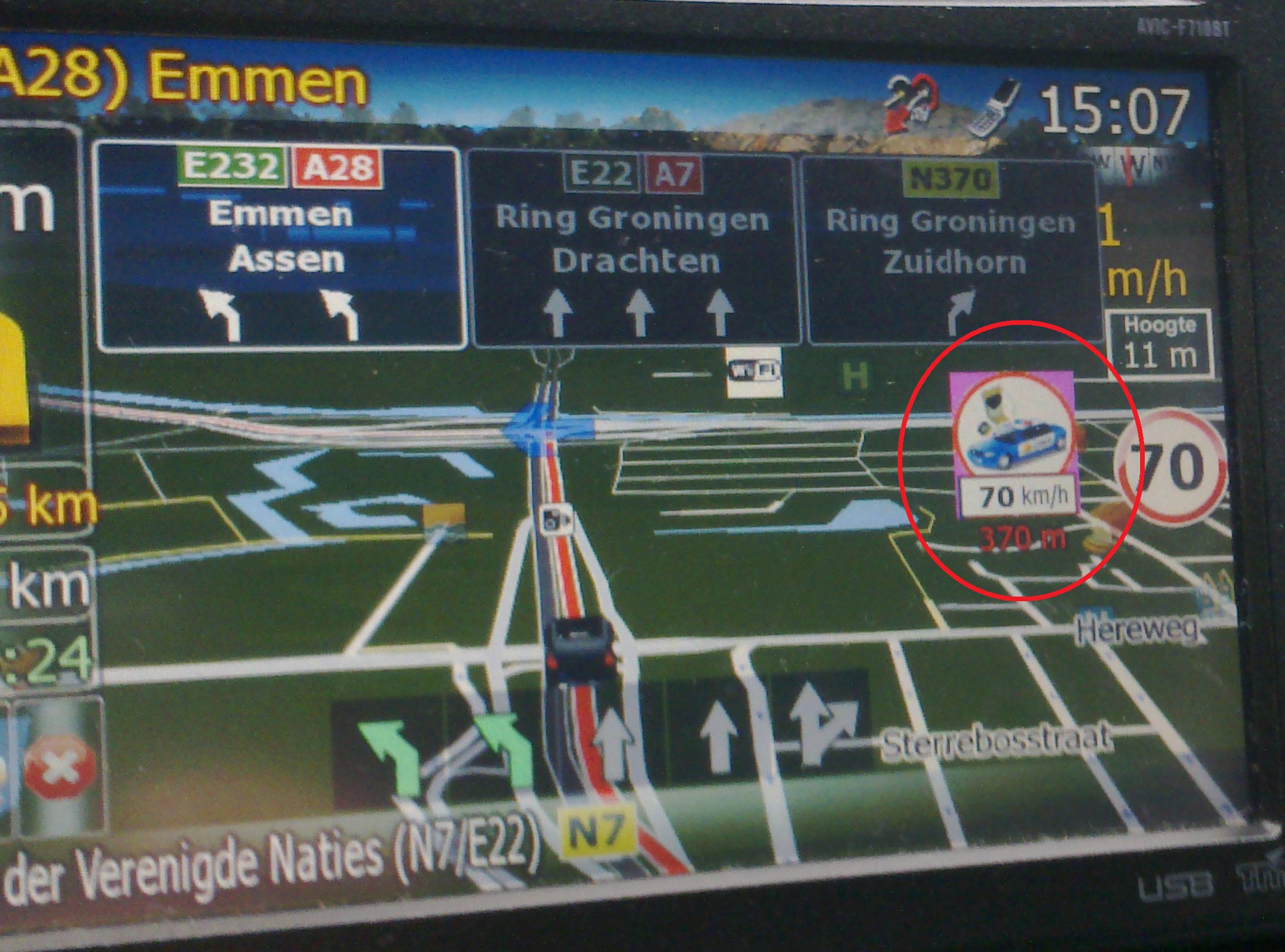
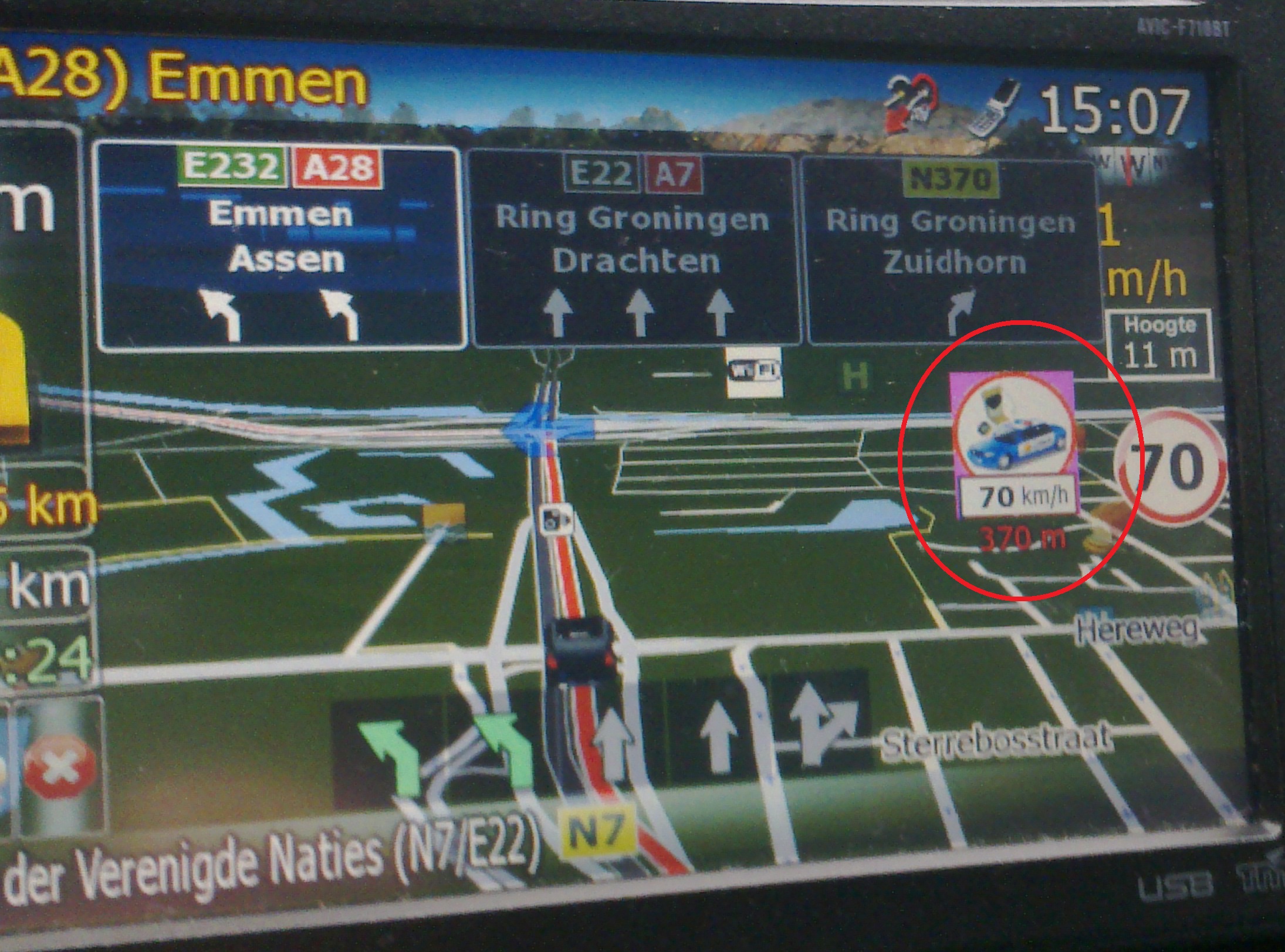
3) For the fixed speedcam is a violet square visible in the background (not transparent).
4) Is the service-info settings default?, when I change an item the next time I start it up again it is changed again to the old setting (default)
Abb1 see attached image for point 3:
In the background of the speedcam there is a violet square. I can fix it by myself but I can't find the file for it.
This version is great but im having some issues....
Since i installed it i cant keep the ilumination from cycling. Also, its always notifying me that the trip computer is available. Can this be turned off?
Hey Abb
Great mod, of course. I did notice that when I am in 3d mode w/o a route and then put in a route, home address for example, the screen will automatically switch to 2d mode. Not a big deal, I just hit the compass to switch it back, but did not know if you were aware of this.
This version is great but im having some issues....
Since i installed it i cant keep the ilumination from cycling. Also, its always notifying me that the trip computer is available. Can this be turned off?
No issues, the illumination from cycling has nothing to do with this mod. Do a search, a few other people had problems with this that dont have mods. As far as the nag screen with the trip computer, the fix is on post #34
Hey Abb
Great mod, of course. I did notice that when I am in 3d mode w/o a route and then put in a route, home address for example, the screen will automatically switch to 2d mode. Not a big deal, I just hit the compass to switch it back, but did not know if you were aware of this.
This should only happen with the 'home address'. I tried to fix this in my V3.25 mod and was unsuccessful, but then again, I didnt try very hard as it is just a minor annoyance and nobody complained about it prior to this. I may look at this again in my next update
Abb1 see attached image for point 3:
In the background of the speedcam there is a violet square. I can fix it by myself but I can't find the file for it.
It is file 'IDT_speedcam_small.bmp'. It is a compressed bmp, so PS wont open it. here is the file, I extracted it for you. Just unzip it, make the background transparent and then put it back in 'ui_pioneer/800_480'
Where and on which lines in the "navigatemap_800_480.ui" file is this text located? I need to change the "Y" dimension so I can drop it down a bit so that I can see it better. My Toyota truck has the unit at about a 5-degree downward tilt which makes this very hard to read.
Thanx,
Bud
Go to 'navigatemap_800_480.ui' find 'Next and current street' and change the y=-3 to y=3 in this code
	;Shielded text in route
<ROADSHIELDEDTEXT  sprNMINextStreetNameShieldedRoute template=xtxt x=46 y=3 h=38 w=515 ANIMATE=2 SCROLLSPEED=25 GAP=1 align="left" valign="center" textmodel_wstr="navigation.next_street_enc" fontsize=34 font="tahoma" glowsize=3 color=#FFFF40 color2=#8f0000 color3=#000000 visiblemodel="navigation.has_route&navigation.direction_icon.valid&ui.vFullScreenNextStreet=1&ui.vShieldedText=1">
<ROADSHIELDEDTEXT  sprNMIActualStreetNameShieldedRoute	template=xtxt x=61 y=431 h=36 z=10 w=315 ANIMATE=2 SCROLLSPEED=25 GAP=1 align="left" valign="center" textmodel_wstr="navigation.current_street_enc" fontsize=34 font="tahoma" glowsize=4 color=#FFFFFF color2=#000000 color3=#000000 visiblemodel="map.follow&navigation.has_route&ui.vShieldedText=1&ui.vFullScreenActualStreet">

;Plain Text in Route
<TEXT sprNMINextStreetNamePlainRoute template=xtxt x=43 y=-3 w=515 font="tahoma" align="left" fontsize=34 glowsize=4 color=#FFFF40 color2=#8f0000 color3=#000000 textmodel_wstr="navigation.next_street" visiblemodel="navigation.has_route&navigation.direction_icon.valid&ui.vFullScreenNextStreet=1&ui.vShieldedText=0" USE_SEPARATED_SAFETY_MODE=0>
<TEXT sprNMIActualStreetNamePlainRoute template=xtxt x=61 y=429 z=10 w=315 align="left" fontsize=34 font="tahoma" glowsize=4 color=#FFFFFF color2=#000000 color3=#000000 textmodel_wstr="navigation.current_street" visiblemodel="map.follow&navigation.has_route&ui.vShieldedText=0&ui.vFullScreenActualStreet">

;Actual street plain text no route
<TEXT sprNMIActualStreetNamePlainNoRoute template=xtxt x=43 y=-3 z=10 w=515 align="left" font="tahoma" fontsize=34 glowsize=4 color=#FFFFFF color2=#000000 color3=#000000 textmodel_wstr="navigation.current_street" visiblemodel="map.follow&!navigation.has_route&ui.vShieldedText=0&ui.vFullScreenActualStreet=2">

;Actual street shielded text no route
<ROADSHIELDEDTEXT  sprNMIActualStreetNameShieldedNoRoute template=xtxt x=43 y=3 h=34 z=10 w=515 ANIMATE=2 SCROLLSPEED=25 GAP=1 align="left" valign="center" textmodel_wstr="navigation.current_street_enc" fontsize=34 font="tahoma" glowsize=4 color=#FFFFFF color2=#000000 color3=#000000 visiblemodel="map.follow&!navigation.has_route&ui.vShieldedText=1&ui.vFullScreenActualStreet=2">
If it is still not low enough just go to 4 or whatever number suits you
Hey Abb, I just started using V4. Looks good. But I was wondering if there was anyway of removing the MPH units associated with "your speed" from the map screen. I don't like advertising my speed to the rest of the car and so I turn that option off. We discussed this with your old version. I would love to try doing it if I new what file to edit (and I have the right program).
Thanks,
Jkdog
Go to 'navigatemap_800_480.ui' and then go to 'Your speed sign' and delete the center line which is this code
<TEXT txtYourSpeed template=xtxt x=690 y=111 w=112 z=10 font="tahoma" align="center" fontsize=30 glowsize=2 color=#f8cc28 textmodel_wstr="navigation.current_speed.unit_text" visiblemodel="gps.valid" USE_SEPARATED_SAFETY_MODE=0>
That will do it
Go to 'navigatemap_800_480.ui' find 'Next and current street' and change the y=-3 to y=3 in this code
	;Shielded text in route
<ROADSHIELDEDTEXT  sprNMINextStreetNameShieldedRoute template=xtxt x=46 y=3 h=38 w=515 ANIMATE=2 SCROLLSPEED=25 GAP=1 align="left" valign="center" textmodel_wstr="navigation.next_street_enc" fontsize=34 font="tahoma" glowsize=3 color=#FFFF40 color2=#8f0000 color3=#000000 visiblemodel="navigation.has_route&navigation.direction_icon.valid&ui.vFullScreenNextStreet=1&ui.vShieldedText=1">
<ROADSHIELDEDTEXT  sprNMIActualStreetNameShieldedRoute	template=xtxt x=61 y=431 h=36 z=10 w=315 ANIMATE=2 SCROLLSPEED=25 GAP=1 align="left" valign="center" textmodel_wstr="navigation.current_street_enc" fontsize=34 font="tahoma" glowsize=4 color=#FFFFFF color2=#000000 color3=#000000 visiblemodel="map.follow&navigation.has_route&ui.vShieldedText=1&ui.vFullScreenActualStreet">

;Plain Text in Route
<TEXT sprNMINextStreetNamePlainRoute template=xtxt x=43 y=-3 w=515 font="tahoma" align="left" fontsize=34 glowsize=4 color=#FFFF40 color2=#8f0000 color3=#000000 textmodel_wstr="navigation.next_street" visiblemodel="navigation.has_route&navigation.direction_icon.valid&ui.vFullScreenNextStreet=1&ui.vShieldedText=0" USE_SEPARATED_SAFETY_MODE=0>
<TEXT sprNMIActualStreetNamePlainRoute template=xtxt x=61 y=429 z=10 w=315 align="left" fontsize=34 font="tahoma" glowsize=4 color=#FFFFFF color2=#000000 color3=#000000 textmodel_wstr="navigation.current_street" visiblemodel="map.follow&navigation.has_route&ui.vShieldedText=0&ui.vFullScreenActualStreet">

;Actual street plain text no route
<TEXT sprNMIActualStreetNamePlainNoRoute template=xtxt x=43 y=-3 z=10 w=515 align="left" font="tahoma" fontsize=34 glowsize=4 color=#FFFFFF color2=#000000 color3=#000000 textmodel_wstr="navigation.current_street" visiblemodel="map.follow&!navigation.has_route&ui.vShieldedText=0&ui.vFullScreenActualStreet=2">

;Actual street shielded text no route
<ROADSHIELDEDTEXT  sprNMIActualStreetNameShieldedNoRoute template=xtxt x=43 y=3 h=34 z=10 w=515 ANIMATE=2 SCROLLSPEED=25 GAP=1 align="left" valign="center" textmodel_wstr="navigation.current_street_enc" fontsize=34 font="tahoma" glowsize=4 color=#FFFFFF color2=#000000 color3=#000000 visiblemodel="map.follow&!navigation.has_route&ui.vShieldedText=1&ui.vFullScreenActualStreet=2">
If it is still not low enough just go to 4 or whatever number suits you
Thanx!
Now all is well.
..Bud
This should only happen with the 'home address'. I tried to fix this in my V3.25 mod and was unsuccessful, but then again, I didnt try very hard as it is just a minor annoyance and nobody complained about it prior to this. I may look at this again in my next update
Thanks Abb, like I said, not a big deal, I just wanted to make sure I downloaded the files correctly. Everything works fine.
One last thing for now. Is there a way to get the splitnav screen to display other than at a right angle view at default? Even though it comes up in 3D I still have to tilt it back down every time I use it.
Thanx,
Bud
One last thing for now. Is there a way to get the splitnav screen to display other than at a right angle view at default? Even though it comes up in 3D I still have to tilt it back down every time I use it.
Thanx,
Bud
No, unfortunately you have to take the good with the bad. It is kinda annoying, but more than worth it