Thanks Chuck,
Unfortunately stuck at work for another 5 hours, but I'll try that out fist thing when I get back home to my laptop.
From there, you can talk about map and mod then!
Keep me posted!
Thanks Chuck,
Unfortunately stuck at work for another 5 hours, but I'll try that out fist thing when I get back home to my laptop.
From there, you can talk about map and mod then!
Keep me posted!
From there, you can talk about map and mod then!
Keep me posted!
Will do! Thanks for the continued support Chuck, it's you, and others like you, that make this forum what it is.
Will do! Thanks for the continued support Chuck, it's you, and others like you, that make this forum what it is.
I try my best to help, as much as I have time.
How was your attempt to the speed camera thing?
I actually have them now. Not sure if they're updated tho. Scared me half to death when she screamed it at me! Ha.
Hello love the interface..... two quick questions one how do i get the cloud background like in your pix? The system only let me use telemap and not navteq and i see on you pic also you have the gas station icons ect how do i apply that on my gps?
Ok Chuck, home now and still nothing but a quick DOS screen. I have installed the emulator. The emulator.exe file is in C:\Program Files(x86)\Microsoft Device Emulator\1.0, and I also moved the nk.bin file and igo folder (renamed to "igo-chuck88") inside C:\Program Files(x86)\Microsoft Device Emulator\1.0 as well. Did I misunderstand something or do something wrong?
I know this was exactly what Abb was talking about as far as not being able to follow directions 
I also changed the ".bat" file to "RUN_AVIC.BAT" and edited to "C:\Program Files(x86)\Microsoft Device Emulator\1.0\DeviceEmulator.exe" /video 800x480x16 /memsize 256 /c nk.bin /sharedfolder "iGo-Chuck88" and still when I double click on it I get a quick DOS window that goes away before I can read it, then nothing else happens.
I actually have them now. Not sure if they're updated tho. Scared me half to death when she screamed it at me! Ha.
Hahaha. If you have my mod, you can control the volume of the spoken warning directly from the MAP popup interface. 
Hello love the interface..... two quick questions one how do i get the cloud background like in your pix? The system only let me use telemap and not navteq and i see on you pic also you have the gas station icons ect how do i apply that on my gps?
1) There are 4 popup icons menus, Settings, Navigation, Map and Applications. From the Map popup, there is an icon for the map color, click on it and change to other scheme (if all my files are installed).
Please search for schemes to know more.
2) On the Applications popup, there is an icon (green with earth) that you can press to switch between Navteq and TeleAtlas maps. Before proceeding, you have to make sure that two folders are created:
Either "map" and "map_nt",
Or "map" and "map_ta"
under the CONTENT folder, and that there is at least one valid FBL map file is stored.
Please search "map changer" for more details.
Ok Chuck, home now and still nothing but a quick DOS screen. I have installed the emulator. The emulator.exe file is in C:\Program Files(x86)\Microsoft Device Emulator\1.0, and I also moved the nk.bin file and igo folder (renamed to "igo-chuck88") inside C:\Program Files(x86)\Microsoft Device Emulator\1.0 as well. Did I misunderstand something or do something wrong?
I know this was exactly what Abb was talking about as far as not being able to follow directions
I also changed the ".bat" file to "RUN_AVIC.BAT" and edited to "C:\Program Files(x86)\Microsoft Device Emulator\1.0\DeviceEmulator.exe" /video 800x480x16 /memsize 256 /c nk.bin /sharedfolder "iGo-Chuck88" and still when I double click on it I get a quick DOS window that goes away before I can read it, then nothing else happens.
The file should be called "DeviceEmulator.exe" and not "Emulator.exe". At this point you are closed. Open a command prompt by shift-right-clicking on the "C:\Program Files(x86)\Microsoft Device Emulator\1.0" and manually run the "RUN_AVIC.bat" file, now you will see the error message! 
Well, I just discover a bug in the event when you have a route, then go to the Browsing Map screen. The navigation map status is shown! 
This is nothing serious and I will fix that in the upcoming update!
Hey chuck loving your build.... Had a question is there a fully working file that fix the nag screens?
Hey chuck loving your build.... Had a question is there a fully working file that fix the nag screens?
Thanks! No sure understood what you want though ... are you talking about the nav nag screen fix found here: Nav Nag Msg and Tel.exe fix
I will consider include that in my next update. 
Thanks! No sure understood what you want though ... are you talking about the nav nag screen fix found here: Nav Nag Msg and Tel.exe fix
I will consider include that in my next update.
Great where do i place that file also it would be nice if you was able to change the main menu screen and add the fuel economy app but thats just my opinions
Great where do i place that file also it would be nice if you was able to change the main menu screen and add the fuel economy app but thats just my opinions
All the 3 or 4 files, and the Tel.exe should replace the original files in \My Flash Disk\APL. Don't forget to make backup of the original files first!!!
The Fuel Calculator application can be accessed from two different locations in my mod, one of them is the Application Popup, the other is in the Trip Computer Screen footer.
Hey Chuck,
Been awhile (workin crazy hours and waiting on my replacement iphone) but I wanted to ask what mic is best for my f700? I've searched around and still no clear answer.
Hey Chuck,
Been awhile (workin crazy hours and waiting on my replacement iphone) but I wanted to ask what mic is best for my f700? I've searched around and still no clear answer.
I am using the X710BT and the mic was included in the package.
Not yours? Or has it broken down?
I am using the X710BT and the mic was included in the package.
Not yours? Or has it broken down?
Never had one. The guy I bought it from kept telling me he had it, but with my hectic work schedule I haven't been able to get back with him to get it. It's been about a month now and my truck is starting to come together so I figured I'd just order the IR remote thing and the mic to complete my system.
Also I wanted to ask, if I download your updated mod will it be compatible with Abb's V5 or should I flash my hard drive and install it fresh? I think I've finally got his mod working (completely) but I had to flash my hard drive to do it.
Also I wanted to ask, if I download your updated mod will it be compatible with Abb's V5 or should I flash my hard drive and install it fresh? I think I've finally got his mod working (completely) but I had to flash my hard drive to do it.
Those are completely compatible. The only requirement for both mod is Pioneer Firmware 3.x.
Of course, you still have to delete the "\My Flash Disk\User\UserData\iGo" to get rid of saved data, if you wish, only if you ran into problem.
Just follow the directions put out in the first post. On my next update, I will make it even simple to copy my mod to the AVIC so all you have to do is copy mine or copy abb's.
Hey Chuck,
I'm interested in using that "stealth mode" you mentioned but I'm not sure if "Carver's Navigation Nag Screen Killer" was installed with Abb1's V5 or if it's a separate hack/mod I need to find and install.
Hey Chuck,
I'm interested in using that "stealth mode" you mentioned but I'm not sure if "Carver's Navigation Nag Screen Killer" was installed with Abb1's V5 or if it's a separate hack/mod I need to find and install.
I am improving my “STEALTH MODE“ my upcoming release.
Carver's hack consists of 4 files that are located in My Flash Disk/APL folder, and they are provided with Abb1's V5 stored in that very folder, but you can use it without problem with my mod (even with the Tel.exe hack), as this is what I am doing right now in my AVIC.
So you don't have to install it if you already copy those files from Abb's mod.
I am considering include the following applications in my next update:
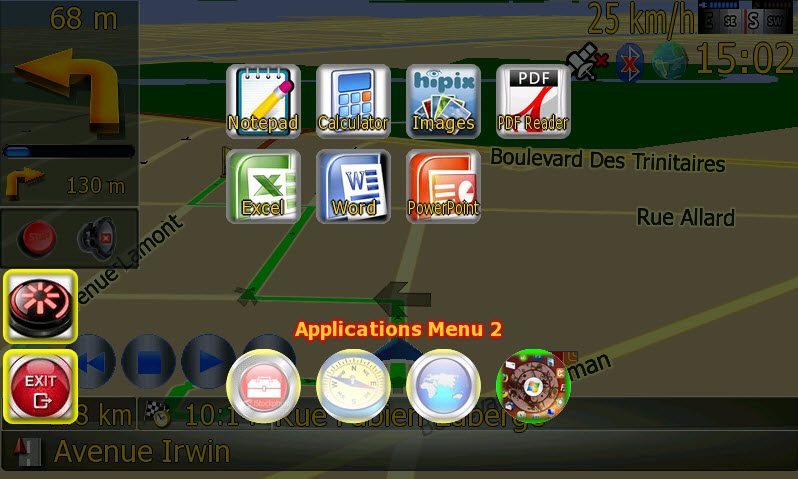
Any interest on those applications?
I am considering include the following applications in my next update:
- Notepad
- Calculator
- Images Viewer (slideshow)
- PDF Viewer
- MS Excel Viewer (up to 2003)
- MS Word Viewer (up to 2003)
- MS PowerPoint Viewer (up to 2003)
Any interest on those applications?
The top three sound good....the bottom four sound like WORK!!!!
Looking forward to your next release...
The top three sound good....the bottom four sound like WORK!!!!
Looking forward to your next release...
Looking good and agree with the previous post!!
Since last weekend, I was working on fixing the AVOIDANCE function of the mod.
After testing many mods (abb1, misterblue, IDT, diaftia's), correct me if I am wrong, my understanding is that NONE of the mods in this forum is functioning correctly on this matter. When you bring up the AVOIDANCE menu and issue a command (avoid xx KM of the current road, avoid street or avoid maneuver), it will NOT be taken by iGo and nothing will happen. One exception if you are entering the first segment of the calculated route, because the issued command remains valid versus the current segment position index content.
If I can succeed, this will help people wishing to use this AVOIDANCE feature, which is a MUST addition to a navigation software. I think that every commercial GPS device has this feature operational, so I don't know why Pioneer got rid of it in the factory iGo setup.
Chuck88 - maybe you can add this set of games; I saw it running on the Russian mod.