Man you guys do some damn good work. Every time one of you issues an update I so want an F/X series again. 
Posted Dec 27, 2010 · 07:26 UTC#151
Man you guys do some damn good work. Every time one of you issues an update I so want an F/X series again.
Thanks  !
!
I assume that you are talking about SCHEME, and not THEME. For theme, you have to change the IMAGE.res in the \My Flash Disk\APL.
So for schemes, you would have to copy all schemes (*.zip files) to \My Flash Disk\APL2\iGo\CONTENT\Schemes. What do you see in this folder?
Let me know if my understanding is wrong or provide more info.
Started over from scratch and everything works great now!
Except.....can't get any music files to play from either the sd or usb now.....XM and cd are fine.
Started over from scratch and everything works great now!
Except.....can't get any music files to play from either the sd or usb now.....XM and cd are fine.
If you have lot of files (any types) in the SD card or USB stick, it could take a long time to load and start playing. In this case, you should see the audio source switched to SD up to 10 seconds after you insert the media (SD or USB), then stays there for up to 2 minutes before any tune is played.
If you have lot of files (any types) in the SD card or USB stick, it could take a long time to load and start playing. In this case, you should see the audio source switched to SD up to 10 seconds after you insert the media (SD or USB), then stays there for up to 2 minutes before any tune is played.
I've tried everything, from complete library down to just one mp3, on both the usb and the sd. Nothing. Even after sitting for an hour.
I started with Retell's 3.0 upgrade, then added your mod. Don't know where to start looking. I can take a box of parts and build a computer, but I'm not a programmer.
Looking back at Retell's 3.0 instructions, after copying his "my flash disk" from the sd to the unit, it says "Copy the Data file from the SD card and replace the one in "My Flash Disk\APL2\iGo" (Soft Bypass)" I might not have done this, could that be causing the problem?
BTW, thanks for your help, and I admire the work all of y'all have put into these mods...
I've tried everything, from complete library down to just one mp3, on both the usb and the sd. Nothing. Even after sitting for an hour.
I started with Retell's 3.0 upgrade, then added your mod. Don't know where to start looking. I can take a box of parts and build a computer, but I'm not a programmer.
Looking back at Retell's 3.0 instructions, after copying his "my flash disk" from the sd to the unit, it says "Copy the Data file from the SD card and replace the one in "My Flash Disk\APL2\iGo" (Soft Bypass)" I might not have done this, could that be causing the problem?
BTW, thanks for your help, and I admire the work all of y'all have put into these mods...
Now I'm getting "out of Memory messages at startup.....
Looking back, I used his FX3.1 Complete Firmware Image....and followed his instructions correctly.
I'm going to start all over and see what happens...
Now I'm getting "out of Memory messages at startup.....
Looking back, I used his FX3.1 Complete Firmware Image....and followed his instructions correctly.
I'm going to start all over and see what happens...
Reinstalled and so far everything is working properly....musta screwed up somewhere!
Reinstalled and so far everything is working properly....musta screwed up somewhere!
Really glad that it has worked for you. Sorry for the late reply because of the vacation .
Enjoy modding and Happy New Year 2011!
Mod v2.8f is up! This version is now very stable and I will leave it as is for some time to come, except if there are serious bugs, which is unlikely.
Please don't forget to install a new font from abb's, which is called "TAHOMA_ABB.TTF" and included with the release, to "My Flash Disk\APL2\iGo".
Thank you everyone for your support .
Happy New Year 
Hey Chuck,a happy new year to you too.Many thanks for your continued contributions and help to the forum.Wonder where 2011 will take us???
Hi Chuck thanks for update.
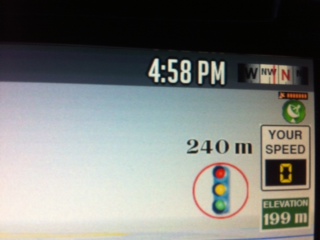
Just one question if you can add distance to simple red light/speed camera mod same as in Diaftia's Hybrid mods V3.2
Thanks
Hi Chuck thanks for update.
Just one question if you can add distance to simple red light/speed camera mod same as in Diaftia's Hybrid mods V3.2
Thanks
Are you talking about the SIMPLE CAMERA icon, and you want to replace the actual SPEED LIMIT by the DISTANCE?
It is simple camera icon with speed limit info and remaining distance info beside.
It is simple camera icon with speed limit info and remaining distance info beside.
Don't remember I have this in my mod 
The SIMPLE is the icon with only speed limit on it (with unit, km/h or mi/h), and the FULL is the red panel with all the info (speed limit and distance to camera). Are you using my mod  ? If so can you post a pic?
Thanks.
Hi Chuck88 this picture from Diaftia's Hybrid mods V3.2.1 with remaining distance to camera.
I was thinking if you can add this to your mod.
Thanks
Hi Chuck88 this picture from Diaftia's Hybrid mods V3.2.1 with remaining distance to camera.
I was thinking if you can add this to your mod.
Thanks
So you want to replace the actual SPEED LIMIT by the DISTANCE in the SIMPLE camera icon view. So you think it is more important to have the distance than the permitted speed before the camera 
OK let me see if I can have time to do that quickly this weekend. If there is no other request, I will just post the modification for you here without updating the whole modded zip.
Hi Chuck88.
I like to have distance and speed limit together in simple camera mode
If this possible (same as in Diaftia hybrid mode v3.2)
Thanks
Hi Chuck88.
I like to have distance and speed limit together in simple camera mode
If this possible (same as in Diaftia hybrid mode v3.2)
Thanks
Yeah it is possible! The only problem I have is that the speed camera doesn't display in Emulator mode, so it will take time because, if my wife is not watching me messing again with modding, I will have to run to my car to test every change.
Maybe Abb1 can tell me how to enable the camera display in Emulator mode in IDT's original MOD (or abb1's MOD) ... 
Hi Chuck88.
I like to have distance and speed limit together in simple camera mode
If this possible (same as in Diaftia hybrid mode v3.2)
Thanks
Hi bigboy,
I don't have time to rewrap to make a release, so I just attach with this post what I have to show ONLY the distance to traffic camera, but not the speed limit, because it would involve more interface redesign (see the small camera icon and you will understand: no space for two parameters). There are also some other subtle improvements to the MOD.
If you are a smartzoom lover, you might also want to replace the SYS.txt with the one included, which contain minor adjustments.
Just unzip the archive and copy to the "My Flash Disk\APL2\iGo" folder, with folder structure retained.
Bye now!
Hi bigboy,
I don't have time to rewrap to make a release, so I just attach with this post what I have to show ONLY the distance to traffic camera, but not the speed limit, because it would involve more interface redesign (see the small camera icon and you will understand: no space for two parameters). There are also some other subtle improvements to the MOD.
If you are a smartzoom lover, you might also want to replace the SYS.txt with the one included, which contain minor adjustments.
Just unzip the archive and copy to the "My Flash Disk\APL2\iGo" folder, with folder structure retained.
Bye now!
Thanks Chuck88
Sorry about that.
Hey chuck, I think I've pretty much got everything figured out accept why when I plug my phone in it automatically reboots the unit. I'm also having trouble setting routs anywhere other than home ( pressing the home button ). Any idea how I can fix this?
Hey chuck, I think I've pretty much got everything figured out accept why when I plug my phone in it automatically reboots the unit. I'm also having trouble setting routs anywhere other than home ( pressing the home button ). Any idea how I can fix this?
I dont' know what you meant by "setting routes"? ...
The fact that you AVIC reboot after plugging in the phone is not related to any mod, as it also does with abb's mod. I have some suggestions, one at a time, but please backup the whole thing before attempting anything.
1) I would try to reset the AVIC by pressing the button just beside the CD/DVD eject button (please read the manual to see what will be reset after this operation).
2) There is RESTORE button within the main menu structure, I don't remember where, that you can try.
3) Remove the current bluetooth connection and re-pair it again.
4) There is a file call BTSettings.dat within \My Flash Disk\USER\UserData\Setup. Rename it to something else. There are other files under this folder that you can try to rename from the DAT extension to something else.
Let us know your results.
Hey Chuck, sorry for the late response ( didn't get the e-mail for some reason) but after a lot of reding and searching, and searching and reading I was able to stop the continuous rebooting by restoring my phone on iTunes. It no longer charges when connected like it use to but im going to try and disconnect and re-pair the bluetooth like you suggested to see if that works. I'm still searching (and reading) trying to find out how to correct the turn restrictions ( they're opposite from the actual "no turn" direction and also when you say " long press the start button " for your new map view I either don't know where the "start" button is, or I'm already seeing it and not aware of it. Any help or nudges in the right direction is very much appreciated ( as always).
And now back to searching and reading and reading and searching.