Search Archive

Abb's Chrome 'All-in-One' V5 - Feb 12/11

By abb1 · Feb 13, 2011in Completed Mods/Themes💬 146 posts👁️ 49,226 views
Page 1 of 6
Posted Feb 13, 2011 · 00:56 UTC#1

Abb's Chrome 'All-in-One' Mod V5


*First off, I would like to thank and give credit to these Modders, who without, given their knowledge and contributions to these forums, a lot of these mods, mine included, would not exist. These Modders are 'IDT, Diaftia, N-S-E-W, BorisM, and MrBlue for his fantastic 3D cars add-on’


I would like to apologize for the delay in for this version, but this was the most comprehensive and time consuming mod that I have done to date, as all the images were redone, and a lot of scripting was changed as well. I am very pleased with this outcome and I am hoping that you will be as well.


New features from V4:

• New Chrome theme with many graphical improvements

• Latest 'Warning screen removal' is included

• The Trip Computer has been incorporated into the ‘SplitNav’ and the ‘Speedometer’ with a touch of a button (see pics)

• Newly designed ‘splitNav’ that is more functional than ever

• Many new options in the Route Menu including the ability to place a drop pin and remove it as well as adding a speed camera

• Many Graphical improvements! Virtually, just about every image has been changed

• File sizes were further reduced to allow smooth operation of mod with all the new features and images.

• Latest version of 3D cars with over 130 different vehicles to choose from (thanks to ‘Misterblue’)

• A ‘Non-MSN’ version is included with ALL MSN features and images removed to conserve space. This is for those that have no use for MSN

• Mod was sorted in folders for easy installation


Screen Shots


cr2-1.jpg


cr2-2.jpg


cr2-5.jpg


cr-14.jpg


cr2-6.jpg


cr-13.jpg


cr-15.jpg


cr-16.jpg


New SplitNav

cr-17.jpg


New tripcomputer in 'SplitNav' by touching the button on the bottom

cr-18.jpg


cr-19.jpg


New tripcomputer in 'Speedometer' by touching the button on the bottom left

cr-20.jpg


cr-21.jpg


cr-12.jpg


Installation Instructions!


THIS MOD IS FOR FIRMWARE V3 ONLY!!!

Extract all of the folders/files from the .rar file you downloaded, onto a freshly formatted SD card with a testmode folder. You only need to deal with 4 different folders on your AVIC and they are labeled on the folders themselves that the files are in within the zip once extracted.

Also make sure you have a full back up of your FLASHDISK. Really, you are going to edit a lot of files here and it will be nice to go back if you want/need to.


Once the SD card is inserted into your AVIC, power it on and boot into testmode:


1. Click Start - Programs, Explorer then click on SD Card, go into ‘MyFlashDisk’ folder and copy ALL the items in it (‘APL, APL2, System’ folders)

2. Now get out of there and back to the first explorer window. Open ‘My Flash Disk’ in the main explorer window which should reside in the same row as your SD card.

3.Paste all contents that you have copied, and say ‘yes’ to overwrite.

4. You need to delete the user files so that your settings are built fresh with these new mods. They are in “My Flash Disk\User\UserData". Delete the ENTIRE "iGo" .

5. Power off your ignition to turn the AVIC off.

6. Pop out your SD CARD and then power back on to restart AVIC. DO NOT REMOVE THE SD CARD WITHOUT TURNING OFF YOUR AVIC FIRST!!!


NEW SCHEMES - Instructions

-Install my GFX folder (after it has been extracted) to 'MyFlashDisk/APL2/IGO' folder. Afterwards it should look like this:

'MyFlashDisk/APL2/IGO/GFX'

-Install my schemes into 'MyFlashDisk/APL2/IGO/CONTENT/SCHEMES' folder. Once it is installed, you should be able to open up the CONTENT folder and see all my schemes along with 'Pioneer_blue_day.zip' scheme

*YOU NEED MY GFX FOLDER FOR THE SCHEMES TO WORK

**If this is too complicated for you, DO NOT TRY THIS!

*To install the NEW GFX folder, delete the present one first and then add the new one! THIS IS A MUST!


Donations

I have NEVER asked for donations EVER, but a lot of forum members are encouraging me to take them as a way to receive thanks in the form of 'Beer Money'. I have agreed to take donations as a form of appreciation for all this hard work. Any donations will be greatly appreciated, but they are by no means mandatory. Donations can be accepted by using PayPal and forwarding payment to [email protected]

DOWNLOADS


Chrome Nav Mod V5 MSN


Chrome Nav Mod V5 Non-MSN


NEW GFX Folder


NEW Schemes

Edited Feb 13, 2011 by abb1
Posted Feb 13, 2011 · 01:09 UTC#2

Thanks for this Abb! I am downloading and installing this right away, I can't wait to use it.

Posted Feb 13, 2011 · 08:01 UTC#3

hello ABB1,


Congratulation for your work, I see that you worked again the images of buttons to integrate them better into your modifications (Transparency) ;):mrgreen:


For 3DCars of Misterblue I agree with you he made a big work and he deserves many congratulations


Good Sunday Jean-louis

Posted Feb 13, 2011 · 15:42 UTC#4

$ent some beer $ for you!!


Great job!!

Posted Feb 13, 2011 · 16:19 UTC#5

$ent some beer $ for you!!


Great job!!

Thank you, I hope you like it! A few glitches that were in the beta version have been ironed out, so it should be 100% now :)! Thank you for your help in pointing his out for me!

Edited Feb 13, 2011 by abb1
Posted Feb 13, 2011 · 16:40 UTC#6

Hi,

I'm sorry that i'm new in modding but when i install this mode it tell me

FFUIERROR: Unknown layer referenced Identifier=[ui_AdvMenu_EW]


I think it is related with data.zip file but i'm not sure. What can i do about this error

I have F500BT with avicnet 2.1


I think the problem is when i have both installed

Edited Feb 13, 2011 by staza
Posted Feb 13, 2011 · 17:46 UTC#7

Hi,

I'm sorry that i'm new in modding but when i install this mode it tell me

FFUIERROR: Unknown layer referenced Identifier=[ui_AdvMenu_EW]


I think it is related with data.zip file but i'm not sure. What can i do about this error

I have F500BT with avicnet 2.1


I think the problem is when i have both installed

You installed it wrong! Follow the installation instructions! Also, make sure that your firmware is V3 or higher

Posted Feb 13, 2011 · 18:15 UTC#8

Sweet...your skills have progressed with each release. By far the most featured rich nav unit out there... thanks again.

Posted Feb 14, 2011 · 02:06 UTC#9

Thanks will try it, excellent work. The non-msn is greatly appreciated. Sent some suds coins for you.

Posted Feb 14, 2011 · 04:08 UTC#10

Thanks will try it, excellent work. The non-msn is greatly appreciated. Sent some suds coins for you.

Thank you, it is very much appreciated :grin:! This is way unexpected, the Non-msn downloads are exceeding the MSN downloads by 2 to 1

Posted Feb 15, 2011 · 03:09 UTC#11

Congratulations Abb for your works and decision to share with the rest of the forum! :rolleyes:

Edited Feb 15, 2011 by Chuck88
Posted Feb 15, 2011 · 08:37 UTC#12

Congratulations Abb for your works and decision to share with the rest of the forum! :rolleyes:

Thanks, but I am really going to need help from you guys to troubleshoot, as I am never here anymore. I am just on my way out of town again :(. I love sharing my mods, that is one of the reasons that I do them, but unfortunately work takes up a big chunk of my life and I dont have any time to troubleshoot faulty installations. This mod is as stable as can be as I have been testing it for some time now and I made a foolproof installation method that will hopefully prevent any problems.
Posted Feb 15, 2011 · 13:07 UTC#13

Thanks, but I am really going to need help from you guys to troubleshoot, as I am never here anymore. I am just on my way out of town again :(. I love sharing my mods, that is one of the reasons that I do them, but unfortunately work takes up a big chunk of my life and I dont have any time to troubleshoot faulty installations. This mod is as stable as can be as I have been testing it for some time now and I made a foolproof installation method that will hopefully prevent any problems.


Hey Abb, you should say "Fortunately, work takes up a big chuck of my life ..." :rolleyes:


Don't forget, everybody is glad that you've shared your works, and in the limit, you don't have too.


Cheers!

Posted Feb 15, 2011 · 13:09 UTC#14

Abb, one question: how did you do to show pictures like in this page, without linking them to external server?


Thanks for sharing this TOO! :mrgreen:

Edited Feb 15, 2011 by Chuck88
Posted Feb 15, 2011 · 15:44 UTC#15

Abb, one question: how did you do to show pictures like in this page, without linking them to external server?


Thanks for sharing this TOO! :mrgreen:


Hey Chuck,


Looking at Abbs post he is linking to his Cogeco home page for his images.

Posted Feb 15, 2011 · 17:01 UTC#16

Hey Chuck,


Looking at Abbs post he is linking to his Cogeco home page for his images.


Thanks. :cool:


I can't see the linked address when I hover my mouse over the pictures, but I do suspect that though, as this is what was required previously.

Posted Feb 16, 2011 · 04:39 UTC#17

Day three using this mod...zero bugs.

Posted Feb 16, 2011 · 18:31 UTC#18

ABB,


thanks for at least one last mod for the F-series. Can't wait to install it asap. Question is, are the "new" schemes actually old ones from the last mod, or did you create new ones for this mod? I haven't had a chance to download yet as I am away from the home computer.

Posted Feb 17, 2011 · 00:54 UTC#19

ABB,


thanks for at least one last mod for the F-series. Can't wait to install it asap. Question is, are the "new" schemes actually old ones from the last mod, or did you create new ones for this mod? I haven't had a chance to download yet as I am away from the home computer.

No, those are the same schemes from the last mod. They are extremely time consuming, so I wont be updating them for a bit, or at least not until I get bored :rolleyes:

Posted Feb 17, 2011 · 15:53 UTC#20

Quick question on your mod


i have 2.0 right now and i am installing a new flash disk 3.0.. i am going to install your files on my computer to flash disk folder then load it on to the avic.. You don't for see any problems with this method?


and


lets say i don't like the theme, in you scheme folder can i click back the default pioneer one or do i need to reload flash disk


thanks


- steve

Posted Feb 17, 2011 · 20:19 UTC#21

Quick question on your mod


i have 2.0 right now and i am installing a new flash disk 3.0.. i am going to install your files on my computer to flash disk folder then load it on to the avic.. You don't for see any problems with this method?


and


lets say i don't like the theme, in you scheme folder can i click back the default pioneer one or do i need to reload flash disk


thanks


- steve

Make sure that you have Pioneer firmware V3.0 loaded before installing this mod. After that, just follow the directions :)! Once you have my schemes loaded, you can use whatever scheme you want. I have a huge selection that you can choose from and you can also have the plain Pioneer schemes if you want. Just go to settings/color profiles and select whatever scheme you want

Posted Feb 18, 2011 · 00:52 UTC#22

I'm a total novice at this. I ran out of disk space during copying of the GFX directory. I assume I have a bunch of stuff I don't need on my system and I can get rid off. What are the common files/directories that are not needed and can be deleted?


Thanks!


--Navid

Posted Feb 18, 2011 · 03:30 UTC#23

I'm a total novice at this. I ran out of disk space during copying of the GFX directory. I assume I have a bunch of stuff I don't need on my system and I can get rid off. What are the common files/directories that are not needed and can be deleted?


Thanks!


--Navid


Look at your CONTENT\MAP folder, there should be lot of them, Alaska, Hawaii etc. Also true for the POI and BUILDING folders.

Posted Feb 18, 2011 · 09:40 UTC#24

Look at your CONTENT\MAP folder, there should be lot of them, Alaska, Hawaii etc. Also true for the POI and BUILDING folders.

Thank you! That worked nicely.


--Navid

Posted Feb 18, 2011 · 17:38 UTC#25

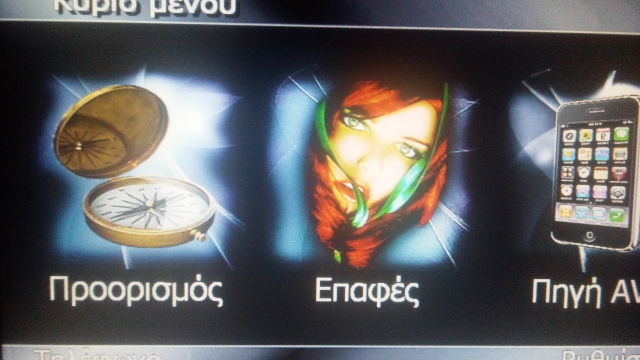
nice mod but when i select greek language, system works fine but the gps part dont show me greek characters only small squares

the main menu is in greek but the navigating part the keyboard letters and the map characters are replaced by small squares instead of greek or latin letters


post-31238-0-23036400-1298050043_thumb.jpg

post-31238-0-09285400-1298050080_thumb.jpg

post-31238-0-58856000-1298050102_thumb.jpg

Edited Feb 18, 2011 by fanaticgps
Page 1 of 6