yep 1st automatic version is up 
btw i've got f30bt with f40bt firmware device 
anyone other got it also?
it was hard to get to work update from z140, but only fw update, not the maps
yep 1st automatic version is up
btw i've got f30bt with f40bt firmware device
anyone other got it also?
it was hard to get to work update from z140, but only fw update, not the maps
I've got a z130bt with z140bt maps/firmware on it now - do you want me to test the autoinstall tonight?
sure
I'm very confused, there is a different password for the HACKMODE.KEY file. It keeps asking and I'm using avic411 as the password and it just says incorrect. How do I get this file?
I'm very confused, there is a different password for the HACKMODE.KEY file. It keeps asking and I'm using avic411 as the password and it just says incorrect. How do I get this file?
try to unpack with 7zip.
guys - people who downloaded 4 times - please REDOWNLOAD again v2.0!
accidentally I've uploaded not the proper version 
now the file is the correct one
This happened to me too, using unarchiver for OSX - WinRAR & WinZIP seem to work fine though.
I'm very confused, there is a different password for the HACKMODE.KEY file. It keeps asking and I'm using avic411 as the password and it just says incorrect. How do I get this file?
yep 1st automatic version is up
Great Great news! I don't understand quite how everything was made but I do understand all the good work of everyone involved! Bravo!
yep 1st automatic version is up
It did work with my X940BT, even though I had a message error code 2000c129 with the inability to remove user\PRG.FLG
I now have Hackmode!  I'm just concerned, did I messed up any way of doing a backup prior to the auto install?
Any options in case something goes wrong in the future at this point...?
Thanks
It did work with my X940BT, even though I had a message error code 2000c129 with the inability to remove user\PRG.FLG
I now have Hackmode!
Any options in case something goes wrong in the future at this point...?
Thanks
the error was probably because of that file doesnt exist.
i dont know the syntax of 'EXIST' parameter
great that it works :) thanks for the info!
Hey Ralpharn, thanks for the updates on the hack, can you send me a link to that russian forum so I can also follow the progress of that hack, it looks promising, as currently I never use the navi in my unit because the map coverage is crap.
Russian forum is here, but to see it you must register and log-in first. Otherwise it is invisible. This link leads to exact post where that guy started to describe his achievement.
Pionara, condiczek, very great work!
Tried the Hack and got a red screen with an error message. Now I cannot boot up at all.
Thanks Ralpharn. It looks promising. Hopefully he won't encounter many problems along the way.
Also Condiczek, great to see you back working on hackmode. And great work for Pionara on discovering this.
Tried the Hack and got a red screen at the end. it seems like all the files were copied over. So I took the sd card out and restarted and it boot up fine. Now should I have the capability to copy files on the 940? Not sure how to get in to do that.
Jimbo
Tried the Hack and got a red screen at the end. it seems like all the files were copied over. So I took the sd card out and restarted and it boot up fine. Now should I have the capability to copy files on the 940? Not sure how to get in to do that.
Jimbo
Had the exact same thing! Now you can remove test mode from your sd card
And keep only hackmode file, your unit should boot in hackmode with all functions.
Condi, you can use ERROR OFF in that script to prevent a red screen if removing a file that doesnt exist. (You can turn error off right before you do an operation that might fail, then turn it back on afterwards)
I'm sorry friend, no other ideas how to help you.. Check all the versions of testmode available in the internet,
check that 4shared collection, for our devices GGS1080 work, maybe other version will work for you!
All guys here are doing great job, we all are working to find the solution!
Everyone is welcome to help! All the work/research is appreciated
Im almost sure that gps port is com7!
GREAT work friend
We are getting closer day by day!
If there is no EU090BOT.PRG bootloader, then maybe after getting corrupted EU090PLT.PRG, or even deleted - it should still be repairable, maybe even testmode working?
We can still look into /NAND/PRG0/BOOT/EU090BOT.PRG
About your list of partition content - .bin files are repeated, doubled, because of PRG0 and second PRG1 copy. One set of RGD+PLT+OPN in PRG0, and another one in PRG1. To get windows in full working condition we need to replace system resources, the most important is coredll.dll, commctrl.dll etc.
coredll.dll is in RGD part.
I've got another idea how to get fully working gps/audio etc.
RGD contains: AstProc.exe, nk.exe, coredll.dll, ceconfig.h and snapshot_secureos.dat.
We need to replace coredll.dll, and maybe edit ceconfig.h to get full working windows ce, and..
the main idea - make copy of AstProc.exe as AstProc1.exe, replace AstProc.exe with mortscript with some condition - for example: if hackmode.key exists on sd - then run explorer, else run AstProc1.exe. Similar as now with hackmode. We should take a look into AstProc.exe - maybe some IDA Pro analyze etc.
I will upload complete dumped AstProc.exe and NEventWatcher.exe (not corrupted/shortened like from dumpromx.exe) later, but now my sdcard-reader isnt working.
---edit:
attached interesting not corrupted - complete rom files like: coredll.dll (which is limited in our wince), NEventWatcher.exe, TestMode.exe, and device dlls NP....dll, NPCommonLib.dll, NEventBaseLib.dll etc.
It is an old quote but could anyone help me with dumping these files.
These files aren't corrupted from the post above but I can't find a way to dump the content of eu090plt on my pc.
Tried dumprom,dumpromx and with parameters -5. Always corrupted..
Condi,
Could you tell me how you dumped the files without corrupting them?
Condi, you can use ERROR OFF in that script to prevent a red screen if removing a file that doesnt exist. (You can turn error off right before you do an operation that might fail, then turn it back on afterwards)
Great! Gonna use it in next version Thanks friend! I was thinking how to make some check if file exists (EXIST?),
that solution will be just great.
I will put some checks if currently used apl is from PRG0 or PRG1.
I next ver
It is an old quote but could anyone help me with dumping these files.
These files aren't corrupted from the post above but I can't find a way to dump the content of eu090plt on my pc.
Tried dumprom,dumpromx and with parameters -5. Always corrupted..
Condi,
Could you tell me how you dumped the files without corrupting them?
Hmm... yes, it was looooooooooooong time ago. I had some windows ce app,
which was dumping files on running system.
Because of lack of virtual keyboard as far as I remember I've made a script which after few seconds wrote filename to that app.
Got to search for that things on my hdd, i'm almost sure that I have them somewhere
Melvin,
see here:
http://avic411.com/i...-platform-file/
You can dump newer roms with:
dumpromx.exe -5 -i 0x200 -d romdump EU090PLT.PRG
I dont know if the files are corrupted or not. they seem to disassemble in ida ok?
Condi, was that NDump?
pionara,
true they dissamble in ida but are definitely corrupted.
They don't run in the emulator.
Also if you compare the dumpromx vs the one from condi you see a difference.
Dumpromx adds a lot off zeros (ASCII) to some sections and some bits are different at the PE header.
Condi,
Would be great if you can find the script or just remember the windows ce app.
I can code something to copy every file from the windows dir then.
Would be great if I can run testmode on an emulator. Missing some important dll's now.
Sorry but I dont understand if this Scrip work with AVIC-Z140BH??? Thanks,
the script was made to fill forms in romextractor app.
you have to prepare it with your dll names, and select correct field after message,
then click dump.
----edit
got hackmode v2.1 ready. with prg0/1 check - it installs on currently used apl - especially for upgraded units
i have to test it anybody wants betatest?
Thank you Condi!! Got Testmode almost working in the emulator.
Testmode needed a LOT dll's. Took some time in the car with my sd card.
Now the problem is that testmode want's to communicate with some data port.
When I start testmode nothing happens. The following exception comes up in the debug console.
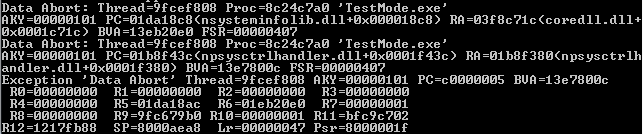
I think testmode could start now on a real win ce 5.0 device. Trying some more things tommorrow.
And one thing: I can see enough network things in testmode. IP, TCP etc. So an network card on the AVIC is possible.
Maybe pioneer uses bluetooth to access the AVIC?
goooood every progress is priceless
v2.1 released
Melvin,
I think it wants to communicate with uCom (Via some libs) which is needed for UI events, hw buttons, etc. There is also bluetooth, and then some nand/rom stuff.
Also it wasnt clear to me how testmode is passed the string from decoded testmode.key. I wonder if that is an ascii string option passed from SysCtrl lib...
yes, I saw lots of functions and classes in various libs for network, http, etc. Not sure how they could do it (like you said maybe bluetooth?).
They (pioneer or whoever they contracted develop) have to have some device emulator in order to test on, so there must be some way.
