So has anyone successfully added their own backgrounds and/or Boot screen on the 70 Nav data? 
Posted Aug 12, 2007 · 19:20 UTC#51
So has anyone successfully added their own backgrounds and/or Boot screen on the 70 Nav data?
Just a FYI.. IsoBuster shows the whole file structure, including PIM2DIN... The good-ole boys at Pioneer added bad data to mess us up..
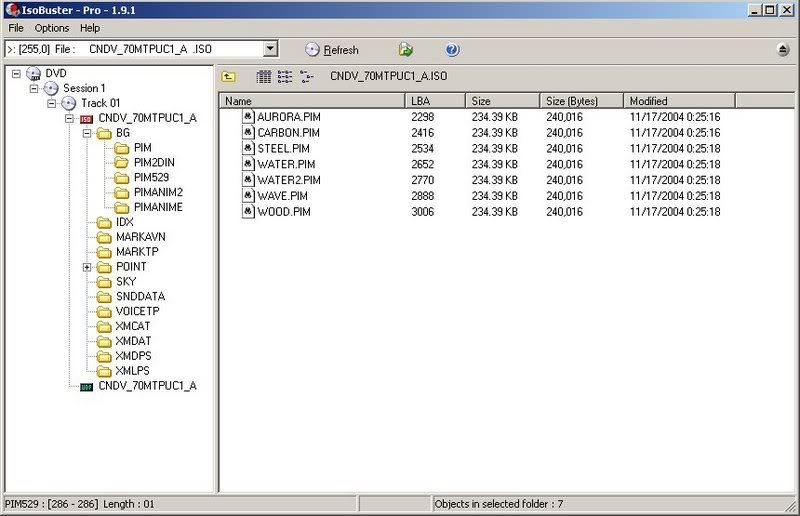
I tried to modify the BGOpen & BGOpen2. I get the "Insert app.....". Using ISOBuster, I copied the whole DVD to my local drive, modded the files then burn it on a DL DVD with Nero.. No Luck.
Why can't hacking be easy (because it wouldn't be fun!!!!) 
Just a FYI.. IsoBuster shows the whole file structure, including PIM2DIN... The good-ole boys at Pioneer added bad data to mess us up..
YUP!!!! PERFECT!!!
When I get a chance, I will look at what Pioneer was screwing with on the DVD's allocation table. Sometimes, the easiest things to fix, are the hardest thing to find! 
i went to isohunt.com and search for "CNDV-70MTP"...it returns nothing...can someone post a link?
No one (that I know of) has been seeding the ISOs. Maybe because it's easier to just buy them off MR XM then downloading 8 - 16 GBs, burning on DL DVDs to find that they are bad or corrupted (I know you can check the ChkSum but..). You could buy a DVD and seed it.... 
That's my 2 cents, and I don't give refunds!!
Meanwhile... Back at the Hall of Justice...........

I did a bad thing, though, now that I think about it. I wanted to preserve my boot up screen and also add some custom backgrounds (my previous attempt failed because I didn't use all uppercase letters in the filename AND extensions). So, my first stop was my computer. I didn't need anything special to read the contents of the disc, so I copied the files to my hard drive, inserted my own files in place of BGOPEN2.JPG and in the BG2DIN (you know what I mean) directory, and then just burned a copy of the files to a DVD+R DL disc, named the same as the original. Then I used my copy to perform the upgrade. Good thing it worked. I probably should have upgraded from the original and then inserted my copy just to ensure no mishaps from a corrupted file created during the copy/burn process. But everything seems to be ok.
For all of you that are asking, YES I was able to add my own custom backgrounds. Using Win XP Pro, I copied the DVD to my hard drive, inserted my desired files, and burned a dual layer DVD using Roxio 6 and the "create ISO" setting.
That's strange?? Are you using the CNDV-70 DVDs?? The DVD shows 0kb files for some bootup images. It also ilooks like it's missing files if you look at it in MS Explorer. You need to use a ISO scanner like ISO Buster to see the missing files?
That's strange?? Are you using the CNDV-70 DVDs?? The DVD shows 0kb files for some bootup images. It also ilooks like it's missing files if you look at it in MS Explorer. You need to use a ISO scanner like ISO Buster to see the missing files?
I'm using the CNDV-70MT discs. With the purchased disc in my DVD-ROM, I don't see that any of the image files are 0 KB in size. BGOPEN2.JPG is 115 KB and is dated 2/28/2007. The PIM2DIN directory is present as well, with a date of 5/22/2007.
As I said before, I simply copied the purchased disc to my hard drive, inserted my own files, and burned a copy to a Verbatim DVD+R DL. I'm using a Plextor burner, and the free version of Roxio 6 that came w/ the burner.

I never thought about it, but I opened the ISO with WinRAR and the directory structure and files look fine, where as with UltraISO I get the 0k files on the same exact ISO.
When I get home from work tonight I will try injecting a few BG's with WinRAR and report back.
any news PaisanNYC ? ... pm me
anyone having trouble burning the torrent? it keeps failing and also asking me what data type.
grrrr
stathound,
I have been a member of this forum for just a few months now, but I've been reading the posts for quite a long time. I just wanted to say "thanks" to all who contribute here. After using this link to download the East file, then unraring it, I was able to burn to a DL disk using alcohol 120. (Nero didn't work) The upgrade works perfectly.
Fish