here it should look like this.
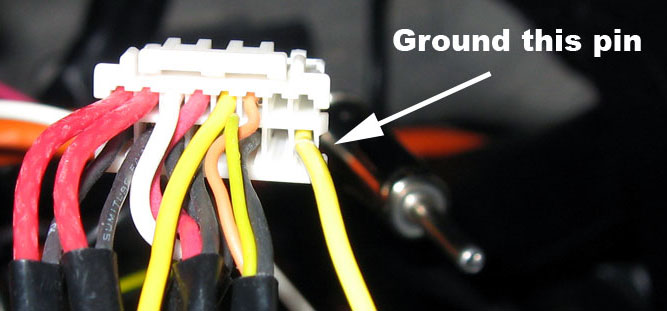
here it should look like this.
this is what im looking at . . . .


does anyone live near montclair california??? i will pay someone at least . . . . .$50 to just do it for me cuz im going crazy!!!!!!
Hey pm me . I live in Orange County I'll walk you thru it dont waste your money.
Connect the loose end of the light green wire to ground (its the black wire in the harness)
how to ground it to that wire though?
how to ground it to that wire though?
I don't mean to be a smart ass, but you really need to find some local help or a shop to do this for you. I'm not saying anything negative about you no knowing this stuff, but if you don't understand this concept, then you either need to find a friend who can help you or pay a shop to do it. No amount of text in one of these posts will be able to give you the tutelage you need that would make me feel comfortable to tell you to work on car wiring. Better to pay someone to do it than pay for a new Avic.
no offense taken i appreciate ur honesty . . . well i guess i'll see if another shop can do it thank you anyways but ur right rather not pay for another one
first of all...thanks for tips....
I made sure the disc was burned as an "IMAGE"
when I press map......the map screen comes up....then system says
"Already Updated"
I press reset.
DVD/Functionality goes in and out. Will not stay working
Do I continue to keep pressing RESET?
OR......did my Sound Advice Installer not due a proper Two-Wire by pass?
I am close to going crazy....and am getting really good at throwing CD-R disc down my driveway
Help?
I'm no expert on this, but if your z2 already has the update installed then the only problem could be the two wire bypass was either not accomplished or done incorrectly.
I'd double check to make sure you have v.2.0 in the Settings>Service Info scree. If you do, then I would double check secure connections of the two wires.
Hope that helps.
hi all,
i did the all the steps and it's not bypassed?? is there any thing i need 2 know about???
thanks
hi all,i did the all the steps and it's not bypassed?? is there any thing i need 2 know about???
thanks
Well, with that much information, all I can tell you is that you did not do all the steps correctly. All Avic Z units can be bypassed, you just have to do all the steps correctly. Which one? Don't know until you give more info.
As Sorbid said: I'd double check to make sure you have v.2.0 in the Settings>Service Info scree. If you do, then I would double check secure connections of the two wires.
hi all,i did the all the steps and it's not bypassed?? is there any thing i need 2 know about???
thanks
Nope, I'd say you know it all! Thanks for stopping by! 
so i need 2 find out the version of my Z2 rite. so up to what version bypass works?? i will check the version of my unit and let u know...
Just burn the patch. Stick it in your Z2-->If it updates, bypass is the 2-wire method. If it says its already updated, bypass is still the 2-wire method
so i need 2 find out the version of my Z2 rite. so up to what version bypass works?? i will check the version of my unit and let u know...
Have burned several dvd's with the iso file but my pre june 06 Z2 says unreadable disc. I am able to see and copy the files from the disc's when in my computer. I use roxio to burn. Any ideas?
Ah ha! did you say DVDs? Try a CD
-------------------METHOD 2 (assed out easy)------------------
CDROM ISO!!!!
1. Download this 30MB file: http://www.megaupload.com/?d=4T5MBJL7
2. Burn to CD or DVD.
3. Insert in Z2, press Map, and run the update!
4. Press the recessed reset button once, and your Z2 is now 2-wire bypassable.
Are you sure it makes a difference if I use DVD or CD?
I have never tried a DVD. Doubt many people have since you can get CDRs so cheap and it definitely works on a CDR. Give it a shot
Had more luck with the CDrom. Thanks guys.
hey im still looking for someone that is willing to send me a cd that they used to upgrade there z2. im having the same problem burning them.
if anyone has done the update already and is willing to send me the disc they used let me know i can paypal u money to ship it out. let me know thanks
Hey dude pm me your address & I'll send you a copy. NO MONEY NEEDED
yes i update it and did the 2 wire thing and i still get the parking break warning. does everyone get the parking break warning?? and i can put address while im driving?? and one question can u watch dvd movie when u drive when u bypass??
thx!!
and one more question!! when u update the program, does 2 wire thing have 2 be off or dont matter?? b/c i update it when 2 wire was on...
let me know if i did it wrong??
you need to reset the unit to get rid of the parking brake message. reset button is just right of the eject button. Also you have all the options available while driving.
i did reset and first time parking break warning didnt pop up, but when i was moving it poped up... so is there anythinkg that im missing?? and can u play dvd when bypass??