Search Archive

Upgrading NEX4000 to NEX4100 - Work in Progress

By Covert_Death · Mar 24, 2015in NEX Series💬 624 posts👁️ 179,956 views
Page 12 of 25
Posted Jun 04, 2015 · 17:33 UTC#276

I haven't figured out how to look too deep into the files  yet since I've only had this radio a couple days now, but looking in the logs I see one thing that stands out.


under the info.txt, it shows


"System uCom:CWW9449- 08.51"


for the 8000, and


"System uCom:9449- 08.51"


Under the 8100, I'm wondering if this has something to do with this operating differently, or it's just a difference in logging/ software versions.


Any thoughts?

Posted Jun 04, 2015 · 20:46 UTC#277

has anyone been able to get in contact with the guy on XDA? He stated he was able to fix the bluetooth but not sure the merit of that: 


Quote:

Originally Posted by flash150xlt 

I designed something myself as for a firmware interface to work with the 4000NEX. If you don't mind though, I'd like to take a look at what you have to see if mine is exactly mirrored or a bit different. Two things I noticing here is when it was posted he said he couldn't get the bluetooth to work for it, which I have rerouted a fix for that. But as for the audio not working for android auto, I want to see what is different on what you have and what I have. Mine worked fine when trialled, but it could be because of my current system already having bluetooth in the truck. If you don't mind, can you upload it here or email it to me? jared.balsor at gmail dot com

http://forum.xda-developers.com/android/help/pioneer-avh-4000nex-updated-to-support-t3063746#post61125695 

Posted Jun 23, 2015 · 01:13 UTC#278

Wow, my mind is sorta spinning after reading thru the entire 19 pages of this post, but lots of great work by many to get their x000 up to x100's firmware.


I just installed a 4100 and I'm enjoying all the features...but...the most annoying thing for me is the stupid Warning screen that Pioneer feels compelled to force me to press OK every time I turn on the HU.  I've seen some videos on You Tube from last year on the 4000 and it looks like that HU didn't have this Warning screen following boot up, it goes straight to source screen.  I called Pioneer tech support and got the standard line that their HUs have to have the warning.  I said, that's funny., I first installed the AVH-5700 and didn't have this screen, in fact it booted twice as fast as my 4100, but i wanted the Android Auto, so I forked over an extra $200.  I also relayed what I saw on the 4000.  Tech couldn't care less, just regurgitated the same "required" drivel again.


So, my simple question, has any who's worked on the file structure for v1.03 found a way to remove that Warning screen and confirmation for the 4100 or any of the x100 series HUs?? 

Posted Jun 25, 2015 · 17:53 UTC#280

@bass_rock, what do you think the next step is in the process? 


I think the next phase is getting someone involved that is familiar with Android ROMs, since that is essentially what this is. Its basically a ROM we need to decompile and modify to suit our needs and sadly that ain't me.

Posted Jun 25, 2015 · 18:41 UTC#281

old

Edited Jan 02, 2025 by minilog118 — Reason: old
Posted Jun 25, 2015 · 18:42 UTC#282

Think we can ask the XDA Site to create a forum for this since it is running android?  I am sure if we all chipped in a few buck we could get one of the tops guys a unit.    


http://www.xda-developers.com/


Yea probably and I would be willing to chip in.

Posted Jun 25, 2015 · 18:42 UTC#283

Yea probably and I would be willing to chip in.

 Hell probably could start an IndieGogo or something

Posted Jun 26, 2015 · 08:06 UTC#284

[deleted post]

Edited Aug 05, 2015 by whatisbypass
Posted Jun 26, 2015 · 22:53 UTC#285

If it possible to upload repacked firmware to device, is anyone tried to replace system applications with own? Is it possible to replace IGO, for example, with Sygic and so on? May me it possible to upload simple file manager to device?


List of apps in app folder of EU version of F960BT:

Av.apk
DataLinkInfoCollector.apk
DrmProvider.apk
FusedLocation.apk
GuidanceInfoProvider.apk
iGO_EU5.apk
IvonaTTS.apk
JupiterHome.apk
LatinIME.apk
Launcher.apk
MediaInfoProvider.apk
MediaProvider.apk
MixTrax.apk
MixtraxProvider.apk
Mode.apk
Notepadv3.apk
SettingsDevelopment.apk
SettingsProvider.apk
synctool.apk
SystemUI.apk
SystemView.apk
TestMode.apk
UIService.apk

It probably is, but like I said before we need a ROM expert, because for instance, if we add an app how can we access it. We would need a launcher of some kind.

Posted Jun 27, 2015 · 05:47 UTC#286

I think the next phase is getting someone involved that is familiar with Android ROMs, since that is essentially what this is. Its basically a ROM we need to decompile and modify to suit our needs and sadly that ain't me.


I'm no ROM expert but I've been looking at the .apks decrypted with apktool and think repackaging an app should work. I'm going to try on my 6000 tomorrow afternoon.


Screenshot%202015-06-27%2001.44.10.png

Posted Jun 27, 2015 · 06:43 UTC#287

I'm no ROM expert but I've been looking at the .apks decrypted with apktool and think repackaging an app should work. I'm going to try on my 6000 tomorrow afternoon.


Screenshot%202015-06-27%2001.44.10.png

Sweet looking forward to what you come up with!

Posted Jun 27, 2015 · 08:22 UTC#288

[deleted post]

Edited Aug 05, 2015 by whatisbypass
Posted Jun 27, 2015 · 18:39 UTC#289

I wonder if something like the 'xposed' framework would be a better way to go about changing things on the HU's.  (Search on XDA)

Posted Jun 28, 2015 · 12:23 UTC#290

I got caught with work yesterday so it won't be till tonight or tomorrow I can test any changes.


No, I offered to replace one of the system applications from list to own, for example, to simple file explorer application, so we can be able to copy files to/from device to/from sd/usb flash.

Just as an example: can we replace IGO_UC.apk with simple file explorer application? Is it will be started when we pressing navi button?


It's almost that simple. The menu calls the appname (or activity) for the assigned application, so we should just have toreplace the package name or activity in the .xml file.

<?xml version="1.0" encoding="utf-8" standalone="no"?>
<manifest xmlns:android="http://schemas.android.com/apk/res/android" android:installLocation="auto" android:sharedUserId="com.navngo" android:sharedUserLabel="@string/shared_user_label" package="com.navngo.igo.javaclient">
    <uses-permission android:name="android.permission.ACCESS_NETWORK_STATE"/>
    <uses-permission android:name="android.permission.ACCESS_FINE_LOCATION"/>
    <uses-permission android:name="android.permission.ACCESS_COARSE_LOCATION"/>
    <uses-permission android:name="android.permission.READ_CONTACTS"/>
    <uses-permission android:name="android.permission.READ_PHONE_STATE"/>
    <uses-permission android:name="android.permission.WAKE_LOCK"/>
    <uses-permission android:name="android.permission.INTERNET"/>
    <uses-permission android:name="android.permission.RECEIVE_BOOT_COMPLETED"/>
    <uses-permission android:name="android.permission.MODIFY_AUDIO_SETTINGS"/>
    <uses-permission android:name="android.permission.ACCESS_LOCATION_EXTRA_COMMANDS"/>
    <uses-permission android:name="com.android.providers.MediaInfo.accessMediaInfo"/>
    <uses-permission android:name="android.permission.WRITE_EXTERNAL_STORAGE"/>
    <uses-permission android:name="android.permission.DISABLE_KEYGUARD"/>
    <uses-permission android:name="com.android.vending.BILLING"/>
    <uses-permission android:name="android.permission.RECORD_AUDIO"/>
    <application android:allowClearUserData="true" android:debuggable="false" android:icon="@drawable/appicon" android:label="@string/app_name" android:name="com.navngo.igo.javaclient.Application" android:persistent="true" android:theme="@android:style/Theme.NoTitleBar">
        <receiver android:name="com.navngo.igo.javaclient.BootReceiver">
            <intent-filter>
                <action android:name="jp.pioneer.ceam.EXTEND_ACTION_RESUME"/>
            </intent-filter>
        </receiver>
        <receiver android:name="com.navngo.igo.pioneer.DeleteRouteReceiver">
            <intent-filter>
                <action android:name="com.navngo.igo.javaclient.DELETE_PLANNED_ROUTE"/>
                <category android:name="android.intent.category.DEFAULT"/>
            </intent-filter>
        </receiver>
        <receiver android:name="com.navngo.igo.pioneer.ShowScreenReceiver">
            <intent-filter>
                <action android:name="com.navngo.igo.javaclient.SHOW_SCREEN"/>
                <category android:name="android.intent.category.DEFAULT"/>
            </intent-filter>
        </receiver>
        <activity android:configChanges="locale|mcc|mnc|touchscreen|keyboard|keyboardHidden|navigation|orientation|screenLayout|uiMode|screenSize|smallestScreenSize|layoutDirection|fontScale" android:label="@string/app_name" android:launchMode="singleTask" android:name="com.navngo.igo.javaclient.MainActivity">
            <intent-filter>
                <action android:name="android.intent.action.MAIN"/>
                <category android:name="android.intent.category.LAUNCHER"/>
                <category android:name="android.intent.category.DEFAULT"/>
            </intent-filter>
            <intent-filter>
                <action android:name="com.navngo.igo.javaclient.NAVIGATE_TO"/>
                <category android:name="android.intent.category.DEFAULT"/>
                <data android:mimeType="vnd.navngo.igo.item/address"/>
            </intent-filter>
        </activity>
        <service android:name="com.navngo.igo.pioneer.PioneerService">
            <intent-filter>
                <action android:name="com.navngo.igo.javaclient.MAINSERVICE"/>
            </intent-filter>
        </service>
        <service android:name="com.navngo.igo.javaclient.SLAPIService">
            <intent-filter>
                <action android:name="com.navngo.igo.javaclient.SLAPI_SERVER"/>
            </intent-filter>
        </service>
        <activity android:launchMode="singleInstance" android:name="com.navngo.igo.javaclient.InsertSDCard" android:theme="@android:style/Theme.Dialog">
            <intent-filter>
                <action android:name="com.navngo.igo.javaclient.InsertSDCard.DEFAULT"/>
                <action android:name="com.navngo.igo.javaclient.InsertSDCard.CLEAR"/>
                <category android:name="android.intent.category.DEFAULT"/>
            </intent-filter>
        </activity>
        <activity android:excludeFromRecents="true" android:launchMode="singleInstance" android:name="com.navngo.igo.javaclient.WarnerBrothers" android:theme="@android:style/Theme.Dialog">
            <intent-filter>
                <action android:name="com.navngo.igo.javaclient.WarnerBrothers.DEFAULT"/>
                <action android:name="com.navngo.igo.javaclient.WarnerBrothers.CLEAR"/>
                <category android:name="android.intent.category.DEFAULT"/>
            </intent-filter>
        </activity>
        <activity android:configChanges="orientation|screenSize" android:name="com.navngo.igo.javaclient.browser.BrowserActivity"/>
    </application>
    <supports-screens android:anyDensity="true"/>
</manifest>

btw.. If I post something you think I shouldn't let me know and I will remove it.

Posted Jun 28, 2015 · 17:26 UTC#291

I got caught with work yesterday so it won't be till tonight or tomorrow I can test any changes.


It's almost that simple. The menu calls the appname (or activity) for the assigned application, so we should just have toreplace the package name or activity in the .xml file.


<?xml version="1.0" encoding="utf-8" standalone="no"?>
<manifest xmlns:android="http://schemas.android.com/apk/res/android" android:installLocation="auto" android:sharedUserId="com.navngo" android:sharedUserLabel="@string/shared_user_label" package="com.navngo.igo.javaclient">
    <uses-permission android:name="android.permission.ACCESS_NETWORK_STATE"/>
    <uses-permission android:name="android.permission.ACCESS_FINE_LOCATION"/>
    <uses-permission android:name="android.permission.ACCESS_COARSE_LOCATION"/>
    <uses-permission android:name="android.permission.READ_CONTACTS"/>
    <uses-permission android:name="android.permission.READ_PHONE_STATE"/>
    <uses-permission android:name="android.permission.WAKE_LOCK"/>
    <uses-permission android:name="android.permission.INTERNET"/>
    <uses-permission android:name="android.permission.RECEIVE_BOOT_COMPLETED"/>
    <uses-permission android:name="android.permission.MODIFY_AUDIO_SETTINGS"/>
    <uses-permission android:name="android.permission.ACCESS_LOCATION_EXTRA_COMMANDS"/>
    <uses-permission android:name="com.android.providers.MediaInfo.accessMediaInfo"/>
    <uses-permission android:name="android.permission.WRITE_EXTERNAL_STORAGE"/>
    <uses-permission android:name="android.permission.DISABLE_KEYGUARD"/>
    <uses-permission android:name="com.android.vending.BILLING"/>
    <uses-permission android:name="android.permission.RECORD_AUDIO"/>
    <application android:allowClearUserData="true" android:debuggable="false" android:icon="@drawable/appicon" android:label="@string/app_name" android:name="com.navngo.igo.javaclient.Application" android:persistent="true" android:theme="@android:style/Theme.NoTitleBar">
        <receiver android:name="com.navngo.igo.javaclient.BootReceiver">
            <intent-filter>
                <action android:name="jp.pioneer.ceam.EXTEND_ACTION_RESUME"/>
            </intent-filter>
        </receiver>
        <receiver android:name="com.navngo.igo.pioneer.DeleteRouteReceiver">
            <intent-filter>
                <action android:name="com.navngo.igo.javaclient.DELETE_PLANNED_ROUTE"/>
                <category android:name="android.intent.category.DEFAULT"/>
            </intent-filter>
        </receiver>
        <receiver android:name="com.navngo.igo.pioneer.ShowScreenReceiver">
            <intent-filter>
                <action android:name="com.navngo.igo.javaclient.SHOW_SCREEN"/>
                <category android:name="android.intent.category.DEFAULT"/>
            </intent-filter>
        </receiver>
        <activity android:configChanges="locale|mcc|mnc|touchscreen|keyboard|keyboardHidden|navigation|orientation|screenLayout|uiMode|screenSize|smallestScreenSize|layoutDirection|fontScale" android:label="@string/app_name" android:launchMode="singleTask" android:name="com.navngo.igo.javaclient.MainActivity">
            <intent-filter>
                <action android:name="android.intent.action.MAIN"/>
                <category android:name="android.intent.category.LAUNCHER"/>
                <category android:name="android.intent.category.DEFAULT"/>
            </intent-filter>
            <intent-filter>
                <action android:name="com.navngo.igo.javaclient.NAVIGATE_TO"/>
                <category android:name="android.intent.category.DEFAULT"/>
                <data android:mimeType="vnd.navngo.igo.item/address"/>
            </intent-filter>
        </activity>
        <service android:name="com.navngo.igo.pioneer.PioneerService">
            <intent-filter>
                <action android:name="com.navngo.igo.javaclient.MAINSERVICE"/>
            </intent-filter>
        </service>
        <service android:name="com.navngo.igo.javaclient.SLAPIService">
            <intent-filter>
                <action android:name="com.navngo.igo.javaclient.SLAPI_SERVER"/>
            </intent-filter>
        </service>
        <activity android:launchMode="singleInstance" android:name="com.navngo.igo.javaclient.InsertSDCard" android:theme="@android:style/Theme.Dialog">
            <intent-filter>
                <action android:name="com.navngo.igo.javaclient.InsertSDCard.DEFAULT"/>
                <action android:name="com.navngo.igo.javaclient.InsertSDCard.CLEAR"/>
                <category android:name="android.intent.category.DEFAULT"/>
            </intent-filter>
        </activity>
        <activity android:excludeFromRecents="true" android:launchMode="singleInstance" android:name="com.navngo.igo.javaclient.WarnerBrothers" android:theme="@android:style/Theme.Dialog">
            <intent-filter>
                <action android:name="com.navngo.igo.javaclient.WarnerBrothers.DEFAULT"/>
                <action android:name="com.navngo.igo.javaclient.WarnerBrothers.CLEAR"/>
                <category android:name="android.intent.category.DEFAULT"/>
            </intent-filter>
        </activity>
        <activity android:configChanges="orientation|screenSize" android:name="com.navngo.igo.javaclient.browser.BrowserActivity"/>
    </application>
    <supports-screens android:anyDensity="true"/>
</manifest>

 
btw.. If I post something you think I shouldn't let me know and I will remove it.

You also have to be careful. Because you need to be able to relaunch settings to get to the update firmware

Posted Jul 05, 2015 · 17:43 UTC#292

Hey guys, I'm Adam Outler.  I'm new here. I'm pretty well known on the XDA-Developers forums and I'm interested in working on this platform.  I own two AVIC-8100NEX units.  One is on my bench and the other is in my car.  I posted quite a bit of information the other day before I found this post.  


I'm very saddened by the lack of communication on this forum.  People are making progress independently without sharing any changes or methodologies.   I'd like to (without overstepping my bounds) encourage people to post cool new hacking techniques in the relevant forums.   You see, without sharing the how of your work, noone can learn anything.  If noone learns anything, noone can reproduce your work.  If noone can reproduce your work, then the product suffers from lack of development.  If the product suffers, you suffer.


So, if I am bringing one bit of the XDA-Developers spirit with me, that's the GPL.  Not the GPL itself, but the spirit of the GPL.    


Remember that anything you do to the firmware on this unit is not your own work.  There were developers at Pioneer who came before you and did the work.  You're undoing their work so you can add a few lines of code.   You owe it to the developers and the community to share it. 


For those curious or with development experience, I just created a shell script that opens up the PRG file, waits for modifications and then merges it back together with the correct CRC32 checks and sizes. It is located here: https://gist.github.com/bassrock/8053d22493785b92958f


The only issue is it uses ext4fuse which is read-only, so just change that to whatever ext4 mounting program you have that allows write access and then code away.


I updated the gist to instead use http://www.paragon-software.com/home/extfs-mac/ which has write support.


I've heavily modified your work to operate on Linux.  I've also added a license header which is desperately needed on these forums.  I want to ensure anything based on your/my work is propagated and anyone who uses it is forced to "pay it forward". 


I made the assumption that the headers on the 5000 are the same as the 5100 and therefore the 8100 as well, because the firmware is apparently compatible as per post #1 in this thread, and the fact that the 5100NEX firware is used on the 8100.  Is this correct?   If so, then this should work properly.


Workflow:

  1. On a Linux computer, copy this to a file called AVIC.sh
  2. download a firmware update
  3. run 
    "AVIC.sh /path_to/MY_FW-update.zip".  
    If you're not using AVIC5000, you can add in the Model and Version parameters.  So a model avic8100-NEX with version pj150plt.prg would be 
    "AVIC.sh /path_to/MY_FW-update.zip 8100 150"
  4. The script will tell you where it mounted the image file.  Modify it utilizing methods available on xda-developers.com for creating custom ROMs. 
  5. Press any key to continue, and it will repackage the ROM utilizing methods by bass-rock
#! /bin/bash 
# AVIC.sh - Unpacks SYSTEM.img from the AVIC firmware for modification, waits for an input, then repackages.

# THIS FILE AND DERRIVITIVE WORKS ARE SUBJECT TO ALL TERMS OF LICENSING BELOW!
# License: 
# Term 0: If you modify this file, you must share any changes with the file creators and/or publicly on AVIC411.com
# Term 1: If you find a new use, share changes on AVIC411.com
# Term 2: If it worked say thanks.
# Term 3: IF anyone claims this is black magic, I'm going to flip.

# By bass_rock http://avic411.com/index.php?/user/116652-bass-rock/
# Heavily modified by AdamOutler [email protected]
# http://avic411.com/index.php?/topic/80945-upgrading-nex4000-to-nex4100-work-in-progress/page-19#entry332704


#this function is called when system is not Linux, user is not root, or user did not specify a file
usage() {
  echo "usage:"
  echo "  AVIC.sh /path_to/firmware.zip [AVIC Model] [AVIC firmware version]"
  echo "where AVIC Model = 5000, or 8100"
  echo "where AVIC firmware version = 140 or 150" 
  exit
}

#exit on any error
set -e

#verify system is Linux and user is root and specifed a file
test "$(uname)" = "Linux" || $(echo "this only works on linux" && usage)
test $(id -u) -eq "0" || $(echo "you must run as root" && usage)
test -z "$1" && $(echo "you must specify a file"&& usage)

#set variables for use (default AVIC-5000NEX, Version 140)
AVICZIP="$1" 
m=$2
model=${m:="5000"}
v=$3 
version=${v:="140"}

#create absolute paths for reference
workdir=$(pwd)"/work"
imageDir="$workdir/AVIC${model}NEX/PLATFORM"
SYSTEMmount="$workdir/AVIC${model}NEX/PLATFORM/SYSTEM"

#set up file and extract properly
mkdir -p $workdir/
unzip -o "$AVICZIP" -d $workdir/
cd "$imageDir"

#remove header from image
dd if=PJ${version}PLT.PRG of=PJ${version}PLT.IMG bs=512 skip=1
dd if=PJ${version}PLT.PRG of=PJ${version}PLT.HEADER bs=512 count=1

#ignore errors while we create a new folder for working with image
set +e
umount "$SYSTEMmount" 2>&1
test -e "$SYSTEMmount" && rm -rf "$SYSTEMmount"
mkdir $SYSTEMmount
set -e

#mount the image
mount PJ${version}PLT.IMG "$SYSTEMmount"

echo "You can now modify the img located in"
echo "$SYSTEMmount"
read -n 1 -p "Press any key to continue" isdone

sync #ensure all changes are written to disk
defaultheader="00010801010000000100000000000000504A313430504C5402100000FFFFFFFFFFFFFFFFFFFFFFFFFFFFFFFFFFFFFFFFFFFFFFFFFFFFFFFFFFFFFFFFFFFFFFFFFFFFFFFFFFFFFFFFFFFFFFFFFFFFFFFFFFFFFFFFFFFFFFFFFFFFFFFFFFFFFFFFFFFFFFFFFFFFFFFFFFFFFFFFFFFFFFFFFFFFFFFFFFFFFFFFFFFFFFFFFFFFFFFFFFFFFFFFFFFFFFFFFFFFFFFFFFFFFFFFFFFFFFFFFFFFFFFFFFFFFFFFFFFFFFFFFFFFFFFFFFFFFFFFFFFFFFFFFFFFFFFFFFFFFFFFFFFFFFFFFFFFFFFFFFFFFFFFFFFFFFFFFFFFFFFFFFFFFFFFFFFFFFFFFFFFFFFFFFFFFFFFFFFFFFFFFFFFFFFFFFFFFFFFFFFFFFFFFFFFFFFFFFFFFFFFFFFFFFFFFFFFFFFFFFFFFFFFFFFFFFFFFFFFFFFFFFFFFFFFFFFFFFFFFFFFFFFFFFFFFFFFFFFFFFFFFFFFFFFFFFFFFFFFFFFFFFFFFFFFFFFFFFFFFFFFFFFFFFFFFFFFFFFFFFFFFFFFFFFFFFFFFFFFFFFFFFFFFFFFFFFFFFFFFFFFFFFFFFFFFFFFFFFFFFFFFFFFFFFFFFFFFFFFFFFFFFFFFFFFFFFFFFFFFFFFFFFFFFFFFFFFFFFFFFFFFFFFFFFFFFFFFFFFFFFFFFFFFFFFFFFFFFFFFFFFFFFFFFFFFFFFFFFFFFFFFFFFFFFFFFFFFFFFFFFFFFFFFFFFFFFFFFFFFFFFFFFFFFFFFFFFFFFFFFFFFFFFFFFFFFFFFFFFFFFFFFFFFFFFFFFFFFFFFFFFFFFFFFFFFFFFFFFFFFFFFFFFFFFFFFFFFFFFFFFFFFFFFFFFFFFFFFFFFFFFFFFFFFFFFFFFFFFFFFFFFFFFFFFFFFFFFFFFFFFF"

#get image size
# for mac
# SIZE="$(stat -f%z PJ${version}PLT.IMG)"
#for linux
SIZE="$(stat -c%s PJ${version}PLT.IMG)"
echo "IMG size is: $SIZE"

#We have to swap the hex values from big endian to little endian cause the NEX is arm.
UNSWAPPEDHEXSIZE="$(printf '%x\n' $SIZE)"
vSIZE="$UNSWAPPEDHEXSIZE"
SWAPPEDHEXSIZE="${vSIZE:6:2}${vSIZE:4:2}${vSIZE:2:2}${vSIZE:0:2}"
UNSWAPPEDHEXCRC="$(crc32 PJ${version}PLT.IMG)"
vCRC="$UNSWAPPEDHEXCRC"
SWAPPEDHEXCRC="${vCRC:6:2}${vCRC:4:2}${vCRC:2:2}${vCRC:0:2}"

echo "Unswapped size hex is: $UNSWAPPEDHEXSIZE"
echo "Swapped size hex is: $SWAPPEDHEXSIZE"
echo "Unswapped crc hex is: $UNSWAPPEDHEXCRC"
echo "Swapped crc hex is: $SWAPPEDHEXCRC"

#create new header
perl -e "print pack 'H*', 'A55A5AA5${SWAPPEDHEXSIZE}${SWAPPEDHEXCRC}${defaultheader}'" > PJ${version}PLT.HEADERNEW
cat PJ${version}PLT.HEADERNEW PJ${version}PLT.IMG > PJ${version}PLT.PRG
rm -rf PJ${version}PLT.IMG
rm -rf PJ${version}PLT.HEADERNEW
defaultheaderver="A55A5AA5C00000000001080101000000010000002C000000FFFFFFFFFFFFFFFFFFFFFFFFFFFFFFFFFFFFFFFF010000000100000050004C004100540046004F0052004D000000000000000000000000000000000000000000000000000000000000000000000000000000000000000000000000000100000050004A0031003400300050004C0054002E005000520047000000000000000000000000000000000000000000000000000000000000000000"
SIZE="$(stat -c%s PJ${version}PLT.PRG)"
echo "PRG size is: $SIZE"
UNSWAPPEDHEXSIZE="$(printf '%x\n' $SIZE)"
vSIZE="$UNSWAPPEDHEXSIZE"
SWAPPEDHEXSIZE="${vSIZE:6:2}${vSIZE:4:2}${vSIZE:2:2}${vSIZE:0:2}"
UNSWAPPEDHEXCRC="$(crc32 PJ${version}PLT.PRG)"
vCRC="$UNSWAPPEDHEXCRC"
SWAPPEDHEXCRC="${vCRC:6:2}${vCRC:4:2}${vCRC:2:2}${vCRC:0:2}"

echo "Unswapped prg size hex is: $UNSWAPPEDHEXSIZE"
echo "Swapped prg size hex is: $SWAPPEDHEXSIZE"
echo "Unswapped prg crc hex is: $UNSWAPPEDHEXCRC"
echo "Swapped prg crc hex is: $SWAPPEDHEXCRC"


perl -e "print pack 'H*', '${defaultheaderver}${SWAPPEDHEXSIZE}${SWAPPEDHEXCRC}A55A5AA5'" > PJ${version}PLT.VERSTART

UNSWAPPEDHEXCRC="$(crc32 PJ${version}PLT.VERSTART)"
vCRC="$UNSWAPPEDHEXCRC"
SWAPPEDHEXCRC="${vCRC:6:2}${vCRC:4:2}${vCRC:2:2}${vCRC:0:2}"
echo "Unswapped verstart crc hex is: $UNSWAPPEDHEXCRC"
echo "Swapped verstart crc hex is: $SWAPPEDHEXCRC"

perl -e "print pack 'H*', '${SWAPPEDHEXCRC}'" > PJ${version}PLT.VERSTART1

cat PJ${version}PLT.VERSTART PJ${version}PLT.VERSTART1 > PJ${version}PLT.VER
rm -rf PJ${version}PLT.VERSTART
rm -rf PJ${version}PLT.VERSTART1
cd "$workdir"
umount "$SYSTEMmount"
test -e "$SYSTEMmount" && rm -rf "$SYSTEMmount"

This script will produce an output like this:

root@adamoutler-desktop:/home/adamoutler/Desktop/pioneer/8053d22493785b92958f# ./AVIC.sh  /home/adamoutler/Downloads/15MY_FW-Update_v1.03_16G_20150318\ \(2\).zip 5100 150
Archive:  /home/adamoutler/Downloads/15MY_FW-Update_v1.03_16G_20150318 (2).zip
  inflating: /home/adamoutler/Desktop/pioneer/8053d22493785b92958f/work/AVIC5100NEX/BLUETOOTH/PJ150BTHBTL.PRG  
  inflating: /home/adamoutler/Desktop/pioneer/8053d22493785b92958f/work/AVIC5100NEX/BLUETOOTH/PJ150BTHSAF.PRG  
  inflating: /home/adamoutler/Desktop/pioneer/8053d22493785b92958f/work/AVIC5100NEX/BLUETOOTH/PJ150BTHUDP.PRG  
  inflating: /home/adamoutler/Desktop/pioneer/8053d22493785b92958f/work/AVIC5100NEX/BOOT/PJ150BOT.PRG  
  inflating: /home/adamoutler/Desktop/pioneer/8053d22493785b92958f/work/AVIC5100NEX/DTV/PJ150DTV.PRG  
  inflating: /home/adamoutler/Desktop/pioneer/8053d22493785b92958f/work/AVIC5100NEX/GPS/PJ150GPS.PRG  
  inflating: /home/adamoutler/Desktop/pioneer/8053d22493785b92958f/work/AVIC5100NEX/HIBENDIR/HIBENDIR.PRG  
  inflating: /home/adamoutler/Desktop/pioneer/8053d22493785b92958f/work/AVIC5100NEX/HIBENDIR.VER  
  inflating: /home/adamoutler/Desktop/pioneer/8053d22493785b92958f/work/AVIC5100NEX/PJ150BOT.VER  
  inflating: /home/adamoutler/Desktop/pioneer/8053d22493785b92958f/work/AVIC5100NEX/PJ150BT.VER  
  inflating: /home/adamoutler/Desktop/pioneer/8053d22493785b92958f/work/AVIC5100NEX/PJ150BTL.VER  
  inflating: /home/adamoutler/Desktop/pioneer/8053d22493785b92958f/work/AVIC5100NEX/PJ150DAT.VER  
  inflating: /home/adamoutler/Desktop/pioneer/8053d22493785b92958f/work/AVIC5100NEX/PJ150DTV.VER  
  inflating: /home/adamoutler/Desktop/pioneer/8053d22493785b92958f/work/AVIC5100NEX/PJ150ERY.VER  
  inflating: /home/adamoutler/Desktop/pioneer/8053d22493785b92958f/work/AVIC5100NEX/PJ150GPS.VER  
  inflating: /home/adamoutler/Desktop/pioneer/8053d22493785b92958f/work/AVIC5100NEX/PJ150OPN/PJ150OPN.PRG  
  inflating: /home/adamoutler/Desktop/pioneer/8053d22493785b92958f/work/AVIC5100NEX/PJ150OPN.VER  
  inflating: /home/adamoutler/Desktop/pioneer/8053d22493785b92958f/work/AVIC5100NEX/PJ150PLT.VER  
  inflating: /home/adamoutler/Desktop/pioneer/8053d22493785b92958f/work/AVIC5100NEX/PJ150REC.VER  
  inflating: /home/adamoutler/Desktop/pioneer/8053d22493785b92958f/work/AVIC5100NEX/PJ150WWR.VER  
  inflating: /home/adamoutler/Desktop/pioneer/8053d22493785b92958f/work/AVIC5100NEX/PLATFORM/PJ150PLT.PRG  
  inflating: /home/adamoutler/Desktop/pioneer/8053d22493785b92958f/work/AVIC5100NEX/RECOVERY/PJ150REC.PRG  
  inflating: /home/adamoutler/Desktop/pioneer/8053d22493785b92958f/work/AVIC5100NEX/RECOVERYEASY/PJ150ERY.PRG  
  inflating: /home/adamoutler/Desktop/pioneer/8053d22493785b92958f/work/AVIC5100NEX/SNAPSHOT/SNAPSHOT.PRG  
  inflating: /home/adamoutler/Desktop/pioneer/8053d22493785b92958f/work/AVIC5100NEX/SNAPSHOT.VER  
  inflating: /home/adamoutler/Desktop/pioneer/8053d22493785b92958f/work/AVIC5100NEX/USERDATA/PJ150DAT.PRG  
  inflating: /home/adamoutler/Desktop/pioneer/8053d22493785b92958f/work/AVIC5100NEX/WWR/PJ150WWR.PRG  
1048568+0 records in
1048568+0 records out
536866816 bytes (537 MB) copied, 2.55588 s, 210 MB/s
1+0 records in
1+0 records out
512 bytes (512  copied, 0.192484 s, 2.7 kB/s
umount: /home/adamoutler/Desktop/pioneer/8053d22493785b92958f/work/AVIC5100NEX/PLATFORM/SYSTEM: not found
You can now modify the img located in
/home/adamoutler/Desktop/pioneer/8053d22493785b92958f/work/AVIC5100NEX/PLATFORM/SYSTEM
Press any key to continue

#########Make your changes at this point before hitting any key#############


IMG size is: 536866816
Unswapped size hex is: 1ffff000
Swapped size hex is: 00f0ff1f
Unswapped crc hex is: 9c1d9cf5
Swapped crc hex is: f59c1d9c
PRG size is: 536867328
Unswapped prg size hex is: 1ffff200
Swapped prg size hex is: 00f2ff1f
Unswapped prg crc hex is: f97384af
Swapped prg crc hex is: af8473f9
Unswapped verstart crc hex is: 86818fcd
Swapped verstart crc hex is: cd8f8186
root@adamoutler-desktop:/home/adamoutler/Desktop/pioneer/8053d22493785b92958f# 

I'm still testing this and have not yet tried it.  I wanted to document my work so as not to hold up progress from interested parties.   I won't have time to test today, but this should help any Linux users to get started.  


@bass_rock: this is how to launch an app.  https://stackoverflow.com/questions/3872063/launch-an-application-from-another-application-on-android.   You would create a button, say 200dip above the SET_OFF button. Then you would create an event listener on the button and have it execute the linked code.  I'd say it would be useful to have it launch "com.android.launcher", and if that package doesn't work, then it needs to be added to /system/app.


Does anyone have an example of a properly formatted SDCard?   I own a very fast web server which I use for ROM image hosting.  Without something to work with, it's going to be difficult to get any sort of custom ROM going here.  If the size is the barrier, I can help.

Posted Jul 05, 2015 · 19:37 UTC#293

@AdamOutler I completely agree. The only person I know that has been able to get the sdcard password is Busching on his failoverfl0w blog but he has been unresponsive and has not shared the password. From what I can tell is that the update files are basically the whole Rom that gets flashed to the sdcard (correct me if I am wrong here). And let me know how I can help. I have a 8000NEX and a 4100NEX.


Would love to be able to see these decks get new features since Pioneer has basically screwed us.

Posted Jul 05, 2015 · 19:44 UTC#294

[deleted post]

Edited Aug 05, 2015 by whatisbypass
Posted Jul 05, 2015 · 19:45 UTC#295

[deleted post]

Edited Aug 05, 2015 by whatisbypass
Posted Jul 05, 2015 · 19:56 UTC#296

I got around to testing.  I took the stock update and ran the above script with 

/AVIC.sh  /home/adamoutler/Downloads/15MY_FW-Update_v1.03_16G_20150318\ \(2\).zip 5100 150

I then copied the resulting AVIC5100NEX folder to an SDCard and popped it into the radio.  The update took just fine.


I was not able to connect Android Auto (which depends on bluetooth) after the update and multiple restarts of the phone and head unit.  I held the pin-hole reset button for 5-seconds, the HU rebooted and Android Auto connected.    Now I'm going to work on the stinkin' start up screen. 


Verified: headers on 8100 are the same as the 5000. 

Edited Jul 05, 2015 by AdamOutler
Posted Jul 05, 2015 · 19:58 UTC#297

Internal SDCard images are also available on torrents sites. I have downloaded avic_5000nex_sd.img image.

c0cfa13514587e7ea2a99358aed67f2d *avic_5000nex_sd.img
f99aacce6347d2c4835fa63b413ed198f0b7fb92 ?SHA1*avic_5000nex_sd.img
e8c49517cd85565343331f7c4282ee3764c484bfb41244f111b0092b98c186b2 ?SHA256*avic_5000nex_sd.img
As I said before, contents of testmode_n.key, testmode_s.key and testmode_a.key for external sd-card/usb is also available. It is possible to enter recovery update modes and test modes using this files.


Thank you ever so much.  I need an AVIC-8100NEX image though.  Any chance you know of one for the x1xxNEX series?

Posted Jul 05, 2015 · 20:34 UTC#298

[deleted post]

Edited Aug 05, 2015 by whatisbypass
Posted Jul 05, 2015 · 21:18 UTC#299

Sorry. I don't know. My unit (F960BT) is 8 (!!!) months in authorized service :) So if I get my device, I'll test uploading modified firmware also.
Thanks. I tried downloading that torrent in the hopes I could rebuild with the update. No luck. It can't even find a single source for download. Any chance you could upload it somewhere? I could set up an ftp at adamoutler.com or casual-dev.com if you'd like.


Currently I'm deodexing the system/app and system/framework. I will then package it all back up, test and upload somewhere.


The deodexing is important because it combines the .odex and the .apk to make a full app. If you don't deodex, you end up with only part of the app when you decompile the apk. Apparently people only do this on Windows.. I can't find a Linux tool. So I've got my dual-core laptop chugging away on this task until its done. After that, we should be able to use any number of tools to decompile and recompile.

Posted Jul 05, 2015 · 22:23 UTC#300

Sorry. I don't know. My unit (F960BT) is 8 (!!!) months in authorized service :) So if I get my device, I'll test uploading modified firmware also.

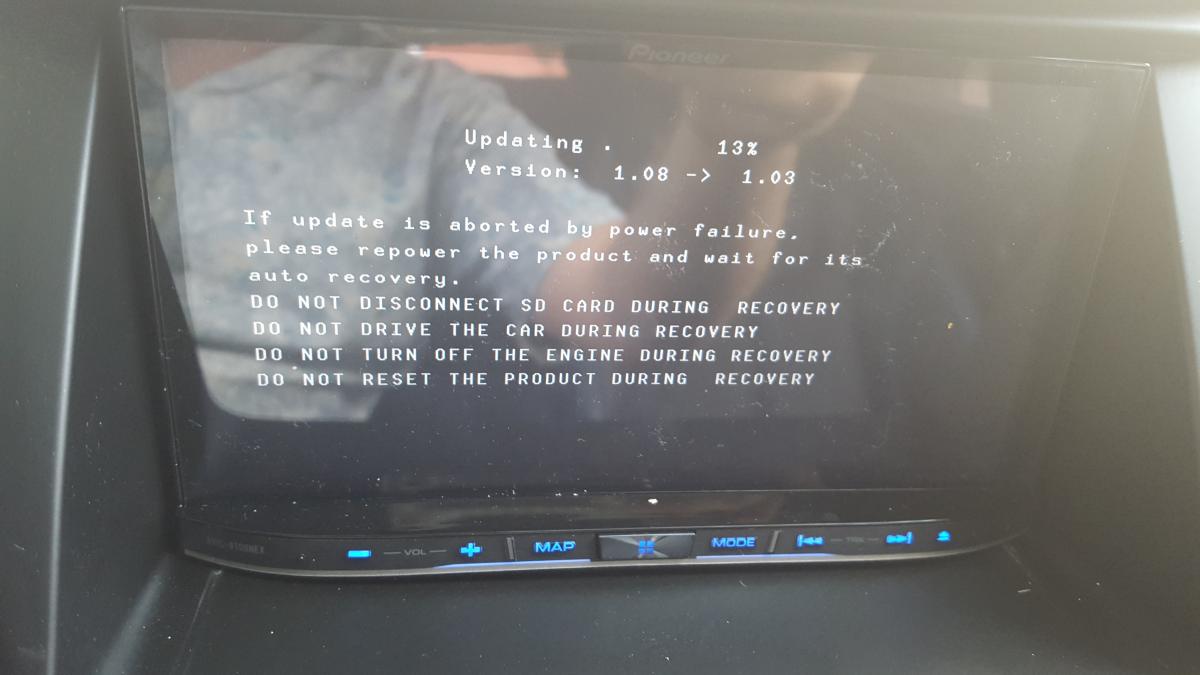
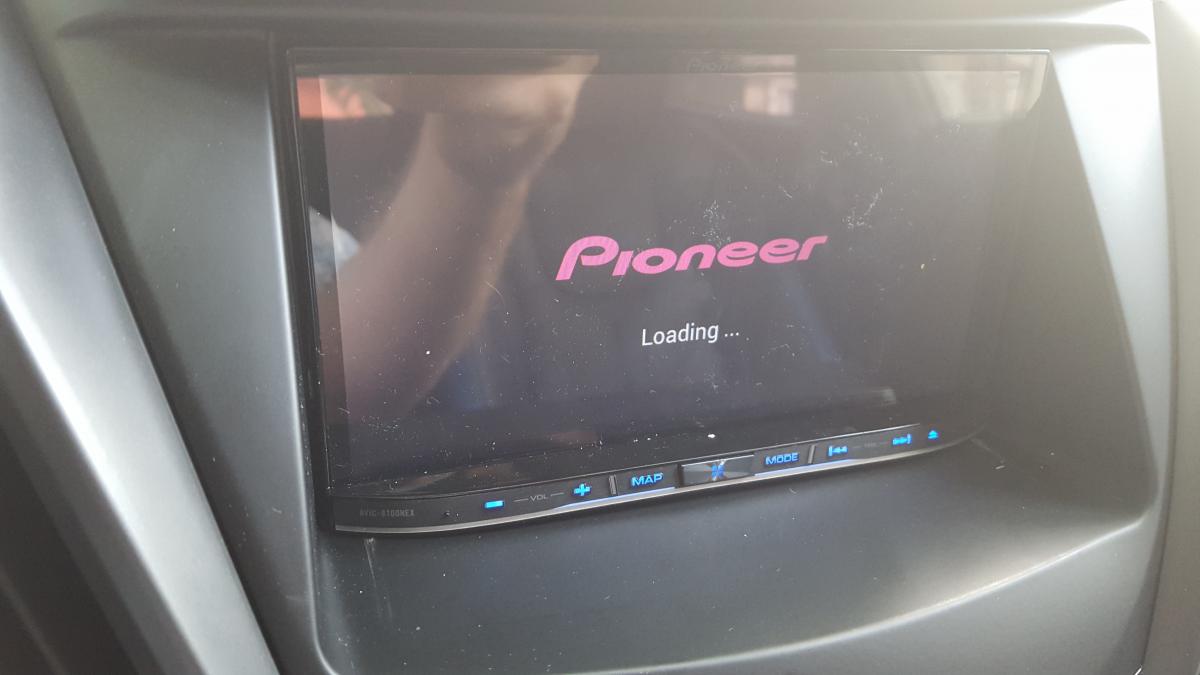
OK.  I really need that SD now.  I've bricked my device.  After deodex, for some reason it said it was upgrading to a different version.  Now it just sits at pioneer loading screen.

post-131243-0-45308400-1436135010_thumb.jpg

post-131243-0-39516300-1436135030_thumb.jpg

Page 12 of 25