Search Archive
📌 Pinned

The AVIC Development Mod

By bass_rock · Aug 10, 2015in NEX Series💬 720 posts👁️ 589,887 views
Page 5 of 29
Posted Oct 29, 2015 · 06:44 UTC#101

Can you point me in the direction of that hack? I used a similiar remount script to install busybox to bypass a problem i was having cloning the sdcard. 


sys.pioneer.misc.navi_pl_cation=sys.pioneer.navi_pl_on


Add to build.prop file.


This is for older generation of nex devices (F60/F960/x000NEX).


System is checking this android property before showing this navigation caution OK screen, so setting this property to "already shown" state disables screen at all.

Posted Nov 04, 2015 · 05:18 UTC#102

does anyone know if Initialization to Factory Default on the test mode screen would return the full unit back to the original factory setting? 

Posted Nov 15, 2015 · 06:55 UTC#103

i'm trying to access jenkins.casual-dev.com site to get the testmode key files... but site seems down... can  anyone post a link to these files?

Posted Nov 30, 2015 · 23:58 UTC#104

TTS available in languages.

You can add any language from the list


russian

english - 2 version EU and US

french - 2 version EU and US

spanish - 2 version EU and US

dutch

danish

german

italian

polish

portuguese

turkish
Posted Dec 01, 2015 · 19:42 UTC#105

iGO is fully cracked now


no doubt my friend...
but do not so beleive those russian stupids...  :lol:  :lol:  :lol: 

You'll have a lot of time together with vke/whatis..for hard work and longtime awaiting...


Edited Dec 01, 2015 by asd255
Posted Dec 03, 2015 · 16:01 UTC#106

I've seen the posts about losing "bluetooth audio" when updating from x000 to x100.  Does this include losing use of bluetooth speakerphone functions, or just losing functions like bluetooth streaming audio/music (which I never use anyway)?

Posted Dec 04, 2015 · 03:04 UTC#107

As far as I remember, all BT functions, voice and streaming :(

Posted Dec 07, 2015 · 04:59 UTC#108

Yea its all the bluetooth functionality. You can pair a device and the audio track shows up, but no audio actually goes through the speakers. 

Posted Dec 11, 2015 · 05:03 UTC#109

Well that kinda blows.  Thanks for the info though, guys.

Edited Dec 11, 2015 by FeloniusMonkey
Posted Dec 11, 2015 · 05:05 UTC#110

Well that kinda blows.  Thanks for the info though, guys.


Yea I have been looking at it. If you put the unit in test mode and switch the codec to digital the audio works. We would just need to configure it to do it on boot. I'm waiting for the next update to see if that changes things and it seems it may be on the way based on the UK Versions.

Posted Dec 13, 2015 · 13:09 UTC#111

I really want to start tinkering with this kind of stuff, especially if it means custom roms. However, I feel like some of this stuff isn't fully explained for some of us who may not already have a strong grasp on the structure of these radios. No bashing, obviously great work is being done. I just feel like maybe some DIY guides and some more thorough explaining, especially in the FAQ section, may aid more users in really learning about what's going on here. Currently, while there is a plethora of information, I feel like it's more geared towards the users on here that already have a big understanding on what's going on behind the scenes.


No hate please, just a guy trying to learn and looking for a good first stepping stone

Edited Dec 13, 2015 by spadz93
Posted Dec 17, 2015 · 23:30 UTC#113
Now we have possibility to change interface
 

Android 

post-124717-0-21558900-1450394946_thumb.jpg 


post-124717-0-96332000-1450440123_thumb.jpg


Edited Dec 18, 2015 by asd255
Posted Dec 18, 2015 · 15:06 UTC#114

Has anyone put the new 8100 1.05 firmware onto an 8000 using the previously described method, to see if this update might give us Android Auto capabilities without breaking bluetooth this time?

Posted Dec 18, 2015 · 15:23 UTC#115

@EditorDZ tried last night with a 4000. Sadly same functionality as before. Although I did not do a bluetooth firmware update.

Posted Dec 18, 2015 · 16:32 UTC#116


Now we have possibility to change interface
 

Android 

attachicon.gifIMG_0082.JPG


;)

Posted Dec 18, 2015 · 17:05 UTC#117

Waddup dawgz? I made this Xposed module for Android that allows you to bypass that stupid OK screen on 8100 units.

https://github.com/InspectifierWrectifier/AVICOkKillerXposedModule/tree/master/app


The installation is complicated.

Disable Warp!

Install a custom launcher like Nova Launcher into /system/app

Install the proper Android version of Xposed to /system/framework from XDA-Developers.

Activate the module.

Remove the launcher.


This module activates when the OK window is created. When the system commands it to show, it parses the UI for the message, finds the button, then activates the onClick() method. It effectively presses the button before the message is shown.


We need to figure out how to reactivate Warp with a custom system image, yo!

Edited Dec 18, 2015 by Inspectifier Wrectifier
Posted Dec 18, 2015 · 17:20 UTC#118

The installation is complicated.


We need to figure out how to reactivate Warp with a custom system image, yo!


For x000 models bypass for OK screen is much simpler: just add sys.pioneer.misc.navi_pl_cation=sys.pioneer.navi_pl_on to build.prop I think something like this is available for x100 series too.


As for warp - nobody knows how to catch new warp snapshot. But system have andsnap script to do this. Also, export snapshot function isn't working in developer debug menu.

Posted Dec 18, 2015 · 18:49 UTC#119

@EditorDZ tried last night with a 4000. Sadly same functionality as before. Although I did not do a bluetooth firmware update.


Thanks... that saves me an hour this weekend :)


Too bad though!

Posted Dec 18, 2015 · 18:57 UTC#120

For x000 models bypass for OK screen is much simpler: just add sys.pioneer.misc.navi_pl_cation=sys.pioneer.navi_pl_on to build.prop I think something like this is available for x100 series too.


I tried that, homie. It didn't work. The new value is called sys.pioneer.misc.smartphone_caution (they fixed that cation jive). I think the way forward is to snap a new snapshot, reenable Warp!, and then party on.
Posted Dec 19, 2015 · 14:11 UTC#121

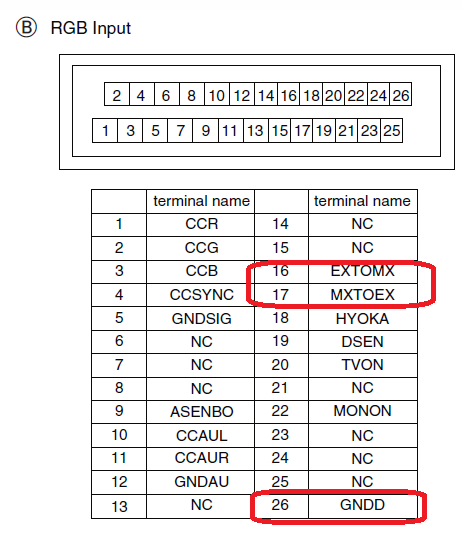
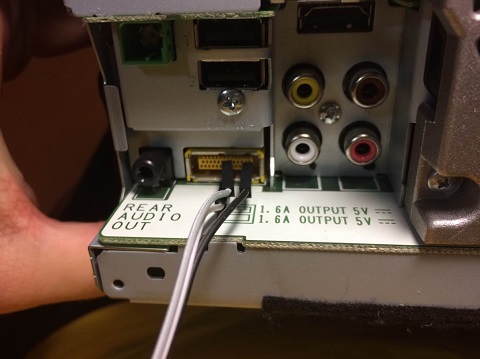
UART  Connect(change bsp, android consol)

You can buy compatible USB-UART adapter ex. PL2303
Just connect three wires (GND, TX, RX) from adapter to your head unit and you will get access to bootloader console where you can change BSP settings to restore boot process.


TX  - to EXTOMX (16)
RX  - to MXTOEX (17)
GND - GND           (26)


 5aec0bc362d26_RGBInput.png.2d63b98e5ca361b8749c0cb22a104432.png 5aec0dbfe2c22_(2).jpg.5357a3bec327d35450d9cd19caee5fc3.jpg 5aec0dbf4af8a_UIART.jpg.66a069fdbf37779516af0185a10043a9.jpg


Use the PuTTY terminal to connect to the console
115200 8N1

you have a few seconds at the beginning that would press any button to enter the command.

you have 20 seconds to enter commands


U-Boot 2009.08 (Jan 06 2014 - 16:32:44)

CPU: Freescale i.MX6 family TO1.1 at 792 MHz
Thermal sensor with ratio = 174
Temperature:   25 C, calibration data 0x54e4a27d
mx6q pll1: 792MHz
mx6q pll2: 528MHz
mx6q pll3: 480MHz
mx6q pll8: 50MHz
ipg clock     : 66000000Hz
ipg per clock : 66000000Hz
uart clock    : 80000000Hz
cspi clock    : 60000000Hz
ahb clock     : 132000000Hz
axi clock   : 198000000Hz
emi_slow clock: 99000000Hz
ddr clock     : 396000000Hz
usdhc1 clock  : 198000000Hz
usdhc2 clock  : 198000000Hz
usdhc3 clock  : 198000000Hz
usdhc4 clock  : 198000000Hz
nfc clock     : 24000000Hz
Board: i.MX6DL/Solo-JUPITER: unknown-board Board: 0x61011 [POR ]
Boot Device: NOR
I2C:   ready
DRAM:   1 GB
Flash:  8 MB
MMC:   FSL_USDHC: 0,FSL_USDHC: 1,FSL_USDHC: 2
Using default environment

In:    serial
Out:   serial
Err:   serial
***** display DDR calibration result *****
***************************************
Display result(register) of WriteLeveling

   MMDC registers updated from WriteLeveling
   MPWLDECTRL0 (0x021b080c) = 0x002E0037
   MPWLDECTRL1 (0x021b0810) = 0x00150017
***************************************
Display result(register) of DDR calibration

   MMDC registers updated from calibration

   Read DQS Gating calibration
   MPDGCTRL0 PHY0 (0x021b083c) = 0x421B0215
   MPDGCTRL1 PHY0 (0x021b0840) = 0x015F0167

   Read calibration
   MPRDDLCTL PHY0 (0x021b0848) = 0x44494848

   Write calibration
   MPWRDLCTL PHY0 (0x021b0850) = 0x3F3F3F37
***************************************


Net:   got MAC address from IIM: 00:00:00:00:00:00
FEC0 [PRIME]
BSP A is valid
BSP B is valid
imx6 core num: 1
BSP A is valid
BSP B is valid
main loop boot env = 0
Hit any key to stop autoboot:  0
MX6SDL JUPITER KT 4.2.2 U-Boot > <INTERRUPT>
MX6SDL JUPITER KT 4.2.2 U-Boot >sdfsdf
 

List command:  help


MX6SDL JUPITER KT 4.2.2 U-Boot > help


?       - alias for 'help'
autoscr - DEPRECATED - use "source" command instead
base    - print or set address offset
bdinfo  - print Board Info structure
bmp     - manipulate BMP image data
boot    - boot default, i.e., run 'bootcmd'
bootd   - boot default, i.e., run 'bootcmd'
booti   - booti   - boot android bootimg from memory

bootm   - boot application image from memory
bootp   - boot image via network using BOOTP/TFTP protocol
bsp     - get bsp info, or set bsp info

clear_bootf- clear Warp!! bootflag
clk     - Clock sub system
cls     - clear screen
cmp     - memory compare
coninfo - print console devices and information
cp      - memory copy
crc32   - checksum calculation
dhcp    - boot image via network using DHCP/TFTP protocol
download_mode- download_mode - enter i.MX serial/usb download mode
echo    - echo args to console
erase   - erase FLASH memory
ext2load- load binary file from a Ext2 filesystem
ext2ls  - list files in a directory (default /)
fatinfo - print information about filesystem
fatload - load binary file from a dos filesystem
fatls   - list files in a directory (default /)
flinfo  - print FLASH memory information
go      - start application at address 'addr'
help    - print online help
i2c     - I2C sub-system
iminfo  - print header information for application image
imxotp  - One-Time Programable sub-system
imxtract- extract a part of a multi-image
itest   - return true/false on integer compare
loadb   - load binary file over serial line (kermit mode)
loads   - load S-Record file over serial line
loady   - load binary file over serial line (ymodem mode)
loop    - infinite loop on address range
md      - memory display
memchk  - memory check
mii     - MII utility commands
mm      - memory modify (auto-incrementing address)
mmc     - MMC sub system
mmcinfo - display MMC info
model   - get model info, or set model info.

mtest   - simple RAM read/write test
mw      - memory write (fill)
nfs     - boot image via network using NFS protocol
nm      - memory modify (constant address)
ping    - send ICMP ECHO_REQUEST to network host
printenv- print environment variables
protect - enable or disable FLASH write protection
rarpboot- boot image via network using RARP/TFTP protocol
regul   - Regulator sub system
reset   - Perform RESET of the CPU
run     - run commands in an environment variable
setenv  - set environment variables
sf      - SPI flash sub-system
sleep   - delay execution for some time
source  - run script from memory
sspi    - SPI utility commands
tftpboot- boot image via network using TFTP protocol
version - print monitor version
warp    - Warp!! boot

asfasfsa

help bsp


MX6SDL JUPITER KT 4.2.2 U-Boot > help bsp
bsp - get bsp info, or set bsp info


Usage:
bsp Usage:
bsp init - init bsp information to init value
bsp get  - get bsp information from nor flash
bsp passwd  <passwd> - set sd card password (16bytes)
bsp set  <item> <value> - set bsp information to nor flash
item
  -m: set boot mode
      value
        0: Normal
        1: Recovery
        2: EasyRecovery(CopyDevice)
        3: Re-EasyRecovery
  -l: set launch mode flag
      value
        0: APL
        1: TestMode.apk
        2: Slave TestMode
        3: Boot Error
  -t: set TestMode Sub Mode
      value
        0: Tech Mode
        1: Serv Mode
        2: TestMode_A.key
  -b: set bootimage active side flag
      value
        0: Side A
        1: Side B
  -r: set recoveryimage active side flag
      value
        0: Side A
        1: Side B
  -d: set debug on/off switch
      value
        0: OFF
        1: ON
  -u: set usb otg switch
      value
        0: Host
        1: Device
  -c: set memchk flag
      value
        0: No
        1: Yes
  -w: set warp boot active side flag
      value
        0: Side A
        1: Side B
  -s: set boot sub mode flag
      value
        0: Normal
        1: Catch snapshot
        2: Warp
  -f: set update flag
      value
        0: Recovery-Update
        1: uboot update
        2: boot.img update
        3: recovery.img update
        4: system.img update
        5: opening data update
        6: UI update
        7: All image update
        8: TESTMODE_N.KEY
        9: easyrecovery copy
        10: easyrecovery copy&verify
        11: password key copy&verify
        12: easyrecovery mode change
  -sf: set update sub flag
      value
        0: SD Card
        1: USB1
        2: USB2
  -uif: set ui update flag
      value
        0: non-updating
        1: updating

MX6SDL JUPITER KT 4.2.2 U-Boot >

BSP get


MX6SDL JUPITER KT 4.2.2 U-Boot > bsp get
BSP A is valid
BSP B is valid
##  A Side BSP Information:
        Magic Number       :0xa55a5aa5(a55a5aa5:Valid, other:Invalid)
        Boot Mode          :0x00000000(0:Normal,
                                       1:Recovery,
                                       2:EasyRecovery,
                                       3:Re-EasyRecovery,
                                       default:Normal)
        Launch Mode        :0x00000000(0:APL,
                                       1:TestMode.apk,
                                       2:Slave TestMode,
                                       3:Boot Error,
                                       default:APL)
        TestMode Sub-Mode  :0x00000000(0:TextMode_A.key, 1:Serv Mode,        2:Tech Mode,     default:                                                                                                         Tech Mode)
        Bootimage Side     :0x00000000(0:Side A,         1:Side B,                            default:                                                                                                         Side A)
        Recoveryimage Side :0x00000000(0:Side A,         1:Side B,                            default:                                                                                                         Side A)
        Debug Switch       :0x00000002(0:OFF,            1:ON,                                default:                                                                                                         OFF)
        Usb OTG Switch     :0x00000000(0:Host,           1:Device,                            default:                                                                                                         Host)
        Memchk flag        :0x00000000(0:No,             1:Yes,                               default:                                                                                                         No)
        Warp boot          :0x00000000(0:Side A,         1:Side B,                            default:                                                                                                         Side A)
        Boot Sub-Mode      :0x00000002(0:Normal,         1:Catch snapshot,   2:Warp,          default:                                                                                                         Normal)
        Update flag        :0x0000000c(0:Recovery-Update,
                                       1:uboot update,
                                       2:boot.img update,
                                       3:recovery.img update,
                                       4:system.img update,
                                       5:opening data update,
                                       6:UI update,
                                       7:All image update,
                                       8:TESTMODE_N.KEY,
                                       9:easyrecovery copy,
                                       a:easyrecovery copy&verify,
                                       b:password key copy&verify,
                                       c:easyrecovery mode change,
                                       default:Recovery-Update)
        Update sub-flag    :0x00000001(0:SD Card,        1:USB1,             2:USB2           default:                                                                                                         SD Card)
        UI Update  flag    :0x00000000(0:non-updating,   1:updating,         default:non-updating)
        Reserved1  flag    :0xffffffff(default:0xFFFFFFFF)
        Reserved2  flag    :0xffffffff(default:0xFFFFFFFF)
##  B Side BSP Information:
        Magic Number       :0xa55a5aa5(a55a5aa5:Valid, other:Invalid)
        Boot Mode          :0x00000000(0:Normal,
                                       1:Recovery,
                                       2:EasyRecovery,
                                       3:Re-EasyRecovery,
                                       default:Normal)
        Launch Mode        :0x00000000(0:APL,
                                       1:TestMode.apk,
                                       2:Slave TestMode,
                                       3:Boot Error,
                                       default:APL)
        TestMode Sub-Mode  :0x00000000(0:TextMode_A.key, 1:Serv Mode,        2:Tech Mode,     default:                                                                                                         Tech Mode)
        Bootimage Side     :0x00000000(0:Side A,         1:Side B,                            default:                                                                                                         Side A)
        Recoveryimage Side :0x00000000(0:Side A,         1:Side B,                            default:                                                                                                         Side A)
        Debug Switch       :0x00000002(0:OFF,            1:ON,                                default:                                                                                                         OFF)
        Usb OTG Switch     :0x00000000(0:Host,           1:Device,                            default:                                                                                                         Host)
        Memchk flag        :0x00000000(0:No,             1:Yes,                               default:                                                                                                         No)
        Warp boot          :0x00000000(0:Side A,         1:Side B,                            default:                                                                                                         Side A)
        Boot Sub-Mode      :0x00000002(0:Normal,         1:Catch snapshot,   2:Warp,          default:                                                                                                         Normal)
        Update flag        :0x0000000c(0:Recovery-Update,
                                       1:uboot update,
                                       2:boot.img update,
                                       3:recovery.img update,
                                       4:system.img update,
                                       5:opening data update,
                                       6:UI update,
                                       7:All image update,
                                       8:TESTMODE_N.KEY,
                                       9:easyrecovery copy,
                                       a:easyrecovery copy&verify,
                                       b:password key copy&verify,
                                       c:easyrecovery mode change,
                                       default:Recovery-Update)
        Update sub-flag    :0x00000001(0:SD Card,        1:USB1,             2:USB2,          default:                                                                                                         SD Card)
        UI Update  flag    :0x00000000(0:non-updating,   1:updating,         default:non-updating)
        Reserved1  flag    :0xffffffff(default:0xFFFFFFFF)
        Reserved2  flag    :0xffffffff(default:0xFFFFFFFF)
MX6SDL JUPITER KT 4.2.2 U-Boot >


If you have an error while updating the firmware.
Replacing the SD card will not solve the problem.
You need to change the boot from Recovery to Normal
set boot mode "normal"

bsp set -m 0 


if you used "Catch snapshot" from Debug Menu - cyclic reboots
set boot sub mode flag "normal"

bsp set -s 0 


Edited May 04, 2018 by asd255
Posted Dec 23, 2015 · 03:55 UTC#122

Nice ASD255 ! Can you tell us the procedure you did ?

Posted Dec 23, 2015 · 17:31 UTC#123

Nice ASD255 ! Can you tell us the procedure you did ?


All changes are made in system\fraemwork\JCommonlib-res.apk

Pictures -  res\drawable-hdpi\

Editing language - values-en-rUS\strings.xml (or choose a different language)


warning text on the screen rear view camera:

   <string name="BCM_01_T1_01">Caution</string> 
   <string name="BCM_01_T1_02">The video may appear reversed</string>
   <string name="BCM_03_T2">The video may appear reversed</string>

delete text

  <string name="BCM_01_T1_01"></string> 
  <string name="BCM_01_T1_02"></string>
  <string name="BCM_03_T2"></string>

My modified pictures

siri_pic.rar


all the changes will work only when the off mode Warp !!!

All were tested for AVIC F960BT (5000/6000 NEX) FW 1.07

Posted Dec 25, 2015 · 17:11 UTC#124

All changes are made in system\fraemwork\JCommonlib-res.apk

all the changes will work only when the off mode Warp !!!

All were tested for AVIC F960BT (5000/6000 NEX) FW 1.07

what for !!!???.. your russian changes needed!!!?? for the U.S. devices with the NEX 1.11 updates !!!???

Edited Dec 25, 2015 by Lucca
Posted Dec 25, 2015 · 19:21 UTC#125

what for !!!???.. your russian changes needed!!!?? for the U.S. devices with the NEX 1.11 updates !!!???

Ты ÑовÑем долбаеб?

Тут опиÑан принцип редактированиÑ. И ÐºÐ°ÐºÐ°Ñ Ñƒ Ñ‚ÐµÐ±Ñ Ð¿Ñ€Ð¾ÑˆÐ¸Ð²ÐºÐ° ÑовÑем не важно. Ð”Ð»Ñ Ð²Ñех прошивок процедура одинакова.

Ð¥Ð¾Ñ‚Ñ Ñ‡Ñ‚Ð¾ там тебе править, у Ñ‚ÐµÐ±Ñ Ð¶Ðµ нет ничего кроме Ñкриншотов

Edited Dec 25, 2015 by asd255
Page 5 of 29