works flawlessly for my f90bt. Be careful though, the mute wire pops out easily! Happened to me and the video starting shutting off at 15mph. Works perfect now!
Posted Jun 25, 2008 · 21:41 UTC#101
works flawlessly for my f90bt. Be careful though, the mute wire pops out easily! Happened to me and the video starting shutting off at 15mph. Works perfect now!
It won't pop out if you put it in correctly and don't mess up the pin or harness.
It won't pop out if you put it in correctly and don't mess up the pin or harness.
Tell that to the people who installed my unit!  I literally argued with them for 30 minutes about how the mute wire came disconnected and they wouldn't believe me (the 15mph video lockout I mentioned earlier). They finally decided to check it out again and what do ya know, the mute wire wasn't connected. Bypass works now
i am going to be doing it tomorrow for a customer and expect good results. ill post up later.
This hack works perfectly if done properly. I have everyone in this forum to thank for that.
hack worked perfect, but the ipod didnt like to work at first. and god this thing takes forever to load.
hack worked perfect, but the ipod didnt like to work at first. and god this thing takes forever to load.
I agree about the loading time, it does suck but my ipod works fine but slow loading too. I really do like the AVIC so maybe Pioneer will release an update soon.
hack worked perfect, but the ipod didnt like to work at first. and god this thing takes forever to load.
I agree about the loading time, it does suck but my ipod works fine but slow loading too. I really do like the AVIC so maybe Pioneer will release an update soon.
If you are not concerned about using the Voice Recognition feature for your iPod right now, you can turn off the cataloging feature under av settings to speed up the unit. This feature has to catalog your whole iPod each time you power it on so that you can access all your songs and artist, ect. via voice recognition. So it takes a while to do that on a big iPod. I am sure Pioneer will come out with a fix for this but...all in due time. I turned it off on my unit and now it is lightning fast.
P.s. Bypass worked for me.
newbie here. My installer grounded the parking brake already. I intend to bypass tonight. My question is, do I need to ground the mute wire after moving it to the "magic" slot? What happens if I just plug it into the fourth pin and don't tap it into the ground?
Stupid question, but I don't want to do unneccesarry wire hacking
newbie here. My installer grounded the parking brake already. I intend to bypass tonight. My question is, do I need to ground the mute wire after moving it to the "magic" slot? What happens if I just plug it into the fourth pin and don't tap it into the ground?Stupid question, but I don't want to do unneccesarry wire hacking
its necessary. it wont work if its not moved and both wires grounded
If you don't ground the mute wire, the bypass will not work. If it did, the instructions for the bypass wouldn't need to include that as a step.
Thus the newbie preface. Thanks for the killer response time. Just bypassed and did a short road test. Works great!
Only problem now is can't get the video on my ipod to play. I even see it try to que the video but it just gets stuck on that stupid apple loading circular icon. I can't see how this is bypass related. Is there another forum that covers this? Worked great on my D3, now I miss it.
Is the AVIC's AV1 input set to ipod? Is thew video out setting on the ipod turned on?
Yes, Vid1 is set to ipod. I tried accessing the video a couple ways. On the D3, when you select "video" under the ipod source, it simply turns control over to the ipod, then playing a video with "TV on" plays great. But with the F, you don't get that ipod control by selecting "video". It just pulls up the available videos onscreen. I thought that was cool at first, but when I tried to play one, the screen is stuck on that circular loading icon. I tried undocking, playing a video on the ipod with "TV on" and re-docking. Same thing.
See anything missing? Does ipod play video for everyone else?
Go through the menu and select a video to play, then hit the BACK button (left on the volume knob) and wait for it to start playing. It may take up to a minute to start playing depending on how much videos/data is on your ipod.
I don't think I've ever seen a circular loading icon on the screen, though. Are you talking about the radio's screen, or the ipod's screen?
I was talking about the radio screen. I have seen it before on the D3, but only for a few seconds before the video plays.
I will try that tonight. Wife took the ipod to work out 
Absolutely fantastic unit! I can't wait to get my MSN and XM working.
Tough to find things to complain about but does anyone else have trouble adjusting the volume with the flexy knob?
Do you mean trouble actually turning the knob, or when you turn the knob it doesn't respond/work as it should?
I don't like the volume know either. It's way too shallow, and it needs grooves in it for traction against your fingers.
Too bad this can't be fixed with a firmware update... 
-Eric
I bought a AVIC-D3 under a month ago and decided to return it to get a AVIC-F900BT. I have the bypass already taken care of, so would i be able to keep the wiring harness connected and just plug it into the AVIC-F900BT and have that bypass work the same??
I bought a AVIC-D3 under a month ago and decided to return it to get a AVIC-F900BT. I have the bypass already taken care of, so would i be able to keep the wiring harness connected and just plug it into the AVIC-F900BT and have that bypass work the same??
Yes, and there is already a thread that discusses this.
I just installed my F900BT this weekend. I did the bypass and it worked!
For those that can't figure this out, I decided to take some pictures


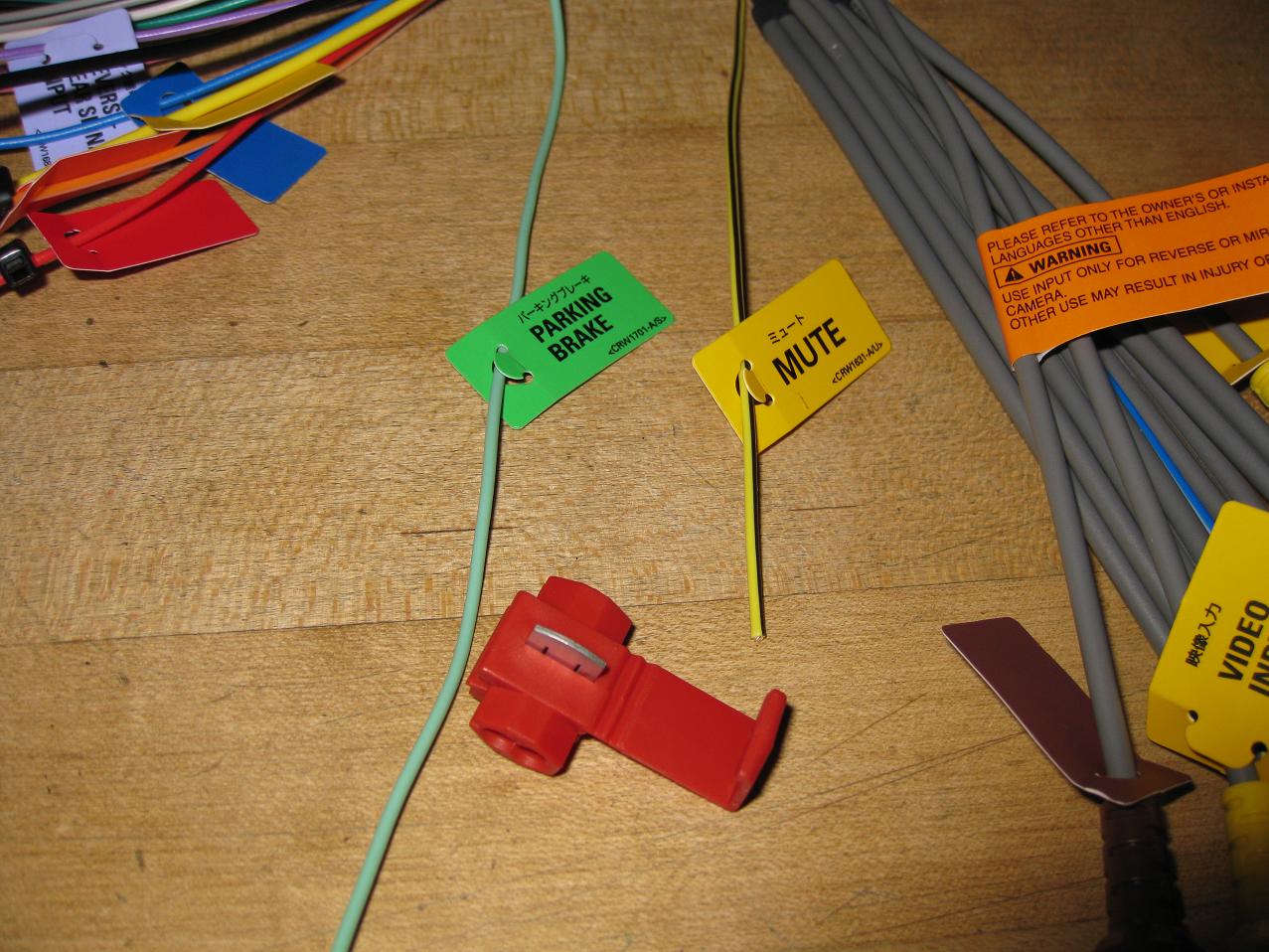
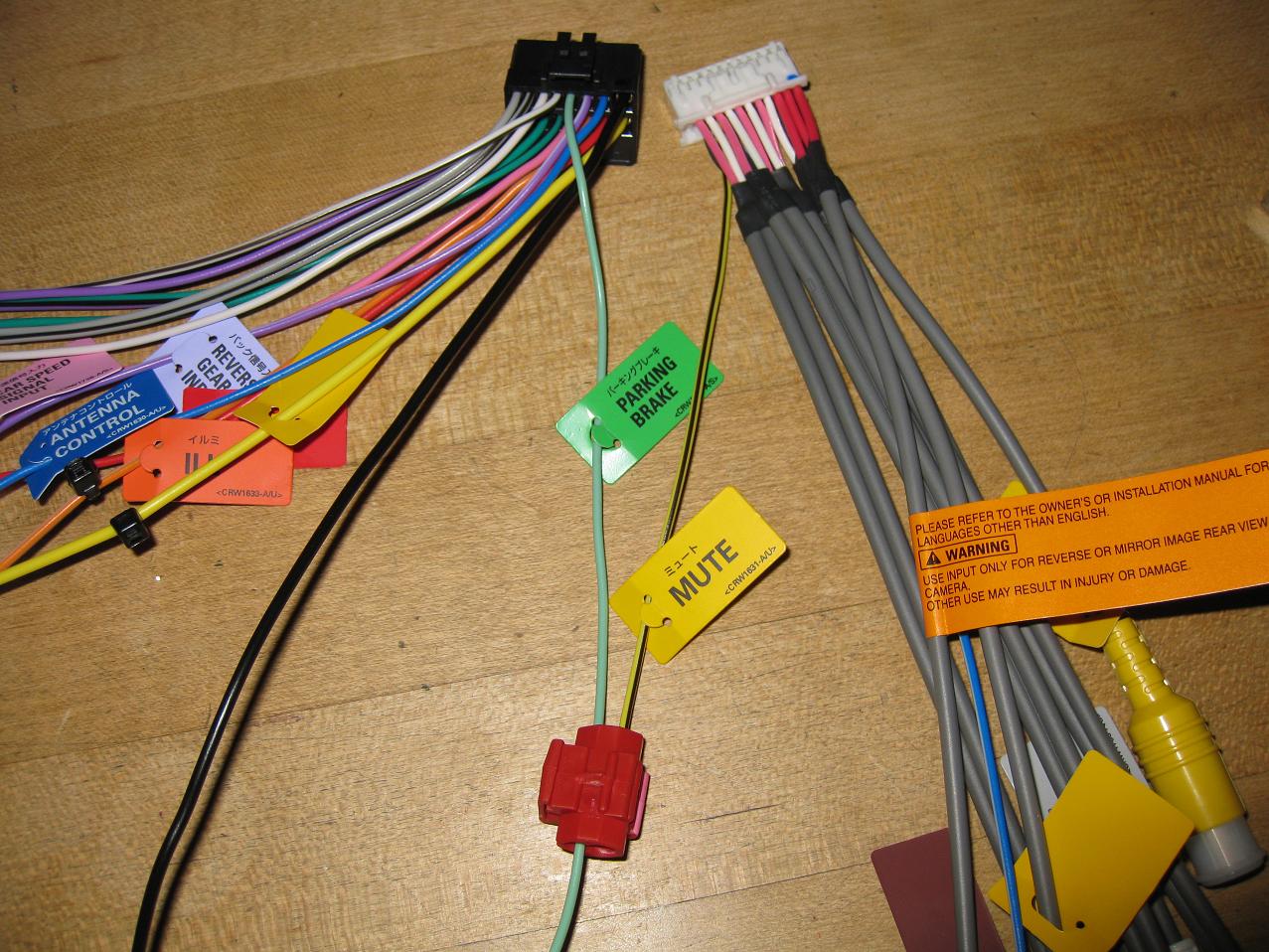
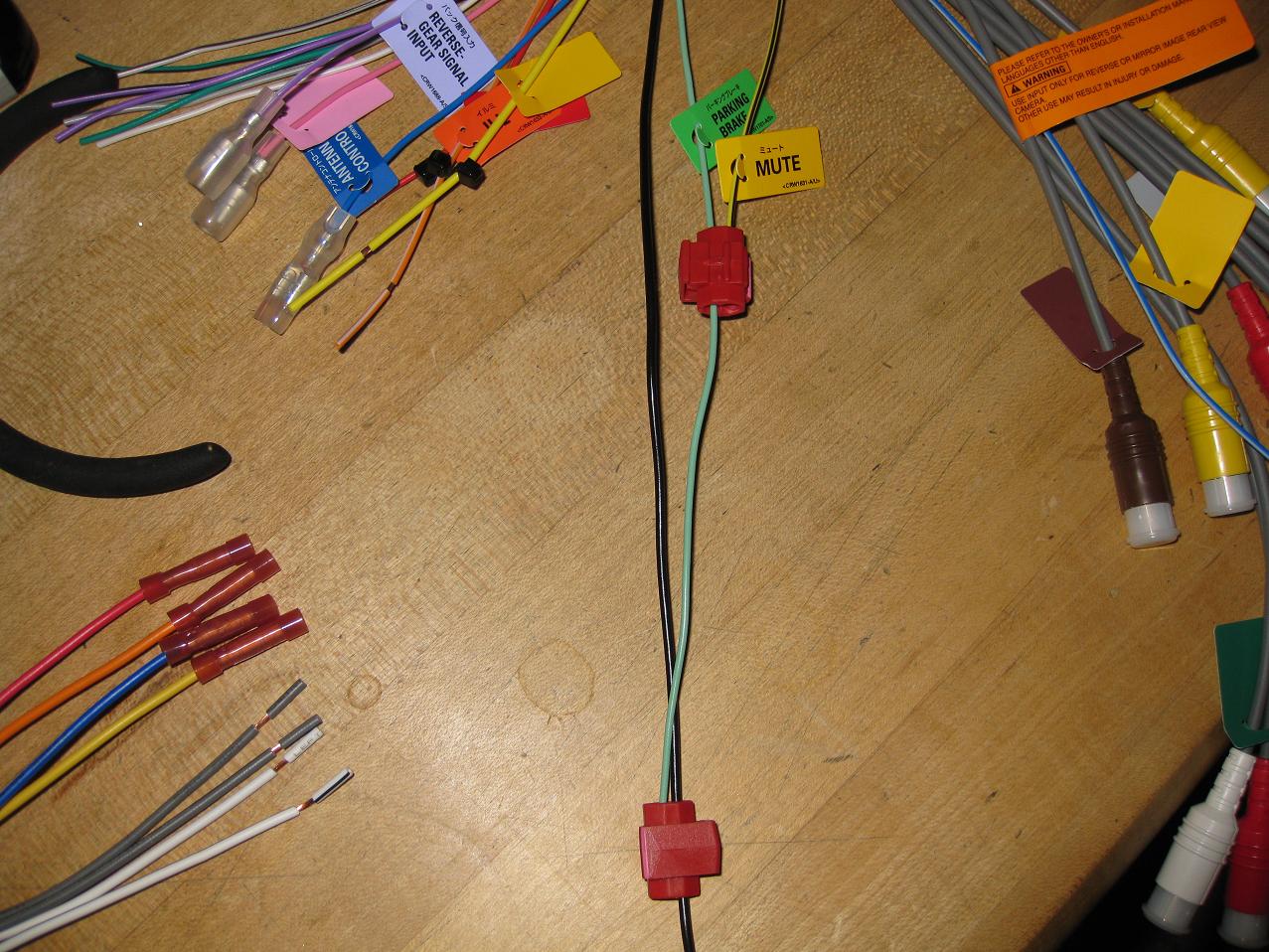
Dude, you are so AWESOME!!! This definitely helped so much! Thanks!
Glad I could give back to this forum. I have learned a great deal from this site! It is a great resource for everyone.
I just got the f-90bt installed and the bypass works great.
Thanks to ALL!
the bypass everyone is talking about... is this for the video playback through ipod and or a dcd player?