the bypass everyone is talking about... is this for the video playback through ipod and or a dcd player?
Posted Jul 09, 2008 · 01:31 UTC#126
the bypass everyone is talking about... is this for the video playback through ipod and or a dcd player?
i have the avic 700 bt and wondering about a few things.....
there is a usb cabel, do i still need a seperate cable for the ipod to conect the usb,
2) they have a gyro ball that indicates the system is motion and no by pass that i know of to play dvd while moving. anyone know any?
the bypass everyone is talking about... is this for the video playback through ipod and or a dcd player?
http://www.avic411.com/forum/viewtopic.php?p=107164#107164
i have the avic 700 bt and wondering about a few things.....
there is a usb cabel, do i still need a seperate cable for the ipod to conect the usb,
2) they have a gyro ball that indicates the system is motion and no by pass that i know of to play dvd while moving. anyone know any?
1. Yes, you need the Pioneer ipod cable. The USB connection only CONTROLS the ipod. If you just use the USB cable that came with the ipod hooked to the unit's USB input, you will get no audio or video. The audio and video signal goes to the unit through the RCA connectors on the Pioneer ipod cable.
2. The bypass works. The internal gyro doesn't have anything to do with it. If you do the bypass correctly, as stated in this topic, you will be able to play videos from the CD drive, SD card, or USB input, as well as enter nav destinations while the vehicle is in motion. Also, the 700 doesn't have a DVD drive. So it will not play DVD's.
thanks, when you say videos from the cd drive, you mean musiv videos or something? not sure what videos you may be referingto. don't mean to sound dumbm but what other video play back is there? the only way i would know to get video play back is movies from the i=pod, and or the sd card. so your saying i still will not be baly to watch dvd from the ipod. if that is the case should i buy a dvd player and set that up through the avic-f700bt? thanks again
yes you could by a in car dvd player and hook it up the the aux in or something similar.
Just so I understand, if I do this bypass with the mute wire, will I not be able to program the mute button on my steering wheel to work?
I grounded the green parking brake wire to the chassis as well as the mute wire seperately, I moved the wire in the harness. The bypass works great, but the parking brake light is on, on the dash and it is trying to alert me that the parking brake is on, which it isn't. Did I mess it up? I have an 03 Silverado.
Did you splice the parking brake wire from the F to the parking brake wire in your truck???
I figured it out. I had to cut wire that best buy had connected to my parking brake. Thanks for all the help, just took a test drive with Superbadd playing! Works great!
Not sure what I did wrong but mine gives me an error message whenever I get over about 10 mph. I moved the pin as instructed and soldered the moved mute wire to the P Brake wire then soldered them both to ground. is there something obvious I am missing here? Or do I need to just go double check nothing came loose.
Thanks
If both wires are grounded and the pin is seated firmly in the correct position it WILL work. Check to make sure that the relocated pin is seated properly in the harness and that the harness has been inserted fully into the back of the unit. Also double check the grounding on both of those wires.
I was talking about the radio screen. I have seen it before on the D3, but only for a few seconds before the video plays.I will try that tonight. Wife took the ipod to work out
Absolutely fantastic unit! I can't wait to get my MSN and XM working.
Tough to find things to complain about but does anyone else have trouble adjusting the volume with the flexy knob?
Got the ipod video working, faulty ipod cable to blame. Audio plays fine but video is VERY sensitive to the cable movement. It has to be just right. Also, take my advice- turn the VR Catalog option off. This thing takes several minutes to load anyway, and even with a 4GB nano it takes about another 5 min for full ipod control. I haven't been patient enough to wait al the way for my 80GB classic. Besides, the on-screen control is great! Way better than the D3 control, although I do miss the option to turn over control back to the ipod.
Starting to get used to the shallow knob but its still difficult to change the volume.
When will they come out with a fix for the 2D birdseye view to freeze North?
I've got an F700 and my harness is different from the one in the picture!
There is a space on the bottom row between two black wires, but that space is on 2 pins in from the outside.
Should I just try it in here?
Cheers.
one up and 4 over. itll land between 2 black ones
it doesn't mate - hold on and I'll post a pic.
here are the pics
You'll see i've already taken the mute wire out.
Any ideas where I should put the mute wire now?
Still the in the same location as everyone else, even though it won't be between two black cables?
Cheers.
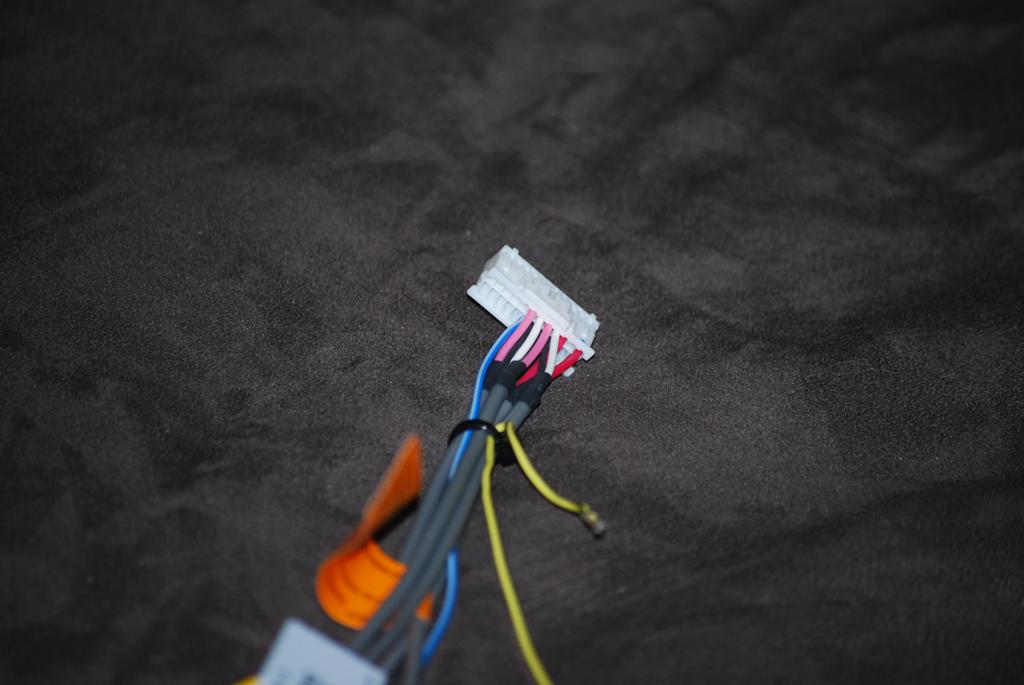

that is odd, my friend....try it anyways, and see wat happens.
Cool, i've put it in the location 4 from the end - it's still two away from the blue cable that everyone else seems to have which would seem good.
I just seem to have less cables than everyone else! 

that's where I've put it hifisi - cheers mate
That's very strange. Your wiring harness appears to be missing two sets of RCA cables... Can you list off what cables and wires are still on that harness? It might help to know which aren't there in the future. Also, is this a brand new unit?
It should have:
Subwoofer preout (red & white)
Front preout (red & white)
Rear preout (red & white)
Audio input (red & white)
Video input (yellow)
Mute wire (yellow/black)
Remote wire (blue/white)
Rear camera (brown)
Rear monitor out (yellow)
it says hes from scotland, cud that jus be for the europe model??
it says hes from scotland, cud that jus be for the europe model??
Good catch. It just might be different on the European version.
yeah, from Scotland and it's a brand new unit. Only landed in the UK earlier this week.
I missed your earlier message and I've already installed it in the car - it seems to work fine.
Uk units don't have voice control - could this affect the harness?
