Contacts first because it was successful.
Problem: Every time I tried sending one or two contacts from my phone, the F700 took all of them. In my phone I'll have or three numbers for a given name. The F700 would list the same name over and over, with no way to tell which number was under which icon without actually calling them!!!! GRRRR. I wanted to edit them so I could just say stuff like Mom - Home or Mom - Cell and I only wanted the half dozen I need, not every last flipping one that is in my phone.
Solution: Boot the F700 to testmode, go to My Flash Drive/User/UserData/Phonedata/PhoneBook?????????.db and copy that file to your SD card. Move the SD card to your computer and use SQLight 3.x to edit the database as much as you want, then back to the SD card and back to the F700. Presto! I have the entries I want, in the order I want, named the way I want. Yay!
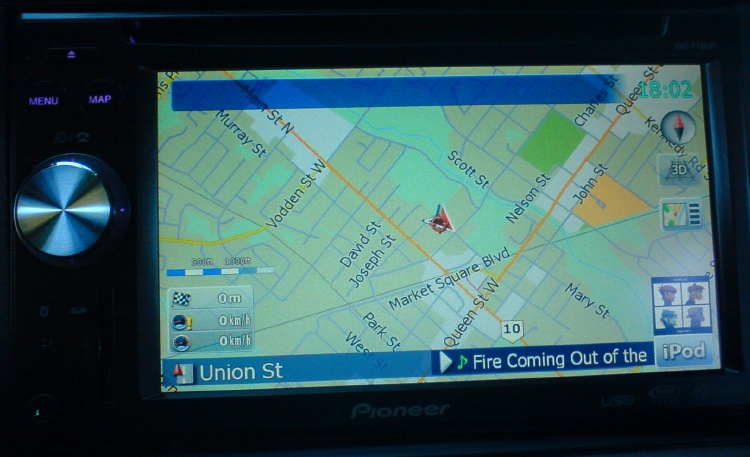
Now the blue boxes... This is not success (yet) but definately a work in progress. The existance and presense of the boxes are determined by two files: In data.zip, ui_pioneer/800_480/ui/navigatemap_800_480.ui and ui_pioneer/common/navigatemap.ui which seems to be duplicated at ui_pioneer/common/ui/navigatemap.ui -- I don't know which is actually used at the moment so I'm messing with them both at the same time.
I have to learn more about how the software handles scripting, but based on what I see, it *should* be possible to make these boxes appear and disappear depending on if we're navigating or not. Currently I am able to make the boxes vanish (but not the line yet) permanently - not ideal but it's a start. I need to learn more about the scripting functions to get these things to appear/disappear based on what is actually happening. I'm confident that it can be done though.
Cheers!
p.s. Don't unzip the data.zip then rezip it - just explore it in place, make your changes then copy them into the existing data.zip rather than making a new one.
p.p.s. Make a backup of your original data.zip before you do anything else!!!

 I'm also a bit OCD. So I think of this as a computer, as opposed to a car radio/gps... I just wish it ran linux rather than wince


