Search Archive

HOW TO: Replace Red Arrow With Car Image

By skicrave · Aug 26, 2008in Hacks/Mods💬 228 posts👁️ 74,054 views
Page 5 of 10
Posted Jan 05, 2009 · 23:47 UTC#101

I can't seem to get this right. I can get my red 3d arrow to disappear but nothing else. I have tried numerous times with no luck. Usually it gets stuck on the system loading screen and reboots after 1 min or 2 and never loads. When I replace the data.zip back to factory it works like stock but no arrow left. Can someone post the proper script....I must be typing the info in the wrong location.


Thanks

Posted Jan 07, 2009 · 00:03 UTC#102

can someone do the VW logo

Posted Jan 07, 2009 · 01:02 UTC#103
can someone do the VW logo


Here, I haven't read up on the size you need.. but here is a 500x500 pixel png you can convert to the proper size and format.

post-26490-12872756714928_thumb.png

Posted Jan 07, 2009 · 02:59 UTC#104

If its not asking too much, can anyone do a scion tc?

Posted Jan 07, 2009 · 03:04 UTC#105
I can't seem to get this right. I can get my red 3d arrow to disappear but nothing else. I have tried numerous times with no luck. Usually it gets stuck on the system loading screen and reboots after 1 min or 2 and never loads. When I replace the data.zip back to factory it works like stock but no arrow left. Can someone post the proper script....I must be typing the info in the wrong location.


Thanks
 

Are you using a Mac? I had the same problem on a mac....it doesn't use the right zip format. If you are using a windows pc, use winrar select open, then adjust file and scripts, save and thats it....no need to unzip or re-compress.

Posted Jan 07, 2009 · 03:07 UTC#106
Here you go.. in png-24 format. You will need to size and convert


Thanks... It looks great but is off center when I load it into the navi. How do i move it to the right a little?


P.s. Is it possible to add a red tail light effect in photoshop to this image. I think it would look even cooler on the screen.


Thanks again?

Posted Jan 07, 2009 · 03:17 UTC#107

I'm not sure I understand what you mean by a red tail light effect.. can you describe what it is you are looking for a little more please?

Posted Jan 07, 2009 · 05:15 UTC#108
I'm not sure I understand what you mean by a red tail light effect.. can you describe what it is you are looking for a little more please?


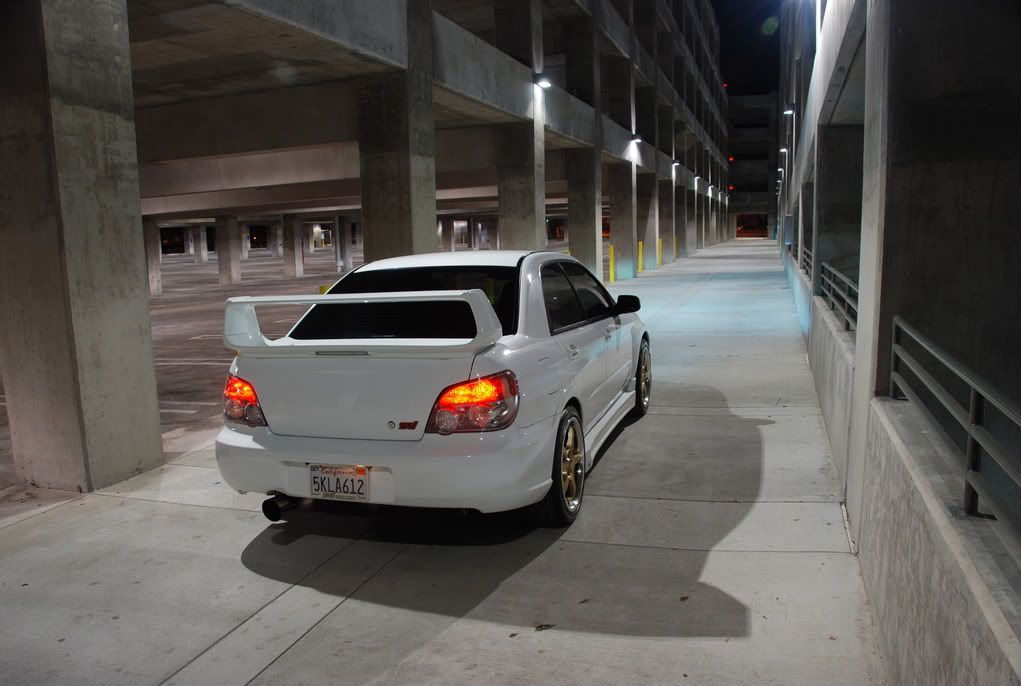
Thanks, I want it to look like the tail lights are lit up as if they were turned on or braking. What do you think of using this image.... could be cool and the lights are already lit up. I would just need help to remove the background from the image.


DSC_0709-1.jpg

Posted Jan 07, 2009 · 14:28 UTC#109

another thought.. would it be possible to have the brake lights on when you actually steps on the brake? :D Would be a cool feature to have

Posted Jan 07, 2009 · 14:57 UTC#110
http://www.ozpoi.com/TomTomCarSymbol.html


A whole page of precut car symbols!


:facepalm:


They have a Honda S2000 listed as a "Vette" and a 240SX listed as a "Skyline"...


lol

Posted Jan 09, 2009 · 06:47 UTC#111
I'm not sure I understand what you mean by a red tail light effect.. can you describe what it is you are looking for a little more please?


Thanks, I want it to look like the tail lights are lit up as if they were turned on or braking. What do you think of using this image.... could be cool and the lights are already lit up. I would just need help to remove the background from the image.


DSC_0709-1.jpg


If anyone gets a chance I would really like to see what this image would look like in the navi. I would really appreciate someone skilled to help to thoroughly remove the background from the above image.


Thanks

Posted Jan 10, 2009 · 20:43 UTC#112

This was one of the first mods I did and I have been pleased with it. Yesterday something odd began to happen when in 3D mode. The map begins with the new icon in the correct place and moving as it should. BUT, I can see underneath it the tips of the red arrow. After a short distance, the red arrow will come out from under neath my custom icon and go on its way alone leaving my custom icon to sit at the starting point.

I cannot think of any mods that I have recently done that would effect the arrow, the custom icon or the way they work.

Any suggestions? This is ONLY in 3D mode.

Thanks,

T


UPDATE: Found it... I had added some code for the tilt angle in 3D and some how changed some other stuff.

Posted Jan 13, 2009 · 05:32 UTC#113

If anyone else is looking for logo here's a site that has almost all manufacturers in vector format

Posted Jan 17, 2009 · 23:20 UTC#114

Can someone cut away the background for me on this. I am horrible at photoshop

post-27182-12872756765355_thumb.jpg

Posted Jan 18, 2009 · 00:49 UTC#115

^ I made one for ya but can't attach it ...

How come .bpm files are not allowed?

Posted Jan 18, 2009 · 01:06 UTC#116
^ I made one for ya but can't attach it ...

How come .bpm files are not allowed?


Iran into a similar issue when trying to attach a bmp. My workaround was to create a zip folded and place the bmp in there. It worked just fine.


Since you appear to have some graphic skills, may I ask you a favor? I have Breast Cancer Research Ribbon that I display on my unit. I'd like to have the ribbon cut out so that only the ribbon with white glow is visible. If you can do that it would be much appreciated. I'm attaching it to this thread. If you want you can just remove it and place your bmp in there for the other member.

bmp.zip

Posted Jan 20, 2009 · 00:31 UTC#117
^ I made one for ya but can't attach it ...

How come .bpm files are not allowed?


were you reffering to my pic? if so Thank you and you can email it to me


[email protected]

Posted Jan 20, 2009 · 00:57 UTC#118

Can someone please photoshop this. This would look great on the nav screen!

Posted Jan 24, 2009 · 07:07 UTC#119
I figure I should post something on here because I have taken so much info from you guys. These are what I am using for my nav screen. They are photos of my truck that I tweaked a bit. So anyone with an F-150 or I guess if you just want a truck on your screen feel free to use these


I am using the first one for 2d and the second image for 3d in case you could not tell.


Thanks for the F-150 icons

Posted Jan 28, 2009 · 00:31 UTC#120

Hey N-S-E-W,


Here's a bmp of your ribbon with the background removed.


Let me know if this is what you're looking for, or if there's anything else that needs to be changed.


http://geckoth.com/dump/car/ribbon1.bmp

Posted Jan 28, 2009 · 02:42 UTC#121
Hey N-S-E-W,


Here's a bmp of your ribbon with the background removed.


Let me know if this is what you're looking for, or if there's anything else that needs to be changed.


http://geckoth.com/dump/car/ribbon1.bmp


geckoth - thank you very, very much. I just finished installing it. I just needed to darken the pink a little. You don't know how how surprised I was to come home from work and see this message. I wasn't even going to mess with tonight, but I just had to get this in the unit.


Welcome to forum - awesome first post to be able to come in help a fellow member. Thanks again.


P.S. I do have a couple more things I wouldn't mind getting fixed up, but the ribbon was the most important of them all.

Posted Jan 29, 2009 · 01:33 UTC#122

Glad I could be of help!


Go ahead and let me know how else I can help ya. I just bought an F90BT the other day online, and have been scouring this site - gaining plenty of knowledge about it in the process. I know I'll be using making use of a lot of the mods here, and will probably be asking plenty more questions, so I figure I might as well start pitching in with things that I'm already familiar with - Photoshop being one of 'em.


Here's a darker version of your ribbon:

http://geckoth.com/dump/car/ribbon1-dark.bmp


Also, for the hell of it, I found a different looking ribbon as an option for you:

http://geckoth.com/dump/car/ribbon2-lrg.bmp


And here's that ribbon resized so it's as small as your original one:

http://geckoth.com/dump/car/ribbon2-sml.bmp

Posted Jan 29, 2009 · 02:03 UTC#123

Thanks for the offer to help and for searching out other ribbon options. I'll send you a PM or start another thread. I did not mean to hi-jack this one.

Posted Jan 29, 2009 · 03:37 UTC#124

Could someone skilled thoroughly remove the background from this image? I want to try something new, however, I am not skilled enough to do the background removal. Thanks in advance.


DSC_0709-1.jpg

Page 5 of 10