94Tbird, I don't know if you got your image taken care of already, but here you go:
http://geckoth.com/dump/car/avic/SMS25thAnniv.bmp

You'll probably have to size this one down quite a bit.
-GeckoTH
94Tbird, I don't know if you got your image taken care of already, but here you go:
http://geckoth.com/dump/car/avic/SMS25thAnniv.bmp
You'll probably have to size this one down quite a bit.
-GeckoTH
Here you go, sacking:
http://geckoth.com/dump/car/avic/WhiteSubieBkg.bmp
This might look weird though since your car icon will always be pointing sideways, hehe
-GeckoTH
Thanks man it looks great...and soo fast. Any chance you could angle it (swing the back end towards the right) to make it look like its going down the road straight?
or.... Could you add the tail light glow from the first iamge to this image?
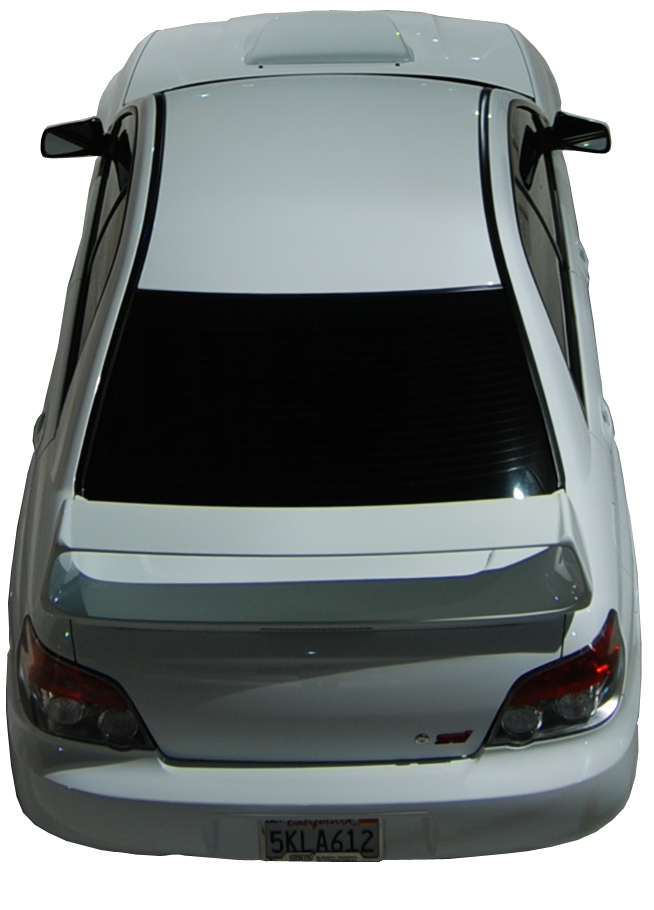
Thanks again!!!!
LOL, if I were to rotate your first image, I think you'd be worse off
(as shown in the 2nd image) Though if you can drive down the street like that, then I say go for it! 
I tried to "turn-on" the brake lights in your other image, but I'm at work, and had to do a shitty rush job, lol. Lemme know if that works for you (it'll probably look a bit better when it's shrunken down to icon size).


LOL, if I were to rotate your first image, I think you'd be worse off(as shown in the 2nd image) Though if you can drive down the street like that, then I say go for it!
I tried to "turn-on" the brake lights in your other image, but I'm at work, and had to do a shitty rush job, lol. Lemme know if that works for you (it'll probably look a bit better when it's shrunken down to icon size).
Your right. Thanks again for all your efforts. I actually like how your first one looks (doesn't look too sideways) but the image looks sort of faded or transparent. Any way to fix that?
Thanks
Sacking,
Try this one on for size -- it should hopefully fix your transparent problem:
Anyone got a black scion tc icon?
Anyone got a black scion tc icon?
If you can take a picture of your car from the right angle, I can help you turn it into an icon.
which angle do you think works the best or looks the best?
Has anyone edited their sys.txt to change the size of the 3D arrow in 3D mode? If so what did you set it to. I was goingto attempt to add a car but apparently i do not have the software on my computer to edit the files. Im a bitof a newb, been reading this forum since i got my F700 and love it, it is a great source of info and i really appreciate what peole have done and the wealth of info. I would really love to make my 3d Arrow smaller (about the size of the 2D arrow) or close to it. I would appreciate any help.
Has anyone edited their sys.txt to change the size of the 3D arrow in 3D mode? If so what did you set it to. I was goingto attempt to add a car but apparently i do not have the software on my computer to edit the files. Im a bitof a newb, been reading this forum since i got my F700 and love it, it is a great source of info and i really appreciate what peole have done and the wealth of info. I would really love to make my 3d Arrow smaller (about the size of the 2D arrow) or close to it. I would appreciate any help.
I've started by halving my 3D arrow size. You really need to play with it to get to the point where you like it...
Thanks, I just did it and think i have it perfect!
I am extremely new to hacking and modifying my unit...so I apologize if this is a dumb question...but what exactly is this data.zip file and how to i get to it. Thanks in advance for the help.
I am extremely new to hacking and modifying my unit...so I apologize if this is a dumb question...but what exactly is this data.zip file and how to i get to it. Thanks in advance for the help.
spend the day reading the hacks/mods section of this board before you attempt any hacks.. you need to know alot more before you begin to touch your unit
Ok, I've got all of my car image edited in Photoshop Elements 5.0 and have it pretty clean, but I cannot seem to get a channel pallet... 
I need to make the backgound transparent somehow.
1999 Corvette
can someone help me? either instruction or a helping hand and a few minutes to make both day and night car and shadows
Thanks to anyone that can help.
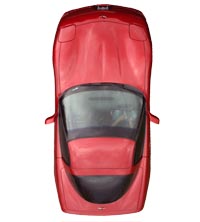
not a c omplete newbie here. been hacking into stuff all my life.. I've only had the AVIC F90BT for about a week but already have had sucess with the vid/nav bypass. Been buried with all of the custom install . Dash mods, LED lighting inside and out, custom paint, and a whole lot more in the works. Trying to get it all done before a local car show coming up....
WORK WORK WORK!!!
Thanks to everyone that has contributed to this site that makes everythinng so much better for the rest of us.. I hope that someone makes great progress with the 3D car icons with a rear view of a car.
I have the full size Photoshop file if anyone could help me out. 
OK...I am now convinced that I am an idiot. Have have started from scratch 3 times with the MOD to replace the 3d arrow with a custom photo from tried Stephanie's instructions. Every time I try the system locks up. The only thing I thought I could be doing wrong was regarding placement of the line in the navigatemap_800_480.ui file. Stephanie's instructions have me place in the first however due to other MODs, my first has changed. So I tried both putting the line in the current first and tried putting it in the that would have been first on the stock file. neither one works. I Have attached the relivent files. If anyone has some spare time at some point, could you please review my work for stupidity?
Thanks in advance,
I shot Stephanie a PM but figured I should ask here too and see if anybody else could help.
I followed your instructions on page 4 and am finding myself having some trouble... I was hoping you could offer some guidance as I have double checked my work twice and can't seem to get what should be easy.
I have a car3d.bmp file that I created which is a picture of my car from the back. The .bmp was created per the instructions on page 1 of this thread.
I added the following to the bottom of sys.txt...
[map]
3d_scale_carmodel=1
3dcarsizemin=30
3dcarsizemax=40
3dcarsizemul=20
I placed my car images in the ui_pioneer\800_480 folder in data.zip.
I added the following line to navigatemap_800_480 in ui_pioneer\800_480\ui in the top layer secion (I have other code here for speed limit signs, altitude, etc).
In ui_pioneer\common\ui\navigatemap.ui I searched for . I also searched for . No double quotes in the file, only the single quote around 'car3d.y 1340' or 'car3d.y 340'.
All saved back to data.zip and moved oved to the AVIC and I never get a successful boot. In reading the first post in the thread I decided to also put the picture of my car named as daycar.bmp and nightcar.bmp and replace what was already there... that felt like a long shot but didn't work either, so I backed it out.
Can you help me get this going? I'd really appreciate the help. I'm sure that I'm missing a small step somewhere but can't figure out where as I've re-read the thread 5 or 6 times. When I make this mod and boot my unit will hang on the boot screen. Audio works, no map. Several minutes later reboot. I simply back the change out and all works on the old data.zip but I really think that this is a cool mod to have. Thanks for your time!!!
Andy
can anyone make me a image to change my arrow? i would like to change it to a blue saturn ion redline if possible
thanks to anyone that does it for me
can anyone make me a image to change my arrow? i would like to change it to a blue saturn ion redline if possiblethanks to anyone that does it for me
if you could find the exact car of your choice i'll be willing to help you out,
here is a few pics of my car
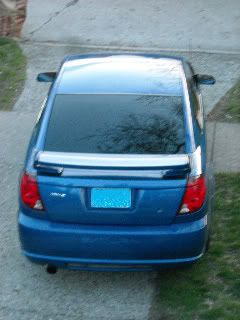
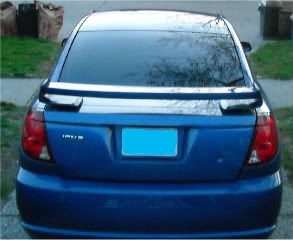
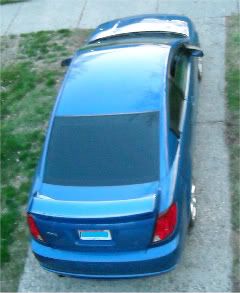
here is a few pics of my car
do you have any other pics?
What kind of pics do you need? A higher angle pic?
What kind of pics do you need? A higher angle pic?
if you're going to use the car image in 2d mode then i would need the top view, the better picture you provide the better your car image will be
ill have to take a new one then i dont really use 2d thou so its not a huge deal, is there a way to change the 3d image to the ones i sent you or can you only change the 2d?
ill have to take a new one then i dont really use 2d thou so its not a huge deal, is there a way to change the 3d image to the ones i sent you or can you only change the 2d?
the second image would be a perfect one but you need to include the wheels in the picture,

