Search Archive

Color Schemes

By BorisM · Sep 27, 2008in Hacks/Mods💬 99 posts👁️ 33,705 views
Page 4 of 4
Posted Mar 17, 2009 · 05:25 UTC#76
Thank you Boris so basically copy that file onto my sd card copy that file i need into the other folder on my computer then stick that into the folder on the avic in testmode correct.. Kevin


Copy DATA.ZIP to SD card.


On PC:

if using WInZIP, unzip the whole thing preserving directory structure

copy cursor_places where it should go

ZIP the whole thing back up, preserving exact same structure.


If using WinRAR or 7ZIP, you could just drag the file out, then back to the new location.


Copy the fil back to the headunit.

Posted Mar 17, 2009 · 14:35 UTC#77

I am having the same problem as Sandpro, no matter what scheme I select the map colors stay the same, the only change I see is the route line color changes. I went in to the save folder and deleted everything as well but still no luck. Any possibility something else is over riding the scheme files? I guess the problem for me is all the surrounding area is green/blue. Do the schemes change the terrain colors too, or am looking at it all wrong? :?

Posted Mar 17, 2009 · 14:58 UTC#78

there are a total of 4 zip files with multiple zip files and .png files. Do you unzip the 4 original files and add each zip within those files 1 by 1 or just add the 4 zip files to the directory. Please help. Thank you

Posted Mar 17, 2009 · 15:18 UTC#79

I unzipped the "main" zip file and put the "little" zip files in. They then showed up fine in the menu.

Posted Mar 17, 2009 · 15:54 UTC#80
I unzipped the "main" zip file and put the "little" zip files in. They then showed up fine in the menu.

For Xerses.rar, scheme.rar, RealViewV6.rar no problem. But in Schemes.rar, there are a bunch of .png files and a text file. What do we do with those? Thanks a lot for your help.

Posted Mar 18, 2009 · 11:19 UTC#81

Hmm, I didn't test those yet. Not sure. Try them the same way, if they don't work, just delete them.

Posted Mar 18, 2009 · 16:49 UTC#82


You still need, in DATA.ZIP, to copy cursor_places.spr from common to common/night folder.


Sorry fo rthe noob question but where can i find this file to download? i see people talking about Mavericks mod DATA.zip but I cant find it to download. Any help pointing me to the thread with the DATA.zip downloads by forum members would be greatly appreciated.

Posted Mar 18, 2009 · 16:54 UTC#83
viewtopic.php?f=34&t=19864 Mav's mods are the best i think.... Kevin
Posted Mar 18, 2009 · 18:43 UTC#85

Yes

Posted Mar 18, 2009 · 19:39 UTC#86

Question now. I downloaded the schemes, its has a color.ini, color3d.ini and content .nng. inside, to i just drop the zip file as is or do i have to separate them please help tired of looking at this boring map. thanks

Posted Mar 20, 2009 · 03:47 UTC#87

Yep, just drop in the individual zips. I didn't see much of a change, but then I tried realviews, they are great! The color changes I was looking for.

Posted Mar 20, 2009 · 04:34 UTC#88

OK maybe im not seeing or doing something right here, how come i dont have the sky on mines,

Posted Mar 20, 2009 · 04:37 UTC#89

you might not be seeing skies cause you have to mess with the tilt view in the view you want and if you cant tilt down as much as you want there is a post that i will find for you just let me know or pm me.. Kevin

Posted Mar 26, 2009 · 14:21 UTC#90

So apparently I'm struggling here. I have made change after change but am probably doing something fundamentally wrong.


I took one of the theme .zip files and copied it to something else... MyTheme.zip. I then modified the colors in the file to be basically the same thing that you see in the Pioneer Blue Day theme but with a light tan/kahki ground background that is something similar to the Xersus Summer theme. Change after change, same results... nada.


Once I change the color.ini and color3d.ini files I put them back into the zip file which also contains a "content.nng" file and "dayheightcolormap.bmp".


So clearly I'm doing something wrong. Can someone help point me in the right direction?


Also, here is some reference material...


this site will allow you to put in RGB values and see what the color is. This is helpful when trying to figure out what color the .ini files are referencing. http://webdeveloper.earthweb.com/reposi ... 1/hex.html


this site will allow you to look at a color and see the value (basically the opposite of what is above). http://web.njit.edu/~kevin/rgb.txt.html


Thanks in advance for your help. This is starting to drive me nuts. :)

Posted Mar 30, 2009 · 15:59 UTC#91

I like the realviewscheme for the colors.

But i cant see sky's clouds etc. And my tilt level is right (modded sys.txt) And the GTImatt mod.


Read the thread and searched but cant really find out.

Sky's and clouds are only visible with leetlauncher?? Not with the pioneer igo??


Please confirm someone

Posted Mar 30, 2009 · 16:44 UTC#92
I like the realviewscheme for the colors.

But i cant see sky's clouds etc. And my tilt level is right (modded sys.txt) And the GTImatt mod.


Read the thread and searched but cant really find out.

Sky's and clouds are only visible with leetlauncher?? Not with the pioneer igo??


Please confirm someone


unfortunately ,yes

Posted Sep 10, 2009 · 20:35 UTC#93

Unit: AVIC F90BT

System: 3.01

Mod: Diaftia’s Keeper Mods with Trip Computer Updated 9/02/09


To BorisM:

I have read this post from start to finish and am very confused on how to add the schemes, mainly the Real View V6 schemes, that BorisM posted. I think there are a lot of contradictions all through the post. I am not complaining just trying to understand what the correct method is to add schemes with associated files. Again I am mainly interested in the RealView Schemes. I have in the past followed Diaftia’s instructions successfully and would greatly appreciate it if you would please post instructions, like Diaftia’s, to add schemes. Please use the RealView files as an example. I do not want to screw up what I already have. I am sure there are other users that are ashamed to ask this and sound stupid but how else can I learn. Thanks BorisM for all the help you have given to this forum. Without this forum I would be totally lost.

Posted Sep 10, 2009 · 21:13 UTC#94

To get it working with firmware 3.x:


Go to http://www.i-go8.com/2009/01/real-view- ... ap-v6.html


Download the scheme. Open up each scheme's ZIP file and edit every INI file, changing every reference to ui_igo8 to $skin$.


Copy ZIP files into APL2\iGO\CONTENT\SCHEME.


Copy GFX folder to APL2\IGO.

Posted Sep 11, 2009 · 13:34 UTC#95

BorisM

Thank you for your quick response.


Just a few questions please:

I edited the RealView ini files and found that changes had to be made in the Icon and Other sections only is this correct?


If I want to add other schemes I would make the same changes and copy the zip files to the

APL2\iGO\CONTENT\SCHEME?

Also, I do not have to add the GFX folder you supplied again because it is already in the APL2\IGO?


Schemes are independent of the Country so I can use the RealView in the US?


Thanks again for all your hard work on this forum.

Posted Sep 11, 2009 · 16:45 UTC#96
BorisM

Thank you for your quick response.


Just a few questions please:

I edited the RealView ini files and found that changes had to be made in the Icon and Other sections only is this correct?


If I want to add other schemes I would make the same changes and copy the zip files to the

APL2\iGO\CONTENT\SCHEME?

Also, I do not have to add the GFX folder you supplied again because it is already in the APL2\IGO?


Schemes are independent of the Country so I can use the RealView in the US?


Thanks again for all your hard work on this forum.


You're welcome.


Yes, only one place in the scheme refers to files external to it. The rest is colors and settings. With other schemes it is the same, just add them to the right folder.


You may already have the GFX folder but it does not necessarily contain particular fiules the scheme calls for (i.e. Sun, sky etc.). Best is to add it directly in the APL2\iGO\GFX.


Schemes are totally location independent so you can use them anywahere.

Posted Sep 15, 2009 · 18:04 UTC#97

Boris -


I like what you've done. One thing I miss from v2.0 of the software was street names. I'm using your Old School theme by day, but none of them work at night (I get the same missing file error as others).


Here is what I would like (and am willing to pay for). Can you point me to where I can download all of the files and instructions for a 3D scheme (for both day and night) that gives as much street detail as possible at 1,000 feet and above? I used the one located at ftp://buckeyecollision.us/ColorSchemes/ and the night schemes don't work.


Much thanks -

Posted Sep 15, 2009 · 19:52 UTC#98
Boris -


I like what you've done. One thing I miss from v2.0 of the software was street names. I'm using your Old School theme by day, but none of them work at night (I get the same missing file error as others).


Here is what I would like (and am willing to pay for). Can you point me to where I can download all of the files and instructions for a 3D scheme (for both day and night) that gives as much street detail as possible at 1,000 feet and above? I used the one located at ftp://buckeyecollision.us/ColorSchemes/ and the night schemes don't work.


Much thanks -


Somewhere on the first page of this thread, I think, there's a post that says which file needs to be copied in DATA.ZIP to fix the night scheme error.


With 3.0, street names disappear. We've been playing with clip_planes parameters for a while, but nobody had found a good setting to maximize street name display yet...

Posted Jan 25, 2013 · 11:12 UTC#99

I'm working on an amber theme fo the AV part (see pics)


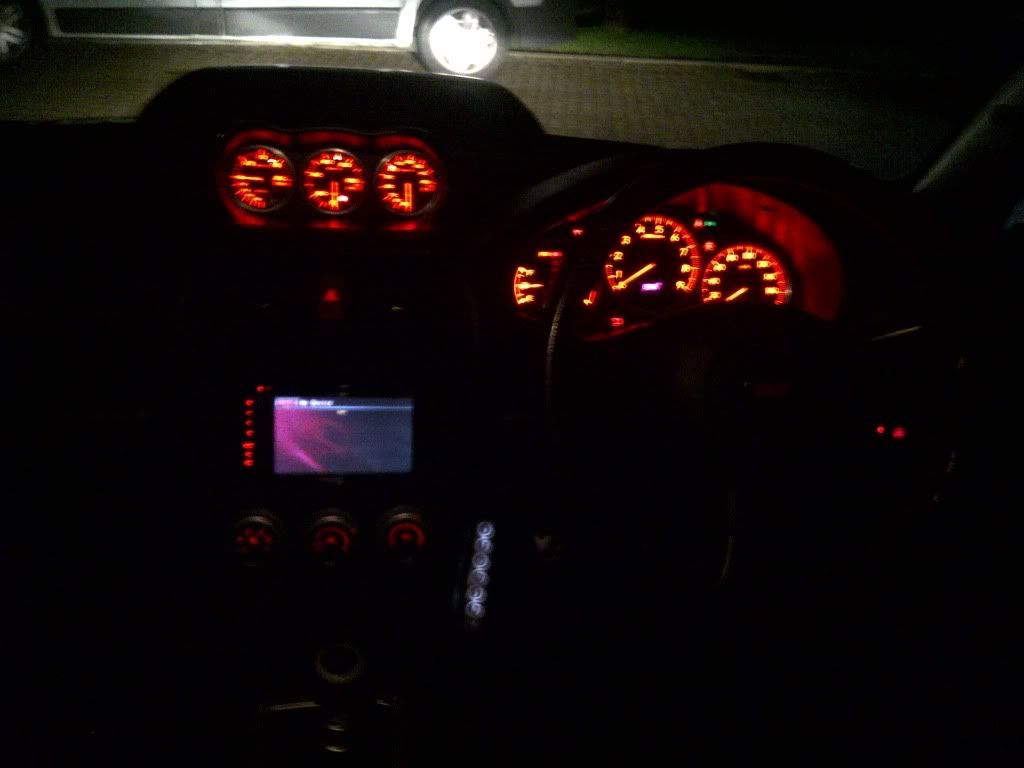
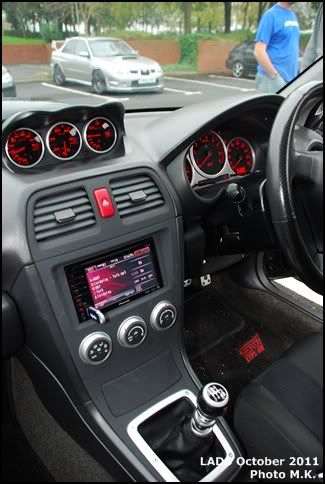
hi can someone help me with this mod i am a newb so dont know where to start i have a f900bt in my imprezza sti and all my clocks/dials are a red/amber colour

see pictures below that shows background colour of my old pioneer unit that is not available on f900bt as standard


IMG-20110917-00298.jpg


DSC_7456Copy.jpg


dave from uk

:-D

Edited Jan 25, 2013 by dave-w-
Page 4 of 4