Search Archive

Maverickster's Mods - UPDATED 12/9/08

By Maverickster · Dec 03, 2008in Hacks/Mods💬 430 posts👁️ 106,956 views
Page 6 of 18
Posted Dec 10, 2008 · 03:37 UTC#126
Nice Mav! Thank you. :)


No, thank YOU. This is a collaborative effort and without folks coming forward and identifying glitches and helping to troubleshoot them, this would be a lot more difficult and a lot less rewarding. I'm still not sure if I'm happy with the way I fixed the 2D/3D thing (there was no z layer command in the original data.zip, so I was hoping I'd be able to fix it without adding that), but it definitely works for the time being and I haven't seen any ill-effects from it, so I guess it will do.


Anyway, again, thanks for your help!


--Mav


If this did fix it, then it probably is the best fix. Z controls the stacking order of layers, and something (may be one of your new layers is full screen?) was on top of 3D/2D button, thus preventing you from pressing it.


You could try moving your layers down, but moving buttons up is just as valid...


Good to know. Thanks Boris.

Posted Dec 10, 2008 · 04:23 UTC#127

You're welcome. Good to hear you got it resolved.


Re: current_elevation. It will be feet below a mile, and mile fractions above...

Posted Dec 10, 2008 · 07:15 UTC#128

hey maverick, thanks, for your data.zip. It work perfectly.


But can you please post your sys.txt and tell me which fonts files your using. Because when i see the screens i have another screen view.

I thinks it is because i use the font files from the hack from kevin.

Do you use everything originally. So the original sys.txt and the original font files from Pioneer or others?


Thanks in advance.

Posted Dec 10, 2008 · 13:38 UTC#129

Everything except the data.zip is stock (well, almost; the phonebooks have been modified using sqlite, but that was to solve a phonebook transfer and vr problem I was having, so it's not really a mod).


Good luck!


--Mav

Posted Dec 10, 2008 · 14:04 UTC#130

I'm new to this. I love all of these customizable things and your mods. To start off simple, I only want make the clock more visible. I found the file for this that you listed, but I don't know how to open and edit that file. For us beginners, how do we do this?

Posted Dec 10, 2008 · 14:07 UTC#131

That's in the FAQs and the links in it. I strongly recommend you read through that first.

Posted Dec 10, 2008 · 16:31 UTC#132

beginners... i suggest. you just take the pre made data.zip and install that.. and go from there

Posted Dec 11, 2008 · 00:59 UTC#133

Hello, this is my first post, and first off, I would like to say thank you for all the hard work you have put into this. The last version of your DATA.zip was excellent and I wanted to just change two things. Then you posted the newest version which fixed the 2D/3D button (which I don't use that much anyway), and it seems to have created other issues. I no longer can use the sowftware parking brake mod from the pioneer.ini that I had modfied (worked fine on the last version of your DATA.zip) and it does not let me keep the sound settings for the beeps. They keep resorting to full volume. It also seems like the "Map" and "Menu" hard buttons are very very "laggy" now. I love the look of the screen and want to keep it that way, but these slight issues render it almost unusable (especially the speed bypass and the loud beeps). Please let me know what your thoughts are. Thanks!

Posted Dec 11, 2008 · 01:23 UTC#134
Hello, this is my first post, and first off, I would like to say thank you for all the hard work you have put into this. The last version of your DATA.zip was excellent and I wanted to just change two things. Then you posted the newest version which fixed the 2D/3D button (which I don't use that much anyway), and it seems to have created other issues. I no longer can use the sowftware parking brake mod from the pioneer.ini that I had modfied (worked fine on the last version of your DATA.zip) and it does not let me keep the sound settings for the beeps. They keep resorting to full volume. It also seems like the "Map" and "Menu" hard buttons are very very "laggy" now. I love the look of the screen and want to keep it that way, but these slight issues render it almost unusable (especially the speed bypass and the loud beeps). Please let me know what your thoughts are. Thanks!


The only thing I changed was to add a "z index" to the 2d/3d button in the navigatemap_800_480.ui file (to bring the 2D/3D button forward) and change the source of the altitude information (in the same file), so the only one of those issues that could possibly be related to my last change is "laggy" buttons. I haven't noticed that at all, though, so I'm not sure what to tell you about that. Is anyone else noticing the button lag? I'm certainly not, but who knows.


As for it breaking your software bypass, that's probably because I don't have the software bypass applied in my data.zip (I'm not gonna be held responsible for someone watching a DVD while driving and killing somebody), so if you applied my latest data.zip, it reset it back to the factory settings. If you want it, you'll have to re-do it.


As far as the button sound, again, I didn't do anything that could have caused a problem with that and I'm not having that problem at all. I have my button sound set pretty low and it's always right where I left it when I startup the car.


P.S. This is another way of saying that I think it's highly likely that these issues are being cause by something else you may have changed.


P.P.S. If you still think my last changes are causing your issues and you want to revert back to the version of the Data.zip I had just before my last set of changes, you can just go into the navigatemap_800_480.ui file and undo the changes. They're enumerated in painstaking detail in the last post of the previous page of this thread.


Hope that's at least kind of helpful.

Posted Dec 11, 2008 · 01:45 UTC#135

Thanks again Maverickster. And thank you for the quick reply. I did re-do the parking brake mod (keeps the girlfriend entertained on long trips), but it does not work now. The buttons are very laggy. when I replaed the DATA.zip with the original from the 2.0 update, they went back to being usable. I wonder what is causing this? Also, I will keep working on the sound buttons not working properl;y. I am attempting to add speedcam functionality to your updates and am combining two DATA.ZIP files. I'm applying your mods individually so that they don't conflict with the others....


Anyway, I would love to change/swap the position of the 2d/3d button and the POI/End Nav button as I will use the end nav button and POI much more often. This is covered up when I use my iPod and the cover art is on top so I cannot "click" the POI/End Nav button when listening to music and navigating. How would you suggest I do this? is there a way to just raise the "Z axes" so that it is clickable when the album art is up?


BTW, the way you have it set up is the way Pioneer should have had this in the first place - this is SOOO much more user friendly. Great job. Thanks in advance!

Posted Dec 11, 2008 · 01:52 UTC#136

...oh, and I just wanted to swap those buttons, not move them over like in previous posts. I think the way you have it set is perfect save that one swap... Thanks again

Posted Dec 11, 2008 · 02:02 UTC#137

Well, I just tested it again and I'm not having any of those issues. In fact, once it's completely booted up and the phone is connected, the buttons are remarkably quick. The only thing I can think of that could be different between you and me is the upload, so I re-uploaded the data.zip in case it got corrupted in any (unknown) way the first time. The new one is there (i.e. linked to in the first post) now, so you can download it and give it a shot if you'd like.


Sorry I can't be of more help.

Posted Dec 11, 2008 · 02:06 UTC#138

No problem. I did redownload, and I'll let you know. And I did swap those two buttons. I just changed the two y axes. Thanks again.

Posted Dec 11, 2008 · 02:06 UTC#139
Thanks again Maverickster. And thank you for the quick reply. I did re-do the parking brake mod (keeps the girlfriend entertained on long trips), but it does not work now. The buttons are very laggy. when I replaed the DATA.zip with the original from the 2.0 update, they went back to being usable. I wonder what is causing this? Also, I will keep working on the sound buttons not working properl;y. I am attempting to add speedcam functionality to your updates and am combining two DATA.ZIP files. I'm applying your mods individually so that they don't conflict with the others....


Anyway, I would love to change/swap the position of the 2d/3d button and the POI/End Nav button as I will use the end nav button and POI much more often. This is covered up when I use my iPod and the cover art is on top so I cannot "click" the POI/End Nav button when listening to music and navigating. How would you suggest I do this? is there a way to just raise the "Z axes" so that it is clickable when the album art is up?


BTW, the way you have it set up is the way Pioneer should have had this in the first place - this is SOOO much more user friendly. Great job. Thanks in advance!


As for switching around the poi/end nav button and the 2d/3d button, just swap their Y axis coordinates. Y is the distance from the top. X is the distance from the left. Z is the distance forward and back (higher number brings it further forward; I solved the 2d/3d button issue by bringing that button "forward" to 3001).


Good luck!


--Mav

Posted Dec 11, 2008 · 02:10 UTC#140

I have no lag whatsoever on my buttons. Definately isn't mavs zip!

Posted Dec 11, 2008 · 20:36 UTC#141

thanks boris you did a great job, I have used your speedo and house number mod, however when I click the route display on an active route I get this error box


FFUIERROR

Identifiter = unknown object

[sc_MSC_showTTD]

script"[unnamed]" command 0


so I click the X to close the box and after that I click the route display again and It would show the route screen.


Do you know what happen here?


thank you

Posted Dec 11, 2008 · 20:38 UTC#142

Speed isn't mine and I did not do anything with the route display lately... Are you using my house numbers mod with Mav's DATA.ZIP?

Posted Dec 11, 2008 · 20:44 UTC#143

I am using the stock data.zip and added the script and files you posted on page 1


added on are

1. Clock/Street Number Info - Increased its size. Also, pressing the clock displays the street numbers adjacent to your current GPS location. Pressing the street numbers makes them go away.


and


6. Speedo/Altimeter/Route Info - The map scale has been removed completely (what a PITA), and the function of the route info box (bottom left) has been changed. When no route is selected, the Route Info box is gone and in its stead is a simple altimeter (showing altitude in feet, not miles) and speedometer (and when a speed limit information is detected, that's also displayed). When a route is selected, a modified and much more legible version of the Route Info box appears.


everything seems to work fine and actually perfect but when I click on the route info just get a error and goes away. haha sounds weird

Posted Dec 11, 2008 · 20:57 UTC#144
thanks boris you did a great job, I have used your speedo and house number mod, however when I click the route display on an active route I get this error box


FFUIERROR

Identifiter = unknown object

[sc_MSC_showTTD]

script"[unnamed]" command 0


so I click the X to close the box and after that I click the route display again and It would show the route screen.


Do you know what happen here?


thank you


I know what happened. When I originally did this I took the code for the route info box from Vorian's data.zip which had a toggle feature. I couldn't get the toggle feature to work (I would get the same error you're getting), so I disabled it in a subsequent update to the data.zip. Unfortunately, I neglected to also update the corresponding code on the first page.


This has now been corrected.


You can "fix" it by either (a) replacing your current data.zip with the data.zip linked to in the first post, or (B) replacing the code in the navigatemap_800_480.ui file with the [now correct] code in the "Speedo/Altimeter/Route Info Mod" post on the first page.


Sorry for the inconvenience. Minor oversight.


--Mav

Posted Dec 11, 2008 · 21:33 UTC#145

Thank you very much, I would go ahead and replace the coding tonight. I love the speedo and house number info. :D


btw do you know if we could use other TTS beside the one from pioneer? from IGO 8. like kate, david and etc? because the stock one from pioneer is horrible.

Posted Dec 12, 2008 · 00:23 UTC#146

Hello Mav, great work bye the way. I applied some of your mods but I am having some issues. I am getting a FFUI error when touching the route info box. Also the compass direction indicator is doubled. Please point me to the right code line to fix these issues. Also, I went back to the route info box code on the first page of this thread to see if it had been updated and apparently there is no replacement code, just the original code. Please let me know if im missing something, thanks.

Posted Dec 12, 2008 · 00:27 UTC#147
Hello Mav, great work bye the way. I applied some of your mods but I am having some issues. I am getting a FFUI error when touching the route info box. Also the compass direction indicator is doubled. Please point me to the right code line to fix these issues. Also, I went back to the route info box code on the first page of this thread to see if it had been updated and apparently there is no replacement code, just the original code. Please let me know if im missing something, thanks.


Re the ffui error, the data.zip and the code on the first page have both been updated. The update is quite subtle so you might not have noticed it. Just copy and paste over the old code and it should go away.


As for the compass direction indicator being doubled, sounds to me like you didn't replace the WHOLE compass code with my code and that the following line appears twice in your file:


To fix, just comment out the one you don't want. I just now edited the instruction post to make this more clear.


Thanks!


--Mav

Posted Dec 12, 2008 · 01:17 UTC#148

Bingo, worked like a charm. There are a couple of other features I wanted to run by you however. I am located on the coast of MS and there is not much elevation around here so I would like to replace that feature with a simple numerical zoom indicator in the same location with the same font if possible. Also, as indicated by the pic below, the size of the current speed font over laps the visual safety cam indicator. If possible I would like to reduce the size of the speed indicator and eliminate the addition of the posted speed limit for the currently traveled road. I realize this is asking allot and if it is to much to ask then I will be happy with what I have, thank you for the awesome work.

post-2925-12872756424516_thumb.jpg

Posted Dec 12, 2008 · 01:32 UTC#149
Bingo, worked like a charm. There are a couple of other features I wanted to run by you however. I am located on the coast of MS and there is not much elevation around here so I would like to replace that feature with a simple numerical zoom indicator in the same location with the same font if possible. Also, as indicated by the pic below, the size of the current speed font over laps the visual safety cam indicator. If possible I would like to reduce the size of the speed indicator and eliminate the addition of the posted speed limit for the currently traveled road. I realize this is asking allot and if it is to much to ask then I will be happy with what I have, thank you for the awesome work.


Dude, you're gonna have to post smaller pictures.


Re replacing the elevation indicator with a "simple numerical zoom indicator" is a bigger deal than you think. If you can find somewhere where someone has successfully made one of those, I'd be happy to take a look at their code and see what I can do; but, I'm not really personally interested in it, so I'm not gonna dig through the code to find if there's there appropriate text somewhere and, if so, what it is. Sorry bro.


Re getting rid the posted speed limit bit and shrinking the size of the current speed, that's pretty simple. Find the code immediately under this: ";current speed (and speed limit where present) and altitude when not navigating". Here's how that code works.


The first one is the altitude indicator.


The second one is the full text of the current speed set to display only when no route is available and no current speed limit is available.


The third one is the number of the current speed set to display only when no route is available and a current speed limit is available.


The fourth one is the "/" set to display only when no route is available and a current speed limit is available.


The fifth one is the full text of the current speed limit set to display only when no route is available and a current speed limit is available.


The sixth one (which is currently commented out -- i.e. there's a ; in front of it so the software ignores it) is the full text of the current speed set to display only when no route is available.


So, if you want to get rid of the function where it swaps between current speed and current speed/speed limit, then just comment out the second, third, fourth, and fifth one. If you want it to show just the current speed, then uncomment the sixth one. If you want to get rid of altitude, comment out the first one.


If you want to adjust the font size, adjust the font size.


Make sense?


--Mav

Posted Dec 12, 2008 · 02:16 UTC#150

Hey Mav,


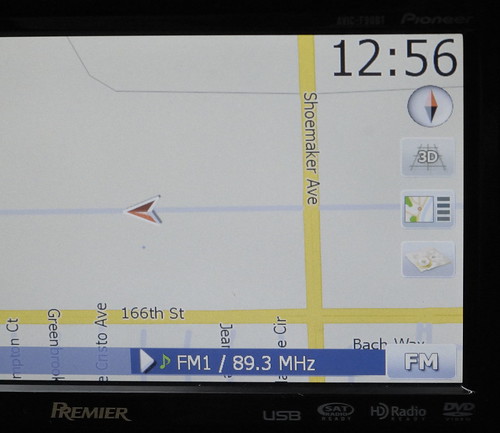
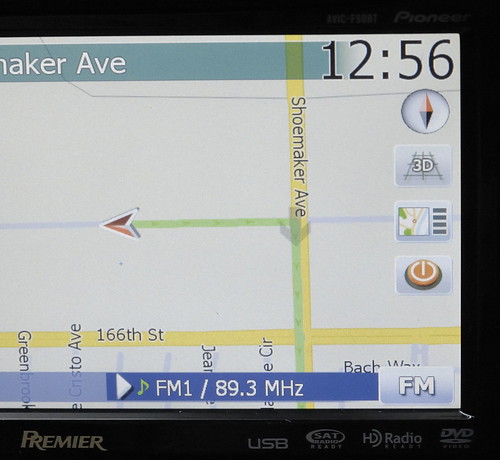
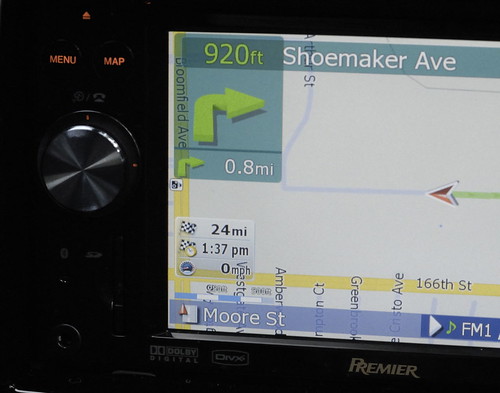
Finally I finished my mod to the style that I like. Thank you for your help and for the rest of the great members who did all the programming. Attached are few pictures of my mod. They are basically just part of your mods. I decided to keep the zoom scale but did switch it position with the route info box.


I made the clock in black color. Gray is still hard to read under the Sun. Font size is a bit smaller than yours. I use different icon for the POI search.

3101764418_5214222199.jpg


Different stop routing button.

3100927559_2131310e04.jpg


New zoom scale location.

3100927641_cfcd657072.jpg

Page 6 of 18