Search Archive

Maverickster's Mods - UPDATED 12/9/08

By Maverickster · Dec 03, 2008in Hacks/Mods💬 430 posts👁️ 106,956 views
Page 7 of 18
Posted Dec 12, 2008 · 02:30 UTC#151
Hey Mav,


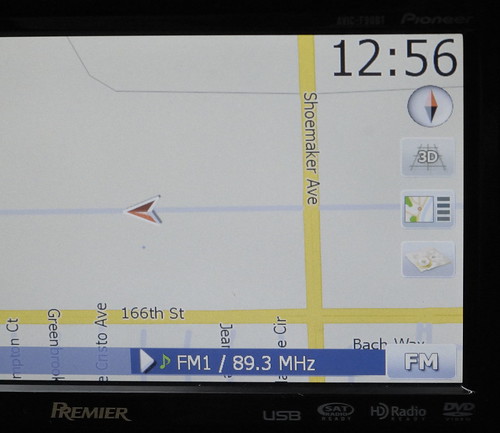
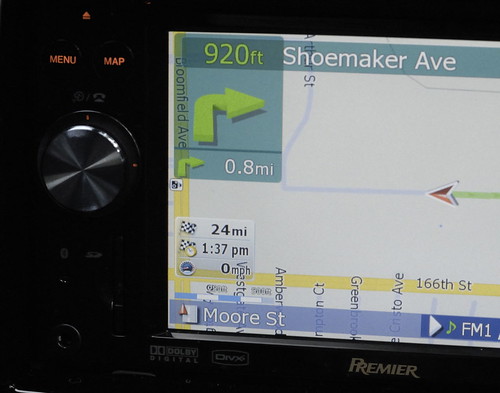
Finally I finished my mod to the style that I like. Thank you for your help and for the rest of the great members who did all the programming. Attached are few pictures of my mod. They are basically just part of your mods. I decided to keep the zoom scale but did switch it position with the route info box.


I made the clock in black color. Gray is still hard to read under the Sun. Font size is a bit smaller than yours. I use different icon for the POI search.

3101764418_5214222199.jpg


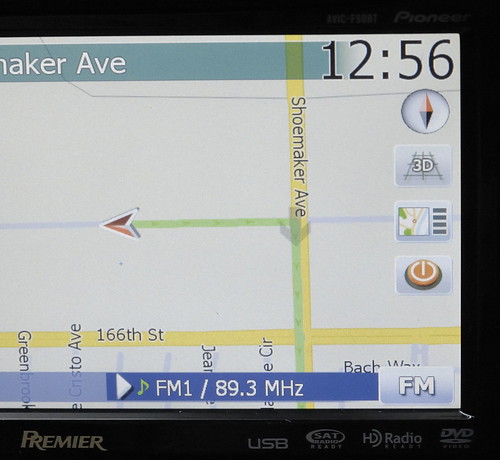
Different stop routing button.

3100927559_2131310e04.jpg


New zoom scale location.

3100927641_cfcd657072.jpg


Very well done! Would you mind posting the bmps for those buttons? Also, what's the code for the zoom scale and the relative positions of the route info box and scale?


Again, very nice!!


--Mav

Posted Dec 12, 2008 · 02:44 UTC#152

Very well done! Would you mind posting the bmps for those buttons? Also, what's the code for the zoom scale and the relative positions of the route info box and scale?


Again, very nice!!


--Mav

Buttons.zip

Posted Dec 12, 2008 · 02:48 UTC#153

Here is the new route info box location


Posted Dec 12, 2008 · 02:53 UTC#154

To move the zoom scale location. Search this:

map.ZOOMCONTROL_Y 300


in browsemap.ui and navigatemap.ui in common\ui folder


Change it to

map.ZOOMCONTROL_Y 420

Posted Dec 12, 2008 · 04:57 UTC#155

Where do I put the routeinfo code? What do I use it to replace?


For the clock, I've found the clock display code, what information do I change?

Posted Dec 12, 2008 · 05:26 UTC#156

Welll, last night I bricked my unit :shock:- constant boot loop after trying to fix it. Then I slept. I woke up and I figured out what had happenned. Last night I was sick and very tired... and didn't notice till this morning that the Speedcam mods that I had applied first were using the older (not 2.0)DATA.zip. When adding each of your mods, one of them created an invalid call error making the buttons lag (it reloaded the map everytime I pressed either the menu or map buttons). I just decided to use your 2.0 DATA.ZIP and manually add the speedcams. That worked. This also solved my "ding" volume issues.


I also noticed that when swapping the two buttons, I couldn't keep the z axis at 3001 for the 2d/3d button when the y was at 337. This was causing a boot loop because the unit was trying to draw album art and this button on a smilar axis. I removed the z from the 2d/3d and added it to the poi/end nav button (now at the previous y=145 axis point) and it works great!!! The 2d/3d doesn't seem to need a z axis when its lower in the screen. It works and is "clickable" without the z axis when y is set to 337. Thanks again Maverickster. You rock!!


Now to work on a bluetooth dun connection for internet... ;)

Posted Dec 12, 2008 · 05:27 UTC#157
Where do I put the routeinfo code? What do I use it to replace?


For the clock, I've found the clock display code, what information do I change?


Clock code is the same. I just changed the color only. If you also want it black w/ white edge, then change color to #000000 and color2 to #FFFFFF


routeinfo code is also the same but I changed the color and the Y position only to move the box up higher.


btw, I think Mav forgot to mention about the scripts for route info box mod. Scripts "sc_MSC_showETA" and "sc_MSC_showTTD" need to be added in the scripts_800_480.ui if you are mod this manually. Just add them to the end of the file. The script makes the ETA clickable and switches between ETA and TTD. Without it, you should get an error message when clicking the ETA.


If you are used Mav's DATA.zip, I think the scripts are included.


Posted Dec 12, 2008 · 14:07 UTC#158
Where do I put the routeinfo code? What do I use it to replace?


For the clock, I've found the clock display code, what information do I change?


Read the first page of this thread.

Posted Dec 12, 2008 · 14:17 UTC#159
Where do I put the routeinfo code? What do I use it to replace?


For the clock, I've found the clock display code, what information do I change?


Clock code is the same. I just changed the color only. If you also want it black w/ white edge, then change color to #000000 and color2 to #FFFFFF


routeinfo code is also the same but I changed the color and the Y position only to move the box up higher.


btw, I think Mav forgot to mention about the scripts for route info box mod. Scripts "sc_MSC_showETA" and "sc_MSC_showTTD" need to be added in the scripts_800_480.ui if you are mod this manually. Just add them to the end of the file. The script makes the ETA clickable and switches between ETA and TTD. Without it, you should get an error message when clicking the ETA.


If you are used Mav's DATA.zip, I think the scripts are included.


FWIW, I didn't forget to mention that. I didn't want (or, more accurately, know how) to make the appropriate changes to the scripts_800_480.ui file to enable the toggling function. I saw that the code I lifted from Vorian suggested that, but I kept getting the above-mentioned error and didn't know how to fix it. So, in my setup, I "undid" the toggle functionality by removing the onrelease command from that line item in the navigatemap_800_480.ui file. So, in my setup, the information displayed in the route info box is static (distance to destination, ETA, and current speed) and clicking anywhere on the box just brings you to the route info screen (it doesn't toggle between anything).


Your way is certainly more elegant and adds a feature (i.e. the ability to toggle between time remaining and ETA by pressing the data), but I wanted to keep my changes to as few files as possible. Now that you've identified how to enable the toggle, I may have to give some thought to whether or not to do that in my data.zip.


Nice discovery BTW!


--Mav

Posted Dec 12, 2008 · 14:53 UTC#160
Where do I put the routeinfo code? What do I use it to replace?


For the clock, I've found the clock display code, what information do I change?


Read the first page of this thread.


I've read every page of this thread (including the first), that doesn't mean I understand how to change font colors, etc. I specified that I knew WHERE to do it, I just needed to know what changes to the code made the clock 'blacker', that has never been specified that I have seen.


I also want to make sure I place them correctly. I really appreciate how you've done the 'Replace this, with this', it helps to idiot proof things for guys like me.


I appreciate what you guys are doing, and maybe I will eventually begin to understand...

Posted Dec 12, 2008 · 14:58 UTC#161
Where do I put the routeinfo code? What do I use it to replace?


For the clock, I've found the clock display code, what information do I change?


Read the first page of this thread.


I've read every page of this thread (including the first), that doesn't mean I understand how to change font colors, etc. I specified that I knew WHERE to do it, I just needed to know what changes to the code made the clock 'blacker', that has never been specified that I have seen.


I also want to make sure I place them correctly. I really appreciate how you've done the 'Replace this, with this', it helps to idiot proof things for guys like me.


I appreciate what you guys are doing, and maybe I will eventually begin to understand...


http://cloford.com/resources/colours/500col.htm


You're interested in the hex value.

Posted Dec 12, 2008 · 15:17 UTC#162

Awesome link, now THAT will help my understanding! Thanks Mav. Amazing that anyone needs that many shades of a color, isn't it?

Posted Dec 12, 2008 · 16:10 UTC#163

Clock code is the same. I just changed the color only. If you also want it black w/ white edge, then change color to #000000 and color2 to #FFFFFF


You mentioed earlier that you changed the font size, was it color only then? Is glowsize the aura around the characters? If so, did you change it?


Sorry for so many questions, I'm trying to learn how to alter all of this myself without flashing every small change to see what it does.


Thanks.

Posted Dec 12, 2008 · 16:35 UTC#164

Clock code is the same. I just changed the color only. If you also want it black w/ white edge, then change color to #000000 and color2 to #FFFFFF


You mentioed earlier that you changed the font size, was it color only then? Is glowsize the aura around the characters? If so, did you change it?


Sorry for so many questions, I'm trying to learn how to alter all of this myself without flashing every small change to see what it does.


Thanks.


Fontsize is what actual control the font size. I think Mav had bigger font initially in his first post; something likes 70 or 75 points. The latest of his is 65 points which is the same as mine.


ckelly, I really think you should read the FAQ post again before you make these mods. But yes, I do agree that we don't have a single point to learn all the syntax.

Posted Dec 12, 2008 · 17:06 UTC#165

I have already read the FAQ's but since you pointed it out, I was concerned I was re-asking questions that were already posted so I went there. Here is the index:


Index

1. Frequently Asked Questions:

a. General Frequently Asked Questions

b. Problem/Troubleshooting Frequently Asked Questions

c. Hack & Modification Frequently Asked Questions

2. Modifications

a. Completed Modifications

b. In-Progress Modifications

c. Requested Modifications


Nothing I have asked, such as what is glowsize or how do you change color or fonts is over there. Was there something I was supposed to see that I missed?

Posted Dec 12, 2008 · 17:10 UTC#166

There was aq thread weith sorta-kinda reference for FireFly syntax and functions, but it is neither stickied (hint) nor complete...

Posted Dec 12, 2008 · 17:32 UTC#167
There was aq thread weith sorta-kinda reference for FireFly syntax and functions, but it is neither stickied (hint) nor complete...


Thanks Boris. I searched both 'FireFly' (produced only one other instance of the use of the word) and 'syntax' and no such thread came up. I will continue to look. I've been googling terms as I need to (just figured out glowsize that way) and I'm learning that way but it is certainly slower than having a syntax FAQ thread - complete or not.


UPDATE: Is this it: http://avic411.com/forum/viewtopic.php?t=17753 ? It's waaayyy back in the back! If there is a better resource and don't mind posting it or pm'ing me, please do. I'm sure Mavericker and hkgms3 would appreciate you sending it to me as well.[/url]

Posted Dec 12, 2008 · 18:24 UTC#168

There was also this one:

http://avic411.com/forum/viewtopic.php?t=17809


I don't think there were too many references to FireFly before, mostly because even PDAMill/NavNGo don't quite tell what exactly it is (basically, seems to be the base UI engine used in their games, navi software, and what not)...

Posted Dec 12, 2008 · 20:42 UTC#169

Forgive me if this question has already been addressed but does anyone know what code to apply the key beep sound to the compass and the sat strength soft buttons? thanks.

Posted Dec 12, 2008 · 20:56 UTC#170

onclick='playsound "!button"'


Or chose one of the other sounds...

Posted Dec 12, 2008 · 21:01 UTC#171

At which line should I insert that in the perspective layers?

Posted Dec 12, 2008 · 21:17 UTC#172

Find the line that defines the element you want to add the sound to (i.e. compass or GPS meter), and add it in there. If there is onclick defined already, insert this with a comma:

onclick='playsound "!button", something_that_was_here'

Posted Dec 13, 2008 · 02:35 UTC#173

Im sorry but that didnt make much sense to me. Where should I insert that line in the following groups of code:


;Clock


;Compass

;


; GPS Status

;


Sorry to be a pain in the but, but I dont know what any of this means. I can however copy and paste really well. :D

Posted Dec 13, 2008 · 04:05 UTC#174
Im sorry but that didnt make much sense to me. Where should I insert that line in the following groups of code:


;Clock


;Compass

;


; GPS Status

;


Sorry to be a pain in the but, but I dont know what any of this means. I can however copy and paste really well. :D


Between the < and the >

Posted Dec 13, 2008 · 04:07 UTC#175

Thats several possibilities. Can you be more specific?

Page 7 of 18