Search Archive

Maverickster's Mods - UPDATED 12/9/08

By Maverickster · Dec 03, 2008in Hacks/Mods💬 430 posts👁️ 106,956 views
Page 9 of 18
Posted Dec 21, 2008 · 07:19 UTC#201

I had the same issue when I attempted to use Mavs DATA.zip to add the speed camera mod to. After several attempts, I did it the opposite way. I used the posted DATA.Zip with the speed camera settings and then followed Mavs PERFECT instructions to do each mod.

It worked perfectly when it was done in this order and I still dont know exactly what line of code threw the system in to a temper tantrum!

Posted Dec 21, 2008 · 08:52 UTC#202
I had the same issue when I attempted to use Mavs DATA.zip to add the speed camera mod to. After several attempts, I did it the opposite way. I used the posted DATA.Zip with the speed camera settings and then followed Mavs PERFECT instructions to do each mod.

It worked perfectly when it was done in this order and I still dont know exactly what line of code threw the system in to a temper tantrum!

thanx for the post man .. its good to know i'm not alone with this prob gonna try your way now and see if i can get it

Posted Dec 21, 2008 · 10:29 UTC#203

I've got Mav's DATA.ZIP with PeterParker's moved button. Everything works fine. I still have not moved the SAT icon out from behind the Address/Mute icon. X will be >14, but it seems like trial and error to get it not to be kissing the other button and not be in the middle of the map.

Just too lazy.

Posted Dec 21, 2008 · 18:24 UTC#204

My brother, thanks for the time you put into this and providing your zip file...we'll see how it works out for me.


Laters...

john

Posted Dec 22, 2008 · 04:01 UTC#205

Hi, I'm sorry if this is a stupid question; however, before I go through with this hack, is there any way to revert back to factory conditions if I don't like this hack?

Posted Dec 22, 2008 · 05:25 UTC#206
Hi, I'm sorry if this is a stupid question; however, before I go through with this hack, is there any way to revert back to factory conditions if I don't like this hack?

http://www.avic411.com/forum/viewtopic. ... light=back

read this

Posted Dec 22, 2008 · 08:55 UTC#207
here's my edited ui ...


this will move the nav mute button to accomadate for iPod album art


just inject into mav's data.zip


link


Quick Question...


Will this remove the Satellite Signal Strength Button and it's function since the Voice Guidance Mute / Address Select Button is now in it's place? Or is the Voice Mute/Address Button just covering up the Sat Sig button?


Thanks.


Peter Parker's edit was actually done before I put the Satellite Signal Strength Icon in its current location, so it probably doesn't account for it at all. So, it probably covers it up (or sits behind it). Either way, it's fixable by just moving the Satellite Signal Strength Icon out of the way (adjust the x/y coordinates).


--Mav

Thanks for getting back to me. I'm wondering if you (or ANYBODY) could help me out a little. I want to move the Sat Sig Icon to the right, out from behind the Guidance Mute/Address Select button. Here's what I'm changing: (bold and underlined)


; GPS Status

;

;


It seems like no matter what I change x to, I can never get the Sat Sig Icon to show. I've tried x=25, 50, 100... All to no avail.


Am I changing the wrong value? Do the y and z value come into play? Can you tell what I'm doing wrong?


I'm attaching my navigatemap_800_480.ui as a txt file to this post. It includes all of Mav's mods plus PParker's mod to allow for iPod artwork.


Thanks in advanced

navigatemap_800_480.ui.txt

Posted Dec 22, 2008 · 16:44 UTC#208

If you are really leaving the semicolon in front of the line, it will be treated as a comment... Remove the semicolon and it should appear.

Posted Dec 22, 2008 · 19:39 UTC#209

Boris is right. Not sure why it's commented out in yours since it's not in my data.zip, but you'll have to remove the ";". You're editing the x/y coordinates in the correct place, but you'll have to remove the ; or it'll be ignored.


--Mav

Posted Dec 22, 2008 · 20:56 UTC#210
Data.zip and first page worth of posts have been updated to resolve the following issues:


1. 2D/3D Toggle Button now works correctly. If you have used my Data.zip and subsequently made your own revisions such that you would prefer not to download a whole new Data.zip, all I did was add a Z index layer command that brought the button forward (i.e. "Z=3001") to both the 2D and the 3D button. If you prefer to cut and paste, in the navigatemap_800_480.ui file in the DATA/ui_pioneer/800_480/ui folder in the DATA.zip file, replace this:


;2D-3D Button


with this:


;2D-3D Button


2. Altimeter in lower left (when no route active) now shows elevation in feet, not miles. If you have used my Data.zip and subsequently made your own revisions such that you would prefer not to download a whole new Data.zip, all I did was change the "navigation.current_altitude.full_text" command to "gps.elevation". If you prefer to cut and paste, in the navigatemap_800_480.ui file in the DATA/ui_pioneer/800_480/ui folder in the DATA.zip file, replace this:


;current speed (and speed limit where present) and altitude when not navigating


;	


with this:


;current speed (and speed limit where present) and altitude when not navigating


;	

so this will make the 2d 3d button work? mine was not working. i did switch ur nav 800 480 ui with parkers so i just add this right? mav i'm talkin to u genius.

Posted Dec 23, 2008 · 15:15 UTC#211
Data.zip and first page worth of posts have been updated to resolve the following issues:


1. 2D/3D Toggle Button now works correctly. If you have used my Data.zip and subsequently made your own revisions such that you would prefer not to download a whole new Data.zip, all I did was add a Z index layer command that brought the button forward (i.e. "Z=3001") to both the 2D and the 3D button. If you prefer to cut and paste, in the navigatemap_800_480.ui file in the DATA/ui_pioneer/800_480/ui folder in the DATA.zip file, replace this:


;2D-3D Button


with this:


;2D-3D Button


2. Altimeter in lower left (when no route active) now shows elevation in feet, not miles. If you have used my Data.zip and subsequently made your own revisions such that you would prefer not to download a whole new Data.zip, all I did was change the "navigation.current_altitude.full_text" command to "gps.elevation". If you prefer to cut and paste, in the navigatemap_800_480.ui file in the DATA/ui_pioneer/800_480/ui folder in the DATA.zip file, replace this:


;current speed (and speed limit where present) and altitude when not navigating


;	


with this:


;current speed (and speed limit where present) and altitude when not navigating


;	

so this will make the 2d 3d button work? mine was not working. i did switch ur nav 800 480 ui with parkers so i just add this right? mav i'm talkin to u genius.


All you need to do is add the z=3001 in the two places indicated in the second code excerpt quoted above.


--Mav

Posted Dec 24, 2008 · 07:35 UTC#212
Boris is right. Not sure why it's commented out in yours since it's not in my data.zip, but you'll have to remove the ";". You're editing the x/y coordinates in the correct place, but you'll have to remove the ; or it'll be ignored.


--Mav


Mavrickster, BorisM, and peterparker,


Thank you all for all your help. I finally got this thing just like I wanted it.


I'm attaching a pic and my navigatemap_800_480.ui as a .txt file. It has all of Mavs mods, including Sat Sig icon, and peterparkers mods to allow for iPod album artwork. Anybody who want's it can use it. Just remember... I am not resposible for damages, use at your own risk, blah, blah, blah...


Thanks again gentlemen. Have Happy Christmas.

navigatemap_800_480.ui.txt

Posted Dec 24, 2008 · 10:10 UTC#213

hey guys

I'm very noob at this. Can someone teach me how to get this done??? I want my navi look like head post those two pics.


sorry...and thank you

Posted Dec 24, 2008 · 11:24 UTC#214

Mavrickster, BorisM, and peterparker,


Thank you all for all your help. I finally got this thing just like I wanted it.


I'm attaching a pic and my navigatemap_800_480.ui as a .txt file. It has all of Mavs mods, including Sat Sig icon, and peterparkers mods to allow for iPod album artwork. Anybody who want's it can use it. Just remember... I am not resposible for damages, use at your own risk, blah, blah, blah...


Thanks again gentlemen. Have Happy Christmas.


From your attached file:


; GPS Status

;

;


It appears you parsed (;) out the GPS Status on the left. Also, I think the y=270 value for the mute button (not posted above) would make the GPS icon at y=283 (posted above) sit behind and maybe slightly below the mute voice/address select button.
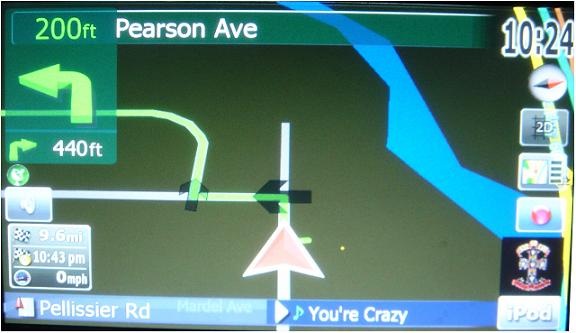
 

If I'm wrong, I'll learn something useful, and if I'm right- you posted the older navigatemap_800_400.ui file.


Steve

Posted Dec 24, 2008 · 15:01 UTC#215

Can anyone tell me how to make 'time-to-destination' show instead of 'time of arrival'?


I tried doing it in the UI (settings>nav settings>visual>etc), but it doesn't change anything...


I currently have all three boxes showing time-to-destination in the UI, and yet it's still MPH, Time-of-Arrival, and Distance-To-Destination (I think... it's however the mod has it)


Thanks in advance

Posted Dec 24, 2008 · 17:07 UTC#216

Hey Mav,

I have a slight issue. I don't know if it is associated with your hack, but would like your opinion.


I installed your data.zip file and have been running it for about a week now. I am really happy with your alterations. Thanks!


I am no longer able to get sound when using any source other than the radio. I am not able to hear anything when using CD, USB, or SD. The features work and the menu comes up showing the song playing, but nothing is coming out of the speakers.


I did verify these sources before installing your hack and everything was fine.


The only thing that I did with your data.zip file was to change the parking brake value to bypass that.


Any suggestions?


I will revert back to the factory data.zip if need be, but I don't really want to loose these upgrades.

Posted Dec 25, 2008 · 00:18 UTC#217

This happened to me too and I forgot to check the AV1 Source setting, I had to reset mine to IPOD then I was getting the sound again. Maybe something like that for you too.

Posted Dec 25, 2008 · 00:44 UTC#218

Mav, thank you very much for this detailled explaination. I'm getting quite the hang of implementing the hacks, and it is all working fine so far!


The strange thing is, i made the changes you wrote to the data.zip, but i did NOT want the replacement of the zoom scale bar and the window in the bottom left corner, so i did not make those changes. Packed it back into a zip, but my device doesn't accept it! It really REALLY shortly displays a sort of error message right after the splash screen, it goes so fast i almost cant read it... something about a database error or so. Then it hangs at the main menu with the loading message at the bottom. I worked around it by using your data.zip and removing the parts i did not want... but quite strange don't you think? Can this be due the fact that in my workaround i made the changes INSIDE the zip while at my first try i extracted-changed-zipped?

Not really important to know, but might be nice for my future attempts...


Keep the good work up!

Posted Dec 25, 2008 · 00:56 UTC#219

Mavrickster, BorisM, and peterparker,


Thank you all for all your help. I finally got this thing just like I wanted it.


I'm attaching a pic and my navigatemap_800_480.ui as a .txt file. It has all of Mavs mods, including Sat Sig icon, and peterparkers mods to allow for iPod album artwork. Anybody who want's it can use it. Just remember... I am not resposible for damages, use at your own risk, blah, blah, blah...


Thanks again gentlemen. Have Happy Christmas.


From your attached file:


; GPS Status

;

;


It appears you parsed (;) out the GPS Status on the left. Also, I think the y=270 value for the mute button (not posted above) would make the GPS icon at y=283 (posted above) sit behind and maybe slightly below the mute voice/address select button.


If I'm wrong, I'll learn something useful, and if I'm right- you posted the older navigatemap_800_400.ui file.


Steve


Sorry guys. You're right Steve. I accidentally posted the navigatemap_800_400.ui file that I was working from.


Here's the correct file. The file which produced the posted screenshot. Attached here and on my previous post.


Sorry once again.


Merry Christmas.

navigatemap_800_480.ui.txt

post-25894-12872756581318_thumb.jpg

Posted Dec 25, 2008 · 04:27 UTC#220

Mavrickster, BorisM, and peterparker,


Thank you all for all your help. I finally got this thing just like I wanted it.


I'm attaching a pic and my navigatemap_800_480.ui as a .txt file. It has all of Mavs mods, including Sat Sig icon, and peterparkers mods to allow for iPod album artwork. Anybody who want's it can use it. Just remember... I am not resposible for damages, use at your own risk, blah, blah, blah...


Thanks again gentlemen. Have Happy Christmas.


From your attached file:


; GPS Status

;

;


It appears you parsed (;) out the GPS Status on the left. Also, I think the y=270 value for the mute button (not posted above) would make the GPS icon at y=283 (posted above) sit behind and maybe slightly below the mute voice/address select button.


If I'm wrong, I'll learn something useful, and if I'm right- you posted the older navigatemap_800_400.ui file.


Steve


Sorry guys. You're right Steve. I accidentally posted the navigatemap_800_400.ui file that I was working from.


Here's the correct file. The file which produced the posted screenshot. Attached here and on my previous post.


Sorry once again.


Merry Christmas.


Hi, i tried using ur file but i believe since it is in txt format, my navi isn't reading it. Could you please post the .ui format? thank you very much, unless I'm doing something wrong haha :(

Posted Dec 25, 2008 · 05:52 UTC#221

ok i have a issue now :( ,


i think i just made my 900 a paper weight.

As soon as i Replaces my DATA.zip with the Mavrickster DATA.ZIP in the APL2 and then iGo folders . i X out of all screens after i have pasted the data.zip. i took the SD card out and hold the reset button for five seconds.when it rebooted i got a ERRoR "Map initialisation error" Map files cannot be found.

I did make a copy of my flashdisk and DID try to replace the original DATA.zip but unfortunately had the same error?


any ideas?

Posted Dec 25, 2008 · 07:36 UTC#222

Mavrickster, BorisM, and peterparker,


Thank you all for all your help. I finally got this thing just like I wanted it.


I'm attaching a pic and my navigatemap_800_480.ui as a .txt file. It has all of Mavs mods, including Sat Sig icon, and peterparkers mods to allow for iPod album artwork. Anybody who want's it can use it. Just remember... I am not resposible for damages, use at your own risk, blah, blah, blah...


Thanks again gentlemen. Have Happy Christmas.


From your attached file:


; GPS Status

;

;


It appears you parsed (;) out the GPS Status on the left. Also, I think the y=270 value for the mute button (not posted above) would make the GPS icon at y=283 (posted above) sit behind and maybe slightly below the mute voice/address select button.


If I'm wrong, I'll learn something useful, and if I'm right- you posted the older navigatemap_800_400.ui file.


Steve


Sorry guys. You're right Steve. I accidentally posted the navigatemap_800_400.ui file that I was working from.


Here's the correct file. The file which produced the posted screenshot. Attached here and on my previous post.


Sorry once again.


Merry Christmas.


Hi, i tried using ur file but i believe since it is in txt format, my navi isn't reading it. Could you please post the .ui format? thank you very much, unless I'm doing something wrong haha :(


You're doing something wrong. hahaha. j/k. :lol:

I'm not allowed to upload .ui files.

If your using Windows, right click on the Download Link-Save Link As- and save the file. Take the text from this file and overwrite the text in yours.

Posted Dec 25, 2008 · 09:26 UTC#223
ok i have a issue now :( ,


i think i just made my 900 a paper weight.

As soon as i Replaces my DATA.zip with the Mavrickster DATA.ZIP in the APL2 and then iGo folders . i X out of all screens after i have pasted the data.zip. i took the SD card out and hold the reset button for five seconds.when it rebooted i got a ERRoR "Map initialisation error" Map files cannot be found.

I did make a copy of my flashdisk and DID try to replace the original DATA.zip but unfortunately had the same error?


any ideas?

pdate from pioneer and see if this fixes it. Otherwise you'll need to get a copy of the couple 100 MB of files to restore your AVIC. Let's hope the 2.0 update fixes it.
Posted Dec 25, 2008 · 09:27 UTC#224
ok i have a issue now :( ,


i think i just made my 900 a paper weight.

As soon as i Replaces my DATA.zip with the Mavrickster DATA.ZIP in the APL2 and then iGo folders . i X out of all screens after i have pasted the data.zip. i took the SD card out and hold the reset button for five seconds.when it rebooted i got a ERRoR "Map initialisation error" Map files cannot be found.

I did make a copy of my flashdisk and DID try to replace the original DATA.zip but unfortunately had the same error?


any ideas?


Try the update from pioneer and see if this fixes it. Otherwise you'll need to get a copy of the couple 100 MB of files to restore your AVIC. Let's hope the 2.0 update fixes it.

Posted Dec 26, 2008 · 02:27 UTC#225

alright , quick question before i try to update all over again i want to try to replces it with my back up flashdisk.

After trying to replace the missing file in my CONTENT folder with my backup ones everything would go good untill it got to the MAP folder , a pop up would come up saying there wasnt enough space.

Now my question is what is the best way to replaces all my backup files ? should i delete the flashdisk and just copy and replace it with one in my desktop?

Page 9 of 18