opps double post
Posted Dec 08, 2008 · 02:29 UTC#76
opps double post
hmmm the speed limit function constantly shows my current speed rather then the expected function...
i've used the latest data.zip posted with the only modifications being the moving of the nav mute button...
It will show your current speed only and not the current speed / speed limit, if there is no speed limit info then available to the system. It works for me on a AVIC-F900BT, but, of course, there could be lots of variables amongst models, I suppose. First, check to be sure your code is as follows, then go get on an interstate highway (which it ought to have speed limit info for) and see what happens.
;current speed (and speed limit where present) and altitude when not navigating


;
Have you tried to enable the speed limit monitoring bit in the Navi settings? If the foregoing doesn't work, I don't know what to tell you. I'll check into it though and report back if I find anything strange.
--Mav
i'll give it a look ...
of further note... when i change the SETTINGS.VISUAL.DISPLAY INFO from speed to speed limit.. it doesn't even change anything.. odd i must say.
i'll give it a look ...
of further note... when i change the SETTINGS.VISUAL.DISPLAY INFO from speed to speed limit.. it doesn't even change anything.. odd i must say.
That's not odd. That's the way it works. If you want to change the info in the Route Info box, you're gonna have to change the code. As for your speed limit issue, I think you're pretty clearly not in an area that has speed limit info available. I just hopped on the freeway again and it worked exactly the way it's supposed to. Go get on an interstate highway (where it should have speed limit info) and let me know if it still doesn't work. Thanks man!
i'm trying to access my SD card on my laptop atm... but i'm having driver issues.. hehehe
PLEASE CAN YOU UPLOAD THE UPDATED DATA.ZIP FILE
ON RAPIDSHARE.COM
PLEASE PLEASE PLEASE PLEASE PLEASE PLEASE PLEASE PLEASE 
PLEASE CAN YOU UPLOAD THE UPDATED DATA.ZIP FILE
ON RAPIDSHARE.COM
PLEASE PLEASE PLEASE PLEASE PLEASE PLEASE PLEASE PLEASE
Huh? Check the first post. There's a link.
why are people yelling@@@@$!@!@#@ =P
I just want to say:
Great job Mav, thanks for the help and for putting all these great mods together!
The data.zip has the complete code/scripts for all of these hacks, but not the .bmp's right? I didn't see them in there...?
Yeah, I made a mistake in the coding of the find address button. I fixed it. It should work fine now.
Wow that was quick!
Thanks so much for making these, they are much better than anything I could ever achieve myself AND you make it easy :beer:
ok.. confirmed speed limit mod is working... but only when no route is designated.. i assume that's how it's setup?
i haven't gone back through the posts to verify yet... i'm a little busy with figuring out button placement still =)
The data.zip has the complete code/scripts for all of these hacks, but not the .bmp's right? I didn't see them in there...?
They're in there.
ok.. confirmed speed limit mod is working... but only when no route is designated.. i assume that's how it's setup?
i haven't gone back through the posts to verify yet... i'm a little busy with figuring out button placement still =)
Yes, that's how it's designed.
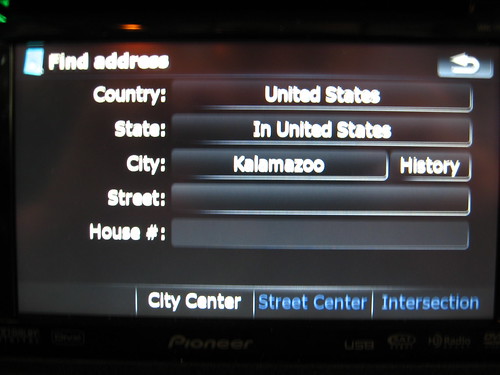
Address Entry Screen Brought up by Pressing Address Button:
Kalamazoo??? Really????
Your mods and instructions look great, cant wait to actually get my unit and start modding it!
As of the 12/9/08 update, the 2D/3D Toggle Button issue has been resolved in the latest Data.zip.
WOW, you guys are on it... I just noticed that the 2d/3d toggle button is actually missing from my screen in both IN/OUT of route mode.
Also, when I go in to the Navigation settings / Visual settings... the 2D settings are not even there. 3D is the only option to adjust settings.
Well, if you're using my data.zip wholesale, the toggle button shouldn't be missing altogether. Are you in 2D or 3D?
--Mav
tried it on my 700bt the 2d button does nothing at all everything else worksWell, if you're using my data.zip wholesale, the toggle button shouldn't be missing altogether. Are you in 2D or 3D?
--Mav
Well, if you're using my data.zip wholesale, the toggle button shouldn't be missing altogether. Are you in 2D or 3D?
--Mav
tried it on my 700bt the 2d button does nothing at all everything else works
Right, but the button is "there" right? It just doesn't work. Correct?
--Mav
that is correct tried it again got it to go 2d after pushing it quite a bit then would not go back to 3d the button changed to a 3d icon from 2d after repeated pushing got it to go back to 3d button changed to 2d now it doesnt work againWell, if you're using my data.zip wholesale, the toggle button shouldn't be missing altogether. Are you in 2D or 3D?
--Mav
tried it on my 700bt the 2d button does nothing at all everything else works
Right, but the button is "there" right? It just doesn't work. Correct?
--Mav
that is correctWell, if you're using my data.zip wholesale, the toggle button shouldn't be missing altogether. Are you in 2D or 3D?
--Mav
tried it on my 700bt the 2d button does nothing at all everything else works
Right, but the button is "there" right? It just doesn't work. Correct?
--Mav
Thanks. Can you do me a favor and check whether the 2D and 3D options are both still "there" when you go into Navi Settings/Display Settings? Thanks a lot!
--Mav
Ok, I just took a little trip and tested this further.
I guess my issue may be different than others because I have also added some things from other data files.
I no longer have a 2D/3D button and the 2D option is not available in settings. I will go back and replace my data.zip with the last copy that I have.
when i go to nav settings under visual map settings i have elevation on street for 2dthat is correctWell, if you're using my data.zip wholesale, the toggle button shouldn't be missing altogether. Are you in 2D or 3D?
--Mav
tried it on my 700bt the 2d button does nothing at all everything else works
Right, but the button is "there" right? It just doesn't work. Correct?
--Mav
Thanks. Can you do me a favor and check whether the 2D and 3D options are both still "there" when you go into Navi Settings/Display Settings? Thanks a lot!
--Mav
when i go to nav settings under visual map settings i have elevation on street for 2dthat is correctWell, if you're using my data.zip wholesale, the toggle button shouldn't be missing altogether. Are you in 2D or 3D?
--Mav
tried it on my 700bt the 2d button does nothing at all everything else works
Right, but the button is "there" right? It just doesn't work. Correct?
--Mav
Thanks. Can you do me a favor and check whether the 2D and 3D options are both still "there" when you go into Navi Settings/Display Settings? Thanks a lot!
--Mav
Great. Thanks. Then it's probably not as huge of a fix as I was fearing. Carlsbad's post had me thinking I had inadvertently disabled the entire 2D feature and since nothing I did should have had that effect, I was, needless to say, concerned. Knowing his problem is isolated to him gives me comfort that it's probably just something in the navigatemap_800_480.ui file.
Thanks for your help (you too Carlsbad)!
--Mav