Search Archive

HOW TO: US Speed & Elevation Road Signs

By mgreinke · Jan 04, 2009in Hacks/Mods💬 94 posts👁️ 24,799 views
Page 1 of 4
Posted Jan 04, 2009 · 05:24 UTC#1

US Speed and Elevation Road Signs...


[uPDATED 3/4/09 to assist with removing the Route Info and Map Zoom displays so they dont overlap with the road signs. Note that step #3, will turn off the route info display when no route is selected however when a route IS selected, the route info display will be fixed to show distance to destination, time to destination and current speed. Still looking for code to allow you to set these variables through the AVIC interface]


1) Copy the (3) bitmap files in the ZIP file to \ui_pioneer\common. These are the various road sign templates. You may want to make a backup of speed.bmp. I'm not sure if this stock speed.bmp is even used on the F series.


2) Copy the DSDIGI.TTF file to \My Flash Disk\APL2\iGo on your F series. Note: This is an alternate font used for the digital display on the "your speed" sign. You can stick with the stock fonts but if you do, you will need to change it back to tahoma or tahomabd in navigatemap_800_480.ui.


3) If you are using the stock navigatemap_800_480, you will notice that the ROUTE INFO display will show when not navigating and this will be a waste of precious screen realestate. If you are already using a script like Mavrickster's, this has already been removed for you. If not, you will probably want to turn off this off. This also will allow the various road signs to not overlap the ROUTE INFO display. If you are already using Mavricksters mods, you can skip to step 4.


To turn off the ROUTE INFO display when not navigating, replace all the code in the section as with this code:


; start hidden


hide


;end hidden


4) To also remove the Map Scale, open up DATA\ui_pioneer\common\ui\navigatemap.ui and seach and replace all references of


map.ZOOMCONTROL_SHOW 1


with


map.ZOOMCONTROL_SHOW 0


Do the same thing for DATA\ui_pioneer\common\ui\browsemap.ui


4) To display the posted speed limit, place the following code in navigatemap_800_480.ui in the same layer as noted in step 3 (). Insert this code at the bottom, just before the statement:


;Display Posted Speed Limit


5) To display your elevation, add the following code in the same layer (again, just before the statement:


;Display Elevation


6) To display your clocked speed, add the following code in the same layer (again, just before the statement:


;Display Clocked Speed


Many thanks to those who have gone before me to show the way....
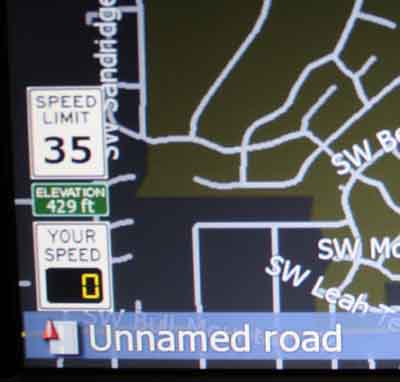
signs_and_font.zip

post-22762-12872756689726_thumb.jpg

Posted Jan 04, 2009 · 05:34 UTC#2

Wow This looks amazing...... cant wait to try it out.

Posted Jan 04, 2009 · 13:56 UTC#3

The signs look great!! If you don't mind I might use your speed limit sign in my set up. Yours is a bit smaller than mine. The sign I created is 100 px high - it's shown in this thread http://avic411.com/forum/viewtopic.php?t=19965


If I can get yours enlarged to 100 px high, it's going in.


Try this out when have a chance, I think you'll get a kick out of it. Create a route along a path where you know there is speed limit data. Do a fly over on the route and you;ll notice the sign will display with the speed limit. If the data changes on the route, the sign will change accordingly. Now here's the fun part. With your newly created digital "Your Speed" sign, see if it'll display the simulated speed. If it does snap a picture of it. It'll likely show a speed in excess of 200 mph.


Awesome work on the signs.

Posted Jan 04, 2009 · 14:41 UTC#4

man you should make a data.zip and post, that all looks great. now i am looking like crazy trying to learn to code new buttons but i suck at coding........ ahhhhhhhhhhhhhhh

Posted Jan 04, 2009 · 18:49 UTC#5

This is cool - nicely done.

Posted Jan 05, 2009 · 00:52 UTC#6

It's a shame that the iGo maps have such skimpy speed limit coverage in the US. I need to hop on a freeway in order to see any posted speed limits. I confirmed it isnt any better with the 2008.4 North America maps. Garmin on the other hand displays speed limits for all my local surface streets. I would have thought that iGo would need this data in order to calculate an ETA for a route.

Posted Jan 05, 2009 · 23:15 UTC#7

Thanks again for posting these. Your graphic far exceed what I could do. I've enlarge your speed limit sign proportiantly to 100 W X 80 H and installed in place of the sign I had made.


It looks really nice.

Posted Jan 05, 2009 · 23:31 UTC#8
It's a shame that the iGo maps have such skimpy speed limit coverage in the US. I need to hop on a freeway in order to see any posted speed limits. I confirmed it isnt any better with the 2008.4 North America maps. Garmin on the other hand displays speed limits for all my local surface streets. I would have thought that iGo would need this data in order to calculate an ETA for a route.


I think they do store average speed on the road. If you add:

show_speed_limit=1

to the [debug] section of SYS.TXt it will show speeds that iGO uses for route calculation when you hit a road on screen (or click the info button). Posted speed limits are nice, but I am sure they do not want to be liable for people speeding through residential streets because the speed limit has changed after maps were compiled...


BTW, with built-in flyover it will drive super very extra fast. There's also route simulation which drives at speed limit (this mode also activates warnings, like speed camera etc.). I had a mod posted at one point that would ask you which one you wanted to use when you click flyover button, but did not put it back after 2.0 because simulation seems to be accessible through another layer of menus somewhere in route info...

Posted Jan 06, 2009 · 04:24 UTC#9

You are right BorisM and thanks for responding. They do store some form of speed limit data which can be viewed when you add that setting to SYS.TXT. It certainly isnt posted speed limit info. The display you get (along side the road name when you tap the screen over a road) is something like 26/?50. Not sure what that is but not very usable. I did a little googling and from what I can tell, the maps iGo uses these days dont have many posted speed limits for US surface streets (they did some time ago). Seems that they still have fairly good coverage in Europe. I agree the iGo folks may be hesitant to display the posted speed limit if they get adjusted every so often however Garmin doesnt seem to care, at least in my part of the US.


Thanks again!

Posted Jan 06, 2009 · 16:00 UTC#10
You are right BorisM and thanks for responding. They do store some form of speed limit data which can be viewed when you add that setting to SYS.TXT. It certainly isnt posted speed limit info. The display you get (along side the road name when you tap the screen over a road) is something like 26/?50. Not sure what that is but not very usable. I did a little googling and from what I can tell, the maps iGo uses these days dont have many posted speed limits for US surface streets (they did some time ago). Seems that they still have fairly good coverage in Europe. I agree the iGo folks may be hesitant to display the posted speed limit if they get adjusted every so often however Garmin doesnt seem to care, at least in my part of the US.


Thanks again!


You're welcome. For what it's worth, my portable Navigon (Navteq maps) does not display speed limits for every street either. Highways, sure, some major roads, but not much else...


Numbers that are displayed are, I think, something average and max speed on the road segment.

Posted Jan 31, 2009 · 23:58 UTC#11

ok, help me here if you can. i wanted the speed limit sign to show up, i did what i thought was right but i dont see the speed limit sign and im wondering if i have it added up on the left side that's full or something. i added most of the mod as directed but since i already have some of that on my unit. I did step 1 copying the 3 bmp's as directed. I added step 3 for the posted speed limit sign to show up where i was told to paste it. i didn't copy the DSDIGI.TTF file as i already have my speed displaying on the top how i like it, and skipped step 4 for the elevation. I'm wondering if its not showing up because there's no room on my left side, i have room on the right lower side but not sure if i need to edit it somehow to move it and make it display in the opening. any help? thanks everyone!!

post-25892-12872756896552_thumb.jpg

post-25892-12872756900441_thumb.jpg

Posted Feb 13, 2009 · 03:55 UTC#12

I have been scared to just place the text anywhere into the folder navigatemap_800_480.ui


Also I am scarred to ammend a data zip and then potentially lose the Keeper data zip that I have already loaded>


Please advise

Posted Feb 13, 2009 · 04:48 UTC#13

Very nice! I'm adding it to the FAQ.

Posted Feb 16, 2009 · 05:33 UTC#14

Sorry a newby question. What "layer" should these codes go under?

Posted Feb 16, 2009 · 10:43 UTC#15

Wow this is a grreat stuff...i missed the US speed limit sign from

my previous GPS, navigon 8100t.


how can i use this w/ Mav's mod? he already has his own version of

speed limit thing. i guess i have to spend some time this week to

figure that out.

Posted Feb 22, 2009 · 06:27 UTC#16

Any answer to aa777rob's question?


Ceger

Posted Feb 22, 2009 · 18:36 UTC#17

The speed limit sign will only display when NO ROUTE is active and then only when driving on a road that iGo reports the speed limit. Where I live, this is on highways only.


Also, the mod YOU are using when NO ROUTE is active, will certainly overlap with the speed limit sign using the X/Y coordinates in the sample script. You will need to use alternate coordinates if you dont want this to happen.


Lastly, if you dont use the DSDIGI font file I provided, then you will need to modify the line which references this font to reference the TAHOMA font.


Good luck!

Posted Feb 22, 2009 · 19:22 UTC#18

mgreinke, super cool mod!

Since my home-brew BMPs won't load, are you able to make a European roadsign to go with this mod?


Speedlimit signs look like this:

large_303772.jpg


this one says "your speed is"

snelheidsmeter%20(394%20x%20263).jpg

Posted Feb 22, 2009 · 22:10 UTC#19

Give these a try. I didnt try them myself. Since the circle would need to have transparancy, hopefully I have that correct. I'm sure you will also need to adjust the X/Y coordinates to make the numbers fit.


Good luck!

post-22762-12872757157699_thumb.jpg

de.zip

Posted Feb 26, 2009 · 23:23 UTC#20

I must be retarded. you said to copy the bmp files into \ui\pioneer\common


I can't even find that folder? is that supposed to be on the F Series or on my flash disk?

Posted Feb 26, 2009 · 23:31 UTC#21

You will find it in MyFlashDisk :wink:

Posted Feb 27, 2009 · 00:39 UTC#22

yeah I got a little post happy :) I found the files and managed to get the approriate changes made


now the original stuff shows over the modded icons.


anyway to get rid of that? I am trying to look at the .ui file but I suck at coding :(

Posted Feb 27, 2009 · 00:56 UTC#23

You mean you've got both original and modded icons superimposed in same spot?

Posted Feb 27, 2009 · 00:56 UTC#24

You mean you've got both original and modded icons superimposed in same spot?

Posted Feb 27, 2009 · 00:56 UTC#25
You mean you've got both original and modded icons superimposed in same spot?


correct ;(

Page 1 of 4