Search Archive

DUMPYSTIG's mods... FTP

By basstoy · Feb 20, 2009in Hacks/Mods💬 114 posts👁️ 16,929 views
Page 4 of 5
Posted Feb 26, 2009 · 08:08 UTC#76
You shouldn't be getting duplicated buttons/icons. Try re-installing the DATA.zip, see if that cures it.


Speedcam has a newer sound that someone else here (forgot who) pointed me to. Go to Top Menu > Settings > Navi Settings > Warnings > Audible Warning Enable/Disable.


Can't help with Ipod Art, it's not something I use so haven't looked into it.


Ok i'll try to do that over this weekend :wink:

at the same time, i'll also try to upload default tahoma font to the unit.

i guess i might have to decrease the font sizes on the map.


oh btw i can hear the speed cam warning sound...after i chnaged my setting to "approaching" from "simple"


neways, thanks again!!!

Posted Feb 26, 2009 · 08:14 UTC#77
DS, any chance to post a screenshot?

(tinypic.com)


Sure, but of what? :)

Of the screens how they look with the mods loaded.


he already did


http://www.avic411.com/forum/viewtopic. ... &start=300


page 20 or 21

Posted Feb 26, 2009 · 08:48 UTC#78

Ah right...


OK.

Just trying to see what I want from whos mods to make a combined thingy...

Much better font though 8)


Also a shot available during navigating?

Posted Feb 26, 2009 · 19:53 UTC#79

at the same time, i'll also try to upload default tahoma font to the unit.

i guess i might have to decrease the font sizes on the map.


oh btw i can hear the speed cam warning sound...after i chnaged my setting to "approaching" from "simple"


neways, thanks again!!!


Installing stock Tahoma/Tahomabd will not be a prob, but with the font I have used the width of the letters is slightly bigger than Tahoma, so I had to alter a lot of 'x=' and 'w=' values for fonts/boxes etc. to suit. You will also have to do the same, it's time consuming but worth the effort to get it just how you want.


You should also now be hearing a quite shrill warning sound on approaching a Speedcam, am I correct?

Posted Feb 26, 2009 · 20:08 UTC#80

DS, can you please revert how you have set the simple speedcam sound will it play once? twice? LOADS of times?

Posted Feb 26, 2009 · 20:13 UTC#81

Eurotuner29,


The bmp you want is in my DATA.zip, >ui_pioneer/800_480,

746_32K_OM-508_edit_32b.bmp


I'm having probs uploading files, so you will have to get it from my DATA.zip.

Posted Feb 26, 2009 · 20:15 UTC#82
DS, can you please revert how you have set the simple speedcam sound will it play once? twice? LOADS of times?


Um, not sure exactly what you mean?

Posted Feb 26, 2009 · 20:47 UTC#83
Ah right...


OK.

Just trying to see what I want from whos mods to make a combined thingy...

Much better font though 8)


Also a shot available during navigating?


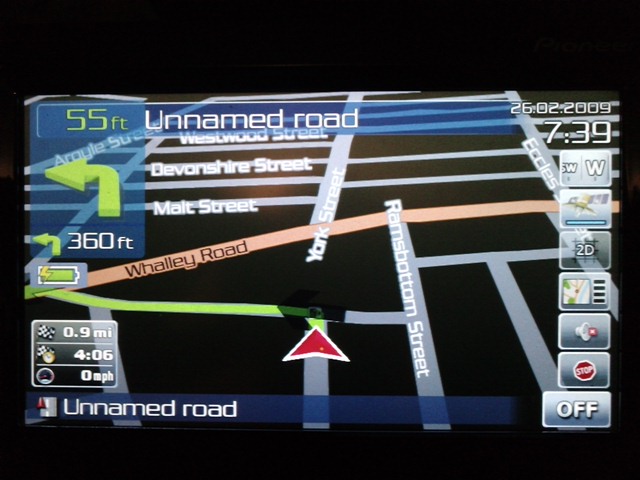
Afew screenshots................ :wink:

post-26891-12872757241311_thumb.jpg

post-26891-12872757242131_thumb.jpg

post-26891-12872757242779_thumb.jpg

Posted Feb 26, 2009 · 21:29 UTC#84

Thanks :)

Like your date thingy there :)


with the speedcam issue I meant do your modifications to that let the alarm go off just once?

Or still as many times as stock?

Posted Feb 26, 2009 · 21:51 UTC#85

I didn't alter any of the settings for the warning sound, apart from the actual sound file. The other mods simply involved moving/resizing the warning box/info.

I have mine set to >Audible Warning >When Approaching, and if I'm exceeding the speed limit for that particular camera I get a really harsh warning sound. Hope this answers your question :)

Posted Feb 26, 2009 · 22:07 UTC#86

What scheme are you running in those screenshots?

Posted Feb 26, 2009 · 22:17 UTC#87

That's easy: Pioneer Blue Night.

Have you got the bmp you wanted?

Posted Feb 26, 2009 · 22:23 UTC#88

Yes i did. Thank you. I just dropped it in my data now and i'm going out to the car to view it.

Posted Feb 26, 2009 · 22:25 UTC#89

Let's know what you think

Posted Feb 26, 2009 · 22:42 UTC#90

Looks great. Definately a nice addition to the map screen. Much more noticeable! Whats the battery icon for on your map screen?

Posted Feb 26, 2009 · 22:47 UTC#91

Glad you like it :)


Battery icon relates to the integral battery on the 500, although I must admit it doesn't really serve much purpose, turned it on just for screenshots.

Posted Feb 27, 2009 · 03:49 UTC#92

so all we need to use with the file is data.zip right? we dont need the sys.txt or whatever? also, how do I move it from my desktop to my sd card.. its saying its write protected

Posted Feb 27, 2009 · 04:20 UTC#93

at the same time, i'll also try to upload default tahoma font to the unit.

i guess i might have to decrease the font sizes on the map.


oh btw i can hear the speed cam warning sound...after i chnaged my setting to "approaching" from "simple"


neways, thanks again!!!


Installing stock Tahoma/Tahomabd will not be a prob, but with the font I have used the width of the letters is slightly bigger than Tahoma, so I had to alter a lot of 'x=' and 'w=' values for fonts/boxes etc. to suit. You will also have to do the same, it's time consuming but worth the effort to get it just how you want.


You should also now be hearing a quite shrill warning sound on approaching a Speedcam, am I correct?


i think ur font looks cool & don't require any modifications....

(sometimes it's kind of hard to read 8) )

yup i hear that shill warning sound...and i don't like it...-_-;;

which .wav file do i have to replace in order to change the warning sound??

one last question, r u using pioneer blue night theme on those screenshots? it looks better than mine for some reasons

Posted Feb 27, 2009 · 04:24 UTC#94

ok so I downloaded the file... first copied and pasted the data.zip over.. then foolishly thought that was it and when I loaded it up it just said application data failed or something like that.. so then I went back and copied and pasted the sys.txt over to apl2>igo>sys.txt.. still no good, now music wont work.. plz help

Posted Feb 27, 2009 · 04:30 UTC#95
ok so I downloaded the file... first copied and pasted the data.zip over.. then foolishly thought that was it and when I loaded it up it just said application data failed or something like that.. so then I went back and copied and pasted the sys.txt over to apl2>igo>sys.txt.. still no good, now music wont work.. plz help


did u make a back up of ur flash folder???

neways, WHERE did u copy the data.zip file into?

u should have made a back up of the original data.zip from ur unit &

replaced it w/ dumpystig' data.zip.

Posted Feb 27, 2009 · 04:32 UTC#96

I did.. does it matter that the guys data.zip had his name in front of it? Instead of saying data.zip it said (his name)-data.zip

Posted Feb 27, 2009 · 04:34 UTC#97

I coped it into apl2>Igo> and then replaced the old one

Posted Feb 27, 2009 · 04:34 UTC#98
I did.. does it matter that the guys data.zip had his name in front of it? Instead of saying data.zip it said (his name)-data.zip


rename "dumpystig-DATA.zip" to "DATA.ZIP" before u copy it over to

igo folder.

Posted Feb 27, 2009 · 04:37 UTC#99
I did.. does it matter that the guys data.zip had his name in front of it? Instead of saying data.zip it said (his name)-data.zip


rename "dumpystig-DATA.zip" to "DATA.ZIP" before u copy it over to

igo folder.


like i said ealier, make a back up of original data.zip and just delete it from igo foler...(to make it easier) then put dumpystig's data.zip into it

Posted Feb 27, 2009 · 04:48 UTC#100

wow thanks so much

Page 4 of 5