I still cannot get the speedcam box to cancel if it displayed on the screen. The code reads:yet it does not function.
And in the common file it pulls up this code:
So does this mean it is only going to cancel the section cams? Because in the line below that it has an SC cancel for the section cams:
Thanx<
Bud
what you can do is create a script that hides it or moves it out of the screen, and then give it a shot, you may want to create some test cameras, the only problem that could occur is that lets say you hide the camera warning box, it may not appear on all camera locations unless you find out a way to run another script to show it, either way the best way to go is create a script and see if it only gets hidden on that intance
IDT v4.2 on p46, last for 2.0
Right now, #333333 is black and #FFFFFF is white. Easy!Good luck,
Bud
just a clarification #000000 is black
NP
I made the simple semi colon and color change, but now my nav gets stuck in "Startup in progress..." and then it restarts. I am using 7zip and I used a blue color for the time color.
What do you think the issue could be? This only happens with IDT mods...
try reverting back, and then try it again, could you post your nav_800_480.ui here so i could take a look at it,
NP
I made the simple semi colon and color change, but now my nav gets stuck in "Startup in progress..." and then it restarts. I am using 7zip and I used a blue color for the time color.
What do you think the issue could be? This only happens with IDT mods...
try reverting back, and then try it again, could you post your nav_800_480.ui here so i could take a look at it,
Here it is. I am just trying to delete the date on the nav screen and possibly change the time to a color that isnt gray b/c it blends too much with the Riks night theme.
checked it and didn't find anything wrong with it, try redownloading the v2.9? try that and see what happens, i think there's a corrupt file somewhere and that's what's causing the reboot,
Right now, #333333 is black and #FFFFFF is white. Easy!Good luck,
Bud
just a clarification #000000 is black
oops ![]()
ok, in what file is the dimming icon script hiding, thinking about adding it to my mod, but can't find it to see what i need to add to mine.. lol
Here it is. I am just trying to delete the date on the nav screen and possibly change the time to a color that isnt gray b/c it blends too much with the Riks night theme.
checked it and didn't find anything wrong with it, try redownloading the v2.9? try that and see what happens, i think there's a corrupt file somewhere and that's what's causing the reboot,
The clean redownloading of v2.9 is working fine. I'll just leave the tweaking to the pros from now on.
Thanks IDT for your help.
FYI, leetlauncher 2.0 is very good for making these kind of updates.
ok, in what file is the dimming icon script hiding, thinking about adding it to my mod, but can't find it to see what i need to add to mine.. lol
in navigatemap.ui
you also have to declare the buttons in your navigatemap_800_480.ui that you want to dim
I have it in mine now as I added all of the buttons.
It is in the common/navmap.ui:
To declare the buttons you then have to go into the navmap_800_480.ui and change the button you want to dim. For instance, change this:
to this:
It's easy.
..Bud
cool, I'll give it a try when i have time in the next few days to work on it. this was very helpful!! THX!!!
ok now i'm trying to add the date to mine.... i got the date stuff done in the navmap_800_480.ui file, but i don't know what else i need to add.
there's nothing else you need,
ok thx,
ok thx,
no prob
got the date put in (i think my dyslexia messed me up the other day while trying to put it in), desided not to try to tackle the fading buttons thing for now, might try sometime in the future.
UPDATE:
what's added,
-speedcam warning box made clickable to hide the warning box and mute speedcam alerts,
-added a button to show speedcam warning box if ever it's hidden (note; once clicked speedcam setting would be
set to "only when approaching)
-optional analog speedometer with a digital unit on the bottom, (to revert back to previous display you have to comment out the following scripts in navigate _800_480.ui
;Current clocked speed 📎 DSC01769.JPG📎 DSC01770.JPG
and remove the ; from the following codes
; ;
instructions:
1) first off this is not an auto installer, this is leetlauncher v2 that i use to install my mods
2)extract files and transfer all files to a freshly formatted SD card
3)this already has testmode file so no need to add anything else
4)insert SD to unit,
5)boot up unit
6)click testmode
7)copy DATA.ZIP, SYS.TXT, and DS-DIGI file to igo folder
8 )optional, copy EZRIDER to igo folder and copy license to content folder,
9)once done click down on control knob and then click the pioneer logo,
10) wait for it to boot and your done
PLEASE BACKUP YOUR FILES
link has been disabled due to some bugs
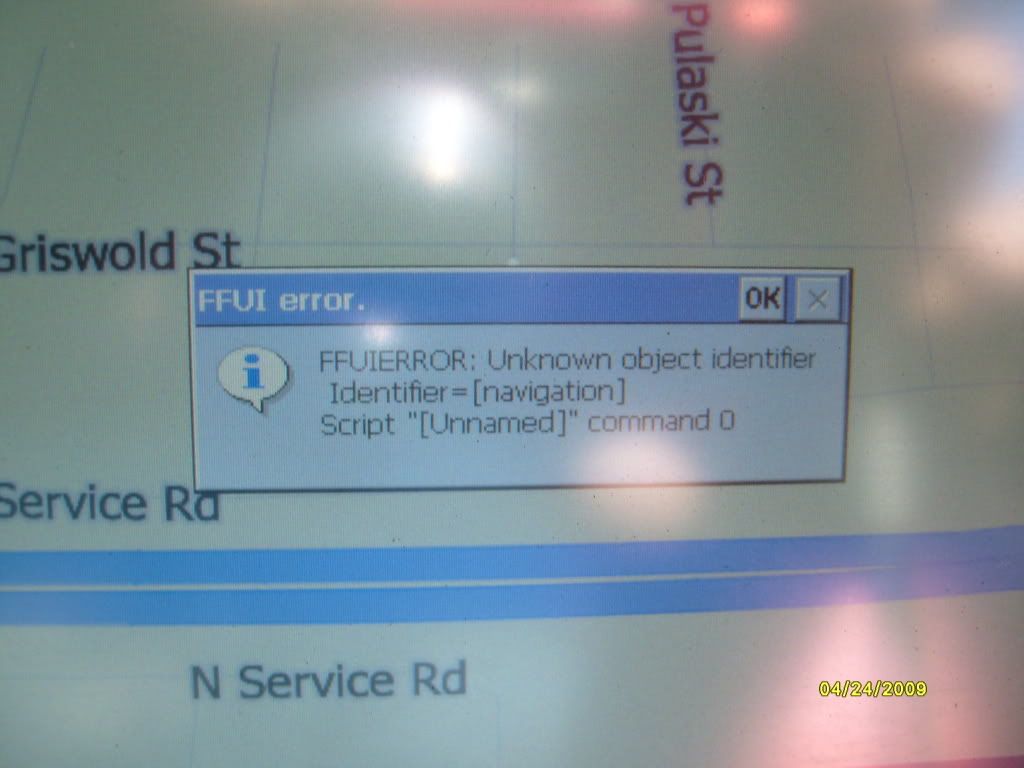
hey here, i figured i would give this a shot and i tried it without using leetlauncher because i dont use that program. it seems like it works but when i first boot it up and go to map, an error comes up. heres a screenshot. maybe you can shed some light on this?
http://i11.photobucket.com/albums/a158/venom0713/S7300611.jpg
hey here, i figured i would give this a shot and i tried it without using leetlauncher because i dont use that program. it seems like it works but when i first boot it up and go to map, an error comes up. heres a screenshot. maybe you can shed some light on this?
http://i11.photobucket.com/albums/a158/venom0713/S7300611.jpg
ill take a look at it
hey here, i figured i would give this a shot and i tried it without using leetlauncher because i dont use that program. it seems like it works but when i first boot it up and go to map, an error comes up. heres a screenshot. maybe you can shed some light on this?
http://i11.photobucket.com/albums/a158/venom0713/S7300611.jpg
could you try downloading the file again and load it to your avic, ad also could you explain to me how that error mesage appears (did hit any buttons before it appeared, ets)
hey here, i figured i would give this a shot and i tried it without using leetlauncher because i dont use that program. it seems like it works but when i first boot it up and go to map, an error comes up. heres a screenshot. maybe you can shed some light on this?
http://i11.photobucket.com/albums/a158/venom0713/S7300611.jpg
could you try downloading the file again and load it to your avic, ad also could you explain to me how that error mesage appears (did hit any buttons before it appeared, ets)
ok, ill try it again tomorrow. but it does it only once and thats when the avic first starts up. it doesnt do it until i hit the map button, and then if i tap the little ok button, it seems to work ok.. but i dont know what that error is for or what it means
hey here, i figured i would give this a shot and i tried it without using leetlauncher because i dont use that program. it seems like it works but when i first boot it up and go to map, an error comes up. heres a screenshot. maybe you can shed some light on this?
http://i11.photobucket.com/albums/a158/venom0713/S7300611.jpg
could you try downloading the file again and load it to your avic, ad also could you explain to me how that error mesage appears (did hit any buttons before it appeared, ets)
ok, ill try it again tomorrow. but it does it only once and thats when the avic first starts up. it doesnt do it until i hit the map button, and then if i tap the little ok button, it seems to work ok.. but i dont know what that error is for or what it means
i just tried the one on the download site and i'm not having any problems, try downloading it again and loading itto your unit and see how it goes
Hi idt i got the same error,download it twice but the error still there
that is weird, i'll ave to take a closer look at it,
yeah man, i tried deleting my flash disk and rewriting it and i did everything over again and i still get that error : ( if it matters, i do change the brake speed from 16 to 256 because i use the software bypass..