Search Archive

New Nav mod (Updated Mar 23, 2010) (Now 3.0 version)

By BorisM · May 24, 2009in Completed Mods/Themes💬 684 posts👁️ 133,910 views
Page 19 of 28
Posted Oct 04, 2009 · 18:47 UTC#451
ok, now I see it. It can be implemented, but what is the rationale of having it?


It's just to have quick visual of the trip progress without having to go to other screens. It's like looking in your mirror, it's a habit to take a peek after many years of driving. I look it as a visual aid to keep focused on the road as much as possible. It's also handy for longer routes or routes with multiple via points. A quick look and you know you're so much into the route or have so much left.

Posted Oct 04, 2009 · 18:52 UTC#452

ok, but we have time to destination and ETA on the screen. Isn't it enough?

Posted Oct 04, 2009 · 19:03 UTC#453
ok, but we have time to destination and ETA on the screen. Isn't it enough?


Those are great, but they deal primarily with time. It's never wrong as by the time you get to the destination it counts you down perfectly. The route progress is more with distance into route and distance to go. It's also why I'd like an on/off setting so each person can have a choice to display it if they want.


I wish I knew how to go about or I would do it myself. If you'd rather skip it, I'd understand.

Posted Oct 04, 2009 · 19:11 UTC#454

No, wait a sec :) I can implement it, but I shall understand why do others need it

and that they do really need it. This is why I'm asking questions

As I said before I love Stanislavovich's work just because of its "simplicity" on the navi screen.

I like Gurjon's work, but it has too much to be tuned - I prefer to have "one big button" instead :)


ok, let's count that we have another feature request to be implemented in the upgoing skin release...

Posted Oct 04, 2009 · 19:38 UTC#455
No, wait a sec :) I can implement it, but I shall understand why do others need it

and that they do really need it. This is why I'm asking questions

As I said before I love Stanislavovich's work just because of its "simplicity" on the navi screen.

I like Gurjon's work, but it has too much to be tuned - I prefer to have "one big button" instead :)


ok, let's count that we have another feature request to be implemented in the upgoing skin release...


Understood. I also love the simplicity of the mod and am grateful you converted it for 3.0. Here's a little of what I did to open it up a little. As you can see the prog bar is a really good fit on the bottom, primarily because of how thin you made it as well as the great choice to use a simple dot.


Thank you very much. :D

post-24694-12872759614885_thumb.jpg

Posted Oct 04, 2009 · 19:49 UTC#456

yes, but it overlaps the arrows! if we move them up a bit, then we eat another portion of the

viewable area of the screen :(

Posted Oct 04, 2009 · 19:56 UTC#457
yes, but it overlaps the arrows! if we move them up a bit, then we eat another portion of the

viewable area of the screen :(


Yes it does, but you also gave us options to turn the arrows off, display at top or we can use the road signs in place of the arrows. The arrows show for a short time anyways, 400 feet forward they would be off.

Posted Oct 04, 2009 · 20:02 UTC#458

ok, then. I'm going to put the arrows a bit upper, so all the lements do not overlap.

And as you said, they are showed not always, so even if they are on the screen this is just for some short time

Posted Oct 04, 2009 · 20:11 UTC#459
ok, then. I'm going to put the arrows a bit upper, so all the lements do not overlap.

And as you said, they are showed not always, so even if they are on the screen this is just for some short time


Great, I look forward to it. :D

It really amazes me how you guys can do this stuff and make it all work so well. I can only do the basics and even at that it's a challenge at times.

Posted Oct 04, 2009 · 20:12 UTC#460

I'm going to try my hand at making the top and bottom text scroll.

Posted Oct 04, 2009 · 20:23 UTC#461

good luck!

tried to move the arrows - it looks like they are already at the very place they should be.

so I see only overlapping solution right now :(

Posted Oct 04, 2009 · 20:45 UTC#462
good luck!

tried to move the arrows - it looks like they are already at the very place they should be.

so I see only overlapping solution right now :(


In the scripts800_480 file they're locked in at y 370, could changing it to y 360 not move it a little up or is there another issue?

Posted Oct 04, 2009 · 20:47 UTC#463

I know where and what to change, but the result doesn't seem to be ok to me

Posted Oct 04, 2009 · 20:52 UTC#464
I know where and what to change, but the result doesn't seem to be ok to me


Okay, you're the pro. :D

Posted Oct 05, 2009 · 04:47 UTC#465

sorry, I didn't mean to offend you by saying that I know where and what to change :(

After thinking a while and talking to other guys at 4pda, I decided not to include

the route progress into mainline. Instead, I'll do a patch for you so you can use it

Posted Oct 05, 2009 · 09:23 UTC#466
sorry, I didn't mean to offend you by saying that I know where and what to change :(

After thinking a while and talking to other guys at 4pda, I decided not to include

the route progress into mainline. Instead, I'll do a patch for you so you can use it


No offense taken. Thanks for taking the time to explore it. Looking forward to the patch.

Posted Oct 05, 2009 · 12:42 UTC#467
Looking forward to the patch.

See attach. You may want to play with the coords of the progress to suite your needs :)

The progress is disabled by default, to enable go to Visual->Additional navi screen settings->Show Route Progress


Hope this is what you expect

N-S-E-W.zip

Posted Oct 05, 2009 · 15:13 UTC#468

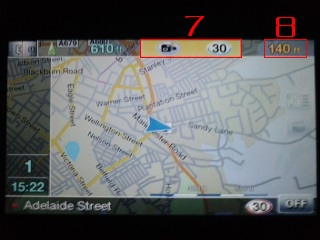
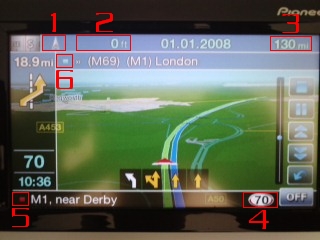
Been away from here for a while, too long TBH, but I've spent a bit of time tinkering with this great mod. Most of what I've done is purely cosmetic, got rid of a lot of unnecessary (IMO) on-screen dialogue and every word starting with a capital, tidied up a shed load of bitmaps, and added my own slant on a few things. I'm running iGO 8.0, firmware 2.007000, hacked ezrider, Worldwide licence hack, Q1 2009 EU maps. Obviously, thanks go to Stanislavovich, Andr2000, and not to forget the inimitable BorisM and N-S-E-W :D Here's a few screenshots, see what you guys think.


1. GPS signal. Click to go to 'GPS Status' screen.

2. Current altitude.

3. Distance to destination (or Viapoint).

4. Current speed limit.

5. Current street icon (red).

6. Next street icon (blue), or Viapoint icon (yellow).

7. Speedcam warning bar.

> Cam type on left

> Section cam in centre

> Cam speed limit on right

8. Distance to speedcam.

post-26891-1287275961645_thumb.jpg

post-26891-12872759617051_thumb.jpg

post-26891-12872759617783_thumb.jpg

Posted Oct 05, 2009 · 15:36 UTC#469
Been away from here for a while, too long TBH, but I've spent a bit of time tinkering with this great mod. Most of what I've done is purely cosmetic, got rid of a lot of unnecessary (IMO) on-screen dialogue and every word starting with a capital, tidied up a shed load of bitmaps, and added my own slant on a few things. I'm running iGO 8.0, firmware 2.007000, hacked ezrider, Worldwide licence hack, Q1 2009 EU maps. Obviously, thanks go to Stanislavovich, Andr2000, and not to forget the inimitable BorisM and N-S-E-W :D Here's a few screenshots, see what you guys think.


1. GPS signal. Click to go to 'GPS Status' screen.

2. Current altitude.

3. Distance to destination (or Viapoint).

4. Current speed limit.

5. Current street icon (red).

6. Next street icon (blue), or Viapoint icon (yellow).

7. Speedcam warning bar.

> Cam type on left

> Section cam in centre

> Cam speed limit on right

8. Distance to speedcam.


I like it, I have as well changed many things mostly on the main screen, I removed the main box on the left of the screen and made all that pop up during navigation only, added some icons for the trip computer stuff on the main screen and moved the clock up the upper left when not navigating but it hides for speed cam warnings and then moves the main box on the left during navigation, I also added the screen change to the GPS when you press the icon. I like simple main screen during driving. I like what you avhe done with the screens.

Posted Oct 05, 2009 · 17:43 UTC#470

I'm also running iGO 8.0, with firmware 2.006, hacked ezrider, Worldwide licence hack and Q1 2009 EU maps. I really like this mod; in my view it takes an ok sat nav system to one that is really good. However, like everyone, it doesn't contain all the bits that I use regularly, so with the direct and indirect help of many on the forum I have adapted this mod.


Here is the navi screen (sorry about the lousy picture)


1 - Mute/Unmute toggle button

2 - Linear Compass

3 - Speed. Press to toggle between mph and kph (I travel in France a fair bit)

4 - Current time (my car doesn't have a clock!)

5 - Bluetooth connected button. Press to phone home

6 - TMC connected button. Press to view traffic

7 - Caravan being towed or not. Press to toggle between. Caravan is really vehicle type lorry but it has the same characteristics. I tow a caravan quite frequently.

8 - Speed indicator, mph or kph. Press to toggle between 2d/3d

9 - Load POI

10. Ring POI, if POI has phone number and bluetooth connected

11 - Load saved route

12 - Load SD/USB POI. I save my client destinations on the SD card

13 - Go Home

14 - Navigation settings, as before

15 - Record journey, as before

16 - Stop button

17 - ETA, visble when on the phone


I have never used 15 and 16 and will use these button spaces if I think of something positive to replace them.


All buttons fade as in the original mod.


I am happy to share the code patches, for any of the buttons, should anyone want them.


I have also added verbal warnings for the basic and advanced speed cameras, having converted the available POI data for hazards that fit the advanced cameras. One interesting point is that in my experience UK average speed cameras (aka section cameras) do not work well. I think this is because they are not always in pairs. I have therefore converted section cameras to the advanced speed camera and adapted the verbal warning to fit.


The verbal warnings are not perfect, but I prefer being told what sort of camera is approaching, regardless of whether I am speeding or not.


Colin

post-35526-12872759618401_thumb.jpg

Posted Oct 05, 2009 · 22:11 UTC#471
Looking forward to the patch.

See attach. You may want to play with the coords of the progress to suite your needs :)

The progress is disabled by default, to enable go to Visual->Additional navi screen settings->Show Route Progress


Hope this is what you expect


Thank you very much for doing this. I just downloaded it, I was the 23rd person to. :) Being from Chicago #23 is a very good number if you like sports. Some our best athletes wore #23 so this has to be good luck.


I'll see how much I can do tonight and let you know how it worked.

Posted Oct 05, 2009 · 22:15 UTC#472
Been away from here for a while, too long TBH,

Obviously, thanks go to Stanislavovich, Andr2000, and not to forget the inimitable BorisM and N-S-E-W :D Here's a few screenshots, see what you guys think.


Hey dumpy - How you been? Looks good. These guys that created this are awesome. For those with 3.0 lets not forget andr2000. Without the conversion who knows how high the frustration level with these units would be.

Posted Oct 05, 2009 · 22:24 UTC#473
I'm also running iGO 8.0, with firmware 2.006, hacked ezrider, Worldwide licence hack and Q1 2009 EU maps. I really like this mod; in my view it takes an ok sat nav system to one that is really good. However, like everyone, it doesn't contain all the bits that I use regularly, so with the direct and indirect help of many on the forum I have adapted this mod.


5 - Bluetooth connected button. Press to phone home


Nice job Colin.


#5 - what would be nice is if we were able to get the phone book and/or dialer to show with a touch of the bluetooth bmp. I had a different bluetooth bmp in one my ver 2.0 zips that did not have that white background if you're interested.

Posted Oct 06, 2009 · 00:32 UTC#474
Been away from here for a while, too long TBH,

Obviously, thanks go to Stanislavovich, Andr2000, and not to forget the inimitable BorisM and N-S-E-W :D Here's a few screenshots, see what you guys think.


Hey dumpy - How you been? Looks good. These guys that created this are awesome. For those with 3.0 lets not forget andr2000. Without the conversion who knows how high the frustration level with these units would be.

Posted Oct 06, 2009 · 00:34 UTC#475
Looking forward to the patch.

See attach. You may want to play with the coords of the progress to suite your needs :)

The progress is disabled by default, to enable go to Visual->Additional navi screen settings->Show Route Progress


Hope this is what you expect


Thank you very much for doing this. I just downloaded it, I was the 23rd person to. :) Being from Chicago #23 is a very good number if you like sports. Some our best athletes wore #23 so this has to be good luck.


I'll see how much I can do tonight and let you know how it worked.


It's in and running. I'll give it the real test tomorrow morning on my 45 mile trip to work.

Thanks!!

Page 19 of 28