Hi WilliamG
thanks for modding-- Any chance you can upload again? Looks like rapidshare will no longer let me download  ... I really would like to try your version.
Hi WilliamG
thanks for modding-- Any chance you can upload again? Looks like rapidshare will no longer let me download ... I really would like to try your version.
Hey guys, I updated the DATA.zip with the following mods, and this works on 3.0 AND 3.01 AVIC F700BT/900BT etc.
The mods included:
1.) Software bypass for speed.
2.) Shortcut menu on top left of map (REALLY awesome) and only visible when not using the guidance
3.) Mute button for voice guidance
4.) Pressing compass button to cancel in-progress route.
Again, this is tested to be working on AVICs running 3.0 OR 3.1! Enjoy!
http://rapidshare.com/files/258434389/DATA.ZIP.html
To install:
1.) Put Test Mode and this DATA.zip onto your SD card.
2.) Boot into Test Mode, go into My Flash Disk/APL2/iGo and replace the DATA.zip already there with this one!
Let me know if you have any questions/comments. Thanks!
Thanks for posting but I tried to download your data.zip and there is a 10 time download limit which has been reached. Can you post somewhere else?
Hey guys, I updated the DATA.zip with the following mods, and this works on 3.0 AND 3.01 AVIC F700BT/900BT etc.
The mods included:
1.) Software bypass for speed.
2.) Shortcut menu on top left of map (REALLY awesome) and only visible when not using the guidance
3.) Mute button for voice guidance
4.) Pressing compass button to cancel in-progress route.
Again, this is tested to be working on AVICs running 3.0 OR 3.1! Enjoy!
http://rapidshare.com/files/258434389/DATA.ZIP.html
To install:
1.) Put Test Mode and this DATA.zip onto your SD card.
2.) Boot into Test Mode, go into My Flash Disk/APL2/iGo and replace the DATA.zip already there with this one!
Let me know if you have any questions/comments. Thanks!
Thanks for posting but I tried to download your data.zip and there is a 10 time download limit which has been reached. Can you post somewhere else?
Try this:
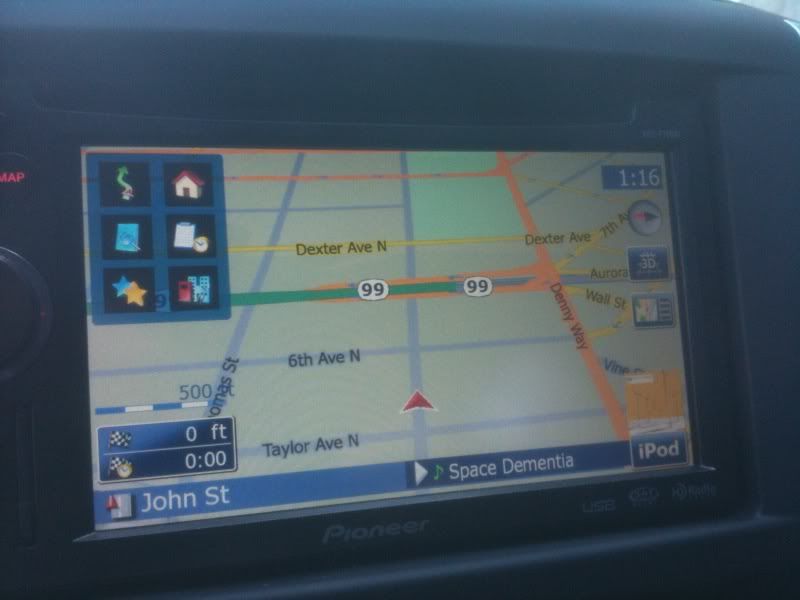
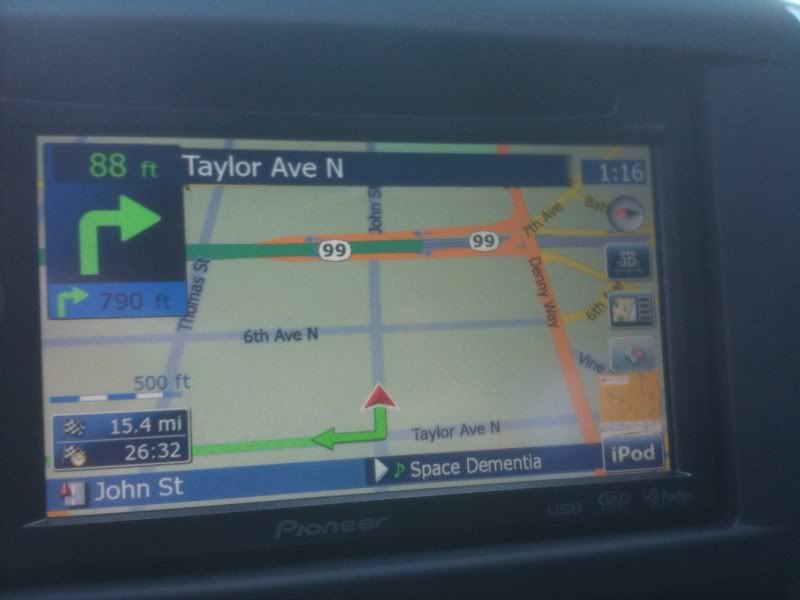
Here are some screenshots. You can see, without a route planned, you have instant access to all the shortcuts to return home, address, favorites etc etc. Then, when you pick a route, the voice guidance mute/unmute button appears on the right, and the shortcuts menu disappears. You can see I have my audio muted at this time. I can cancel a route by tapping the compass button.
Where else can you D/L the X90BT.zip from. Cant find it on Frostwire. 
Hey guys, I updated the DATA.zip with the following mods, and this works on 3.0 AND 3.01 AVIC F700BT/900BT etc.
The mods included:
1.) Software bypass for speed.
2.) Shortcut menu on top left of map (REALLY awesome) and only visible when not using the guidance
3.) Mute button for voice guidance
4.) Pressing compass button to cancel in-progress route.
Again, this is tested to be working on AVICs running 3.0 OR 3.1! Enjoy!
http://rapidshare.com/files/258434389/DATA.ZIP.html
To install:
1.) Put Test Mode and this DATA.zip onto your SD card.
2.) Boot into Test Mode, go into My Flash Disk/APL2/iGo and replace the DATA.zip already there with this one!
Let me know if you have any questions/comments. Thanks!
Thanks for posting but I tried to download your data.zip and there is a 10 time download limit which has been reached. Can you post somewhere else?
Try this:
Thanks!
Ok, I have a Mac Book Pro and avic f90bt. I have updated three times to 3.0 with no problem, but when i try to update to 3.01 using the oficial x series updated, my system hold on system starting up message. I try three diferent ways.
1. unzip with winzip (doesn't work)
2.unzip with winrar (does't work)
3. replace with the ezrider hacked and the one on the flash back up (doesn't work)
What else can i do?
Ok, I have a Mac Book Pro and avic f90bt. I have updated three times to 3.0 with no problem, but when i try to update to 3.01 using the oficial x series updated, my system hold on system starting up message. I try three diferent ways.1. unzip with winzip (doesn't work)
2.unzip with winrar (does't work)
3. replace with the ezrider hacked and the one on the flash back up (doesn't work)
What else can i do?
No idea what to tell you there. I updated to 3.0 using the first post, and then updated to 3.01 using the official Pioneer update no trouble using my MacBook Pro to extract the files and put them on my SD card.
WilliamG this is freaking awesome, love it, there is only one more mod that I would love to have, maybe you can help? Is it possible to make the turn and the next turn boxes almost transparent?
That would be awesome.
Any help would be greatly appreciated.....
No idea what to tell you there. I updated to 3.0 using the first post, and then updated to 3.01 using the official Pioneer update no trouble using my MacBook Pro to extract the files and put them on my SD card.
So u just put the 3.0 image on and downloaded pioneer 3.01 and installed that? That's it, u did'nt have to use sake mode and copy the folder or anything?
No idea what to tell you there. I updated to 3.0 using the first post, and then updated to 3.01 using the official Pioneer update no trouble using my MacBook Pro to extract the files and put them on my SD card.
So u just put the 3.0 image on and downloaded pioneer 3.01 and installed that? That's it, u did'nt have to use sake mode and copy the folder or anything?
Yep that's exactly what I did. I did exactly as the first post suggested to install 3.0, and then just did exactly as Pioneer tells you to install the 3.01 update!
WilliamG this is freaking awesome, love it, there is only one more mod that I would love to have, maybe you can help? Is it possible to make the turn and the next turn boxes almost transparent?
That would be awesome.
Any help would be greatly appreciated.....
You're welcome! As for transparencies, I'm REALLY clueless as to how to make that work... I'm sure the hardcore among us can make that work!
Rettel,
Awesome job man....Ugraded to 3.0 (tks to CMH)..this is way faster...I mean..waaaaaay faster....
I'm running 3.0 with the 8.0 hacked Igo, brazilian maps...works perfect....just rename the 3.0 apl2 folder and copy the apl2 folder from version 2.0....
Tks Again for this awesome mod!!
GUGA
Just read through this post. I have seen some updated f700's.. i have an f7010 (supposedly the same as f700 only with 3yr warranty) has anyone tried this? I am reading where you replace the entire myflashdrive with the image of the x910 drive. has someone done this on a 7 series? or have you just been replacing the APL folder from the x710 update on pio's website? or is there an image of the x710 floating around?
No idea what to tell you there. I updated to 3.0 using the first post, and then updated to 3.01 using the official Pioneer update no trouble using my MacBook Pro to extract the files and put them on my SD card.
So u just put the 3.0 image on and downloaded pioneer 3.01 and installed that? That's it, u did'nt have to use sake mode and copy the folder or anything?
Yep that's exactly what I did. I did exactly as the first post suggested to install 3.0, and then just did exactly as Pioneer tells you to install the 3.01 update!
Did u get the new maps as well doing that?
Here are some screenshots. You can see, without a route planned, you have instant access to all the shortcuts to return home, address, favorites etc etc. Then, when you pick a route, the voice guidance mute/unmute button appears on the right, and the shortcuts menu disappears. You can see I have my audio muted at this time. I can cancel a route by tapping the compass button.
WilliamG, looks nice. One thing can you maybe figure out how to make the destination shortcut the typwriter like in the reg menu? Sorry, little things like that catch my eye. Also do you have any interest in changing your sys so u can tilt and see some pretty skies i have added?
http://rapidshare.com/files/258509283/DATA.ZIP
There is my latest DATA.ZIP. My other one was the one that WilliamG used (I posted it a few pages back: http://rapidshare.com/files/257760948/DATA.ZIP).
This new one has a working stop nav button, and a different shortcut menu taken from CMHs mod.
http://rapidshare.com/files/258509283/DATA.ZIP
There is my latest DATA.ZIP. My other one was the one that WilliamG used (I posted it a few pages back: http://rapidshare.com/files/257760948/DATA.ZIP).
This new one has a working stop nav button, and a different shortcut menu taken from CMHs mod.
Any pics? Do u mean all your shortcuts are up top like cmh's?
Yes, but I only have 4 shortcuts, Home, Favorites, Address Entry, and POI Lookup. I took out all the extra, less necessary stuff from CMHs. I just wanted the features that I would use. No screenshots or anything. Just picture a stripped down CMH.
Yes, but I only have 4 shortcuts, Home, Favorites, Address Entry, and POI Lookup. I took out all the extra, less necessary stuff from CMHs. I just wanted the features that I would use. No screenshots or anything. Just picture a stripped down CMH.
Really like this mod (and used the other one you posted on the other page before as well).
I really like the new placement of the mute and stop buttons and the four shortcuts along the top now...
Thanks for sharing this!
Ben
once the wince image has been flashed with that of the 3.0 will i still be able to just copy over my backup of myflashdisk from my 2.006 install and everything be fine if something goes wrong?
sucks this does not work on the 500BT  I guess I need to wait for my SD cards next month.
Here's what the skies look like i'm talking about. Sorry for the crappy pics but they will do. LOL, With igo8.3 this unit is going to be great.


Here's what the skies look like i'm talking about. Sorry for the crappy pics but they will do. LOL, With igo8.3 this unit is going to be great.
damn, those look great, now i have to bug the body shop to rush it up,
shit man that looks good. I wonder if my 500 will look like that after mods and new maps.