Search Archive

IDT skin#1 v5.5 03/02/10 9download link to be updated)

By ill.die.trying · Aug 05, 2009in Completed Mods/Themes💬 1,618 posts👁️ 210,687 views
Page 23 of 65
Posted Aug 29, 2009 · 13:38 UTC#551
Hello,


Just using it for 3 days, here's my report :

- 1st, this is great improvement from Pioneer's original, much easy to use and to deal with, thanks for that.

then :

All of these are not so important but will be good improvements to me.

Thanks for our job, it's awesome


Franck


thanks for the comments and inputs and bug report,


- I think it will be very good to have a "current speed" indicator always on in navigation window, just behing the "speed limit", so in one quick look you see what you're really dealing with about speed


i'll figure a spot for the speed indicator during navigation


- The letters and numbers in the two windows left down are very small to read (I use "time left to destination" and "current speed" but I prefer "km left to destination if you fix the upper quest :-) Why not the same dimension as in the "direction" window ?? or in bold??
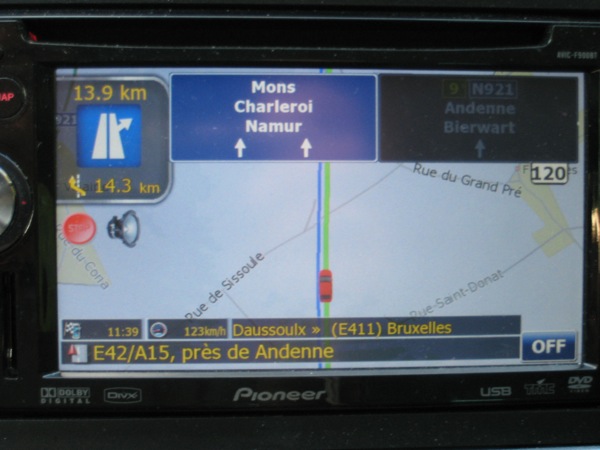
pionee10.jpg


i'll make them more visible on the next release


- Sometimes (don't know exactly when it happens), the background of these 2 windows disappear... so it 's impossible to read these informations , I have to restart the unit to have the background back...
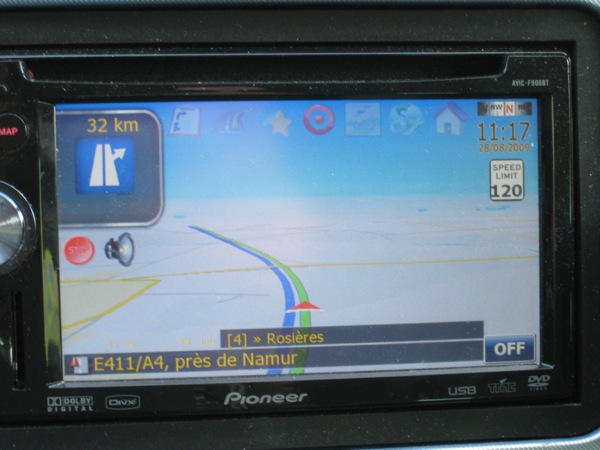
pionee11.jpg


not sure what version you're using but as of v3.1 that should have been fixed, if you're using the 3.1 when you had this please report back so that i could take care of it, the only thing i could think of why it's acting like that is when the full screen map setting is turned on, but athoer than that it should have been fixed


- In navigation mode, the lane indications "overwrite" the speed alerts... And as here in Belgium, we have exits every 3-5 km, with a speed cam just before and after most of the times, so I never see these speed limits indications...
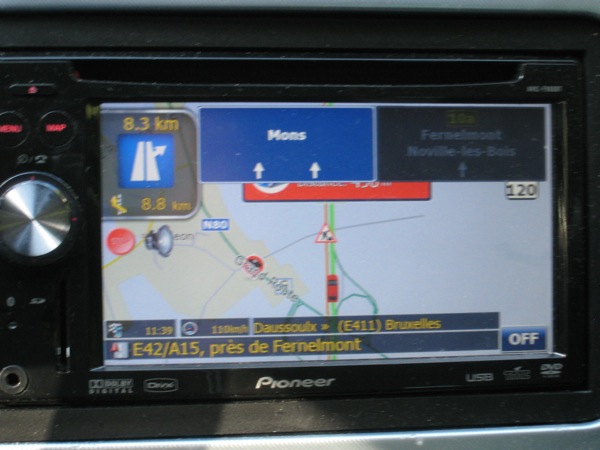
pionee12.jpg


this is something that i'm trying to figure out,


May be the speed limit should be smaller in the left part of the image just behing "stop" and "sound" buttons??


i'll think about it


- and last, I cannot record the image position in 3D mode, the horizon line is too down, and if I try to put it alittle bit upper, this position is never reorded and immediately erased when I push any button...
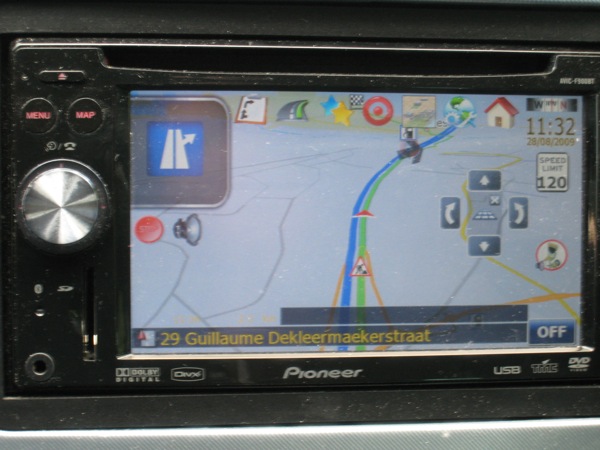
pionee13.jpg


could you clarify this

Posted Aug 29, 2009 · 13:38 UTC#552
Hello,


Just using it for 3 days, here's my report :

- 1st, this is great improvement from Pioneer's original, much easy to use and to deal with, thanks for that.

then :

All of these are not so important but will be good improvements to me.

Thanks for our job, it's awesome


Franck


thanks for the comments and inputs and bug report,


- I think it will be very good to have a "current speed" indicator always on in navigation window, just behing the "speed limit", so in one quick look you see what you're really dealing with about speed


i'll figure a spot for the speed indicator during navigation


- The letters and numbers in the two windows left down are very small to read (I use "time left to destination" and "current speed" but I prefer "km left to destination if you fix the upper quest :-) Why not the same dimension as in the "direction" window ?? or in bold??

pionee10.jpg


i'll make them more visible on the next release


- Sometimes (don't know exactly when it happens), the background of these 2 windows disappear... so it 's impossible to read these informations , I have to restart the unit to have the background back...

pionee11.jpg


not sure what version you're using but as of v3.1 that should have been fixed, if you're using the 3.1 when you had this please report back so that i could take care of it, the only thing i could think of why it's acting like that is when the full screen map setting is turned on, but athoer than that it should have been fixed


- In navigation mode, the lane indications "overwrite" the speed alerts... And as here in Belgium, we have exits every 3-5 km, with a speed cam just before and after most of the times, so I never see these speed limits indications...

pionee12.jpg


this is something that i'm trying to figure out,


May be the speed limit should be smaller in the left part of the image just behing "stop" and "sound" buttons??


i'll think about it


- and last, I cannot record the image position in 3D mode, the horizon line is too down, and if I try to put it alittle bit upper, this position is never reorded and immediately erased when I push any button...

pionee13.jpg


could you clarify this

Posted Aug 29, 2009 · 14:16 UTC#553

Hi, Thanks for your quick answer and continuous improvements.

I'm using 3.1 when this "disparition" occurs, with full screen map "on", so I will put it "off" to see what is happening...

For the horizon line, look at my 2nd pic, this is what I actually see. I prefer to see no sky and have a better road view angle as in pic 4. But when I edit this position with the arrows, it is not stored as "default". Each time I'm touching a button (physical on the F900 or virtual on the screen), the monitor goes back to pic 2.


Thanks


Franck

Posted Aug 29, 2009 · 14:26 UTC#554
Hi, Thanks for your quick answer and continuous improvements.

I'm using 3.1 when this "disparition" occurs, with full screen map "on", so I will put it "off" to see what is happening...

For the horizon line, look at my 2nd pic, this is what I actually see. I prefer to see no sky and have a better road view angle as in pic 4. But when I edit this position with the arrows, it is not stored as "default". Each time I'm touching a button (physical on the F900 or virtual on the screen), the monitor goes back to pic 2.


Thanks


Franck


setting the full screen map to off should fix that, i think i'll just have the full screen map setting taken out as i see no use for it now,


for the setting tilt setting to stick you have to play with it, just keep on setting it to your desired view and click hard button and see if it stays, i've noticed it ever since i got the pioneer update, i know for sure that the setting would stick as i have done it before but just can't remember the exact procedures i did but AFAIK you just have to play with it for it to stick

Posted Aug 29, 2009 · 14:30 UTC#555
Hi, Thanks for your quick answer and continuous improvements.

I'm using 3.1 when this "disparition" occurs, with full screen map "on", so I will put it "off" to see what is happening...

For the horizon line, look at my 2nd pic, this is what I actually see. I prefer to see no sky and have a better road view angle as in pic 4. But when I edit this position with the arrows, it is not stored as "default". Each time I'm touching a button (physical on the F900 or virtual on the screen), the monitor goes back to pic 2.


Thanks


Franck

Check and see if your smart zoom is turned on. I had this same problem and after I turned that off it didn't do it anymore.

Posted Aug 29, 2009 · 15:27 UTC#556

just waiting for a couple of checks to clear and my donation will be sent to you. hopefully that helps you out with your bricked unit seems like you really need it now. That sucks. Good luck with that. I am going to continue to mess around witht the trip computer later today. Thanks for all your help.

Posted Aug 29, 2009 · 15:32 UTC#557
just waiting for a couple of checks to clear and my donation will be sent to you. hopefully that helps you out with your bricked unit seems like you really need it now. That sucks. Good luck with that. I am going to continue to mess around witht the trip computer later today. Thanks for all your help.


no prob

Posted Aug 29, 2009 · 20:51 UTC#558

ok got the trip computer to work but have a minor issue. I would like the on screen icons to show up over the speed limit and elevation bitmap. Also how do I make them go away and display the map screen without the trip computer boxes? When i tap the current speed bitmap it doesn't hide. Thanks this is very nice.

post-29366-12872758821517_thumb.jpg

Posted Aug 29, 2009 · 21:03 UTC#559

just tap the red arrow atop the trip computer to hide it. Coding is required to bring the trip computer image in front of speed/elevation bmp's....... IDT may need to chime in on that one


ok got the trip computer to work but have a minor issue. I would like the on screen icons to show up over the speed limit and elevation bitmap. Also how do I make them go away and display the map screen without the trip computer boxes? When i tap the current speed bitmap it doesn't hide. Thanks this is very nice.
Posted Aug 29, 2009 · 21:26 UTC#560
just tap the red arrow atop the trip computer to hide it. Coding is required to bring the trip computer image in front of speed/elevation bmp's....... IDT may need to chime in on that one


ok got the trip computer to work but have a minor issue. I would like the on screen icons to show up over the speed limit and elevation bitmap. Also how do I make them go away and display the map screen without the trip computer boxes? When i tap the current speed bitmap it doesn't hide. Thanks this is very nice.


Lower the "z" number for the speed limit and elevation sign to a lower value than the trip bmps. This way way they will be in the background and will show when hiding the trip bmps.

Posted Aug 29, 2009 · 21:42 UTC#561
ok got the trip computer to work but have a minor issue. I would like the on screen icons to show up over the speed limit and elevation bitmap. Also how do I make them go away and display the map screen without the trip computer boxes? When i tap the current speed bitmap it doesn't hide. Thanks this is very nice.


add this onrelease part of the button you're using for it to show up,


txtsprSpeed.hide, sprSpeed.hide


assuming that the text and the sprite you used have that name


for example,


;Current clocked speed/Trip computer 


from the example abov you'll see that the spr and bmp get's hidden onrelease of the button,

Posted Aug 29, 2009 · 23:00 UTC#562

from the example abov you'll see that the spr and bmp get's hidden onrelease of the button,


this is the code I have:

;display current clocked speed/ Trip computer

Posted Aug 29, 2009 · 23:05 UTC#563

This is what I am going to test out now:


;display current clocked speed/ Trip computer

Posted Aug 29, 2009 · 23:06 UTC#564
from the example abov you'll see that the spr and bmp get's hidden onrelease of the button,


this is the code I have:

;display current clocked speed/ Trip computer


here's how to make it work, see the item's i highlighted in red


you have to declare the text so that you can hide it,

Posted Aug 29, 2009 · 23:07 UTC#565
This is what I am going to test out now:


;display current clocked speed/ Trip computer


you can't use this code


xxx template.

Posted Aug 29, 2009 · 23:45 UTC#566

Hey J,

when I press the target icon to add a speed trap, I then press the add speedcam buttom/icon.


After i add the cam and hit done it goes to the previous page as expected (shown here), on this page the return arrow goes again to the add cam page. I want it to return to the map at the view showing when i selected the cam (we can always hit the map button to go to our current gps position).


I can hit return on both pages a few times and it eventually goes back to the map view page (or just hit the map button).


this was the same for the previous release (3v3.1) also, but was correct for earlier releases. I really want to go back to the map view that i was viewing at the time i selected the target icon.


also, with 3.1, if i was using guidance, the return map view would be zoomed out to display almost my entire route. requiring me to hit the zoom 5-6 times to get back to a usable view. this still seems a little off in 3v3.5 but not like 3v3.1. hopefully you can help with this.


do you need anything to help get your unit back up and going (from the community)

post-834-12872758825612_thumb.jpg

Posted Aug 29, 2009 · 23:57 UTC#567

you can't use this code


xxx template.


well i tried changing the text name in the navigatemap_800_480.ui file but I knew it wasn't that easy. I guess there is somewhere else that code is linked and I have no idea how to change it. I changed the code to this:

;Display Elevation


;display current clocked speed/ Trip computer


and now it doesn't work. Is there somewhere else I need to fix that text?

Posted Aug 30, 2009 · 00:12 UTC#568
you can't use this code


xxx template.


well i tried changing the text name in the navigatemap_800_480.ui file but I knew it wasn't that easy. I guess there is somewhere else that code is linked and I have no idea how to change it. I changed the code to this:

;Display Elevation


;display current clocked speed/ Trip computer


and now it doesn't work. Is there somewhere else I need to fix that text?


you cant use the same name for the elevation and the speed, you have to declare the elevation as something different, lets say txtelvation and sprelevation or something like that, that's the reason it's not working

Posted Aug 30, 2009 · 00:13 UTC#569
Hey J,

when I press the target icon to add a speed trap, I then press the add speedcam buttom/icon.


DSC01981.JPG


After i add the cam and hit done it goes to the previous page as expected (shown here), on this page the return arrow goes again to the add cam page. I want it to return to the map at the view showing when i selected the cam (we can always hit the map button to go to our current gps position).


I can hit return on both pages a few times and it eventually goes back to the map view page (or just hit the map button).


this was the same for the previous release (3v3.1) also, but was correct for earlier releases. I really want to go back to the map view that i was viewing at the time i selected the target icon.


also, with 3.1, if i was using guidance, the return map view would be zoomed out to display almost my entire route. requiring me to hit the zoom 5-6 times to get back to a usable view. this still seems a little off in 3v3.5 but not like 3v3.1. hopefully you can help with this.


do you need anything to help get your unit back up and going (from the community)


thanks for pointing it out, i'll have it fixed as soon as i get my unit back

Posted Aug 30, 2009 · 00:50 UTC#570

ok i know i am being picky but now when the trip computer goes off the speed shows but the elevation doesn't come back. Should i add the code to the elevation also? This is what I have now:

;Display Elevation


;display current clocked speed/ Trip computer

Posted Aug 30, 2009 · 01:39 UTC#571
ok i know i am being picky but now when the trip computer goes off the speed shows but the elevation doesn't come back. Should i add the code to the elevation also? This is what I have now:

;Display Elevation


;display current clocked speed/ Trip computer


the reason why it's not showing up is because the command for the tripcomputer hide (the red arrow) is set to hide the the tripcomputer and show the current speed, just add the elevationtxt and elevation sign names to that command and it'll work, just follow how the current speed is being called and it'll work

Posted Aug 30, 2009 · 01:47 UTC#572

after having a very boring day, i tried to install my 5 year old jvc cd player cause i'm not used to not having music while driving, i spent a good hour and a half installing it, when i started the car i heard the unit start but then there's ws no backlight on the lcd, pissed that i wasted that time reinstalling it i just went for a drive and out of nowhere it hit me, i remember reading from the F700 manual that every all the important wires should be connected otherwise the unit would not work, so i went home trying to figure out why the illumination on my deck was not working, i checked the all the fuses and found one fuse that was busted, i went to check my car manual to check what that fuse was and it was for a rear window mirror control which AFAIK my car does not have, so i changed the fuse and decided to give my unit another shot (good thing the dealer was closed yesterday) and guess what, it's back, i guess it was not a faulty unit after all, now back to modding

Posted Aug 30, 2009 · 03:09 UTC#573

thanks IDT cant wait to donate. Awesome that your unit still works, that is real good news. The trip computer and everything works fine. That was almost painful with all my questions. Now if I can get you to show us how to do the multi route. That would be great, otherwise thanks a lot for your help.

Posted Aug 30, 2009 · 04:13 UTC#574

I recently received the latest 3.something SD cards from Pioneer and have installed them with no problem. Now I can't wait to try IDT's 3.0 v3.5 mods. My question is this; if I load IDT's v3.5 onto a new SD card (as instructed), load it properly into my F90BT, etc. but later decide to go back to the original setup or if I have a problem with loading the v3.5, can I just use the new Pioneer SD cards to reinstall to factory settings (instead of copying the original files from the unit)?

Posted Aug 30, 2009 · 05:51 UTC#575
I recently received the latest 3.something SD cards from Pioneer and have installed them with no problem. Now I can't wait to try IDT's 3.0 v3.5 mods. My question is this; if I load IDT's v3.5 onto a new SD card (as instructed), load it properly into my F90BT, etc. but later decide to go back to the original setup or if I have a problem with loading the v3.5, can I just use the new Pioneer SD cards to reinstall to factory settings (instead of copying the original files from the unit)?


you just need a backup of the files your going to replace,

Page 23 of 65