Search Archive

IDT skin#1 v5.5 03/02/10 9download link to be updated)

By ill.die.trying · Aug 05, 2009in Completed Mods/Themes💬 1,618 posts👁️ 210,687 views
Page 21 of 65
Posted Aug 27, 2009 · 15:13 UTC#501
I have read through the post regarding the trip computer and there are a lot more steps to adding this TC. I would rather follow your coding, So far I have done this:

I added the files into my navigatemap_800_480.ui.

Then I added the bitmaps you listed.

Then i copied tripcomputer.ui and tripcomputer_800_480.ui into my data.zip file.

and you are saying that i need to add something into my templates_800_480.ui file and 2 additional bitmaps, Please explain.

1. What do I add this to """onrelease='run sc_tripresetrefresh, ui_NSEWtripcomp.show'""""? Is this for an onmap icon?

2. Should I just follow those instructions and pull the code out from your files including the main.ui file, setting_800_480.ui and variable_def.ui. Some of them are different then yours.

2. there just seems to be alot that was fixed since the instructions were posted and I would rather follow your set of instructions


Thank you hate to be a pain


hold off for now,

i'll have a complete how to later as soon as i get to work
Posted Aug 27, 2009 · 15:16 UTC#502

hold off for now,

i'll have a complete how to later as soon as i get to work


thanks your the man let me know how to donate you are doing a heck of a job and I will be glad to participate.

Posted Aug 27, 2009 · 15:18 UTC#503
hold off for now,

i'll have a complete how to later as soon as i get to work


thanks your the man let me know how to donate you are doing a heck of a job and I will be glad to participate.


thru paypal are very much appreciated http://[email protected]

Posted Aug 27, 2009 · 15:34 UTC#504

I like your linear compass better than the one I have, is it as easy as just copying your bitmap and renaming it to match mine or do i need you sprite file as well?

Posted Aug 27, 2009 · 15:50 UTC#505

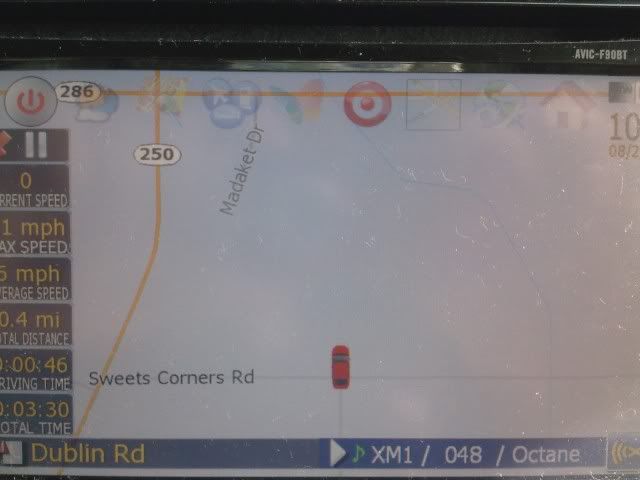
Here is what I am talking about for the car position. I am sitting about 50' short of the intersection in this situation. Also, regarding day/night, I did have my day/night setting set for automatic. I reselected auto and it switched from night to day mode this morning.


0827091000_01.jpg

Posted Aug 27, 2009 · 16:10 UTC#506
I like your linear compass better than the one I have, is it as easy as just copying your bitmap and renaming it to match mine or do i need you sprite file as well?


you could try that

Posted Aug 27, 2009 · 16:46 UTC#507

Hey, IDT - great work on the mod. I love the look and the functionality that you've included. Can you post the paypal address again?


One request: I know that being that you live in Winnipeg, having a constant read-out of the elevation/altitude is pretty usesless (who needs/wants to know that for the last three hours of driving, your elevation has remained at 240m?). However, living out on the west coast, elevation is constantly changing. And in the winter, the temperature (and whether or not it's freezing) often changes a lot with the elevation.


So, whether in route or not in route, could we get an option to have elevation continuously displayed?


Or is there a bit of code that would be easy enough for a simpleton such as myself to add to the appropriate .ui file?


I know diaftia had one, but his sign/bmp was absolutely tiny - no way I could make that out on a quick glance.


(BTW, in editing the .ui files, are you just using a simple text editor like Notepad or TextEdit? And when you re-zip the DATA.ZIP back up, does one choose the .ZIP option in 7-zip? Every time I've tried to edit something (using Notepad), the DATA.ZIP seems to be corrupt when I re-load it - I get the "PLEASE WAIT FOR START-UP" holding pattern).

Posted Aug 27, 2009 · 16:54 UTC#508
Hey, IDT - great work on the mod. I love the look and the functionality that you've included. Can you post the paypal address again?


One request: I know that being that you live in Winnipeg, having a constant read-out of the elevation/altitude is pretty usesless (who needs/wants to know that for the last three hours of driving, your elevation has remained at 240m?). However, living out on the west coast, elevation is constantly changing. And in the winter, the temperature (and whether or not it's freezing) often changes a lot with the elevation.


So, whether in route or not in route, could we get an option to have elevation continuously displayed?


Or is there a bit of code that would be easy enough for a simpleton such as myself to add to the appropriate .ui file?


I know diaftia had one, but his sign/bmp was absolutely tiny - no way I could make that out on a quick glance.


(BTW, in editing the .ui files, are you just using a simple text editor like Notepad or TextEdit? And when you re-zip the DATA.ZIP back up, does one choose the .ZIP option in 7-zip? Every time I've tried to edit something (using Notepad), the DATA.ZIP seems to be corrupt when I re-load it - I get the "PLEASE WAIT FOR START-UP" holding pattern).


paypal address is juliusniiya2yahoo.com


regarding the elevation, i'll figure something out and will have it ready on the next update


regarding the editing, i just use notepad to edit the ui's


regarding the zip, i just zip it back using the zip setting instead of 7z


(who needs/wants to know that for the last three hours of driving, your elevation has remained at 240m?).


that's funny

Posted Aug 27, 2009 · 17:03 UTC#509


check your speedcam.ui for st_speedcam and look if you have this script


runif vTmp 1 'txtSC_SpeedValueMI.HIDE, txtSC_SpeedUnitMI.HIDE, txtSC_Speed.HIDE, hscSC_Speed.HIDE, txtSC_SpeedValue.HIDE,  txtSC_SpeedUnit.HIDE, txtSC_SpeedNo.HIDE'
	runif vTmp 4 'txtSC_SpeedValueMI.HIDE, txtSC_SpeedUnitMI.HIDE, txtSC_Speed.HIDE, hscSC_Speed.HIDE, txtSC_SpeedValue.HIDE, txtSC_SpeedUnit.HIDE, txtSC_SpeedNo.HIDE'


since i haven't had the luck to properly have them say the right speedlimit i just removed the option of setting the speed,


I thought I was using your speedcam.ui files and I am. I just did a diff on them and they are the same except for a state change that I put in when clicking on something. Maybe your mods are still having this problem too? Or do you mean you removed them someplace else?

Posted Aug 27, 2009 · 17:23 UTC#510


check your speedcam.ui for st_speedcam and look if you have this script


runif vTmp 1 'txtSC_SpeedValueMI.HIDE, txtSC_SpeedUnitMI.HIDE, txtSC_Speed.HIDE, hscSC_Speed.HIDE, txtSC_SpeedValue.HIDE,  txtSC_SpeedUnit.HIDE, txtSC_SpeedNo.HIDE'
	runif vTmp 4 'txtSC_SpeedValueMI.HIDE, txtSC_SpeedUnitMI.HIDE, txtSC_Speed.HIDE, hscSC_Speed.HIDE, txtSC_SpeedValue.HIDE, txtSC_SpeedUnit.HIDE, txtSC_SpeedNo.HIDE'


since i haven't had the luck to properly have them say the right speedlimit i just removed the option of setting the speed,


I thought I was using your speedcam.ui files and I am. I just did a diff on them and they are the same except for a state change that I put in when clicking on something. Maybe your mods are still having this problem too? Or do you mean you removed them someplace else?


i'll check it out

Posted Aug 27, 2009 · 17:41 UTC#511

Hey IDT, you've got paypal... thanks for all the hard work!


-Chuck

F90BT

Posted Aug 27, 2009 · 17:45 UTC#512

Ditto... You should have gotten mine a coupla days ago. Your work is appreciated!

Posted Aug 27, 2009 · 18:32 UTC#513

One simple question that I failed to see in this thread. Why did the Arnold impersonator replace the sexy english lady for the SpeedCam warnings? Is there a way to switch it back?


Also, my trip computer does nothing, it stays at 0 for everything but my current speed. This is for both on the map screen as well as from the settings panel.


Thanks.


Ceger

Posted Aug 27, 2009 · 19:33 UTC#514
Hey IDT, you've got paypal... thanks for all the hard work!


-Chuck

F90BT


thanks for the donation bro

Posted Aug 27, 2009 · 19:34 UTC#515
Ditto... You should have gotten mine a coupla days ago. Your work is appreciated!


thanks for the donation bro

Posted Aug 27, 2009 · 19:37 UTC#516
One simple question that I failed to see in this thread. Why did the Arnold impersonator replace the sexy english lady for the SpeedCam warnings? Is there a way to switch it back?

Ceger


i'll create another set of voices for speedcam using a sexy english lady


Also, my trip computer does nothing, it stays at 0 for everything but my current speed. This is for both on the map screen as well as from the settings panel.


Thanks.


not sure why everyone's tripcomputer is acting up, it has been posted by users not only using my mod but as well as other mods

Posted Aug 27, 2009 · 19:54 UTC#517
One simple question that I failed to see in this thread. Why did the Arnold impersonator replace the sexy english lady for the SpeedCam warnings? Is there a way to switch it back?

Ceger


i'll create another set of voices for speedcam using a sexy english lady


Also, my trip computer does nothing, it stays at 0 for everything but my current speed. This is for both on the map screen as well as from the settings panel.


Thanks.


not sure why everyone's tripcomputer is acting up, it has been posted by users not only using my mod but as well as other mods


Awesome on the sexy voice! :)


The trip computer is more just playing around, so it is not that important, just more for information purposes for you.


Thanks as always. You rock!


Ceger

Posted Aug 27, 2009 · 21:21 UTC#518


thanks for the donation bro

Posted Aug 27, 2009 · 21:56 UTC#519
I have read through the post regarding the trip computer and there are a lot more steps to adding this TC. I would rather follow your coding, So far I have done this:

I added the files into my navigatemap_800_480.ui.

Then I added the bitmaps you listed.

Then i copied tripcomputer.ui and tripcomputer_800_480.ui into my data.zip file.

and you are saying that i need to add something into my templates_800_480.ui file and 2 additional bitmaps, Please explain.

1. What do I add this to """onrelease='run sc_tripresetrefresh, ui_NSEWtripcomp.show'""""? Is this for an onmap icon?

2. Should I just follow those instructions and pull the code out from your files including the main.ui file, setting_800_480.ui and variable_def.ui. Some of them are different then yours.

2. there just seems to be alot that was fixed since the instructions were posted and I would rather follow your set of instructions


Thank you hate to be a pain


here's the easiest way to do it, attached are the files needed,


instructions


**********for anyone else wanting to try this, PLEASE BE SURE YOU HAVE A BACK UP******************


1)copy all the contents of the 800_480 folder to your 800_480 folder

2)place the tripcomputer_800_480.ui file to 800_480\ui folder

3)place the tripcomputer.ui file to common\ui folder

4)add this script to whatever bmp you want to act as your button for your onmap tripcomputer

onrelease='run sc_tripresetrefresh, ui_NSEWtripcomp.show'

5)add this script to whatever bmp you want to act as your button for your tripcomputer screen

onrelease='nextstate ST_TRIPCOMPUTER'

6)add this code to your main.ui found in 800_480\ui folder

import "ui_pioneer/800_480/ui/tripcomputer_800_480.ui"
import "ui_pioneer/common/ui/tripcomputer.ui"


and you're done, let me know how it goes,


tripcomputer.zip

Posted Aug 27, 2009 · 22:00 UTC#520
Hey IDT-


Have you noticed that the speedcams for red light camera's report in KPH in the pop-up? It says MPH but the speed is the KPH value. For example if the red light camera is at an intersection and the speed limit is 35MPH or 56KPH it will report 56MPH. I am not sure if its my port over from your mods or if its something in the code itself. I have noticed it for speed traps that I have added, it pop-ups fine with MPH. Maybe because it knows the speed limit on the road already?


i just checked and had created some dummy cameras on the way to work and everything was working, both on MPH and KPH, could you post a picture of it,

Posted Aug 27, 2009 · 22:12 UTC#521

Hey IDT,


after using your mod for a couple of days some feedback: I'm very happy with it, so the bugs are just for your info, not meant to be critcism at all!


By the way I'm using v3.1 with a stock 3.0 and have only edited your SYS.TX to make TMC working on my EW device. The only addition ist the Poicon database for speedtraps, hence the stock solution we got for free here in Europe.


BUGS

1) House numbers are on the wrong side of the street


2) Trip computer not working (as the data is not saved it's useless anway)


3) 3D view is sometimes not direction up


4) To be honest I don't like the car in 2D, the arrow was more precise


5) I had it 4 times now at the same location, that the Avic rebooted out of the blue while on route, no speed cam around. I drove like 400 mls and it only happened at this particular point on a highway. Will downgrade to stock on monday and check if it happens with the stock software as well, will let you know.


Questions:

When I use the multiplan list, I can just click a little longer on the preferred route and it is used in the navigation, how do I do that from the multiplan list?


Can I hide the speedtrap Icons and just get the warning? It's against the law to have them here in Germany and there are too many, they just fill the screen in some urban areas.


Thanks

Jörg

Posted Aug 27, 2009 · 22:29 UTC#522
Hey IDT,


after using your mod for a couple of days some feedback: I'm very happy with it, so the bugs are just for your info, not meant to be critcism at all!


By the way I'm using v3.1 with a stock 3.0 and have only edited your SYS.TX to make TMC working on my EW device. The only addition ist the Poicon database for speedtraps, hence the stock solution we got for free here in Europe.


Thanks

Jörg


thanks for the feedback,


BUGS

1) House numbers are on the wrong side of the street


i guess the EU housenumbers are different from the US ones, i'll have a fix for it on the next update


2) Trip computer not working (as the data is not saved it's useless anway)


most of the people here are having the same problem with the tripcomputer


3) 3D view is sometimes not direction up


could you post a picture of this


4) To be honest I don't like the car in 2D, the arrow was more precise


i'll change it for the EU version


5) I had it 4 times now at the same location, that the Avic rebooted out of the blue while on route, no speed cam around. I drove like 400 mls and it only happened at this particular point on a highway. Will downgrade to stock on monday and check if it happens with the stock software as well, will let you know.


i've also had this problem even when i was using my mod on 2.0, not sure on what's causing this


Questions:


When I use the multiplan list, I can just click a little longer on the preferred route and it is used in the navigation, how do I do that from the multiplan list?


on the multiplan screen if you click on you're preffered calculation method it gets set as is and just goes to the planmode screen

on the multidraw screen if you hold the preferred method it gets set as is


Can I hide the speedtrap Icons and just get the warning? It's against the law to have them here in Germany and there are too many, they just fill the screen in some urban areas.


this would require an executable file that would restart the navi and delete the speedcam files (text files in the content folder) and be transferred to another folder, i will have to take a look at some advanced igo skins and figure out how they do it

Posted Aug 28, 2009 · 00:47 UTC#523
I have read through the post regarding the trip computer and there are a lot more steps to adding this TC. I would rather follow your coding, So far I have done this:

I added the files into my navigatemap_800_480.ui.

Then I added the bitmaps you listed.

Then i copied tripcomputer.ui and tripcomputer_800_480.ui into my data.zip file.

and you are saying that i need to add something into my templates_800_480.ui file and 2 additional bitmaps, Please explain.

1. What do I add this to """onrelease='run sc_tripresetrefresh, ui_NSEWtripcomp.show'""""? Is this for an onmap icon?

2. Should I just follow those instructions and pull the code out from your files including the main.ui file, setting_800_480.ui and variable_def.ui. Some of them are different then yours.

2. there just seems to be alot that was fixed since the instructions were posted and I would rather follow your set of instructions


Thank you hate to be a pain


here's the easiest way to do it, attached are the files needed,


📎 tripcomputer.zip


instructions


**********for anyone else wanting to try this, PLEASE BE SURE YOU HAVE A BACK UP******************


1)copy all the contents of the 800_480 folder to your 800_480 folder

2)place the tripcomputer_800_480.ui file to 800_480\ui folder

3)place the tripcomputer.ui file to common\ui folder

4)add this script to whatever bmp you want to act as your button for your onmap tripcomputer

onrelease='run sc_tripresetrefresh, ui_NSEWtripcomp.show'

5)add this script to whatever bmp you want to act as your button for your tripcomputer screen

onrelease='nextstate ST_TRIPCOMPUTER'

6)add this code to your main.ui found in 800_480\ui folder

import "ui_pioneer/800_480/ui/tripcomputer_800_480.ui"
import "ui_pioneer/common/ui/tripcomputer.ui"


and you're done, let me know how it goes,


📎 tripcomputer.zip


great IDT, just add onscreen trip to tip you made for me, works great!


all though I think we need to add this to navigatemaps_800_400


;Trip computer controls

Posted Aug 28, 2009 · 01:07 UTC#524

I added both trip on map and on screen to the "road name picture" so on click I have onmap comp trip and on long click onscreen comp trip


;road name picture


works great IDT

Posted Aug 28, 2009 · 01:14 UTC#525
I have read through the post regarding the trip computer and there are a lot more steps to adding this TC. I would rather follow your coding, So far I have done this:

I added the files into my navigatemap_800_480.ui.

Then I added the bitmaps you listed.

Then i copied tripcomputer.ui and tripcomputer_800_480.ui into my data.zip file.

and you are saying that i need to add something into my templates_800_480.ui file and 2 additional bitmaps, Please explain.

1. What do I add this to """onrelease='run sc_tripresetrefresh, ui_NSEWtripcomp.show'""""? Is this for an onmap icon?

2. Should I just follow those instructions and pull the code out from your files including the main.ui file, setting_800_480.ui and variable_def.ui. Some of them are different then yours.

2. there just seems to be alot that was fixed since the instructions were posted and I would rather follow your set of instructions


Thank you hate to be a pain


here's the easiest way to do it, attached are the files needed,


📎 tripcomputer.zip


instructions


**********for anyone else wanting to try this, PLEASE BE SURE YOU HAVE A BACK UP******************


1)copy all the contents of the 800_480 folder to your 800_480 folder

2)place the tripcomputer_800_480.ui file to 800_480\ui folder

3)place the tripcomputer.ui file to common\ui folder

4)add this script to whatever bmp you want to act as your button for your onmap tripcomputer

onrelease='run sc_tripresetrefresh, ui_NSEWtripcomp.show'

5)add this script to whatever bmp you want to act as your button for your tripcomputer screen

onrelease='nextstate ST_TRIPCOMPUTER'

6)add this code to your main.ui found in 800_480\ui folder

import "ui_pioneer/800_480/ui/tripcomputer_800_480.ui"
import "ui_pioneer/common/ui/tripcomputer.ui"


and you're done, let me know how it goes,


📎 tripcomputer.zip


great IDT, just add onscreen trip to tip you made for me, works great!


all though I think we need to add this to navigatemaps_800_400


;Trip computer controls


i already added it to the tripcomputer_800_480.ui so no need for it

Page 21 of 65