Search Archive

IDT skin#1 v5.5 03/02/10 9download link to be updated)

By ill.die.trying · Aug 05, 2009in Completed Mods/Themes💬 1,618 posts👁️ 210,687 views
Page 32 of 65
Posted Sep 10, 2009 · 02:33 UTC#776

idt where is the code for the current speed located? id like to remove it.. i just loaded this up today and i like it alot. Makes working with this nav SOOO much simpler! I had done my own mods before i upgraded to 3.02 today and lost them all so i decided to give yours a try.. i like that it shows speed limits.. only prob more than half the ones i have seen today are wrong how can i edit them?

Posted Sep 10, 2009 · 02:43 UTC#777
idt where is the code for the current speed located? id like to remove it.. i just loaded this up today and i like it alot. Makes working with this nav SOOO much simpler! I had done my own mods before i upgraded to 3.02 today and lost them all so i decided to give yours a try.. i like that it shows speed limits.. only prob more than half the ones i have seen today are wrong how can i edit them?


the current speed is in navigatemap_800_480.ui, its at the first layer,

Posted Sep 10, 2009 · 07:57 UTC#778

Hmm...I tested this yesterday and house numbers show in wrong sides of street (I'm using your mod V3.5 europe), is this bug in mod or are house numbers included in map, so this were error in map itself?


Also I have two other strange issues:


1. I'm living in Finland which is bilingual country (we have finnish and swedish as official languages). Somehow f.ex. most of streets near my home show in swedish, which is "secondary" language in Finland, although all regional settings are set to finnish/Finland. I installed same map that I have in my windows mobile-based phone (it has iGo 8.3 too), but problem still remains with Avic but iGo in my phone shows all street names in finnish. I'll have propably try to reset save-folder once if this might fix this problem.


2. When I installed unmodded version of Pioneer 3.0 update, it shows me one lane sign near my home (its on smaller street, not on highway), after installing your mod this sign doesn't show anymore. I've tried with two different map versions and this lane sign doesn't show but I haven't tested in highway yet, so I dont know if problem is only with this sign or are all signs missing. AFAIK signs should work by default with your mod, no need to enable them separately?


the the map is responsible for the house numbers, what i currently do with my EU release is i just switch the textmodels,

1) try deleting the contents of the saved folder and let me know if it works

2)the lane guidance is being covered by the signpost, everything is fixed on v4, next release will be up soon,


1) This problem is somehow related to system user interface language, when I change it to finnish, all street names show in finnish, when i switch to english, some street names show in swedish! This wasn't problem in iGo 8.0 when I used it with english language, I dont remember was this problem present with unmodded Igo 8.3, but I'm too lazy to test it, its not issue for me to use finnish interface :)


2) I drove longer distance yesterday and lane signs were shown as expected, so it seems to work too, I just dont understand why unmodded iGo show one sign near my home and modded version doesnt. Well, not a big issue.

Posted Sep 10, 2009 · 13:52 UTC#779

thanks idt... i just realized this morning that it is the trip computer as well! so i no longer want it gone.. im going to mess with it after work today.. i would like it to only show when there is a route. also is there a database of speed limits? or a way to change them directly in the nav? seems like many in my area are wrong.


thanks

Posted Sep 10, 2009 · 14:07 UTC#780
thanks idt... i just realized this morning that it is the trip computer as well! so i no longer want it gone.. im going to mess with it after work today.. i would like it to only show when there is a route. also is there a database of speed limits? or a way to change them directly in the nav? seems like many in my area are wrong.


thanks


not sure if there's any and you can't change them directly on the nav screen although there's a work around for it,

Posted Sep 10, 2009 · 14:15 UTC#781
thanks idt... i just realized this morning that it is the trip computer as well! so i no longer want it gone.. im going to mess with it after work today.. i would like it to only show when there is a route. also is there a database of speed limits? or a way to change them directly in the nav? seems like many in my area are wrong.


thanks


not sure if there's any and you can't change them directly on the nav screen although there's a work around for it,


Can you edit the map files to add/edit speed limits for certain roads?

Posted Sep 10, 2009 · 14:37 UTC#782
thanks idt... i just realized this morning that it is the trip computer as well! so i no longer want it gone.. im going to mess with it after work today.. i would like it to only show when there is a route. also is there a database of speed limits? or a way to change them directly in the nav? seems like many in my area are wrong.


thanks


not sure if there's any and you can't change them directly on the nav screen although there's a work around for it,


Can you edit the map files to add/edit speed limits for certain roads?


you can't edit the map files as well as add speed limits, what i did for the 2.0 mod that i had was take whatever speedlimit the map data has and then convert it to the right value through a script,

Posted Sep 10, 2009 · 18:24 UTC#783

thats sucks i kind of figured they were built into the map files themselves because the little searching i did last nite i came up with nothing... does anyone know it TeleAtlas has an online form to submit needed changes to their maps? and i am taking back that i wanted to remove the current speed (i just moved it).. ive been using your mod for2 days... i finally got around to using it to navigate somewhere... its awesome!

Posted Sep 10, 2009 · 18:27 UTC#784
you can't edit the map files as well as add speed limits, what i did for the 2.0 mod that i had was take whatever speedlimit the map data has and then convert it to the right value through a script,


i just reread what you said. so basically you cant edit them from the files on your pc.. but with a script/added menu you can edit them? ive noticed nothing happens when you press the speed limit sign.. is it possible to add in a menu to allow you to edit the speed limit when you press the sign on the nav?

Posted Sep 10, 2009 · 18:42 UTC#785
you can't edit the map files as well as add speed limits, what i did for the 2.0 mod that i had was take whatever speedlimit the map data has and then convert it to the right value through a script,


i just reread what you said. so basically you cant edit them from the files on your pc.. but with a script/added menu you can edit them? ive noticed nothing happens when you press the speed limit sign.. is it possible to add in a menu to allow you to edit the speed limit when you press the sign on the nav?


i guess i got you confused, what i did with two was added a script that converts the speedlimit value and displays the converted, the actual speedlimit is no longer used for any other script, the display you'll see on your nav screen is a text and that text is being set by the script,


here's an example,


runif navigation.current.speed.limit value > 161 'text_speedfix.set 90 " 


this is not the actual script but as you can see the text-speedfix is just a text that's being controlled by the actual speed limit value

Posted Sep 10, 2009 · 21:20 UTC#786
thats sucks i kind of figured they were built into the map files themselves because the little searching i did last nite i came up with nothing... does anyone know it TeleAtlas has an online form to submit needed changes to their maps? and i am taking back that i wanted to remove the current speed (i just moved it).. ive been using your mod for2 days... i finally got around to using it to navigate somewhere... its awesome!


http://mapinsight.teleatlas.com/mapfeedback/index.php

Posted Sep 10, 2009 · 23:55 UTC#787

your mod is very similar to CMH's and I am thinking of reverse ebgineering your file and adding my items into it.

Posted Sep 11, 2009 · 00:54 UTC#788
thats sucks i kind of figured they were built into the map files themselves because the little searching i did last nite i came up with nothing... does anyone know it TeleAtlas has an online form to submit needed changes to their maps? and i am taking back that i wanted to remove the current speed (i just moved it).. ive been using your mod for2 days... i finally got around to using it to navigate somewhere... its awesome!


http://mapinsight.teleatlas.com/mapfeedback/index.php


sweet! everyone should add this as a favorite in your favorite browser and start making edits! i know i will!

Posted Sep 11, 2009 · 02:51 UTC#789
your mod is very similar to CMH's and I am thinking of reverse ebgineering your file and adding my items into it.


not sure who's your message for? CMH used my mods as his base that's why they look similar,

Posted Sep 11, 2009 · 02:59 UTC#790
your mod is very similar to CMH's and I am thinking of reverse ebgineering your file and adding my items into it.


not sure who's your message for? CMH used my mods as his base that's why they look similar,


Yes I remember, I used a combo of yours and his. I will begin to do this tomorrow. If i add a ; in front of text it will not effect the .ui files?

I plan on adding ";DIFFERENT THAN IDT" wherever i change the code so whenever you make a change, it will be easy for me to incorporate and maybe the trip compuetr will work.

Posted Sep 11, 2009 · 03:00 UTC#791

did you already post version 4 final not beta?

Posted Sep 11, 2009 · 03:17 UTC#792
did you already post version 4 final not beta?


i'm posting it now, download will be available in 10mins

Posted Sep 11, 2009 · 03:47 UTC#793
did you already post version 4 final not beta?


i'm posting it now, download will be available in 10mins


i gues i should also delete all the schemes that i have as well before installing your mod

Posted Sep 11, 2009 · 03:51 UTC#794

UPDATE

-added a custom audible alert (this is now where you select the spoken alert setting)

-added speedcam spoken alert volume slider

-added beep warning distance

-when adding a speedcamera instead of having the kph on top of the mph speed i just had it to display appropriate units depending on your regional unit

-fixed time and date color

-map color shortcut onlongclick of day/night scheme button

-moved lane guidance to the right

-added zoom control button on planmode screen

-fixed problem with the speedcamera warning box not showing up (from v4 BETA)

-schemes that are attached to the download were all edited to include clip_plane part

-added housenumber background for better visibility

-fixed roundabout number not being centered

-navigation cruise page when time/compass area is pressed (onrelease=simple and onlongclick=advanced) extracted from gj skin


currently i'm still trying to figure out the best way to hide camera warning box when sign boards are available


1) first off this is not an auto installer,

2)extract files and transfer all files to a freshly formatted SD card (for F500 users, you have to edit the device type part first to reflect the device type of the F500 before transfering it to the SD)

3)this already has testmode file so no need to add anything else

4)insert SD to unit,

5)boot up unit

***if this is your first time,PLEASE BACK UP YOUR FILES

6) copy DATA.ZIP, SYS.TXT, and DS-DIGI file to igo folder

7) to add a different scheme, add the contents of scheme folder to MYFLASHDISK\APL2\IGO\CONTENT\SCHEME


**IT'S MANDATORY TO DELETE THE SAVE FILES, it's in My Flash Disk\USER\UserData\iGo\save, everything should be deleted except for favourites.dat if you have it


8) once done copying turn off the unit, remove sd card and then turn unit on,


any comments, suggestions are welcome, i need more than one set of eyes to get this thing going


any donations thru paypal are very much appreciated [email protected]


here's the lnik ftp://avic:[email protected]/illdietrying/IDT%203.0/

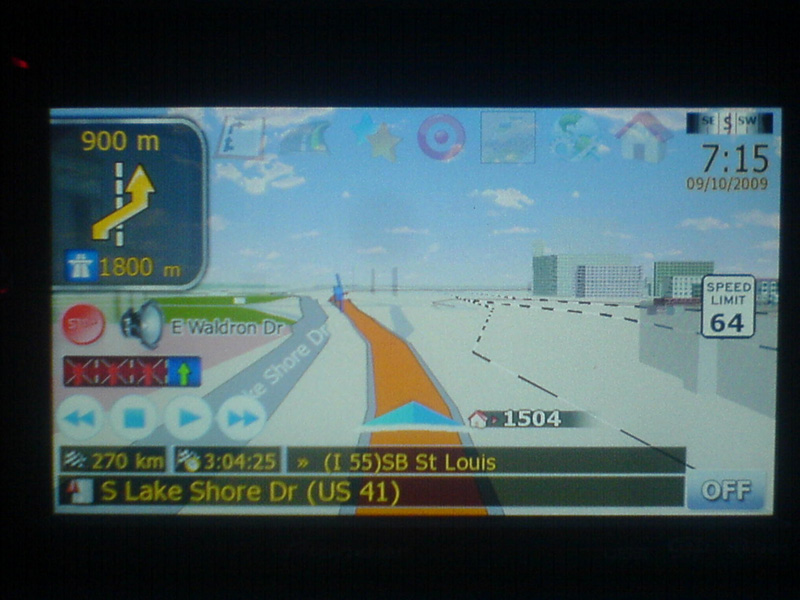
post-26677-12872758931554_thumb.jpg

post-26677-12872758932528_thumb.jpg

post-26677-12872758933296_thumb.jpg

Attached Files (1)
DSC02120.JPG
DSC02120.JPG
Posted Sep 11, 2009 · 04:10 UTC#795

Excellent-looking v4.3, IDT! Can't wait to get it installed.


In answer to your question (in response to my issue with the speed limits showing up incorrectly), it was on Trans-Canada Hwy. on Vancouver Island - 90km/h speed limit was showing as 145 on the box.


I installed the tele-atlas 2009 maps (someone on one of these threads had posted a 14-part .rar archive). You thinking it's time to start over and re-load a full MY FLASH DISK backup?


'cause that's what I'm thinking. ;)

Posted Sep 11, 2009 · 04:12 UTC#796
Excellent-looking v4.3, IDT! Can't wait to get it installed.


In answer to your question (in response to my issue with the speed limits showing up incorrectly), it was on Trans-Canada Hwy. on Vancouver Island - 90km/h speed limit was showing as 145 on the box.


I installed the tele-atlas 2009 maps (someone on one of these threads had posted a 14-part .rar archive). You thinking it's time to start over and re-load a full MY FLASH DISK backup?


'cause that's what I'm thinking. ;)


its the map that has the problem not your unit, i was able to get a copy of that map and had the ame result that's why i decided to revert back to the one included in the x910 backup

Posted Sep 11, 2009 · 06:19 UTC#797

Ok, I did what you said and changed the daycar1.bmp and nightcar1.bmp to daycar.bmp and nightcar.bmp but I am still getting the arrow and not the car image. What else do I need to change? BTW...LOVE V4.3!!!! THANK YOU SO MUCH!

Posted Sep 11, 2009 · 09:19 UTC#798

Help!!!! ASAP

After I loaded your mod unit rebooting all the time. but I can start testmode without problem. I put old files back but still rebooting. have f500bt and 3.01 firmware. what I need to do????

Posted Sep 11, 2009 · 10:07 UTC#799
Help!!!! ASAP

After I loaded your mod unit rebooting all the time. but I can start testmode without problem. I put old files back but still rebooting. have f500bt and 3.01 firmware. what I need to do????


did you follow all the instructions?

did you delete the save folder?

did you include the font file?

did you change the device type on the sys.txt to reflect F00 device type?

Posted Sep 11, 2009 · 10:57 UTC#800

Yes and no I tried to change sys.text but i can not read this text it`s likely japanish or chines text on it.and i guess I downloaded wrong files from you ( you have many files on your disc) I downloaded OEM map is it wrong map???

Page 32 of 65