Here comes one of scheme I use!
I don`t know if sys.txt I use is wrong one. because I edit sys.txt from 746UC to 749EW.
the latest one has the most current update regarding it, though i still have to poslish something regarding the color changer on the date and time but aside from that everything is a-ok
I see, so as of right now there is no fix for manually changing the clock colors right?
pushing the day scheme would easily fix it, the problem here is on the initial start up, after the first boot it would work
i'm having a problem with changing the color of the clock with v4.3. Normally, i would go into navigatemap_800_480.ui and change the clock colors -
;TIME
but this color converts back to stock (black with yellow highlights), I'm not having this problem with the V3.5.
they are the same with the one i'm using, proceed with the reloading of the files and let me know how it goes, if you could post a pic of it that would be great
the latest one has the most current update regarding it, though i still have to poslish something regarding the color changer on the date and time but aside from that everything is a-ok
I see, so as of right now there is no fix for manually changing the clock colors right?
pushing the day scheme would easily fix it, the problem here is on the initial start up, after the first boot it would work
i'm having a problem with changing the color of the clock with v4.3. Normally, i would go into navigatemap_800_480.ui and change the clock colors -
;TIME
but this color converts back to stock (black with yellow highlights), I'm not having this problem with the V3.5.
that is because there's some scripts in navigatemap.ui that sets them to a color depending on the time of the day
pushing the day scheme would easily fix it, the problem here is on the initial start up, after the first boot it would work
i'm having a problem with changing the color of the clock with v4.3. Normally, i would go into navigatemap_800_480.ui and change the clock colors -
;TIME
but this color converts back to stock (black with yellow highlights), I'm not having this problem with the V3.5.
that is because there's some scripts in navigatemap.ui that sets them to a color depending on the time of the day
ok, that i understand, but is there a way to change what color the script is using?
Nevermind, i think i found the solution. Thanks IDT.
pushing the day scheme would easily fix it, the problem here is on the initial start up, after the first boot it would work
i'm having a problem with changing the color of the clock with v4.3. Normally, i would go into navigatemap_800_480.ui and change the clock colors -
;TIME
but this color converts back to stock (black with yellow highlights), I'm not having this problem with the V3.5.
that is because there's some scripts in navigatemap.ui that sets them to a color depending on the time of the day
ok, that i understand, but is there a way to change what color the script is using?
Nevermind, i think i found the solution. Thanks IDT.
i'll figure something out regarding this, i'm currently looking for something to reference night and day so that proper colors will be set for them,
ok, that i understand, but is there a way to change what color the script is using?
Nevermind, i think i found the solution. Thanks IDT.
i'll figure something out regarding this, i'm currently looking for something to reference night and day so that proper colors will be set for them,
I changed the default colors of the script for both day and night view. What do you guys think?
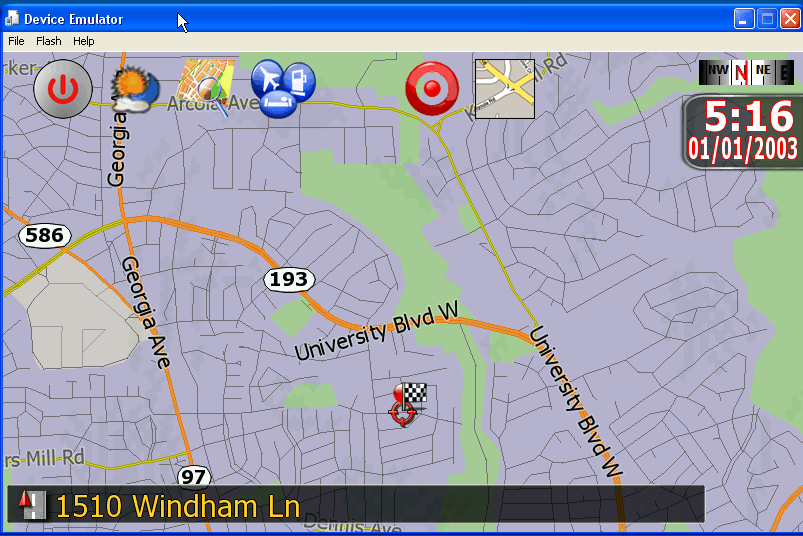

they are the same with the one i'm using, proceed with the reloading of the files and let me know how it goes, if you could post a pic of it that would be great
I reloaded all files but no solution. I can`t load any pic. right now. can it be wrong that edit sys.txt 746EW???
I changed the default colors of the script for both day and night view. What do you guys think?
I like the way the clock is bigger!! How do we make the clock bigger?
they are the same with the one i'm using, proceed with the reloading of the files and let me know how it goes, if you could post a pic of it that would be great
I reloaded all files but no solution. I can`t load any pic. right now. can it be wrong that edit sys.txt 746EW???
what unit do you have?
ok, that i understand, but is there a way to change what color the script is using?
Nevermind, i think i found the solution. Thanks IDT.
i'll figure something out regarding this, i'm currently looking for something to reference night and day so that proper colors will be set for them,
I changed the default colors of the script for both day and night view. What do you guys think?
Are you using my data.zip - window for the clock is coming from my file, made by IDT for me
f500bt eu
f500bt eu
did you change the device type to reflect F500? try that
forgive me if this has been discussed before. But on my F500BT I can see all the schemes when booted up. I can see them on the flash drive. IS the 500BT just too old to see them? Hardware wise?
thanks
forgive me if this has been discussed before. But on my F500BT I can see all the schemes when booted up. I can see them on the flash drive. IS the 500BT just too old to see them? Hardware wise?
thanks
i'm not sure what you're asking bro
forgive me if this has been discussed before. But on my F500BT I can see all the schemes when booted up. I can see them on the flash drive. IS the 500BT just too old to see them? Hardware wise?
thanks
i'm not sure what you're asking bro
I cant see or select 1/2 of the schemes that are in v4.3 that I put on my flash. I can see some of the nights and some of the days but not all of them. Hope this makes sence. remember I can see all the schemes listed in testmode just fine.
In the map color secection DAY I can see:
poineer blue day
gerd day
john cougar 1 day
john cougar 2 day
Easy
Poineer red day
Real view day6
real view day
monopoly
forgive me if this has been discussed before. But on my F500BT I can see all the schemes when booted up. I can see them on the flash drive. IS the 500BT just too old to see them? Hardware wise?
thanks
i'm not sure what you're asking bro
I cant see or select 1/2 of the schemes that are in v4.3 that I put on my flash. I can see some of the nights and some of the days but not all of them. Hope this makes sence. remember I can see all the schemes listed in testmode just fine.
In the map color secection DAY I can see:
poineer blue day
gerd day
john cougar 1 day
john cougar 2 day
Easy
Poineer red day
Real view day6
real view day
monopoly
Actually I think there all there but the night on easy is not visable when booted up. Does the spelling matter on the files? Some are spelled night and some are nite. Some with an _ and some with a -
thanks
I cant see or select 1/2 of the schemes that are in v4.3 that I put on my flash. I can see some of the nights and some of the days but not all of them. Hope this makes sence. remember I can see all the schemes listed in testmode just fine.
In the map color secection DAY I can see:
poineer blue day
gerd day
john cougar 1 day
john cougar 2 day
Easy
Poineer red day
Real view day6
real view day
monopoly
Actually I think there all there but the night on easy is not visable when booted up. Does the spelling matter on the files? Some are spelled night and some are nite. Some with an _ and some with a -
thanks
i'll take a look at it
I cant see or select 1/2 of the schemes that are in v4.3 that I put on my flash. I can see some of the nights and some of the days but not all of them. Hope this makes sence. remember I can see all the schemes listed in testmode just fine.
In the map color secection DAY I can see:
poineer blue day
gerd day
john cougar 1 day
john cougar 2 day
Easy
Poineer red day
Real view day6
real view day
monopoly
Actually I think there all there but the night on easy is not visable when booted up. Does the spelling matter on the files? Some are spelled night and some are nite. Some with an _ and some with a -
thanks
i'll take a look at it
looking at the schemes included in my download there's only 9 day schemes and 8 night schemes, so what you're seeing is just what's included
I cant see or select 1/2 of the schemes that are in v4.3 that I put on my flash. I can see some of the nights and some of the days but not all of them. Hope this makes sence. remember I can see all the schemes listed in testmode just fine.
In the map color secection DAY I can see:
poineer blue day
gerd day
john cougar 1 day
john cougar 2 day
Easy
Poineer red day
Real view day6
real view day
monopoly
Actually I think there all there but the night on easy is not visable when booted up. Does the spelling matter on the files? Some are spelled night and some are nite. Some with an _ and some with a -
thanks
i'll take a look at it
looking at the schemes included in my download there's only 9 day schemes and 8 night schemes, so what you're seeing is just what's included
i think your right. Its just weird what IGO does to the file names/format
f500bt eu
did you change the device type to reflect F500? try that
What do you mean?
if you mean inside sys.txt I changed to 749EW but 746EW was it your orginal. I don`t know what is different between them.
> IDT
An update on the speed camera warning beeps after a longer drive today past various speedcam locations.
For static cameras I still get no beep at all. Tested in both "over-limit" and "on approach". The camera shows correctly on the map screen and visual/spoken warnings work if selected.
For mobile cameras I get a very quiet , repeating beep as I drive past the camera location.
I am happy to test any change in settings, check file locations etc etc that you can suggest to help you investigate this.
> IDT
An update on the speed camera warning beeps after a longer drive today past various speedcam locations.
For static cameras I still get no beep at all. Tested in both "over-limit" and "on approach". The camera shows correctly on the map screen and visual/spoken warnings work if selected.
For mobile cameras I get a very quiet , repeating beep as I drive past the camera location.
I am happy to test any change in settings, check file locations etc etc that you can suggest to help you investigate this.
i'm currently working on it right now, no update til everything is fixed
ok, that i understand, but is there a way to change what color the script is using?
Nevermind, i think i found the solution. Thanks IDT.
i'll figure something out regarding this, i'm currently looking for something to reference night and day so that proper colors will be set for them,
I changed the default colors of the script for both day and night view. What do you guys think?
Are you using my data.zip - window for the clock is coming from my file, made by IDT for me
yes, i saw your screenshot and got the clock.bmp from your data file posted here.