a nice blue theme with blue buttons please?
Posted Sep 30, 2009 · 03:00 UTC#1151
a nice blue theme with blue buttons please?
Not a color request, but something I just noticed tonight. If I click the image to edit the Nav options from within the map (I was using 3d), the BACK arrow button doesn't return to the map, but instead moves up within the menus. Easy enough to work around by hitting the Map button instead, so no big deal. Not sure if this one was already posted, if so my apologies for the dup.
Not a color request, but something I just noticed tonight. If I click the image to edit the Nav options from within the map (I was using 3d), the BACK arrow button doesn't return to the map, but instead moves up within the menus. Easy enough to work around by hitting the Map button instead, so no big deal. Not sure if this one was already posted, if so my apologies for the dup.
this is from the stock, what you could do is just click hard button for the map or hold the about button below to go back to the map,
a nice blue theme with blue buttons please?
i don't have the photoshop skills to do it that's why i'm just sticking to the script part, though i already have the blue color available for the text color option
so here are the colors available so far,
saffron- default
black
white
grey
red
blue
yellow
green
orange
violet
this are for both the main color and the outline color, unless someone asks for something else i'll just stick to the basic colors
How about the clock being bigger on the map and or other screens, with a blur theme or whatever easier? Thanks!!
Thank you soooo much.
After upgrading to the 3.01 from 2 I was somewhat dissapointed since it didn't really fix much up at all (thank God I did not pay for it as I would be uber pissed). Your mod makes me so happy though as the unit is finally where it more or less should be.
Will you be making any changes to make the street names show up? Right now I only see street names for things right in front and nothing else.
Luke
Thank you soooo much.
After upgrading to the 3.01 from 2 I was somewhat dissapointed since it didn't really fix much up at all (thank God I did not pay for it as I would be uber pissed). Your mod makes me so happy though as the unit is finally where it more or less should be.
Will you be making any changes to make the street names show up? Right now I only see street names for things right in front and nothing else.
Luke
the only fix for that right now is to zoom it in a little until the road names show up,
a nice blue theme with blue buttons please?
i don't have the photoshop skills to do it that's why i'm just sticking to the script part, though i already have the blue color available for the text color option
i made a blue theme and also modified the blue bar in the navigation part as well if you are interested. Here is a link to some pics
i cant seem to get theses 3 schemes to work. Gerd night and the john cougar 1 night and 2 night. I got the others to work and the day ones as well, but cant get those night schemes to work. I added the lines for the sky and sun bmps into the ini files but it keeps rebooting. Is there something i am missing?
i cant seem to get theses 3 schemes to work. Gerd night and the john cougar 1 night and 2 night. I got the others to work and the day ones as well, but cant get those night schemes to work. I added the lines for the sky and sun bmps into the ini files but it keeps rebooting. Is there something i am missing?
why did you have to add lines of codes to it, it was meant to work with my mod without any modifications
i cant seem to get theses 3 schemes to work. Gerd night and the john cougar 1 night and 2 night. I got the others to work and the day ones as well, but cant get those night schemes to work. I added the lines for the sky and sun bmps into the ini files but it keeps rebooting. Is there something i am missing?
why did you have to add lines of codes to it, it was meant to work with my mod without any modifications
i didn't actually add them i am modifying them to work with my mod and everything is pretty much the same. pioneer blue and red night worked and i just had to change the sun and sky bmp names to match my gfx folder and everything worked. those are the only 3 i cannot get to work. weird
Thank you soooo much.
After upgrading to the 3.01 from 2 I was somewhat dissapointed since it didn't really fix much up at all (thank God I did not pay for it as I would be uber pissed). Your mod makes me so happy though as the unit is finally where it more or less should be.
Will you be making any changes to make the street names show up? Right now I only see street names for things right in front and nothing else.
Luke
the only fix for that right now is to zoom it in a little until the road names show up,
OK cool, that's fair enough. Just sent you some cash. Keep up the good work 
Luke
jalm111
thanks for the donation bro
I might be beating a dead horse here but I STILL get only partial usability of the damn trip computer 
Has any figured out how to make a positive reset of the tripmeter unit whenever you restart the unit?
This is damn frustrating to say the least!
I love the mod but I hate the fact that I can't use the friggin' thing!!
Thanx,
Bud
I might be beating a dead horse here but I STILL get only partial usability of the damn trip computerHas any figured out how to make a positive reset of the tripmeter unit whenever you restart the unit?
This is damn frustrating to say the least!
I love the mod but I hate the fact that I can't use the friggin' thing!!
Thanx,
Bud
no one has figured it out, some say that it might be the hardware itself,
Hi IDT.Is there any chance of either making the numbers bigger(or bolder)in respect of distance to destination and time of arrival in the info box?They are ok in some conditions but in others I can't make them out.Have you any more goodies planned for your next update?Will send another PP when I get squared up.Terrific work.
Hi IDT.Is there any chance of either making the numbers bigger(or bolder)in respect of distance to destination and time of arrival in the info box?They are ok in some conditions but in others I can't make them out.Have you any more goodies planned for your next update?Will send another PP when I get squared up.Terrific work.
i'll figure something out regarding that, update coming later,
UPDATE
-fixed speedcamera reboot problem
-added an option on how you want the speed camera warning to display (Full or Simple)
-when the speedcamera warning box is pressed it reverts to the simple camera mode, onlongclick mutes all the speedcamera warnings and goes to simple mode
-spoken alert changed to female voice (the male alert files were the ones causing reboot)
-removed a couple speed camera settings that i found not usefull
-fixed audible warning not saving upon reboot
-added a custom setting button on the navi setting screen
-added an option for the fading buttons
-added a navigation text color setting (for the streetnames, next streetname, distance etc, also controls the time and date color)
-there's a couple more stuff that i did that i can't remember
-currently i haven't found a way for the elevation to display feet on all unit settings,
-still working on the signpost covering the speedcamera warning box
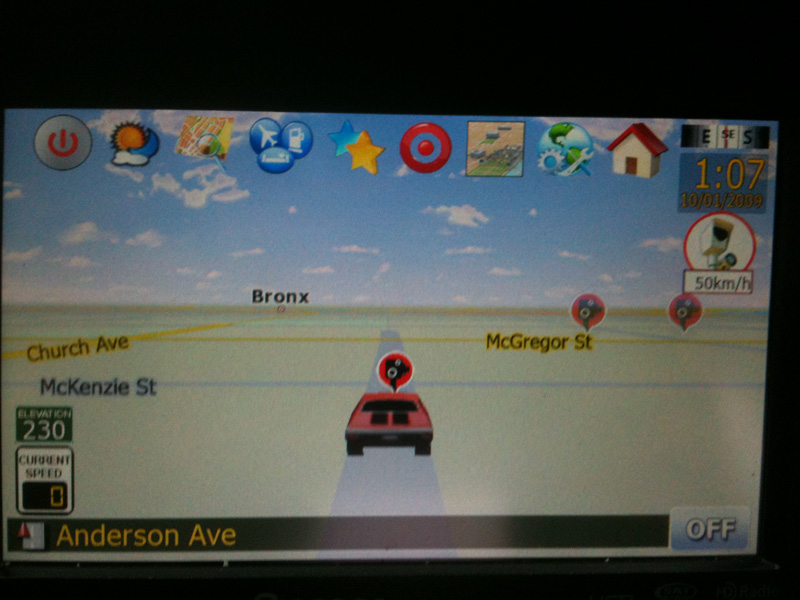
to change the 3D arrow to a car model download this file and extract it
and you have to edit the sys.txt
change the current values of this
3dcarsizemin=2500
3dcarsizemax=5000
3dcarsizemul=15000
to this
3dcarsizemin=5000
3dcarsizemax=8000
3dcarsizemul=30000
and add this part to the [3D] section
car_day=hot_rod_red.mdl
car_night=hot_rod_red.mdl
ghost_day=hot_rod_red.mdl
ghost_night=hot_rod_red.mdl
you now have to transfer the desired carmodel and tex file to the gfx folder in the data.zip and change the names of the above code to your selected car model name, i haven't tested every car model out as i already like the hot_rod car, but it's just a trial and error thing
1) first off this is not an auto installer,
2)extract files and transfer all files to a freshly formatted SD card (for F500 users, you have to edit the device type part first to reflect the device type of the F500 before transfering it to the SD)
3)this already has testmode file so no need to add anything else
4)insert SD to unit,
5)boot up unit
***if this is your first time,PLEASE BACK UP YOUR FILES
6) copy DATA.ZIP, SYS.TXT, and DS-DIGI file to igo folder
7) to add a different scheme, add the contents of scheme folder to MYFLASHDISK\APL2\IGO\CONTENT\SCHEME
**IT'S MANDATORY TO DELETE THE SAVE FILES, it's in My Flash Disk\USER\UserData\iGo\save, everything should be deleted except for favourites.dat if you have it
 once done copying turn off the unit, remove sd card and then turn unit on,
any comments, suggestions, requests are welcome, anyone who wants to be a tester for upcoming mods please send me a PM,i need more than one set of eyes to get this thing going
any donations thru paypal are very much appreciated [email protected]
sorry but i think the CMH's ftp site is down so i will have to upload it somewhere's else
the download link contains all of the versions (EU, MSN and regular) for v4.9 so downloading it might take longer
here's the lnik http://www.4shared.com/file/136830571/b ... 9_all.html
mirror link http://ul.to/4crynq


Damn, Julius!
You are our hero!
You've got cash!!! 
Fing sweeeeet I should just leave my GPS out on the coffee table for easy modding 
Hi IDT,
Great work,thanks.I seem to have a problem with the schemes which i had from dpdurst.They are still there to be selected but i get the message file not found and the nav part of the avic won't reopen.All i did was copy the new data.zip and sys.txt files over>have i missed something?Thanks again.
Hi IDT,Great work,thanks.I seem to have a problem with the schemes which i had from dpdurst.They are still there to be selected but i get the message file not found and the nav part of the avic won't reopen.All i did was copy the new data.zip and sys.txt files over>have i missed something?Thanks again.
Did you copy the new GFX folder I have as well? Did you copy the ui_igo8\common folder out of my data.zip into the idt data.zip? If they were working before, sounds like the ui_igo8\common folder is the issue as that is where some of the spr files and such would be located.
Thank you for your great job!
Have you corrected the problem of adding mobile camera speed ?
Hi IDT,Great work,thanks.I seem to have a problem with the schemes which i had from dpdurst.They are still there to be selected but i get the message file not found and the nav part of the avic won't reopen.All i did was copy the new data.zip and sys.txt files over>have i missed something?Thanks again.
Did you copy the new GFX folder I have as well? Did you copy the ui_igo8\common folder out of my data.zip into the idt data.zip? If they were working before, sounds like the ui_igo8\common folder is the issue as that is where some of the spr files and such would be located.
Yes that was it.I have now copied the ui igo 8 files over and..happy days!Thanks again for your help.