Hey IDT love the mod and thank you for the work you do. I used the fly over and now my 2d/3d button is gone. I tried to recopy the data file and it is still not showing up any ideas?
i will look into this
Hey IDT love the mod and thank you for the work you do. I used the fly over and now my 2d/3d button is gone. I tried to recopy the data file and it is still not showing up any ideas?
i will look into this
IDT, are you going to be adding back the auto-dimming of the top buttons? If so, can you provide hints as to where to comment it out like in the other version (if its location changed)?
One thing I noticed, and maybe I dont have it setup correctly, but the traffic flow (MSN) didnt seem to be working. Maybe its scheme dependent? On one road with a Real View scheme, I was encountering these green dots on the road, which I assume should have been coloring the road green completely. I later changed to the default Pioneer scheme, but didnt have the dots as I think the road I was travelling at that time did not have traffic flow info. Not sure if this has any bearing on your mod or if its all scheme related, thought I would bring it up with you just in case.
unfortunately i won't be able to help you with this one as i don't have MSN direct feature
Hey IDT,
Thank you very much for the mod, I am really enjoying it. I was just wondering if you could let me know how to move the compass down just a little bit, because my HU is at an angle where it is kinda hard to see the compass. And is it possible for me to modify it to be a bit larger? My eyes are very weak 
Also, maybe it's just me but somehow I can't seem to get that pretty sky background going. It's just a flat sky blue colour. Is there a reason why? I can clearly see the cloud picture files in the zip.
Thanks again.
I noticed that no matter which camera I set I do not get the volume muting. Either on "simple" (which is where it is supposed to work, correct?) or "when approaching".
I get the beeps but I do not get any other muting I see where the "!alert3" was changed to "beep beep"..no biggie to swap sounds but there is no volume restore or cancel. Is there supposed to be with this mod?. Just the spoken alerts and the visual which do work in the default settings and also the canceling on the screen tap.
Thanx!
Bud
how come my maps dont look as nice as the pics you have?
do you have by any chance hacked your unit?
I have the 3.0 update and followed the instructions you have posted above. Is that all I need? I like the 2d view of your map with the big roads. Thanks in advance IDT.
Hey IDT,
Thank you very much for the mod, I am really enjoying it. I was just wondering if you could let me know how to move the compass down just a little bit, because my HU is at an angle where it is kinda hard to see the compass. And is it possible for me to modify it to be a bit larger? My eyes are very weak
Also, maybe it's just me but somehow I can't seem to get that pretty sky background going. It's just a flat sky blue colour. Is there a reason why? I can clearly see the cloud picture files in the zip.
Thanks again.
look for this code in your navigatemap_800_480.ui and play with the y values
;COMPASS


;TIME


;DATE
I noticed that no matter which camera I set I do not get the volume muting. Either on "simple" (which is where it is supposed to work, correct?) or "when approaching".I get the beeps but I do not get any other muting I see where the "!alert3" was changed to "beep beep"..no biggie to swap sounds but there is no volume restore or cancel. Is there supposed to be with this mod?. Just the spoken alerts and the visual which do work in the default settings and also the canceling on the screen tap.
Thanx!
Bud
i'll check it out,
UPDATE
what's new
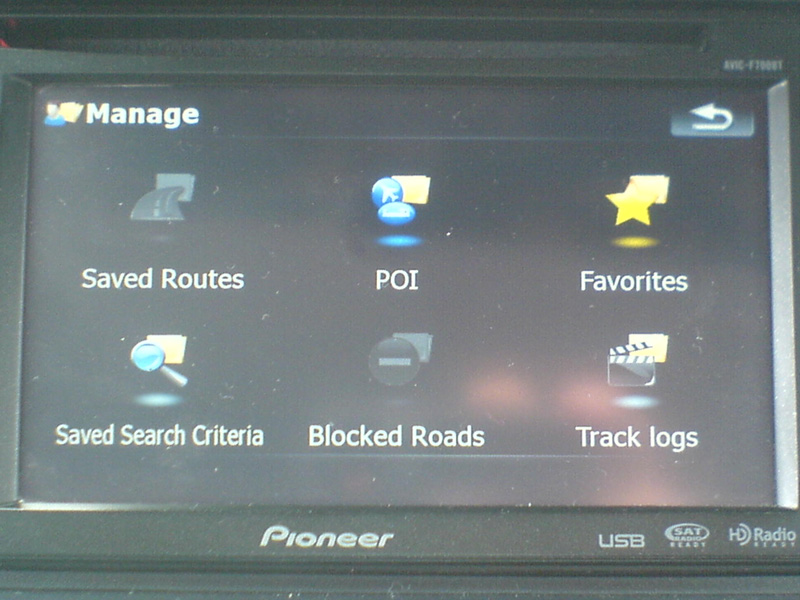
-multi-route
-trip computer
-road blocking
-manage screen
-snap to road option
-building setting
-fading shortcuts
-plan mode screen
-some other stuffs i can't remember
instructions:
for newbies READ THE HACKS THREAD FIRST, don't just jump into doing a mod without enough knowledge,
1) first off this is not an auto installer,
2)extract files and transfer all files to a freshly formatted SD card
3)this already has testmode file so no need to add anything else
4)insert SD to unit,
5)boot up unit
***if this is your first time,PLEASE BACK UP YOUR FILES
6)all the files are in files to be added folder copy DATA.ZIP, SYS.TXT, and DS-DIGI file to igo folder
**I RECOMMEND DELETING THE SAVE FILES, it's in My Flash Disk\USER\UserData\iGo\save, everything should be deleted except for favourites.dat if you have it
7) once done copying turn off the unit, remove sd card and then turn unit on,
any comments, suggestions, are welcome, i need more than one set of eyes to get this thing going
any donations thru paypal are very much appreciated http://[email protected]
here's the lnik ftp://avic:[email protected]/illdietrying/IDT%203.0/

what exactly does the msn file do?
what exactly does the msn file do?
that's for users with f900 and f90
what exactly does the msn file do?
that's for users with f900 and f90
Thanks. IDT how do I get that map to look like yours in page 1? Is there just a button that zooms in that far that im not seeing?
The MSN files are for users that have MSN Direct. Anyone can get a free 3 month free trial.
If your unit supports it.
Thanks for the Mod IDT looks great.
Thanks for your hard work.
IDT,
Dont worry about the MSN Traffic thing I was mentioning. It was working with the Pioneer scheme's, so my guess is that its just something wrong with the other schemes, not having support for road color shading maybe (other than when in route)? I would say its not an issue at all with your mod.
-fading shortcuts
Is this in the same file the as 2.0 version?
UPDATE
what's new
-multi-route
-trip computer
-road blocking
-manage screen
-snap to road option
-building setting
-fading shortcuts
-plan mode screen
-some other stuffs i can't remember
[[/url]
Hi IDT
can you please post the codes, and procedures to do:
1. road blocking
2. snap to road option
3. building setting
Thank you in advance. The reason I ask cuz I want to keep Pioneer original look, just add a fews of these mode. Thank you
I need some help please with camera setting i dont see any speed and red light camera on the map
X,Y,TYPE,SPEED,DIRTYPE,DIRECTION
-114.13547,51.03782,3,0,0,0 this is for red light settings
-113.57794,53.53942,7,100,0,0 this is for speed camera settings
Thanks for any help
what exactly does the msn file do?
that's for users with f900 and f90
Thanks. IDT how do I get that map to look like yours in page 1? Is there just a button that zooms in that far that im not seeing?
its the control knob, when you click it up it zooms in and it zooms out when you click down
The MSN files are for users that have MSN Direct. Anyone can get a free 3 month free trial.If your unit supports it.
Thanks for the Mod IDT looks great.
Thanks for your hard work.
no prob
-fading shortcutsIs this in the same file the as 2.0 version?
yes
UPDATE
what's new
-multi-route
-trip computer
-road blocking
-manage screen
-snap to road option
-building setting
-fading shortcuts
-plan mode screen
-some other stuffs i can't remember
[[/url]
Hi IDT
can you please post the codes, and procedures to do:
1. road blocking
2. snap to road option
3. building setting
Thank you in advance. The reason I ask cuz I want to keep Pioneer original look, just add a fews of these mode. Thank you
that's going to be too much work on my side though, currently i'm working pretty much double shifts 7 days a week and having a very little time to mod my unit, what i would suggest is to trace everything back, from variables to scripts to bmp's, once i save up enough money i'm going back to just working 8 hr shifts then i'll be more than willing to help you,
6)all the files are in files to be added folder copy DATA.ZIP, SYS.TXT, and DS-DIGI file to igo folder**I RECOMMEND DELETING THE SAVE FILES, it's in My Flash Disk\USER\UserData\iGo\save, everything should be deleted except for favourites.dat if you have it
If I may just add to IDT's excellent work and excellent instructions that the DATA.ZIP, SYS.TXT and DS-DIGI.TTF files go into the APL2\iGo folder.
The only path I found on my first attempt was the iGo folder that he referenced in getting rid of the contents of the SAVED folder. Strangely enough - that didn't do anything. 
Putting them into the APL2\iGo folder, though - works great. Looks great! Much thanks!
UPDATE
what's new
-multi-route
-trip computer
-road blocking
-manage screen
-snap to road option
-building setting
-fading shortcuts
-plan mode screen
-some other stuffs i can't remember
[[/url]
Hi IDT
can you please post the codes, and procedures to do:
1. road blocking
2. snap to road option
3. building setting
Thank you in advance. The reason I ask cuz I want to keep Pioneer original look, just add a fews of these mode. Thank you
that's going to be too much work on my side though, currently i'm working pretty much double shifts 7 days a week and having a very little time to mod my unit, what i would suggest is to trace everything back, from variables to scripts to bmp's, once i save up enough money i'm going back to just working 8 hr shifts then i'll be more than willing to help you,
No problem bro, no rush here... when you have time. It is only a hobby after all....
idt....if i wanted the red car pointer, where can i get it, and where do i put it? Thanks.
hey idt i cant set my return to home. i get all the way til i am supoesed to hit ok at the bottom right but no ok button.
hey idt i cant set my return to home. i get all the way til i am supoesed to hit ok at the bottom right but no ok button.
Yes I had the same problem
But I used set home by map location (I think) and that way worked