Can anyone tell me where the 2d mode button is on this mod. I must just be missing it somewhere, I don't see it.
Posted Aug 19, 2009 · 00:34 UTC#51
Can anyone tell me where the 2d mode button is on this mod. I must just be missing it somewhere, I don't see it.
Can anyone tell me where the 2d mode button is on this mod. I must just be missing it somewhere, I don't see it.
i think it's the compass
Did ya ever get the glitch with the trip comp ironed out or is it all still zeroes?
Thanx,
Bud
Hello,
I'm new to modding here. I just installed this and it looks as promised, however, under the POI icon on the menu the first three buttons all bring me to the save POI search menu, but the only button at the bottom is save criteria. When you press this it reboots the machine. There is no actual menu option to search for a POI.
These mods are excellent! My thanks go to everyone who has worked on them.
I'm having a similar response on my f90bt 3.01 that dhp did. Any POI icon takes me to a POI menu without the search function and save criteria causes the system to reboot (my CD kept playing so it seems just the display and related processes rebooted)
If this is an issue someone has solved could they send me a message. If not, can someone point me in the direction of the file I should go about modifying when I try to fit it myself tomorrow?
Thanks,
Stevfuri
dhp106 - Can you confirm that this is the line that you removed the QS from?
If so let me know and I will change the original file and upload a new one.
Affirm, remove the QS from the POI,gps, cursor and whatever the other one was.
Can anyone tell me where the 2d mode button is on this mod. I must just be missing it somewhere, I don't see it.
i think it's the compass
Yes, its the compass. Touch it and the map direction will change.
Did ya ever get the glitch with the trip comp ironed out or is it all still zeroes?Thanx,
Bud
Its something larger than my mods. Other modders are having the same problem with theirs. What we have narrowed it down to is moving too quickly before the nav finishes booting. Even then its not 100%. Seems like a problem that has existed since 2.0. We are still trying to find out what it is for sure.
Affirm, remove the QS from the POI,gps, cursor and whatever the other one was.
Excellent. Thanks for finding the fix. I will update the file and edit my main thread with a new link tomorrow. Maybe if Keeper see's this thread he can tell is what the original intent of that string was. I don't think I have edited that at all so maybe its still happening in the original Keeper version?
Did ya ever get the glitch with the trip comp ironed out or is it all still zeroes?Thanx,
Bud
Its something larger than my mods. Other modders are having the same problem with theirs. What we have narrowed it down to is moving too quickly before the nav finishes booting. Even then its not 100%. Seems like a problem that has existed since 2.0. We are still trying to find out what it is for sure.
What are your supposed "problems"? It works the same as on 2.0. Maybe it's the way you incorporated them into with your mods. It works the same in 3.0 as it did in 2.0. What have you narrowed down that you think it may have to do with moving too quickly before the unit finishes booting?
I've also got a question about branding. I only get shell gas stations to show up and even so not all of them show up. There is a street where i work where there is a shell station like 1/4 mile away from each other and only one of them shows up on my map. they are not new so they should be in there.
I've also got a question about branding. I only get shell gas stations to show up and even so not all of them show up. There is a street where i work where there is a shell station like 1/4 mile away from each other and only one of them shows up on my map. they are not new so they should be in there.
I also noticed this. All the brands show up for me (Chevron, Shell, 76, Valero) but it seems like 2/3 of the locations aren't found/shown..
Did ya ever get the glitch with the trip comp ironed out or is it all still zeroes?Thanx,
Bud
Its something larger than my mods. Other modders are having the same problem with theirs. What we have narrowed it down to is moving too quickly before the nav finishes booting. Even then its not 100%. Seems like a problem that has existed since 2.0. We are still trying to find out what it is for sure.
What are your supposed "problems"? It works the same as on 2.0. Maybe it's the way you incorporated them into with your mods. It works the same in 3.0 as it did in 2.0. What have you narrowed down that you think it may have to do with moving too quickly before the unit finishes booting?
I notice that EVERY TIME the gps shows ANY movement as evidenced by the "speed" in the gps settings screen the trip comp ALWAYS freezes and shows zeroes. If I am lucky enough to get the system to boot up and the speed is showing "0.00 MPH" then it will ALWAYS start to work. My unit will show movement EVEN IF I AM STANDING STILL and this is when the trip comp fails to work. It had to do with the fact that (I theorize) if is detecting the slightest bit of movement it cannot begin to calculate anything so it just freezes up.
I have come to this conclusion after MANY tests and attempts to get it to work with numerous configurations. It was not until about a week ago when I finally found the root of the problem (at least for me) was tied to the speed indicated. My VSS has been hooked up since day one so I am going to un hook it just for the hell of it and see if it has any bearing on the situation. Besides, this thing is so inaccurate it surely wont make a difference if the VSS is attached or not IMHO.
Thanx,
Bud
That's really odd. It works perfect for me each/every time.
I don't have VSS hooked up - but not sure how that makes a difference.
Thanks,
Ben
Installed the mods on the F500.
Is it possible to change the speed and speed limit signs to a different location, so they would not interfere with the highway signs?
Thank you.
I notice that EVERY TIME the gps shows ANY movement as evidenced by the "speed" in the gps settings screen the trip comp ALWAYS freezes and shows zeroes. If I am lucky enough to get the system to boot up and the speed is showing "0.00 MPH" then it will ALWAYS start to work. My unit will show movement EVEN IF I AM STANDING STILL and this is when the trip comp fails to work. It had to do with the fact that (I theorize) if is detecting the slightest bit of movement it cannot begin to calculate anything so it just freezes up.I have come to this conclusion after MANY tests and attempts to get it to work with numerous configurations. It was not until about a week ago when I finally found the root of the problem (at least for me) was tied to the speed indicated. My VSS has been hooked up since day one so I am going to un hook it just for the hell of it and see if it has any bearing on the situation. Besides, this thing is so inaccurate it surely wont make a difference if the VSS is attached or not IMHO.
Thanx,
Bud
Bud,
There's definitely something else going on that's affecting the operation.
I'm attaching my trips from today so you know it does work. Yourself and diafia are still the only two reporting "issues".
The 8-17c picture is the combined of the morning and afternoon trip. I forgot to reset the start of it when I booted it this morning. I also didn't pause it when I went into standby. Notice the trip times, speeds, distance and altitudes. Nothing abnormal in any way whatsoever.
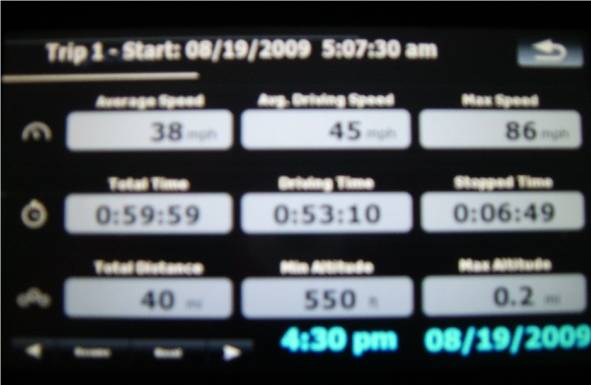

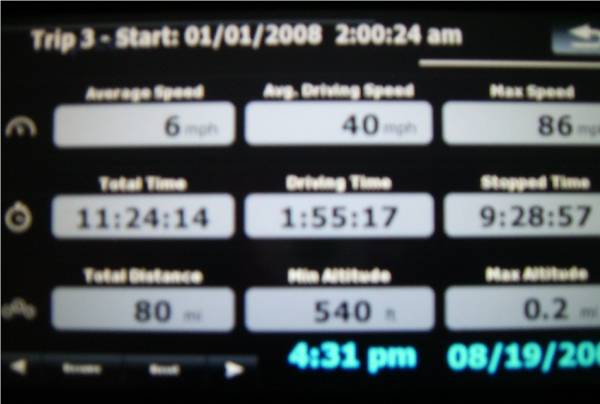
Well, that is also what mine looks like...when it does work..and I like it when it does but obviously ther IS something with OUR setups. It did it on V2.0 and likewise on my current V3.01 so I dunno  I have tried it with a virgin DATA.zip and also with my own add-in and with the exact same result. Anywho, I will just see if sometime, somehow, somewhere sombody will figure it out and I will just leave it be for now.
Thanx for all the help!
Bud
Well, that is also what mine looks like...when it does work..and I like it when it does but obviously ther IS something with OUR setups. It did it on V2.0 and likewise on my current V3.01 so I dunnoThanx for all the help!
Bud
not sure why it's acting that way on your mod as i never had problems with it before and upto now
Well, that is also what mine looks like...when it does work..and I like it when it does but obviously ther IS something with OUR setups. It did it on V2.0 and likewise on my current V3.01 so I dunnoThanx for all the help!
Bud
sounds like most likely it's a hardware problem or the gps antenna is picking up interference? especially since you said "My unit will show movement EVEN IF I AM STANDING STILL".
sounds like most likely it's a hardware problem or the gps antenna is picking up interference? especially since you said "My unit will show movement EVEN IF I AM STANDING STILL".
Any GPS receiver will show some movement even when standing due to accuracy errors. (There are ways to pretend you are in one spot by ignoring any movement under a certain cut-off speed, but I am not sure if AVIC does that)...
You might want to compare your SYS.TXT as well... there might be some differences there.
First time poster, nice work on the mod. Just have a quick question, which file do I need to modify in order to remove the speed, elevation, and the speed limit sign that keeps popping up. thx in advance
Heres my sys.txt:
[device]
type="PIONEER746UC"

[interface]
skin="ui_pioneer"
default_day_color="COLORSCHEME~Pioneer Blue Day"
default_night_color="COLORSCHEME~Pioneer Blue Night"
tmc_events_icon_set="$tmc2.spr"
small_tmc_events_icon_set="$smalltmc2.spr"
show_kml_type=0
maxzoom2d=6000000
show_exit=1
defaulttilt3d=8100
mapfontscale=200


[rawdisplay]
screen_x=800
screen_y=480
class="landscape"
highres=0
dpi=250

[debug]
skip_eula=1
enable_roadshadow=1
enable_buildings=1
restart_mode_in_file=1
traincrossing=1
speedcam_enabled=1
cache=2048
show_lane_info=1

[folders]
;app=""\My Flash Disk\APL2\iGo"
data="\My Flash Disk\User\UserData\iGo"
tts_nuance="\My Flash Disk\APL2\iGo\ScanSoft\RealSpeakSolo"
secondary_app="Storage Card/usericon,USB Disk/usericon"
usb_trackexport_path="\USB Disk"
storage_trackexport_path="\Storage Card"

[gps]
port=7
baud=9600
log_base_dir="\My Flash Disk\User\UserData\iGo\LogData"
default_latitude="40.29880"
default_longitude="-83.06774"

[2d]
show_guidance_arrows=1
show_guidance_strip=0

[3d]
max_poly_segments_shown_1=400
min_poly_segments_shown_1=200
show_guidance_arrows=1
show_guidance_strip=0

[3d_config]
roadsign_lines_per_screen=19


[local]
voice_key="Eng_us_m1"
default_language="english US"

[regional]
units=1

[dynamiccompressor]
compressor="1"
a0="56806"
thrs="24703"
ratio="8"
gain="8"

[timezone]
reset_os_timezone=1
multi_timezone=1

[map]
3d_scale_carmodel=1
3dcarsizemin=3150
3dcarsizemax=5000
3dcarsizemul=30000
3d_tunnels=1
;3d_max_tiltlevel=8100
3d_max_tiltlevel=8800
3d_max_zoomlevel=3000
3d_min_zoomlevel=40
3d_max_zfar=2000
show_oneway=1

[smartzoom]
minangle=60
maxangle=81
;restore_smartzoom_on=1

[map]
2dheadup=1
zoomfactor=110

[poi]
;enable_pois_before_080217=1
Excuse my ignorance, but was that the answer to my question?
I've also got a question about branding. I only get shell gas stations to show up and even so not all of them show up. There is a street where i work where there is a shell station like 1/4 mile away from each other and only one of them shows up on my map. they are not new so they should be in there.
Does that Shell have another gas station on another corner in the same intersection?
Excuse my ignorance, but was that the answer to my question?
Nope. Thats for another one. You need to comment out the sections (or delete them) as they are marked in the navigatemap_800_400.ui file.
(Links updated 8/19/09. First post edited.) Fixes are new data.zip and sys.txt. If you want the sky to show in 3D map mode then edit out the commented lines in the map section of the sys.txt. Also edited navigatemap file to fix rebooting problem when saving a POI. Last change was to add in the GPS mods but those are now at the top above the your speed sign and all the signs below that have been moved down.
Its something larger than my mods. Other modders are having the same problem with theirs. What we have narrowed it down to is moving too quickly before the nav finishes booting. Even then its not 100%. Seems like a problem that has existed since 2.0. We are still trying to find out what it is for sure.
What are your supposed "problems"? It works the same as on 2.0. Maybe it's the way you incorporated them into with your mods. It works the same in 3.0 as it did in 2.0. What have you narrowed down that you think it may have to do with moving too quickly before the unit finishes booting?
I notice that EVERY TIME the gps shows ANY movement as evidenced by the "speed" in the gps settings screen the trip comp ALWAYS freezes and shows zeroes. If I am lucky enough to get the system to boot up and the speed is showing "0.00 MPH" then it will ALWAYS start to work. My unit will show movement EVEN IF I AM STANDING STILL and this is when the trip comp fails to work. It had to do with the fact that (I theorize) if is detecting the slightest bit of movement it cannot begin to calculate anything so it just freezes up.
I have come to this conclusion after MANY tests and attempts to get it to work with numerous configurations. It was not until about a week ago when I finally found the root of the problem (at least for me) was tied to the speed indicated. My VSS has been hooked up since day one so I am going to un hook it just for the hell of it and see if it has any bearing on the situation. Besides, this thing is so inaccurate it surely wont make a difference if the VSS is attached or not IMHO.
Thanx,
Bud
Thanks for replying Bud. I had not had a chance to with everything going on today. This is the exact same thing I have been experiencing as well.