Search Archive

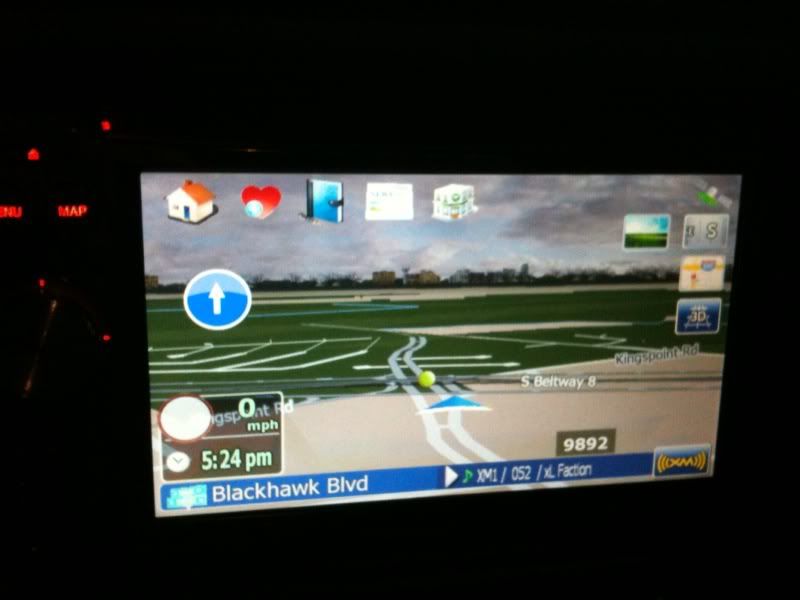
Stan/Andr2000 v3.0 main screen by dpdurst - update 3/15/10

By dpdurst · Oct 13, 2009in Completed Mods/Themes💬 155 posts👁️ 38,999 views
Page 5 of 7
Posted Nov 22, 2009 · 06:18 UTC#101
Tengo un problema con el USB, después de instalar el mod.

El mod no es 100% de mí, pero funciona, el problema es que no reconoce el USB y también bloquea la unidad cuando puse mi USB.


Cualquier solución?

Use the Sd card slot. I don't speak espanol, but I think he is trying to install a mod with USB???


Translation via Google Translate


I have a problem with the USB, after installing the mod.

The mod is not 100% on me, but it works, the problem is that it recognizes the USB and also locks the drive when I put my USB.


Any solution?

Posted Nov 22, 2009 · 17:48 UTC#102

Tried to install your mod today and when trying to copy the gfx folder over it told me I was out of space and could not copy all files. Is there something I need to do before installing this.


I installed Diaftia's mod yesterday to check it out and that worked fine.


After your mod could not be completely installed I deleted the APL2 folder contents and restored from backup. I also deleted my userdata and restored from backup. I am now running on the factory version again. Pioneer official 3.02 update.


Let me know if you know anything I need to do.


I will probably try again tonight but at the moment I have other things to do.

Posted Nov 22, 2009 · 18:25 UTC#103
Tried to install your mod today and when trying to copy the gfx folder over it told me I was out of space and could not copy all files. Is there something I need to do before installing this.


I installed Diaftia's mod yesterday to check it out and that worked fine.


After your mod could not be completely installed I deleted the APL2 folder contents and restored from backup. I also deleted my userdata and restored from backup. I am now running on the factory version again. Pioneer official 3.02 update.


Let me know if you know anything I need to do.


I will probably try again tonight but at the moment I have other things to do.

Free up some space by deleting maps you don't use.

Posted Nov 24, 2009 · 04:16 UTC#104

Deleted Canada, Hawaii and Alaska mod and got the mod installed.


I found the ding before nav announces annoying and could not find a setting to disable it (maybe I missed it).


I used the flag version but found the clock too hard to read in that version, which would require a font color change if I stick with it.


Also when selecting a destination after POI search it does not let me see where it is on the map before selecting it as my destination like the stock Pioneer does. This may be because of the andr200 mod. I don't know because I hav not tried that yet.


Overall this is a fairly nice mod.


F.Y.I All (This is just my opinion and each of you need to try this if you want it and form your own opinion)

I tried the left right destination announce with this mod and found it too unreliable for my taste with my current setup, your mileage may differ. About half the time it announced the destination on the wrong side of the street. In one case I know the nav knows the destination is on the right but the announce says it is on the left.


Example of wrong announce:

I went to Fry's Electronics in Anaheim, CA. It is at 3370 E La Palma Ave, Anaheim, CA 92806. When I approach Fry's is on the right but the destination announce says I reached my destination on the left. If I approach from the west the nav tells me to go past Fry's and make a u-turn (it must think there is a divider) then again it tells me I reached my destination on the left. Obviously it knew it was on the right or it would not have told me to make a u-turn.


Update 11-26-2009:

N-S-E-W thinks this has to due with the POI search and what POIs are being used. He is using Navteq POIs and I am using the stock TeleAtlas POIs. I got his Navteq POIs and will try them today.


2nd Update 11-26-2009:

I tried the Navteq POIs for California and that resolved my left/right announce problem.

Posted Nov 24, 2009 · 13:41 UTC#105
Deleted Canada, Hawaii and Alaska mod and got the mod installed.


I found the ding before nav announces annoying and could not find a setting to disable it (maybe I missed it).


I used the flag version but found the clock too hard to read in that version, which would require a font color change if I stick with it.


Also when selecting a destination after POI search it does not let me see where it is on the map before selecting it as my destination like the stock Pioneer does. This may be because of the andr200 mod. I don't know because I hav not tried that yet.


1. Ding is from the turn restriction mod can't remove it

2. Using the quick buttons on the top of the screen will not show you the map, clicking on the route plan button and then doing a search will show you the map before selecting.


These are because of the way the original mod was created.

Posted Nov 24, 2009 · 19:57 UTC#106

this Mod ist the only one i can run on my 500er, thank you for your work!!!


I have two questions: is it possibel to change the blue background into green background (while Navigation)?


How can i create a Dodge Nitro as 3DCar?


Best regards

Posted Nov 26, 2009 · 15:07 UTC#107

Thank you David for providing and reconfiguring the themes to work on our units. I have installed most of them without any issues other than it takes a little longer to bring up the list when changing themes. I have no problem waiting a little more for the list in order to have a larger selection to choose from.Thanks again!

Posted Nov 30, 2009 · 15:22 UTC#108
Thank you David for providing and reconfiguring the themes to work on our units. I have installed most of them without any issues other than it takes a little longer to bring up the list when changing themes. I have no problem waiting a little more for the list in order to have a larger selection to choose from.Thanks again!


Thanks! yea I have about 30 loaded and it takes a few to bring them up..

Posted Nov 30, 2009 · 15:33 UTC#109
this Mod ist the only one i can run on my 500er, thank you for your work!!!


I have two questions: is it possibel to change the blue background into green background (while Navigation)?


How can i create a Dodge Nitro as 3DCar?


Best regards


1. Change of background to green? Yep piece of cake, stay tuned I'll get one going for you

2. Adding picture for 3D car. Its documented somewhere.. here it is.. hope this helps.


----------------------------------------------------

to change the 3D arrow to a car model

download the 3DCars.rar file on the download link provided and extract it. (Don't have the DL link right now)


You have to edit the sys.txt


change the current values of this

3dcarsizemin=2500

3dcarsizemax=5000

3dcarsizemul=15000


To this


Code: Select all

3dcarsizemin=5000

3dcarsizemax=8000

3dcarsizemul=30000


and add this part to the [3D] section


car_day=hot_rod_red.mdl

car_night=hot_rod_red.mdl

ghost_day=hot_rod_red.mdl

ghost_night=hot_rod_red.mdl


You now have to transfer the desired carmodel and tex file to the gfx folder in the data.zip and change the names of the above code to your selected car model name

Posted Dec 03, 2009 · 20:05 UTC#110

Hello and thanks für your work. I have tried it but didn´t work. For green Background i will try the Kawasaki.....


Best Regards

Posted Dec 06, 2009 · 14:32 UTC#111

David,

Any new changes on the horizon? I am currently using this mod and I have to say so far so good. No hiccups or errors whatsoever. Thanks.

Mark

Posted Dec 06, 2009 · 14:51 UTC#112
David,

Any new changes on the horizon? I am currently using this mod and I have to say so far so good. No hiccups or errors whatsoever. Thanks.

Mark


I agree.I can't fault it.I have tried others(which are still brilliant)but come back to this one.I like the distance to destination it is really easy to see.Also having the speed limit next to the actual speed is a big help.The only thing i would really like is the trip computer showing on the screen along the bottom like in some of the other mods.Absolutely love this mod.

Posted Dec 07, 2009 · 20:21 UTC#113


I found the ding before nav announces annoying and could not find a setting to disable it (maybe I missed it).


1. Ding is from the turn restriction mod can't remove it


Technically you could by finding the ding sound file and replacing the audio file with an empty one. Not really sure how to create an empty audio file but I know it can be done.

Posted Dec 07, 2009 · 22:17 UTC#114


I found the ding before nav announces annoying and could not find a setting to disable it (maybe I missed it).


1. Ding is from the turn restriction mod can't remove it


Technically you could by finding the ding sound file and replacing the audio file with an empty one. Not really sure how to create an empty audio file but I know it can be done.


..........or comment out the playsound from the ui file. That ding sound may be used elsewhere.

Posted Dec 07, 2009 · 23:21 UTC#115

..........or comment out the playsound from the ui file. That ding sound may be used elsewhere.


Or turn it off somewhere in the settings (in original Stan/Andr skin it is, I believe, controlled by the lane info ding setting...


Or, for adventurous coders, make it configurable separately.

Posted Dec 08, 2009 · 22:59 UTC#116

..........or comment out the playsound from the ui file. That ding sound may be used elsewhere.


Or turn it off somewhere in the settings (in original Stan/Andr skin it is, I believe, controlled by the lane info ding setting...


Or, for adventurous coders, make it configurable separately.


Hmmm.... I might look into that. I'll put on my to-do list. The adventures of try to f up the nav unit continues. I don't have the original, mine is 8.3.2.90139.

Posted Dec 09, 2009 · 12:06 UTC#117

The file for the dingdong sound is in the audio folder


!nav_dingding.wav


I have not heard this for anything else in the unit other than the turn restriction sounds. There is another file that does a single ding I have heard. It's pretty simple to just make a zero byte file with nothing and that would solve the problem. I have changed the file and attached if someone wants to test it out go for it. It should only effect the turn restriction mode.


For the other questions about my plans, None really. At some point shortly I need to delve into this and make my changes current with the Dec 2 release. There are a few things I am thinking about, whether they get done or not right now is another story..

!nav_dingding.zip

Posted Dec 09, 2009 · 17:21 UTC#118

I'm trying to get this to work but keep getting an error message when i try to run the gps : "Unable to open ui_igo8/common/trackinglist.spr" Any help would be greatly appreciated!

Posted Dec 10, 2009 · 03:10 UTC#119
I'm trying to get this to work but keep getting an error message when i try to run the gps : "Unable to open ui_igo8/common/trackinglist.spr" Any help would be greatly appreciated!


Not sure what your installing, my mod has that file in there so you should not be getting that error. What exactly did you load?

Posted Dec 10, 2009 · 19:40 UTC#120

Confirmed this morning that the dingdong.wav file is in fact the one that is the issue. I have my current zip updated (not posted) I'll work this weekend on getting some updates done and try to bring this current as well to the new andr2000 changes for the Dec 2 file.

Posted Dec 12, 2009 · 21:16 UTC#121

I keep getting an error cannot find gfx/day/cs.bmp then igo crashes. :(

Posted Dec 12, 2009 · 21:27 UTC#122
I keep getting an error cannot find gfx/day/cs.bmp then igo crashes. :(


Check that you have installed the GFX folder in the correct place.


flashdrive/apl2/igo/gfx.Also check that the scheme you are trying to run in the day folder :)Also delete everything in user/userdata/igo/save


Also did you install the igo_8 foder into your data.zip......

Posted Dec 12, 2009 · 22:40 UTC#123
I keep getting an error cannot find gfx/day/cs.bmp then igo crashes. :(


Check that you have installed the GFX folder in the correct place.


flashdrive/apl2/igo/gfx.Also check that the scheme you are trying to run in the day folder :)Also delete everything in user/userdata/igo/save


Also did you install the igo_8 foder into your data.zip......


I figured it out, I needed to change the scheme to something other than the default pioneer schemes, after that everything loaded up perfectly. :D


Thanks for the help!

Posted Dec 15, 2009 · 11:44 UTC#124

Finished up the Dec 2 update with my mods.


1. For some reason I can't get the Route Progress to work correctly. Its there but not sure if its really broke or its me.


2. New route tools button on top left, pressing this causes the original route buttons I have to show up to use, after 5 seconds they disappear again.


3. Fixed the CarpositionCursor that was centered on the screen


Will post it shortly.

Posted Dec 15, 2009 · 21:07 UTC#125

I gots a question though...can anyone tell me what the icons in the middle-left of the screen that pop up are?


Here is a pic of one below, I also get like a "no left turn" or "no right turn" icon randomly, but i know they don't apply to the streets i am on, because they don't necessarily come up at any intersection or turn off and when it does you can def tell it doesn't apply to that intersection (ie: you CAN turn left or right).


photo-6.jpg


Also is trip computer supposed to store data between power cycles? When I turn my vehicle off and back on, it seems trip data starts over, but it seems it would be possible to make it preserve the data as speed logs are preserved between power cycles. does anyone know? or maybe mine is messed up and its supposed to?


thanks!

Page 5 of 7