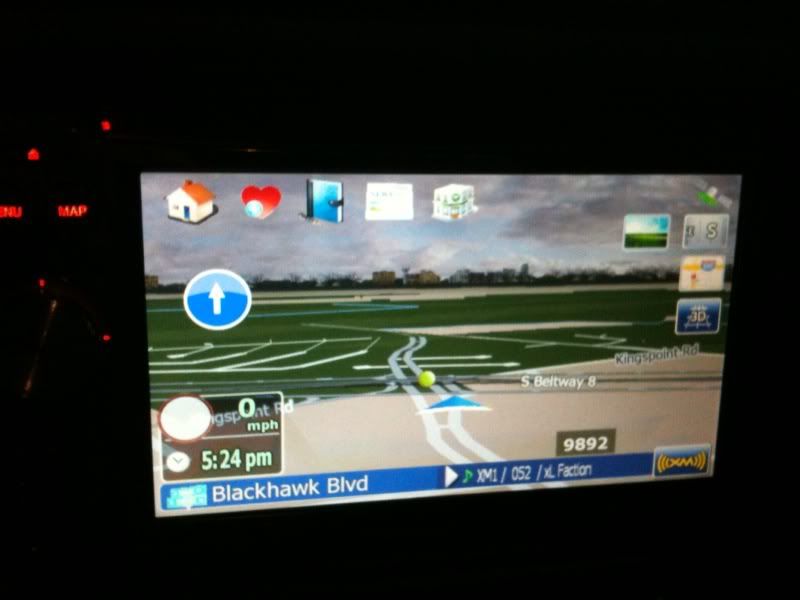
Here is the awesome Stanislov/Andr2000 v3.0 setup with a new front end to it. I love the new changes they have done for 3.0, but never liked having the big screen on the left of the main screen when not navigating so as you can see below in the screen shots I have done some modifications. Current screen shots below show non-navigate and navigate mode of operation.
Not sure where its going next... gonna play some XBOX with the wife for a bit.
I'll update the newest Andr2000 as soon as I see if some more updates come out.
Currently uses the Dec 2, 2009 Andr2000 change
3/15/10 update
1. Click and hold the bottom street sign causes screen to black out
2. Click and hold Time during non-navigation toggles date and time
3. Other fixes by Andr2000 for this version
10/29/09 update
1. Next and Current street backgrounds match with transparency
2. Clock moved under speed, new cockpit background
3. Satellite icon upper right corner (sat dish shows status sat dish shows status) when no navigation,
And 2 vertical bars when navigating
4. GPS screen has globe with satellites around it now color of sat wings show status
5. Fixed MPH readout so when using Kilometers it will change to KM/H instead
6. Return to Cockpit button is on the map plan screen left side
A. New ezrider.exe that should now show correct altitude in feet up to 21120 feet
10/21/09 update
1. Added route progress bar when in navigation mode and also will show up same place during simulation mode. Upper right of screen white/black bar and orange icon moves from left to right. To enable go into visual settings and advanced settings toggle on or off
10/19/09 update
1. New icons added for street and next waypoint and also GPS on the screen
2. Top and Bottom for street and next street show more details
3. Street on bottom if to much is on the line it will animate and scroll
4. Added new speedwarn icon that is bigger
5. Freeway signs are now smaller and don't take up so much room. Don't overlap icons on right
10/14/09 update
1. Fixed the issue in navigation mode, clicking on the clock or time under the speed will toggle through 3 settings, current time, eta to destination and ete to destination
2. More alignment fixes in the cockpit detail screen
10/13/09
1. Time format when not navigating moved to top right with new background. This hides when speed cam warning fires off and shows distance instead and also hides when you have a route running.
2. Added GPS screen access by clicking on top right of screen where GPS icon is. This works only when GPS icon is present.
3. Removed big Cockpit on left of screen during non-navigation modes and added small speed and speed limit screen that matches and lines up with main cockpit during navigation mode
4. Added my shortcut icons across top of screen with new icons.
5. Changed icons on right of screen to new picturs
6. Added delete route and new mute speaker icon when route is present
7. Added shortcut to access day and night mode schemes easier.
8. All icons fade out after a few seconds. Compass does not.
9. Clicking on the speed icon still brings up the cockpit mode display and I have positioned the readouts vertically to be more inline with each other.


All schemes and other stuff you can find at the bottom of this post
Download the data.zip here - update 10/29/09 http://www.gpssoftware.us/avic/stan/data.zip
Download the data.zip here that has front end US flag theme - update 10/30/09
Rename the file to data.zip - http://www.gpssoftware.us/avic/stan/data_flag.zip
Download the data.zip here that has front end Cross of St George theme - update 10/30/09
Rename the file to data.zip - http://www.gpssoftware.us/avic/stan/data_cross_st_george.zip
--------------------------------------------------------------
Unzip the sys.zip file and copy to the apl2/igo folder and then copy the new font to the apl2/igo folder
If you running the new Andr2000 3.0 mod then you don't need the below files you already have them. However it won't hurt if you copy over the ones you have or just want to replace them.
Download the sys.txt file - http://www.gpssoftware.us/avic/30/sys.zip
Download font needed with this mod as well - http://www.gpssoftware.us/avic/stan/digital.ttf
To get the sky and such going you need to get the files listed below and have the sys.txt listed above. All the schemes are modified to show solid 3d color buildings if you have the appropriate building files:
Testmode files needed to get into the unit. Unzip and copy the testmode folder to SD card
http://www.gpssoftware.us/avic/30/testmode.zip
1. Hacked EZrider.exe for the 3.0 - update 10/29/09 - Should now show ALT above 1 mile as feet
Unzip and copy the ezrider.exe to the APL2\igo folder
http://www.gpssoftware.us/avic/30/ezrider_alt_mod.zip
2. New GFX folder - 9/30/09, unzip and copy the folder into the main APL2\igo folder -
http://www.gpssoftware.us/avic/30/gfx.zip
3. Tons of new Schemes unzip and select what you want and move to the APL2\igo\content\scheme folder
Updated on 9/17/09 5:50pm, now show textured buildings. Removed 2 that didn't belong, small size now.
http://www.gpssoftware.us/avic/30/scheme.zip
Updated Schemes II and Night Schemes available now 9/29/09 - Download, unzip and copy to your existing scheme folder. Download the new GFX folder update above #3, new schemes II are for all 4 seasons and should have the textured buildings, the new night schemes have new and more clear backgrounds for the following skies: clear, rainy, cloudy, fog
1. Schemes II
http://www.gpssoftware.us/avic/30/scheme2.zip
2. Night Schemes
http://www.gpssoftware.us/avic/30/night_scheme.zip