Search Archive

IDT skin#2 v3.0 12/30/10 (download link updated)

By ill.die.trying · Oct 25, 2009in Completed Mods/Themes💬 442 posts👁️ 72,478 views
Page 13 of 18
Posted Feb 23, 2010 · 19:16 UTC#301


Agree with abb1, it has to be software releated since now is working fine with teleatlas maps on my unit. I also tested with Diaftia's mod and work fine. No luck on navteq maps.


...thank you for the signboard fix!!! ...some Mula your way!!! :wink:


thanks for the donation bro, really appreciate it

Posted Feb 23, 2010 · 19:17 UTC#302


Where is the navigatemap.ui file?


Thanks


data\ui_pioneer\common\ui\

Posted Feb 23, 2010 · 20:54 UTC#303


yes, i found the culprit,


for those guys who wants a quickfix regarding the signboard bug open your navigatemap.ui and look for this script


as you can see a simple coding error like having " " on your variable could have a serious effect on the navi,


for those who doesn't want to do this a minor update will be out this weekend with that fixed and a minor bug i found in the planmode screen

Thank you :D

Posted Feb 23, 2010 · 21:04 UTC#304


yes, i found the culprit,


for those guys who wants a quickfix regarding the signboard bug open your navigatemap.ui and look for this script


as you can see a simple coding error like having " " on your variable could have a serious effect on the navi,


for those who doesn't want to do this a minor update will be out this weekend with that fixed and a minor bug i found in the planmode screen

Thank you :D


no prob

Posted Feb 23, 2010 · 21:23 UTC#305

I have to give a big thanks to both abb1 and IDT. I finally got all the schemes working, thanks to abb1, and imo IDT's nav mod is the most complete and user friendly on the forum.

I don't want to forget dpdurst for the excellent schemes.

Posted Feb 23, 2010 · 22:21 UTC#306
I have to give a big thanks to both abb1 and IDT. I finally got all the schemes working, thanks to abb1, and imo IDT's nav mod is the most complete and user friendly on the forum.

I don't want to forget dpdurst for the excellent schemes.

Your welcome! It is this kind of appreciation that keeps me going :) !

Posted Feb 23, 2010 · 22:33 UTC#307
The Pioneer schemes, I am not touching because they are part of the original AVIC and if the system is ever defaulted back to original, you need these files intact and not not pointing to another location from the default, if this happens, your NAV WILL NOT START! With all these schemes, who wants to use the basic ones anyways?


Very impressed with your efforts Abb1, could not have gotten this without you (as if you didn't already know) :D


I thank you for your patience, attention to detail and consideration in helping total strangers. I hope in time I will learn enough to contribute back to someone here.


I have to give a big thanks to both abb1 and IDT. I finally got all the schemes working, thanks to abb1, and imo IDT's nav mod is the most complete and user friendly on the forum.

I don't want to forget dpdurst for the excellent schemes.


I second that, Abb1 is amazing,


so is Diaftia (very friendly and willing to answer my Q's)


IDT, thank you very much for your work, haven't had much time to enjoy it yet but i will on the next trip to Miami.


DPdurst or DPHurst, whichever it is, thank you for all your schemes.


I will pay tribute to one of you guys each week out of me wee earnings until i have given something to each person here who has helped me here.I wish I could do it all today.


My Avic F900BT is worth double what i paid for it and I can't thank you geniuses enough, but i will try to leave you alone for a few days.. :shock:


Abb1..for someone who says he's no smarter than anyone else you sure impressed the hell out of me.

post-30542-12872761492407_thumb.jpg

Posted Feb 23, 2010 · 23:26 UTC#308


Very impressed with your efforts Abb1, could not have gotten this without you (as if you didn't already know) :D


I thank you for your patience, attention to detail and consideration in helping total strangers. I hope in time I will learn enough to contribute back to someone here.


I have to give a big thanks to both abb1 and IDT. I finally got all the schemes working, thanks to abb1, and imo IDT's nav mod is the most complete and user friendly on the forum.

I don't want to forget dpdurst for the excellent schemes.


I second that, Abb1 is amazing,


so is Diaftia (very friendly and willing to answer my Q's)


IDT, thank you very much for your work, haven't had much time to enjoy it yet but i will on the next trip to Miami.


DPdurst or DPHurst, whichever it is, thank you for all your schemes.


I will pay tribute to one of you guys each week out of me wee earnings until i have given something to each person here who has helped me here.I wish I could do it all today.


My Avic F900BT is worth double what i paid for it and I can't thank you geniuses enough, but i will try to leave you alone for a few days.. :shock:


Abb1..for someone who says he's no smarter than anyone else you sure impressed the hell out of me.

Thanks for the comments. I have sent you a present in your inbox. PLEASE do not distribute it!
Posted Feb 23, 2010 · 23:36 UTC#309

I have forgotten whether I installed the eu zip or the eu altenative zip from a few months ago, is there a way that I can find out what one it is, so that I can downlaod this latest update?


thanks

Posted Feb 23, 2010 · 23:38 UTC#310
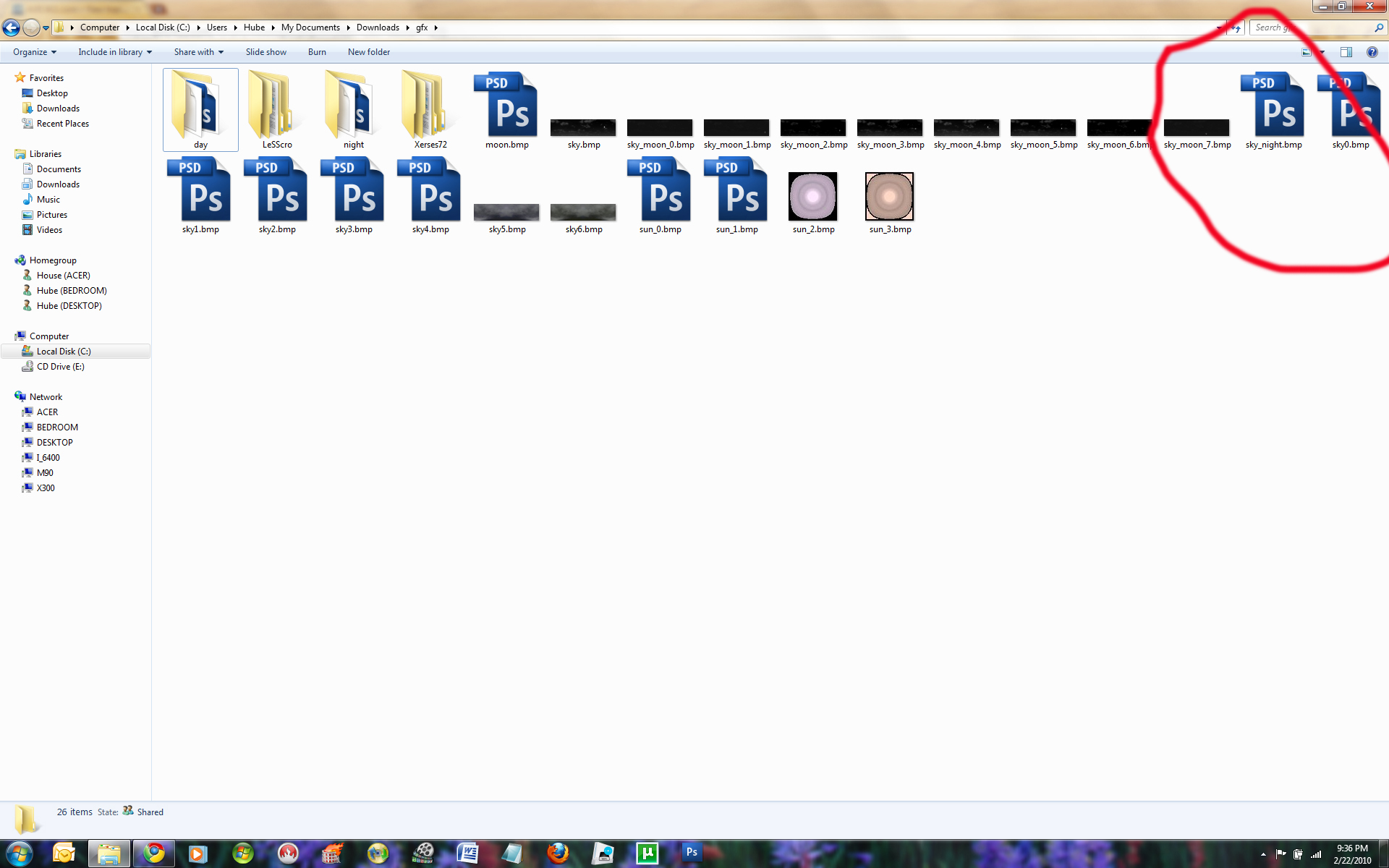
Could it be corrupt images? I may be off base but some of the key images will not open and if i view them in a folder windows can't render a thumbnail image?


notice in the screen shot you can see some images as thumbnails and not others and not the moon.bmp? is this what is causing the errors in certain schemes and why i never get a big moon?


is this normal or is this part of the problem?


it's not sorrupt, it's a compressed image,


Just for clarification....


does this mean it was corrupt images after all? The reason i ask is because i'm not sure if i should be able to view a thumbnail of a compressed image or not. I'm sure idt IS correct in that it IS a compressed image but if you note the 2 pics i posted after Abb1 gave me the 'sky_night.bmp' you can see a thumbnail where you could not before when idt responded.


makes me wonder if the others that have the Photoshop icon and not a thumbnail are corrupt as well.......


could someone confirm this for me. i know squat about corrupt or compressed images, i do know that the ones with the PS icon and not a thumbnail error when i try to open them in PS as shown in third photo


post-30542-12872761497882_thumb.jpg

post-30542-12872761501767_thumb.jpg

post-30542-12872761505348_thumb.jpg

Posted Feb 23, 2010 · 23:52 UTC#311

IDT is right, it was a compressed image. The file that I uploaded was NOT compressed and that is why you can see it.

Posted Feb 24, 2010 · 00:08 UTC#312
I have forgotten whether I installed the eu zip or the eu altenative zip from a few months ago, is there a way that I can find out what one it is, so that I can downlaod this latest update?


thanks


open your speedcam.ui and search for this

run sc_camspeedunitchange


if you have it then it means that your using the regular, if it doesn't have it then it means that it's the alternate version

Posted Feb 24, 2010 · 00:11 UTC#313

Just for clarification....


does this mean it was corrupt images after all? The reason i ask is because i'm not sure if i should be able to view a thumbnail of a compressed image or not. I'm sure idt IS correct in that it IS a compressed image but if you note the 2 pics i posted after Abb1 gave me the 'sky_night.bmp' you can see a thumbnail where you could not before when idt responded.


makes me wonder if the others that have the Photoshop icon and not a thumbnail are corrupt as well.......


could someone confirm this for me. i know squat about corrupt or compressed images, i do know that the ones with the PS icon and not a thumbnail error when i try to open them in PS as shown in third photo


here's a tool used to view, save as compressed bmp's


http://www.rc-dev.com/i3t/

Posted Feb 24, 2010 · 00:20 UTC#314
Thanks for the comments. I have sent you a present in your inbox. PLEASE do not distribute it!


You are too kind.....I'm not worthy...but I'll still take it. :lol:


Thank You...


IDT is right, it was a compressed image. The file that I uploaded was NOT compressed and that is why you can see it.


Thanks, I was sure he was right but I thought I might be missing a sun or something... :mrgreen:


I'm done son


and in the words of the immortal prophet Ozzy Osbourne


Thank You....I Love You All....And Goodnight

Posted Feb 24, 2010 · 00:29 UTC#315
here's a tool used to view, save as compressed bmp's


http://www.rc-dev.com/i3t/


oh well....sleep is for people who died yesterday


Thanks

Posted Feb 24, 2010 · 01:33 UTC#316

The signboard fix worked just like I thought it would. Thanks for all the help!

Posted Feb 24, 2010 · 01:52 UTC#317

Thank you IDT, YOU RULE! Thank you so much and thanks to superman for some icons and a cool av theme. You guys are awesome.

Posted Feb 24, 2010 · 02:29 UTC#318

IDT my man you rule I just loaded the signboard fix to my system and I must say "job well done"... Keep up the good work and when things pick up for me I will be sending some funds your way. Again excellent job...

Thx

Posted Feb 24, 2010 · 02:50 UTC#319

Hey IDT or ABB1

I just attempted to change the off button to change the schemes on the fly and I not sure if I have it coded properly, I want it to be able to pull up all my schemes and choose which 1 I want at the time is that possible or I can only set it to switch between day and night scheme.


Posted Feb 24, 2010 · 03:05 UTC#320

you have to have the unit set to either day, night or automatic. abb1 gave me the code, it is a few pages back. just follow his directions or i will try to find it for you.

Posted Feb 24, 2010 · 07:31 UTC#321

map version or map provider Russia83N_2009.Q2_091104.fbl; Russia83TA_2009.09_091026


i'll update the EU zip hopefully this weekend to fix this

Thanks I will await

Posted Feb 24, 2010 · 16:35 UTC#322

How do you save your current location as a favorite or set it as home in case your address is off a little?

Posted Feb 24, 2010 · 16:43 UTC#323
Hey IDT or ABB1

I just attempted to change the off button to change the schemes on the fly and I not sure if I have it coded properly, I want it to be able to pull up all my schemes and choose which 1 I want at the time is that possible or I can only set it to switch between day and night scheme.


Abb1 gave me this;


Switching the 'off' button is actually not that hard, just make sure that you backup your present Data.zip before making changes to it. I usually make a copy and use that to experiment. In your Data folder, go into the 800_480 folder and then open up the ui folder. That is where all your scripts are. In the ui folder, open up the 'navigatemap_800_480.ui' file with notepad. In there you will see the code right at the top


;BLANKSCREEN


Replace it with this code


;BLANKSCREEN


Then if you want, just replace the icon, without renaming it, to your liking.

Posted Feb 24, 2010 · 16:49 UTC#324
How do you save your current location as a favorite or set it as home in case your address is off a little?


there are different ways to add it as a favorite,

-from the navi screen, click on the map and then click the bullseye looking button then you'll be directed to the planmode screen and then click the star with a plus icon,

-from the address bar, enter the address and then you'll be directed to the planmode screen and then click the star with a plus icon,

- when you want a poi as a favorite, search for the poi and then you'll be directed to the planmode screen and then click the star with a plus icon,


to set home, click the home button and then you'll be asked to enter the address and then click OK

Posted Feb 24, 2010 · 17:01 UTC#325

thanks


so if house numbers are a block off the only way to set home accurately is to enter the wrong address? you can't be sitting in your driveway and mark your current location as home, only as a favorite?

Page 13 of 18