Search Archive

IDT skin#2 v3.0 12/30/10 (download link updated)

By ill.die.trying · Oct 25, 2009in Completed Mods/Themes💬 442 posts👁️ 72,478 views
Page 15 of 18
Posted Feb 26, 2010 · 14:52 UTC#351
Note: probably been noticed before but song title covers road #. I don't know if that can be fixed but does anyone think it would look better to have road # cover song title if the 2 had to overlap?


I think the problems is the font size. It sure look good, but you clearly can see on the pic that the font size is way too big.


My nav size of the unit is not mod and have never had that problem.


try to use smaller font sizes.

Posted Feb 26, 2010 · 14:57 UTC#352

IDT,


can those signboard be mod on size and position?


the reason I ask is cause, if you are able to move it under the top black strip where the time is and make it a lit smaller, you might be able to use the top part to put more shortcut (more real-state for future features).


just a thought!!!!

Posted Feb 26, 2010 · 16:27 UTC#353

So far so good on all my stuff I did yesterday. Have not tried the map changer yet, but TA maps (2009.06) running off of the SD card (in fact all of Contents is running off SD card) just fine! The new maps are so much better than the old 2008.10 I had. Getting speed limits on all small roads in my small town, used to be just on major highways. Love the skin #2 also. Cant wait to see Skin #3! :D


One thing I did notice is with Abb1's newest scheme.zip, not all of those seem to show up on the Avic. Or maybe the file name doesnt match up with the name on the avic. Is that possible? I'll try and decipher which ones are missing, or possibly under different names.

Posted Feb 26, 2010 · 16:40 UTC#354


One thing I did notice is with Abb1's newest scheme.zip, not all of those seem to show up on the Avic. Or maybe the file name doesnt match up with the name on the avic. Is that possible? I'll try and decipher which ones are missing, or possibly under different names.

What doesn't show up on my theme? The image.res file has no dependence on the NAV section and runs totally independent, so it should have no effect on the Nav at all
Posted Feb 26, 2010 · 16:49 UTC#355


One thing I did notice is with Abb1's newest scheme.zip, not all of those seem to show up on the Avic. Or maybe the file name doesnt match up with the name on the avic. Is that possible? I'll try and decipher which ones are missing, or possibly under different names.

What doesn't show up on my theme? The image.res file has no dependence on the NAV section and runs totally independent, so it should have no effect on the Nav at all


I meant some of the schemes dont show up in the selection list on the avic. or maybe they have a different name on the screen than the actual file name? I've verified that all 60 schemes copied over to my SD card, but some dont appear in the list, such as: NEWMOON, MOON_FOG, moon_rain, JohnCougar2-Night (but JohnCouger2-nite does). I am using your scheme.zip from page 20 of this thread.

Posted Feb 26, 2010 · 17:15 UTC#356
Cant wait to see Skin #3! :D


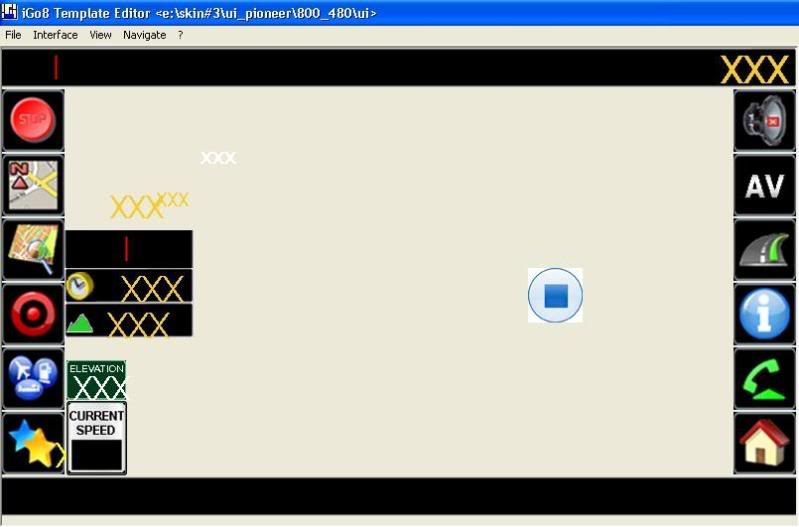
i don't ussually show teaser shot but here's how it will pretty much look like,

skin3.jpg


it's pretty much like skin#2 but i just wanted to make the screen look even, the shortcut buttons are 13px larger than the ones on skin#2, as you guys can see i have created an av button that when clicked shows the current playing music and when clicked again will hide it, i haven't perfected that part yet but i 'm close,


also, all the layer's are shown here that's why even the cockpit and other layers are shown

Posted Feb 26, 2010 · 19:57 UTC#357

i don't ussually show teaser shot but here's how it will pretty much look like,


it's pretty much like skin#2 but i just wanted to make the screen look even, the shortcut buttons are 13px larger than the ones on skin#2, as you guys can see i have created an av button that when clicked shows the current playing music and when clicked again will hide it, i haven't perfected that part yet but i 'm close,


also, all the layer's are shown here that's why even the cockpit and other layers are shown

Hmmm, the AV button is awesome, but dont those large buttons hide most of the NAV screen, especially when a route is planned? Also, having those large buttons, you lose 3 functions. You now have 6 buttons as compared to nine previously

Posted Feb 26, 2010 · 20:06 UTC#358

i don't ussually show teaser shot but here's how it will pretty much look like,


it's pretty much like skin#2 but i just wanted to make the screen look even, the shortcut buttons are 13px larger than the ones on skin#2, as you guys can see i have created an av button that when clicked shows the current playing music and when clicked again will hide it, i haven't perfected that part yet but i 'm close,


also, all the layer's are shown here that's why even the cockpit and other layers are shown

Hmmm, the AV button is awesome, but dont those large buttons hide most of the NAV screen, especially when a route is planned? Also, having those large buttons, you lose 3 functions. You now have 6 buttons as compared to nine previously


regarding the buttons, i didn't lose any of them as you'll have 12 buttons navigating or not (i actually added more), i know making the buttons bigger is going to take up more of the map space and my fix for it is to lower the max zoom settings,

Posted Feb 26, 2010 · 23:31 UTC#359

Well, as I mentioned before, the map changer sis not working for me. When I first installed the mod, I went from TA to NT. Then i went to TA again and then to NT without a problem. I was then on NT for a couple of days and then I tried to go to TA. It would not switch over. The warning message came on and then it went to the Navi Settings screen and it just stayed there without restarting. The NT maps did not change. IDT, then told me to put everything back to normal, so I changed the 'map' folder which now had the NT maps in it to 'map_nt' and switched the TA maps from 'map_ta' to 'map'. Now, I got the TA maps as original, but I cannot switch to NT maps. There is definately something wrong!

Posted Feb 26, 2010 · 23:31 UTC#360

Well, as I mentioned before, the map changer sis not working for me. When I first installed the mod, I went from TA to NT. Then i went to TA again and then to NT without a problem. I was then on NT for a couple of days and then I tried to go to TA. It would not switch over. The warning message came on and then it went to the Navi Settings screen and it just stayed there without restarting. The NT maps did not change. IDT, then told me to put everything back to normal, so I changed the 'map' folder which now had the NT maps in it to 'map_nt' and switched the TA maps from 'map_ta' to 'map'. Now, I got the TA maps as original, but I cannot switch to NT maps. There is definately something wrong!

Posted Feb 27, 2010 · 00:25 UTC#361
Well, as I mentioned before, the map changer sis not working for me. When I first installed the mod, I went from TA to NT. Then i went to TA again and then to NT without a problem. I was then on NT for a couple of days and then I tried to go to TA. It would not switch over. The warning message came on and then it went to the Navi Settings screen and it just stayed there without restarting. The NT maps did not change. IDT, then told me to put everything back to normal, so I changed the 'map' folder which now had the NT maps in it to 'map_nt' and switched the TA maps from 'map_ta' to 'map'. Now, I got the TA maps as original, but I cannot switch to NT maps. There is definately something wrong!


when you renamed the folders did you delete the content of the save folder? i have used it so many times and haven't experienced any problem at all,

Posted Feb 27, 2010 · 16:10 UTC#362

when you renamed the folders did you delete the content of the save folder? i have used it so many times and haven't experienced any problem at all,

No, I did not. I will try that later today. I usually dont delete the save data unless I am changing mods.
Posted Feb 27, 2010 · 16:55 UTC#363

Hey IDT


Just wondering if there was a way to change the 3d car to any car of my preference.


I tried replacing the hot rod red car bmp with an image I wanted to use, but when I boot up the unit it has the same hot rod red image that was originally there.


Hope I'm making sense.


Thanks

Posted Feb 27, 2010 · 16:55 UTC#364

Hey IDT


Just wondering if there was a way to change the 3d car to any car of my preference.


I tried replacing the hot rod red car bmp with an image I wanted to use, but when I boot up the unit it has the same hot rod red image that was originally there.


Hope I'm making sense.


Thanks

Posted Feb 27, 2010 · 18:28 UTC#365

Maybe I'm missing something, but, I can't get the map changer to work. I created a new folder and named it maps_nt and copied the file. I downloaded the NT maps from another thread, but, I can't get them to fit on the AVIC. What am I doing wrong?

Posted Feb 27, 2010 · 18:35 UTC#366
Maybe I'm missing something, but, I can't get the map changer to work. I created a new folder and named it maps_nt and copied the file. I downloaded the NT maps from another thread, but, I can't get them to fit on the AVIC. What am I doing wrong?

Simple, The Avic has only 2 gb of space on it so you cannot put the entire NT map on it as the size for the entire map is about 900 mb and you probably have only 200 mb left. Just install the map that you want to u7se such as, if you live in NY, only install the NY map. I live in Canada, and the map size is aprox 70 mb, so I was able to fit the entire Canada map on there but nothing else. If you want to go outside the map area, just switch back to TA

Posted Feb 27, 2010 · 19:40 UTC#367
Maybe I'm missing something, but, I can't get the map changer to work. I created a new folder and named it maps_nt and copied the file. I downloaded the NT maps from another thread, but, I can't get them to fit on the AVIC. What am I doing wrong?

Simple, The Avic has only 2 gb of space on it so you cannot put the entire NT map on it as the size for the entire map is about 900 mb and you probably have only 200 mb left. Just install the map that you want to u7se such as, if you live in NY, only install the NY map. I live in Canada, and the map size is aprox 70 mb, so I was able to fit the entire Canada map on there but nothing else. If you want to go outside the map area, just switch back to TA


Perfect! Thanks for the help. I got it going. I just put in IL, IN, and WI since those are the three I drive through regularly.


IDT, this is a GREAT mod!!! I will give it the full work out this weekend when I drive around. Thanks you for all the hard work on this!

Posted Feb 27, 2010 · 22:14 UTC#368

when you renamed the folders did you delete the content of the save folder? i have used it so many times and haven't experienced any problem at all,

No, I did not. I will try that later today. I usually dont delete the save data unless I am changing mods.

The problem with the mapchanger was on my end :(. A lesson not to work on mods working 14 hr days and 3 hrs sleep :(. It works fine now!

Posted Feb 28, 2010 · 05:05 UTC#369

Hello:


Is there a way to make just the Navteq maps work with the SD card, and keep the TA maps on the internal memory of the nav???

Posted Feb 28, 2010 · 16:19 UTC#370

IDT,


which config file refer to the dem file?


Looking into my dem folder, I found out that it was empty. I found some dem files and I was wondering how to know if the maps are using the dem file or any way to have the some dem on my maps. they all look flat.

Posted Feb 28, 2010 · 16:30 UTC#371
IDT,


which config file refer to the dem file?


Looking into my dem folder, I found out that it was empty. I found some dem files and I was wondering how to know if the maps are using the dem file or any way to have the some dem on my maps. they all look flat.


it's in the map setting, can't remember where but it's in there,

Posted Mar 01, 2010 · 03:50 UTC#372

What speed cam/red light camera files are you guys using in the US? Do I just copy the files called Red_Light_Camera_us and Speed_Trap, or do I need the font files too?

Posted Mar 01, 2010 · 04:26 UTC#373
What speed cam/red light camera files are you guys using in the US? Do I just copy the files called Red_Light_Camera_us and Speed_Trap, or do I need the font files too?


just the Red_Light_Camera_us and Speed_Trap

Posted Mar 01, 2010 · 04:29 UTC#374

Thank you Sir!

Posted Mar 01, 2010 · 04:30 UTC#375
Thank you Sir!


no prob

Page 15 of 18