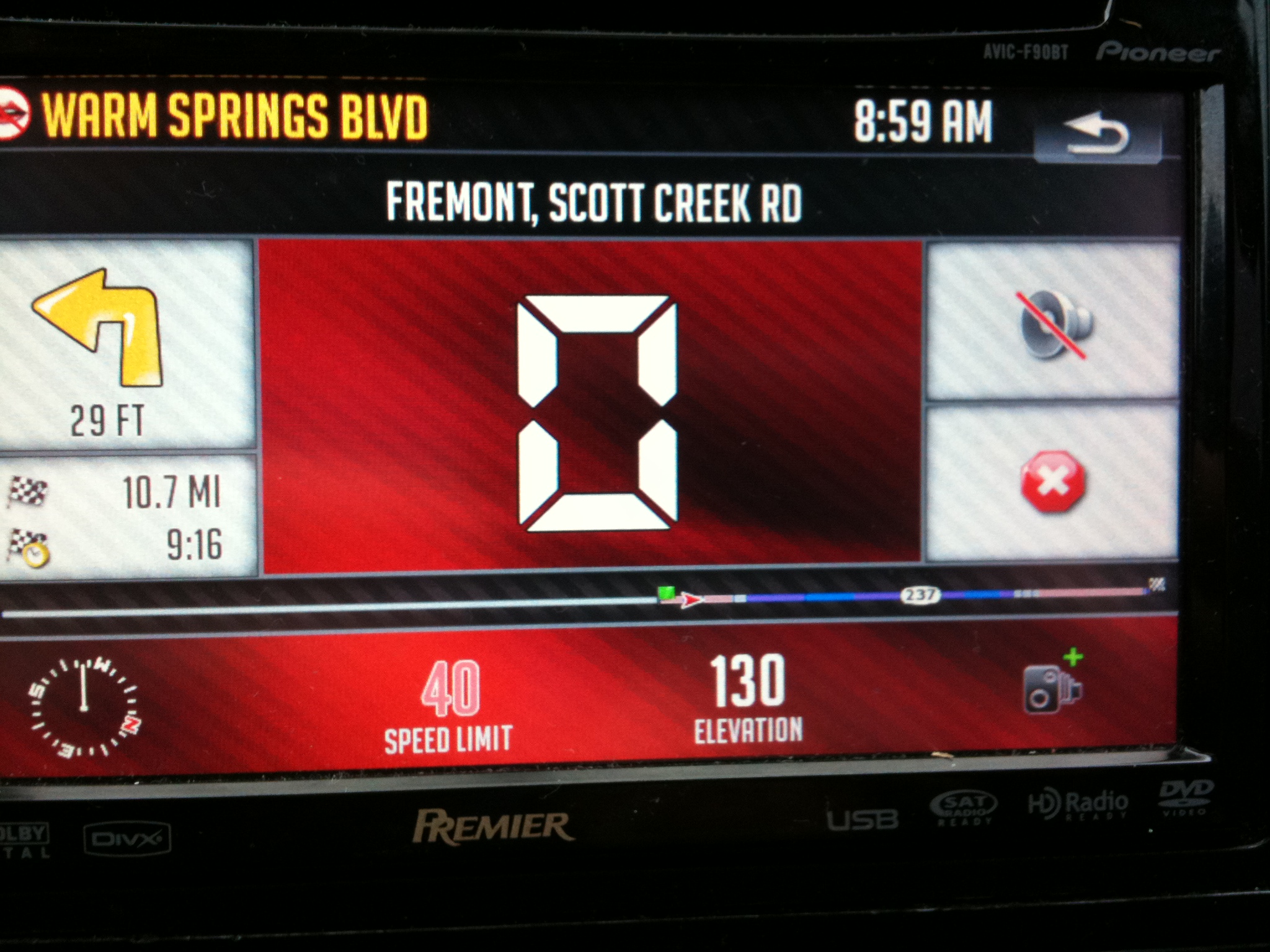
Ok, heres my new slightly updated Speedo screen. In jpeg format so I could upload it. Must be renamed and made into BMP.
Ok, heres my new slightly updated Speedo screen. In jpeg format so I could upload it. Must be renamed and made into BMP.
Check the sys.txt file.At the top make surethe device is set to pioneer 746 EW.If not you can change it with a text editor file(notepad
-----------------------
Thank you ovalball. I am back up and running with Traffic notifications.
Matthew
YES me too....but I lost bluetooth capability.
I remember reading about that issue somewhere on this forum.
Hmmm...will search, but feel free to come with a sollution 
You must change in the sys.txt:
type="PIONEER746EW"
tmc_events_icon_set="$tmc.spr"
small_tmc_events_icon_set="$smalltmc.spr"
Dude, you just hijacked this thread! That sorta shit is not tolerated in ANY forum. START YOUR OWN THREAD!Does anyone know the best way to look up an address if you don't know the city?
I live in Chicago and know the city very well. Every so often I will need to go to a particular address in the suburbs.
Let's say I need to go to 123 N. Main Street... It won't let me look up an address unless I know the exact city, or suburb. Unfortunately sometimes you might think the address in one suburb, but it's in another.
On my old factory nav if I put in 123 N. Main Street it would list that address in cities in texas, florida, illinois, etc and I could choose the one I wanted.
Has anyone experienced this situation?
With the update, can you also change the code to 480 instead of 580 for the 'current street - no route'. I tried 520, and 500 and neither fully cleared the bluetooth icon with the longer street names. 480 should be good. I will test it out tomorrow
I just tested it and the value is DEFINATELY '480'
With the update, can you also change the code to 480 instead of 580 for the 'current street - no route'. I tried 520, and 500 and neither fully cleared the bluetooth icon with the longer street names. 480 should be good. I will test it out tomorrow
I just tested it and the value is DEFINATELY '480'
Did the same thing this morning. Make sure you get all the other ones too for the other texts. 480 is good though thanks for finding the value.
Ok, heres my new slightly updated Speedo screen. In jpeg format so I could upload it. Must be renamed and made into BMP.
Here is mine. Got all the edges from the buttons and header removed, new mute button as well as put a background in for the progress bar:
You must change in the sys.txt:
type="PIONEER746EW"
tmc_events_icon_set="$tmc.spr"
small_tmc_events_icon_set="$smalltmc.spr"
I will add these into the sys.txt and comment them out with a note so it should help future EU users. What section do these go in?
Here is mine. Got all the edges from the buttons and header removed, new mute button as well as put a background in for the progress bar:
Looks good. Can I have all the images you changed? 
Here is mine. Got all the edges from the buttons and header removed, new mute button as well as put a background in for the progress bar:
Looks good. Can I have all the images you changed?
None have been treated with ipaq in this zip. You also need to go into the speedometer800 ui file and change the X= position of the 3 buttons on the right to 619 from 612 to align them to the right more.
Will those images work with the background I made as well?
Will those images work with the background I made as well?
Should. I didn't re-size them at all, just cropped out the part that I wanted and created a new image. So they are the same size minus that gray border that stuck out.
Nice work. I really like your mod. I have a couple of questions though:
1. I can get to plan mode by Route > Plan. Is there a faster way?
2. On some of my favorites, selecting the destination immediately starts navigation. On others, selecting them takes me to the plan mode with the cursor at the selected location. I prefer the former. Can I make the others work the same way?
Thanks
None have been treated with ipaq in this zip. You also need to go into the speedometer800 ui file and change the X= position of the 3 buttons on the right to 719 from 712 to align them to the right more.
Where is this file? Can't seem to find it. 
EDIT - Ok I found it. How do I edit it? Wont let me open it.
You must change in the sys.txt:
type="PIONEER746EW"
tmc_events_icon_set="$tmc.spr"
small_tmc_events_icon_set="$smalltmc.spr"
I will add these into the sys.txt and comment them out with a note so it should help future EU users. What section do these go in?
[interface]
You must change in the sys.txt:
type="PIONEER746EW"
tmc_events_icon_set="$tmc.spr"
small_tmc_events_icon_set="$smalltmc.spr"
I will add these into the sys.txt and comment them out with a note so it should help future EU users. What section do these go in?
[interface]
LOL... already in there.  Thanks.
None have been treated with ipaq in this zip. You also need to go into the speedometer800 ui file and change the X= position of the 3 buttons on the right to 719 from 712 to align them to the right more.
Where is this file? Can't seem to find it.
EDIT - Ok I found it. How do I edit it? Wont let me open it.
The zip file or the BMP file?
Nice work. I really like your mod. I have a couple of questions though:
1. I can get to plan mode by Route > Plan. Is there a faster way?
2. On some of my favorites, selecting the destination immediately starts navigation. On others, selecting them takes me to the plan mode with the cursor at the selected location. I prefer the former. Can I make the others work the same way?
Thanks
1. That is the quickest way. You can add a button if you like to the main interface but I like that the interface is clean of buttons and the menu is one click away.
2. There is a bug that I know about going on here. The address search is the same way. Sometimes it takes you to plan mode and other times it starts routing directly. What I want it to do is take you directly to a route if one is not in progress. If there is a route in progress then it should take you to the plan mode screen so you can add a via if desired. This should work for favorites or searches. I just need to dig into the code to find the problem.
The zip file or the BMP file?
The ui file. I got it. Just opened it with notepad. Edited it(its 612/619 btw not 712/719 ) and uploaded the new zip. Looks good. 
Dude, you just hijacked this thread! That sorta shit is not tolerated in ANY forum. START YOUR OWN THREAD!Does anyone know the best way to look up an address if you don't know the city?
I live in Chicago and know the city very well. Every so often I will need to go to a particular address in the suburbs.
Let's say I need to go to 123 N. Main Street... It won't let me look up an address unless I know the exact city, or suburb. Unfortunately sometimes you might think the address in one suburb, but it's in another.
On my old factory nav if I put in 123 N. Main Street it would list that address in cities in texas, florida, illinois, etc and I could choose the one I wanted.
Has anyone experienced this situation?
My apologies. Didn't know asking a question was hijacking. Didn't mean to offend anyone. I will start another thread.
btw Alex, I still cannot change view mode by clicking the compass. 
The zip file or the BMP file?
The ui file. I got it. Just opened it with notepad. Edited it(its 612/619 btw not 712/719
Thx that was from memory from last night. I will edit my post.
btw Alex, I still cannot change view mode by clicking the compass.
Calibrate in the system settings.
My apologies. Didn't know asking a question was hijacking. Didn't mean to offend anyone. I will start another thread.
I searched this morning for a street not in the city. It got it because it was close. I don't think you can do a blanket search for a street in all cities. I would just search for a major intersection if you knew of one.
Does anyone know the best way to look up an address if you don't know the city?
I live in Chicago and know the city very well. Every so often I will need to go to a particular address in the suburbs.
Let's say I need to go to 123 N. Main Street... It won't let me look up an address unless I know the exact city, or suburb. Unfortunately sometimes you might think the address in one suburb, but it's in another.
On my old factory nav if I put in 123 N. Main Street it would list that address in cities in texas, florida, illinois, etc and I could choose the one I wanted.
Has anyone experienced this situation?
Hmm I know once i forgot to set the city and when i typed in the street name and number it showed me a list of suggestions for every city in illinois with that specific street name and number, it was a bit weird i can't remember what was listed under city but maybe tomorrow I will try it again