Search Archive

Abb's NAV Mod V2.75 for 'Chrome Theme' - Upd. July 7 '10

By abb1 · Mar 23, 2010in Completed Mods/Themes💬 719 posts👁️ 85,531 views
Page 4 of 29
Posted Apr 01, 2010 · 00:46 UTC#76

Hi Abb, I try not to quoted our previous exchanges to make the text lighter ...


1) I have the TURN RESTRICTION turned OFF, so it no longer shows in 3D view, but still shown in speedometer screen.


2) Yes you are right.


3) Forget it for now.


4) When I am inside a tunnel of more than 2 KM, I don't have direct access to the phone menu. I think this should be fixed to be logical, and it is no big deal, please see visiblemodel='xxxxxxxxxx' under the icon creation in navigatemap_800_480.ui.


5) OK. The return key is dimmed under the total traveled distance.


NEW) Just esthetic: in the second fuel consumption screen, the word "Calculation" doesn't have the shadow as in "Fuel Consumption". Is this intented?


Thanks.

Posted Apr 01, 2010 · 01:21 UTC#77

Regarding the bluetooth try replacing the visablemodel that's in there now with this one


visiblemodel="other.pioneer.bt_connected"

Posted Apr 01, 2010 · 01:29 UTC#78

Voila. Thanks!

Posted Apr 01, 2010 · 01:54 UTC#79
Voila. Thanks!


No problem

Posted Apr 01, 2010 · 02:43 UTC#80

All is fixed! I removed the turn restrictions from the speedometer, so they will not come back up. I also took N-S-E-W's solution for the phone fix while in a tunnel. however, doing it this way, is also kinda screwy because if there is no bluetooth connected, then there will be an empty spot where the icon should be. I will have this all ready in the next release which should be in the next couple of days where I am off and can do some playing :)

Posted Apr 01, 2010 · 03:05 UTC#81
I also took N-S-E-W's solution for the phone fix while in a tunnel. however, doing it this way, is also kinda screwy because if there is no bluetooth connected, then there will be an empty spot where the icon should be.


Hey Abb, why don't you make it visible all the time, except when no BT is connected, show the green phone with a red X on it, as it is already somewhere in your mod?


Please check or if you want, I can search it to see where ...

Posted Apr 01, 2010 · 06:59 UTC#82

So then I do not know what I am doing wrong, because if you upload them v1.02, the TMC is not ..... I'm doing something wrong? :oops: I was in Europe. And sorry about the English ... Dik Pat

Posted Apr 01, 2010 · 12:20 UTC#83
I also took N-S-E-W's solution for the phone fix while in a tunnel. however, doing it this way, is also kinda screwy because if there is no bluetooth connected, then there will be an empty spot where the icon should be.


Hey Abb, why don't you make it visible all the time, except when no BT is connected, show the green phone with a red X on it, as it is already somewhere in your mod?


Please check or if you want, I can search it to see where ...

Yeah, that should be doable, it just needs another line of code which is easy. I got some time today where I can play around.

Posted Apr 01, 2010 · 12:27 UTC#84
So then I do not know what I am doing wrong, because if you upload them v1.02, the TMC is not ..... I'm doing something wrong? :oops: I was in Europe. And sorry about the English ... Dik Pat

Sorry my friend, I dont know what to tell you. I made no changes to TMC from my last update to the prior. I have no way of testing this out as it is not available in my area. Same with all of MSN DIRECT. I got full functiuonality and it tells me to activate it but Microsoft politely told me that they will NEVER support my area and that they are killing MSN DIRECT by the end of this year to the end of next, where it will not even be available anymore. It will just function as a dead screen on your AVIC. Typical of Microsoft :evil:

Maybe someone else that has it and uses it can help with regards to my mod. Also, maybe just use my prior version if that worked.

Posted Apr 01, 2010 · 13:29 UTC#85

Good morning Abb, just another suggestion, please don't feel obligated to do it :mrgreen: ...


I love a lot the font that you used to show the current speed in the speedometer screen, with transparency. However, it becomes somehow irritating over time to see it blinking all the time when the speed changes. Any way to find an equivalent font in the fixed size system fonts, with transparency also?


I am sure that you already search though ...

Posted Apr 01, 2010 · 15:15 UTC#86
Good morning Abb, just another suggestion, please don't feel obligated to do it :mrgreen: ...


I love a lot the font that you used to show the current speed in the speedometer screen, with transparency. However, it becomes somehow irritating over time to see it blinking all the time when the speed changes. Any way to find an equivalent font in the fixed size system fonts, with transparency also?


I am sure that you already search though ...

I tried several fonts for the speedometer screen and found this one to be the best, IMO. You can download your own font in that slot by adding the Font file to your 'IGO' folder and inserting it in the code here which is found in the navigatemap_800_480.ui. Just replace the BULLPEN3D font to the one of your choosing :


The phone has now been fixed and tested. It works great, even when no GPS is present and there is no empty socket if no bluetooth is present :)

Posted Apr 01, 2010 · 15:19 UTC#87

So the True Type Fonts are those used by any version of Windows? How do I know whether it has the transparency property or not?


Can you tell me the list of font that you already tried and specify which is fixed width fonts?


Thanks.

Posted Apr 01, 2010 · 15:44 UTC#88

ABB - and so thank you. :!:

Posted Apr 01, 2010 · 16:12 UTC#89

Quick question about the "switchmap"

I am using TA maps as the resident app. If I put the NavTeq maps on the SD card will this map changer run the maps from the SD if I command it to?

I am just a bit confused.

Thanx,

Bud

Posted Apr 01, 2010 · 18:14 UTC#91

Thanx, Chuck!

I know that in IDT's mod he has it pulling from the CONTENT folder in the flash disk but the problem is, is that I don't have enough memory to house both sets of maps.

I'll give it a try.

BTW, nice mod ABB!! 8)

Posted Apr 01, 2010 · 18:21 UTC#92

Yeah, you only has so much space on the internal flash card. If you want to store both map sets on the internal flash, you would have to be selective. For example, if you are living in New York or any eastern States, why bother to have California or Alaska, Hawaii maps on your HU? The same goes to the POI and 3D building files: just keep what you need is the rule of thumb!!!


BTW, you can use one set of POI and 3D building files (or even DEM files) for both Navteq and TeleAtlas.

Posted Apr 01, 2010 · 19:53 UTC#93
Thanx, Chuck!

I know that in IDT's mod he has it pulling from the CONTENT folder in the flash disk but the problem is, is that I don't have enough memory to house both sets of maps.

I'll give it a try.

BTW, nice mod ABB!! 8)

It is a matter of opinion, but I still believe that since Flash memory is so much faster than the memory card, I would just put it on the internal flash. Just install the maps that you want in the map_nt folder, and get rid of some of the maps that you will never use in the map folder such as mexico, alaska, hawaii, etc.. I mean like, what are your chances of driving to Hawaii? Also, you do not need the poi of those locations as well. It is easy to scrounge up about 200-300 mb of crap that you will never use. Yhis will give you more than enough space to hold a ton of Navteq maps. The only maps that I have in my Navteq folder is Canada, and New York. I will not go anywhere else, and if I do, I just switch over to the TA maps.

Posted Apr 01, 2010 · 20:16 UTC#94

I've pretty done much of the "cleaning" long ago when I put in the TA 2009, Q2 maps. I kept all of my POI's from the NT 2008 maps because there were so much more of them as well as adding my own in a custom BRANDING file. I have alot of different schemes and a really big GFX file to complement them so I am getting close to being full..not to mention in is running quite a bit slower because of it. I too rarely drive outside of the western states and I can't remember the last time I drove to Hawaii :roll:

Anyhoo, I will dabble some more with these great mods!


Thanx, bro..

Bud

Posted Apr 01, 2010 · 21:04 UTC#95

Abb, kind of strange, I don't have the font displayed on my HU as those screen shots shown in page 1 of this thread. You only add one TTF font in your mod, aren't you?


Just look at the picture that I posted on page 3 ...

Posted Apr 01, 2010 · 23:16 UTC#96
Abb, kind of strange, I don't have the font displayed on my HU as those screen shots shown in page 1 of this thread. You only add one TTF font in your mod, aren't you?


Just look at the picture that I posted on page 3 ...

That is correct! It is a special font that I have installed in the Nav section. I didnt include it because it is a preference not for everyone. Also, the font is there to stay, in other words, no matter what Data.zip file you have installed, it will still have this font because it is in the igo folder and not in the DATA.zip

Posted Apr 01, 2010 · 23:22 UTC#97

Just want to understand ... in your script within DATA.zip, don't you refer to the fonts to be used by their names? So how come our DATA.zip doesn't signal any error when the font is missing?


Curious ... Also please: Can you tell me the list of font that you already tried and specify which is fixed width fonts (couple of postes up ...)?


Thanks.

Posted Apr 03, 2010 · 08:59 UTC#98

Hello Master ABB. I have a request that would reduce auto folder in the 3D view? Thank you, Pat

Posted Apr 04, 2010 · 00:00 UTC#99

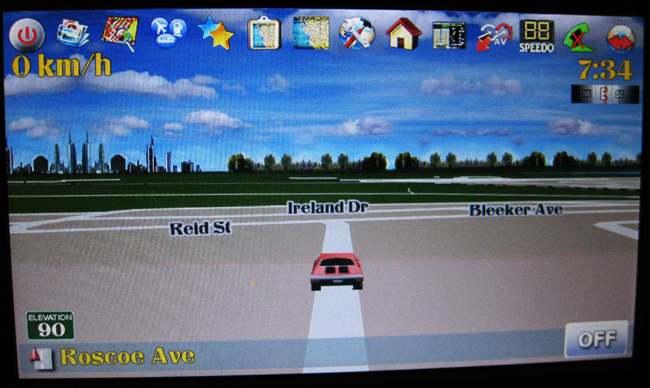
Well, the final update (I hope) is just about ready. Here are the fixes and highlights and a quick pic:


Changes

- It is now working so that if you wanted all icons to remain on screen, just turn the fade control to 'OFF'. To have all icons hidden the way it was prior, just have the fade control set to 100% and push the invisible button below the compass to bring the icons back up again for 5 sec. I have to thank 'Chuck88' for the idea of this awesome change that now suits everybody.

-Added a button on the main screen which directly brings up the mapchanger as I use this function frequently depending on where I am travelling and it was a pain to go to 2 menu selections to go to it.

-Several new icons as some were just too old

-Removed the turn restriction from the 'speedometer' screen which previosly still showed wrong turn restrictions when feature was turned off

-Phone is now NOT DEPENDENT on GPS signal. Prior, the phone button would not work when in tunnels or parking garages. It is now fully functional no matter where you are.

-Got rid of the text colour changer which previosly just caused multiple errors

post-32106-12872762217377_thumb.jpg

Posted Apr 04, 2010 · 00:08 UTC#100

I like the changes, thanks for this and it works perfectly (hopefully) into my request. I was thinking since I have a compass in my rearview mirror of getting rid of the compass on the screen. Can you tell me how to just delete it out? Can't wait for it to be done.

Page 4 of 29