Search Archive

Diaftia's Hybrid mods V3.6 - UPDATED: 04/19/11 - Now with auto installer.

By diaftia · Dec 13, 2010in Completed Mods/Themes💬 857 posts👁️ 216,897 views
Page 10 of 35
Posted Jan 07, 2011 · 05:15 UTC#226

I am having the exact same problem. Did you find any solution?


I am having the same problem as lordjohn. I am pretty sure I was on 3.0 or 3.1 I was running your mod version 2.3 since last summer. After installing the new mod, I am stuck on the startup screen.


Interesting. Seems three of you are having this problem. Lets do a couple things. Can you also reply with what install method you chose (looking for menu option # based on device and location).


Delete all save files. You can do this on your own or let my testmode script do it. Its one of the options at the bottom.


1. Easiest way to see what is happening is in testmode. Once there navigate to my flash disk\apl2\igo and double click ezrider.exe. That will load it so when it generates an error it should pop something up. Can you let me know what happens?


2. You very well may have ran out of room. Check to see how much free space your unit has. Select the flash disk in explorer and then go to the file menu and click properties. Check to see how much is free.


3. As another test can you verify that all of the files that are in my distribution made it over to your AVIC? Look in the mitacap folder in my zip file and see if each of the files that are in there are on your avic.


Thanks,


Alex

Edited Jan 07, 2011 by diaftia
Posted Jan 07, 2011 · 05:41 UTC#227

Worked perfectly. To test without actually driving, I added a speedcam at the current gps position and was able to see the speedcam and speed limit straight away. However, during simulation the speedcam info did'nt change, even when the car icon moved. Guess speedcams won't work during simulation. Just wanted to mention, in case some one wanted to test the feature without actually driving.


Were you able to test the saved poi search, as that is another very useful feature to have, especially on the road?


Thanks a lot for all your help.


Not sure why they are coded that way but speedcams do not work in simulation (which makes them hard to troubleshoot from a coding perspective).


Yeah, working on the poi search now. Got the same behavior you did.

Posted Jan 07, 2011 · 05:43 UTC#228

Hi Alex,


here are the files I get from Poicon when I use the Speed camera updater.Should contain 19k fixed and 24k mobile cams across Europe


Usually it works as follows:


1: Formatted SD card into Avic to get the Device.nng

2: SD card into PC with Speed Camera Updater Software

3: Start Speed Camera Updater Software, which will ask for Login Data and will only work with registered device.

4: Stick SD card into Avic and boot which will create or update Speedcam files


This is what I have handy right now. If you want me to, I can copy the speedcam files from my Avic once I get my car back ( my son just got his driving license :-) )


Jörg

Please do! ;)

Posted Jan 07, 2011 · 08:42 UTC#229

Hello. Newbie to the forum here.


A week ago my stock X910 was stuck on the Pioneer splash screen. I fixed it by updating to the FX3.1 update/mod found elsewhere in the forum. I had to delete Alaska and Hawaii maps in order for the update to fit in the units Flashdrive. After those states were deleted the mod installed fine and was working well. This mod looks like a huge improvement so I couldn't leave well enough alone. :)


First tried the 3.2 mod - I believe it copied over correctly (got a big green "+" on the screen). However after rebooting it's stuck on the "system startup" screen overlaying the menu. I can go into the Audio selection menu and choose a valid input (say FM) and the unit will play. However trying anything tied to the Navigation side will freeze the touchscreen up. And whether I try to get into navigation or not the unit will reboot after a few minutes and the cycle repeats itself.


Thought maybe the new 3.2.1 update would help. Only difference I saw is the finished copying screen now shows a green box instead of the "+" sign. Also the icons in the Audio selection menu that I don't have hooked up are colored instead of greyed out. Navagation still won't start.


The first time the unit boots up after updating there's a WinCE error of some sort that flashes VERY quickly on the screen. I think one of the words in the error is "object", but I'm not sure. It's not on the screen long enough to read. Subsequent boots after that don't have the error.


Any ideas? Possibly not enough space for the mod to fully copy over? I don't think WinCE gave any error when I tried to copy the full maps over in the FX3.1 update, so I'm not sure there would be any indication if the files didn't fully copy over. Or maybe that's not it at all? Did a search for "reboot loop" but only a couple of threads came up and neither seemed to fit.


Thanks in advance for any help.


Which Map folders do you have on your flashdisk? Do they contain the basemap.fbl? I'm sure the error says it does not find the map, hece Igo does not start.


I had the same problem when I just had the folders Map_ta and Map_nt, since i added a folder Map with the basemap.fbl it works, don't ask me why


Try it with all 3 folders in content, these folders should contain the respective basemap and the map of your location. If it works you can add more maps.


Might sound fool to some of you, but helped to reanimate my Avic after installing this mod.


Jörg

Edited Jan 07, 2011 by Segler1963
Posted Jan 07, 2011 · 09:05 UTC#230

Which Map folders do you have on your flashdisk? Do they contain the basemap.fbl? I'm sure the error says it does not find the map, hece Igo does not start.


I had the same problem when I just had the folders Map_ta and Map_nt, since i added a folder Map with the basemap.fbl it works, don't ask me why


Try it with all 3 folders in content, these folders should contain the respective basemap and the map of your location. If it works you can add more maps.


Might sound fool to some of you, but helped to reanimate my Avic after installing this mod.


Jörg


Was this right when you installed or after you might have changed something with mapchanger? Only asking because its odd due to the fact that I do not edit the map directory at all. Any info on what you found would be great so I can try and repair it. Seems like an odd issue.

Posted Jan 07, 2011 · 09:38 UTC#231

Was this right when you installed or after you might have changed something with mapchanger? Only asking because its odd due to the fact that I do not edit the map directory at all. Any info on what you found would be great so I can try and repair it. Seems like an odd issue.

Can't tell anymore, as I was adding new maps at the same time. I think I just had Map_ta and Map_nt at the beginning, got the error and then added Map again and it worked.


I don't think it's your mod, but us users trying to be too clever


Jörg

Posted Jan 07, 2011 · 14:37 UTC#232

Interesting. Seems three of you are having this problem. Lets do a couple things. Can you also reply with what install method you chose (looking for menu option # based on device and location).


Delete all save files. You can do this on your own or let my testmode script do it. Its one of the options at the bottom.


1. Easiest way to see what is happening is in testmode. Once there navigate to my flash disk\apl2\igo and double click ezrider.exe. That will load it so when it generates an error it should pop something up. Can you let me know what happens?


2. You very well may have ran out of room. Check to see how much free space your unit has. Select the flash disk in explorer and then go to the file menu and click properties. Check to see how much is free.


3. As another test can you verify that all of the files that are in my distribution made it over to your AVIC? Look in the mitacap folder in my zip file and see if each of the files that are in there are on your avic.


Thanks,


Alex


Hi Alex,


1) I installed using menu option #1. I have a US X910BT so I think that's right. Had a chance to play around with it a little this morning. Trying to start via ezrider generates this error message. "Program Application Database can't be found". Probably what was showing before that didn't stick around long enough to read.


2) WinCE Explorer shows My Flash Disk has just 6.5MB free. Looking like that could be the problem.


3) Ran out of time to check this. Will do after work today.


Looks like maybe there wasn't enough space to fully copy over. I'll axe another state or two out of the maps and see what that does. For the other guy that asked what maps I'm using it's the TA2009.06 ones. No R/T installed or map switching of any type.

Posted Jan 07, 2011 · 15:30 UTC#233

Hi Alex,


1) I installed using menu option #1. I have a US X910BT so I think that's right. Had a chance to play around with it a little this morning. Trying to start via ezrider generates this error message. "Program Application Database can't be found". Probably what was showing before that didn't stick around long enough to read.


2) WinCE Explorer shows My Flash Disk has just 6.5MB free. Looking like that could be the problem.


3) Ran out of time to check this. Will do after work today.


Looks like maybe there wasn't enough space to fully copy over. I'll axe another state or two out of the maps and see what that does. For the other guy that asked what maps I'm using it's the TA2009.06 ones. No R/T installed or map switching of any type.


I am pretty sure that means there is no data.zip. Probably ran out of space when it was copying it over. Delete Canada, Mexico and whatever states you will never go to. Being in CA I deleted most of the New England states as well as most everything down and around Florida. To be honest things seem a little snappier too with a little extra free room.


I will remove the large maps from my distro and make things smaller so this will hopefully happen less. If I was a good scripter I could put some checks in there and do it right but I am not, lol. If anyone is I would be happy to work with them on it. I have a good set of requirements.

Edited Jan 07, 2011 by diaftia
Posted Jan 07, 2011 · 18:13 UTC#234

I am pretty sure that means there is no data.zip. Probably ran out of space when it was copying it over. Delete Canada, Mexico and whatever states you will never go to. Being in CA I deleted most of the New England states as well as most everything down and around Florida. To be honest things seem a little snappier too with a little extra free room.


I will remove the large maps from my distro and make things smaller so this will hopefully happen less. If I was a good scripter I could put some checks in there and do it right but I am not, lol. If anyone is I would be happy to work with them on it. I have a good set of requirements.


I'm on the East Coast so it's possible I might drive to Canada. Mexico maps aren't included in the set I got. Not planning any cross country trips at the moment so I got rid of the Northwest - California, Washington, and Oregon.


Happy to report that fixed the problem. Your mod installed fine afterwards. Didn't get a chance to play around with it but the default map screen is very nice.


Thanks for the help!

Posted Jan 08, 2011 · 02:44 UTC#235

I'm on the East Coast so it's possible I might drive to Canada. Mexico maps aren't included in the set I got. Not planning any cross country trips at the moment so I got rid of the Northwest - California, Washington, and Oregon.


Happy to report that fixed the problem. Your mod installed fine afterwards. Didn't get a chance to play around with it but the default map screen is very nice.


Thanks for the help!


Excellent! Working now on a script that checks disk space before copying. :)

Posted Jan 08, 2011 · 04:18 UTC#236

Alex, all I can say is you are one smart mofo! :)


Bud

Posted Jan 08, 2011 · 16:47 UTC#237

Sorry i know this has been discussed a million times but i still can't get the MapSwitcher working. In my content folder i have "maps" which has the TA maps and i have "maps_nt" which has the NT maps. When I go to the map switcher my two options are Teleatlas and Australia something or other...no Navteq. I have both sets of maps on my storage card. This is what I've changed in my sys.txt:


[folders]

content="\Storage Card\iGO\content"


[switchmap]

content="\Storage Card\iGO\content"

1=",map_ta,\Storage Card\iGO,\My Flash Disk\APL2\iGo,"

2=",map_nt,\Storage Card\iGO,\My Flash Disk\APL2\iGo,"

Posted Jan 08, 2011 · 17:10 UTC#238

Here's the findings:


1. When I run the ezrider.exe, I get this error "Program application database cannot be found" This is the same error that flashes for a second when I boot normally.


2. I had only 13MB space left on Flashdisk. I deleted Alaska, Hawaii etc to create some space. Tried installing the mod 3.2.1 again and it worked like charm.


Thanks for the suggestions. I am looking forward to exploring the new features. I wish Pioneer includes these UIs in their future units


Interesting. Seems three of you are having this problem. Lets do a couple things. Can you also reply with what install method you chose (looking for menu option # based on device and location).


Delete all save files. You can do this on your own or let my testmode script do it. Its one of the options at the bottom.


1. Easiest way to see what is happening is in testmode. Once there navigate to my flash disk\apl2\igo and double click ezrider.exe. That will load it so when it generates an error it should pop something up. Can you let me know what happens?


2. You very well may have ran out of room. Check to see how much free space your unit has. Select the flash disk in explorer and then go to the file menu and click properties. Check to see how much is free.


3. As another test can you verify that all of the files that are in my distribution made it over to your AVIC? Look in the mitacap folder in my zip file and see if each of the files that are in there are on your avic.


Thanks,


Alex

Posted Jan 09, 2011 · 12:10 UTC#239

Hi Alex,


there you go: My Speedcam files for the whole of EuropeSPEEDCAM.rar


Sorry it took a while

Jörg

Edited Jan 09, 2011 by Segler1963
Posted Jan 09, 2011 · 15:38 UTC#240

Hi Alex,


have upgraded to your latest version now and it works just great. Thanks a lot for that. Obviously as we are never satisfied there is one thing to mention:

Trip computer works 1 out of 10 times (if that often)


I did not follow the tc discussions that closely, but maybe it would make sense to do a poll and differenciate between regions. I have the feeling it works better with US units


Jörg

Posted Jan 09, 2011 · 18:14 UTC#241

Awesome job Alex!

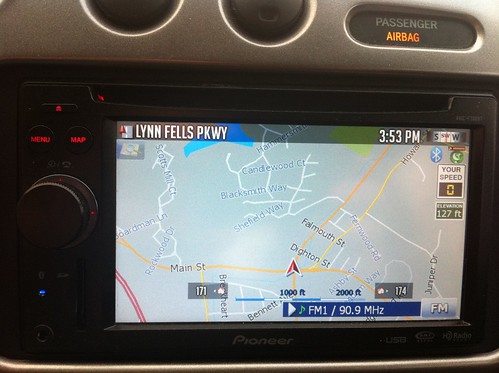
This is the first of the mods that I felt offered a boring person like myself something of value operationally, so it just became the first mod for my F700!


I do have one question and I can't figure it out at all, what are the little home "houses" with numbers 174 and 171 signifying? and how do I turn it off :-)5339377357_b7f0c4c48f.jpg

Diane

Posted Jan 09, 2011 · 19:58 UTC#242

Awesome job Alex!

This is the first of the mods that I felt offered a boring person like myself something of value operationally, so it just became the first mod for my F700!


I do have one question and I can't figure it out at all, what are the little home "houses" with numbers 174 and 171 signifying? and how do I turn it off :-)5339377357_b7f0c4c48f.jpg

Diane


Those are the approximate street addresses on the right and left sides of the street. You can turn them off in the mod by going to the Settings Menu > Visual > Signs Displayed On Map > House Numbers and turning them Off or On.


Dan

Posted Jan 09, 2011 · 20:25 UTC#243

Thanks a lot for that. Obviously as we are never satisfied there is one thing to mention:

Trip computer works 1 out of 10 times (if that often)


That is normal with alot of these units. They SUCK ASSS for the most part. You will notice that the Tracklogs nor the Fuel Calc will work either as these are tied into the same logic. If you sit completely still for about 3 minutes BEFORE starting out then they will USUALLY work but then again, I won't wait around long enough for this POS to make up it's mind and fully boot so I don't even bother any more. It is a GREAT mod when it works but it is up to the mercy of the unit. Sometimes mine even says I am moving (by virtue of the Your Speed display)when I am completely still!!

It is what it is. Some work and some don't.


Bud

Posted Jan 09, 2011 · 21:43 UTC#244

Those are the approximate street addresses on the right and left sides of the street. You can turn them off in the mod by going to the Settings Menu > Visual > Signs Displayed On Map > House Numbers and turning them Off or On.


Dan

HA! I would never have figured that out because I first saw them on the highway and was confused!

Thanks Dan

Posted Jan 09, 2011 · 21:57 UTC#245

thanks, didn't know 3.x has not only released in Dec but has already revised to 3.2.1. I kept checking the old 2.3 thread, ya know? ;-)

Posted Jan 10, 2011 · 07:39 UTC#246

I just updated to this mod... but now Im missing street names on most if not all the streets/freeways. I know there was a way to enable/disable this...

Posted Jan 10, 2011 · 16:11 UTC#247

I installed last Version and it works :-))


No Problems so far. Easy to use interface.


I tried to change Images in the image.res from my old to yours (to get some green screens). But my Image.res will grow up to 2,67 MB and with that the radio will stop booting. I use 7zip but don`t know how to make it smaller.

Posted Jan 10, 2011 · 19:42 UTC#248

Sorry i know this has been discussed a million times but i still can't get the MapSwitcher working. In my content folder i have "maps" which has the TA maps and i have "maps_nt" which has the NT maps. When I go to the map switcher my two options are Teleatlas and Australia something or other...no Navteq. I have both sets of maps on my storage card. This is what I've changed in my sys.txt:


[folders]

content="\Storage Card\iGO\content"


[switchmap]

content="\Storage Card\iGO\content"

1=",map_ta,\Storage Card\iGO,\My Flash Disk\APL2\iGo,"

2=",map_nt,\Storage Card\iGO,\My Flash Disk\APL2\iGo,"


Are your maps on your storage card? Looks like you changed all the paths. If so make sure there is a map_nt or map_ta directory in the content directory on that drive.


Alex

Posted Jan 10, 2011 · 19:43 UTC#249

Hi Alex,


there you go: My Speedcam files for the whole of EuropeSPEEDCAM.rar


Sorry it took a while

Jörg


Excellent! I will make sure these are installed with the EU option. if someone has a canadian file and a AUS file I will be happy to do those as well.


Alex

Posted Jan 10, 2011 · 19:46 UTC#250

Hi Alex,


have upgraded to your latest version now and it works just great. Thanks a lot for that. Obviously as we are never satisfied there is one thing to mention:

Trip computer works 1 out of 10 times (if that often)


I did not follow the tc discussions that closely, but maybe it would make sense to do a poll and differenciate between regions. I have the feeling it works better with US units


Jörg


Mine never works. I have to sit still and wait for the GPS to fully lock for it to work each time I get in the car. Some units are horrible and others are great. For the ones that it works my mods continue to have them work fine. Others not. Have you had better tripcomp experiences with other folks mods? FYI mine *should* have all of the hacks that help to get it to work. Unless someone has done something even more to it.

Page 10 of 35