Search Archive

working custom apps/nav launcher for u310bt, f310bt, & f320bt

By pionara · Dec 06, 2011in Hacks/Mods💬 233 posts👁️ 187,172 views
Page 5 of 10
Posted Jan 09, 2012 · 16:02 UTC#101

Thank you for the reply. I have the u310bt model. I put the appropriate files on the root of the sdcard. It seems to not do anything. It just freezes at the blue screen after a reboot. It states "updating image..." or something similar no matter what files i place on the sdcard... I have tried to use the cks and bin files from my original backup as well. It doesnt do anything with those on the sdcard either... I have tried reformatting the card to different filesystems at this point as i am desperate to get my unit in working condition again.


If it was possible to get the updating process to work, im sure that updating this unit would be very easy as the footwork has been done by you guys. Sidenote: i tried all of this with the screen removed from the unit itself. I have had it plugged into a usb charger to keep the battery going. I dont know if that makes a difference but i am trying to give as much info as possible.
Posted Jan 09, 2012 · 16:54 UTC#102

yeah that should be fine. thats how i updated my unit.


try a different sdcard. if you can find one non-sdhc, 2gb or less.. try formatting FAT (instead of FAT32).


try resetting the unit (with the reset button on right side of screen).


does it go to any other screen after "updating image", if so, what does that screen say?

i bricked one of my units by intentionally flashing wrong fw image... also, another user flashed f320bt with this firmware, and did same thing... bricked units stuck... cant find a way to unbrick... havent been able to try jtag yet..

Posted Jan 09, 2012 · 17:05 UTC#103

I only get the full blue screen that states updating. It does nothing. Prior to me deleting the My Flash folder, i could remove the sdcard and it would reset itself to the iboot (?) bluescreen and show a progress bar at the bottom. It would then reset and boot into the old version of the software. The pioneer nav screen. After deleting the My Flash folder it will no longer do this. Gonna grab a different sdcard today.

Posted Jan 09, 2012 · 17:12 UTC#104

so u updated firmware already? i am confused.

once iboot did the OS firmware flash the first time, it would boot into the old NAV version (but os version is new). You then needed to update the application. replacing the folders in My Flash folder. seems like you did some extra stuff or out of order of the instructions.


Can you boot to testmode/windows at all?

Posted Jan 09, 2012 · 17:30 UTC#105

It wouldnt show a progress bar. After sitting for 30 minutes i decided it wasnt working. Then i pulled the sdcard and reset it. It went into iboot recivery mode and recovered the old/existing software on the unit and booted into it. I didnt upgrade. Then i tried other options which led me to deleting my My Flash folder...


Whats weird is this is the sdcard i used to update the firmware previously. I will still try another card cux you never know...

Posted Jan 09, 2012 · 18:31 UTC#106

Pionara, you are great. I did it sucessfully. I updated my avic F310BT following your steps. I'm already with the version 2.0001

I replaced the Appslib.dll, with patched one.

The only thing I couldn't understand is from where to take AVIC-APPS folder to place it in the SD card.


Thank You

Posted Jan 09, 2012 · 19:29 UTC#107

Pionara, can you please tell me what files i need to put on the new sdcard? Do i put the folder named "update" or do i put the whole "QI...." folder on the root of the sdcard? Also, i know i should put the cki and bin file on the root too. I will also try formatting the card with windows this time to see if that makes any difference. Please let me know! Thanks!

Posted Jan 09, 2012 · 23:37 UTC#108

Nikigenov: you need to use NavGate feeds for EU (or Avic Feeds for US ) PC app available on pioneers website. This will provision AVIC-APPS folder on your sd card with apps. You can then add the custom apps to that folder...


Basketthis,

Can you boot into testmode?

Posted Jan 10, 2012 · 00:30 UTC#109

No...

Posted Jan 10, 2012 · 01:53 UTC#110

Okay. I may have bricked mine. It seems to be able to read this sdcard but it goes from the "Updating image" screen to a blue screen with "Open OS CKS File Failure. Please Cold boot and Retry" in red and in the center of the screen... No matter which bin and cks (either the new or my own backup) doesn't change the results. Is there anyway to replace the "My Flash" folder with the backup I have?

Posted Jan 10, 2012 · 02:39 UTC#112

I think I've figured out what my problem is. Because I can't access WinCE/testmode I need to know how to push it back to the "My Flash" folder from my backup...

Posted Jan 10, 2012 · 03:18 UTC#113

sorry basket, there is no way to recover from that stage that im aware of... i have tried many things... only way i know of to get a unit in that state is to flash with wrong or corrupt firmware.... it doesnt ahve any uboot menu that i can find so you may be stuck in this mode...

Posted Jan 10, 2012 · 03:20 UTC#114

sorry basket, there is no way to recover from that stage that im aware of... i have tried many things... only way i know of to get a unit in that state is to flash with wrong or corrupt firmware.... it doesnt ahve any uboot menu that i can find so you may be stuck in this mode...


There has to be a way to force the files to the My Flash directory on the unit

Posted Jan 10, 2012 · 03:28 UTC#115

I believe a nand flash method would work. It is stored on the nand partition right?

Posted Jan 10, 2012 · 06:33 UTC#116

yes, but you can try to put correct winceimg.bin and winceimg.cks on root of sdcard... it just doesnt seem to want to pick them up - unsure why... i cant really find the bootloader code for this unit... doesnt seem to use uboot like other avics..

I do suspect that there is some magic file or soemting you can put on sd card that will let it do flash recovery, but i dont know what it is...


what is nand flash method? im only aware of the aplupdate utility to get it into flashing mode, and that requires you to be able to boot into testmode. testmode should boot even if My Flash disk is toasted... there is a hidden smflash partition with the os on it... still, how to get it to boot?

I have another u310bt PND unit here that is in the same state... so far I have been too lazy to hook up jtag...

Posted Jan 10, 2012 · 14:17 UTC#117

Nand flash would flash to the stored memory of the device directly. Almost like a recovery menu. It may be similar to the unoot thag you are talking about although i have no experience with the uboot method... I would be willing to explore jtag at this point. You certainly know much more than me when it comes to this so if you could give a starting point or some direction, that would be great. I want to try to bring this thing back from the dead.

Question:

Why wont mine boot into test mode? It seems to be stuck in this mode that checks for the update files...

Posted Jan 10, 2012 · 16:08 UTC#118

Pionara,


Thanks for your help. Everything is working perfect.

I didn't mod sys.txt for reg changes but in spite of this, everything is working. I tried to install into the folder Launcher MioPocket, as i changed MioAutoRun.exe to Launcher.exe and MioAutoRun.mscr to Launcher.mscr but after I pressed the icon "More Scrip Launcher" appeared "MioPocket not found Directory: :\Storage Card\MioAutoRun" is missing.

Has somebody already run MioPocket successfully on Pioneer device?


Best Regards

Posted Jan 11, 2012 · 20:49 UTC#119

Hi!

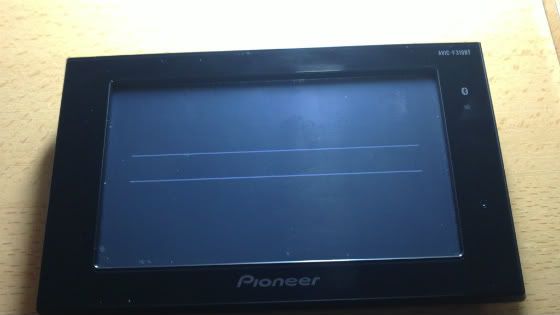
I have the following problem, I can not upgrade to version 2.00101, follow all steps in the tutorial but I do not work. I used different SD cards, but the result is always the same, a black background with two horizontal stripes.

I put a picture with the result.

I have a F310BT and FW 1.0004.

The tutorial is a great job but it's a shame that I did not get to finish it.

Thanks for your help.


11012012002-1.jpg

Edited Jan 11, 2012 by bigzipote
Posted Jan 11, 2012 · 22:22 UTC#120

bigzipote:

Probably it's trying to start up application but some file isnt in the right place.

did you leave My Flash Disk content alone?

Do you have two PRG folders (PRG0, PRG1) or just one PRG0?


If you can boot to testmode, then you are ok - you can get it working again, its just a matter of putting the right files/folders in the right place...

Edited Jan 11, 2012 by pionara
Posted Jan 11, 2012 · 23:08 UTC#121

Hi Pionara!

My device has two folders (PRG0 yPRG1) and I can boot TestMode with which I can restore my backup.

I follow the steps marked on the tutorial but the result is the two white stripes on black background.

I've seen that in the update folder there are more files than those mentioned. Also be inserted into My Flash Disk?

Posted Jan 11, 2012 · 23:23 UTC#122

did you replace My Flash Disk\PRG0 with one from CNSD-130FM update? If so, please delete PRG1 on My Flash Disk (which is old version of app and will be trying to start - unless you have PRG.FLG in My Flash Disk\) - If you still had PRG1 folder, then you did NOT follow directions completely.


also, check that My Flash Disk has VOLUME.DAT?

Edited Jan 11, 2012 by pionara
Posted Jan 12, 2012 · 00:00 UTC#123

Yes, I replaced the folder PGR0 why this folder CNSD-130FM. Also delete the folder and file PGR1 VOLUME.DAT is in place. My device does not contain PRG.FLG.

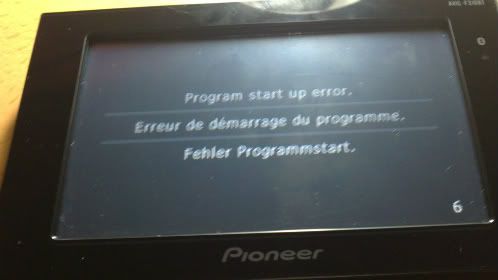
Here is another picture with another bug.


12012012002-1.jpg

Posted Jan 12, 2012 · 00:06 UTC#124

ok. did you remove all other folders and files inside My Flash Disk before copying new files?

Did you copy APL and FONTS folders and EL090APL.HTM and EL090APL.VER from CNSD-130FM folders to the new folder My Flash Disk/PRG0 ?

Maybe you can give me a detailed list of what you did, step by step. Also, if possible, please show me a list of files folders on My Flash Disk...

Edited Jan 12, 2012 by pionara
Posted Jan 12, 2012 · 00:30 UTC#125

Any update pionara for my/our situation? Check your pm btw. :)

Page 5 of 10