replied to your pm... without bootloader code to examine, i dont know what options there might be for triggering recovery flashing (if it exists)...
how are your jtag skills?
replied to your pm... without bootloader code to examine, i dont know what options there might be for triggering recovery flashing (if it exists)...
how are your jtag skills?
These are my steps:
1 - Run the file "update / user / prg / apl / aplupdate.exe" which is on the SD Card, choose the second option and the device automatically resets to 5 seconds.
2 - Remove the entire contents of My Flash Disk.
3-1 - Install step by step as shown in the tutorial, only the folders and files mentioned (including EL090APL.HTM and EL090APL.VER, VOLUME.DAT, VERINFO.DAT, WINCEIMG.bin and WINCEIMG.cks) and restart I get the black background and the two white lines.
3-2 - copied and pasted from the CNSD-130FM update the folder and rename PRG0 PRG, I think the SYSTEM folder and inside the folder I put my RENEWAL and VERINFO.dat file, finally I put the other files in place and restart I get the error message starting with 6 below.
It will be a simple error on my part but it does not know where.
I'll research more on jtag and see if i can come up with anything. The ARM processor is a popular processes used on many devices... I think we can figure something out with this.
basket,
i think one can use a jtag app like sjf2450 or similar to extract boot loader to examine..
bigzipote,
in your My Flash Disk, you should have following files/folders:
PRG0\APL\...
PRG0\FONTS\...
PRG0\EL090APL.HTM
PRG0\EL090APL.VER
SYSTEM\RENEWAL\VERINFO.DAT
VOLUME.DAT
My captures.
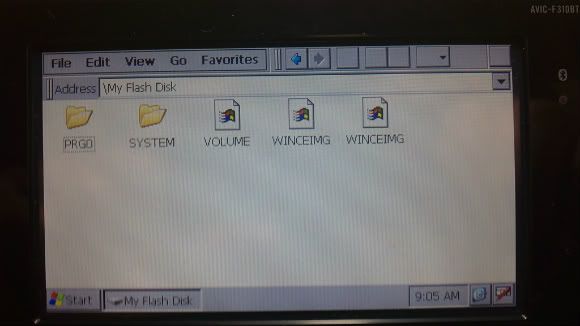
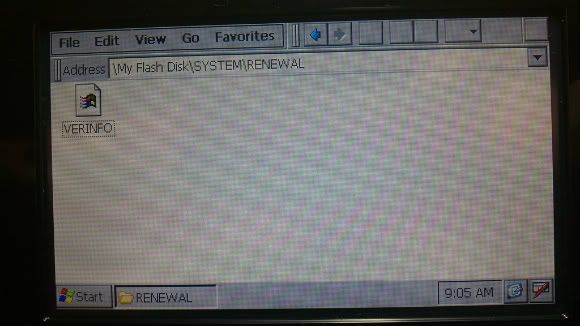
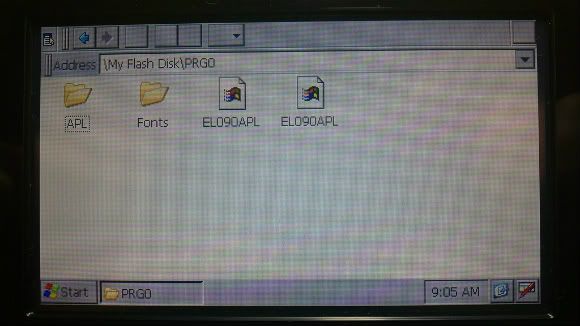
I'm not sure about this one... Maybe some other guys with F310BT can help you out? I'm not aware of anything special needing to be done for F310BT.
How is your "My Flash Disk2" NDATA? I trust that it was not touched as part of the upgrade?
Another try: delete the SYSTEM folder on My Flash Disk and see if it will start up...
Also, you may want to try running app & maps from SD card from this post to see if it starts up ok:
The partition "My Flash Disk2" has not been modified and contains the NDATA, when I restore my backup navigator works smoothly and the other options too.
I'm scratching my head on this one bigzipote... try running it from SD card (look at the thread for instructions)..
maybe one of the other F310BT guys can help you figure this out?
Does any of this help?
http://www.gpspassion.com/forumsen/topic.asp?TOPIC_ID=127723&whichpage=80
Sorry, I was busy and have not had time to test things out of the link.
I'll try the option to run from SD card.
I will continue waiting for any user who has suffered the same problem tell me how you have solved it.
EDIT : Can anyone share their backup "My Flash Disk" updated to 2.0001, is the only solution I find to my problem.
Thanks for your help.
Work.
But the original Nav now is slow!!!
yea original navi is couple blocks slow. any updates lately?
No. Purchased 1 month ago...
Solved by disconnecting the battery.
Sorry for my English... I'm Italian 
yea original navi is couple blocks slow. any updates lately?
I've had the same problem for quite some time now. Strangely it was fine initially as I remember using the eco-meter with a functioning GPS. At some point soon after, it stopped working well. Now it's slow to update and well behind my position.
Does anyone have a well behaving stock NAV after dong this hack?
just curious, does it do it if you do a hard reset (the recessed button on front) of the unit?
If it's not a bug in the 2.0001 stock nav software itself, perhaps there is a reg entry that didnt get changed back properly after rebooting?
note: I swear I saw some discussion of this very problem with the CNSD-130FM update somewhere else on this forum, and the solution was some update from pioneer, however I cant find the thread (so mabye it was just my imagination)...
Anyhow, CNSD-239FM would be nice to play with...
Pionara do you want create for me tomtomlauncher for u310bt
thank you very much
Dear pionara,
do you have any minds about this issue:
3. when custom app is running, and the unit goes to sleep (i.e., you turn off the vehicle), upon resuming (waking up from car start, etc) the unit will reboot back to regular stock nav mode. Not sure why this does this yet... Still looking to find what is causing this behavior... I suspect it's some internal watchdog or "safety feature" of app mode... (Stock apps dont have this issue...)
I'm so tired to launch IGO again and again after any restart of my car 
how to get out of testmode to recopy files? seems i am stuck in testmode.
hard reset button on front, self help.
How many people have tried version 2.001 with succes. I still have guarantee on the unit and I'm don't want to void it.
How great is the chance of bricking the device? I only want the firmware update, I don't mind the map updates yet.
Can anyone repost "patched AppsLib.dll:" for custom apps on the 310bt.
original link does not work
Anyone has instructions how install miopocket or igo? i tried to install in testmode, but im not sure how i must do it.
Thanks,
Sebastian
added the patched appslib.dll for u310bt to first post
Hello Pionara!
great job. Works flawless for me on AVIC-F220
added the patched appslib.dll for u310bt to first post
Please, explain about this new dll. What changes?
schumi, nothing changed - the site where it was hosted is one of the many filesharing sites that are now blocked in US  - so posted to this thread