Yeah well thats not right. Read the first post again.
Posted Sep 17, 2012 · 23:47 UTC#476
Yeah well thats not right. Read the first post again.
Yeah well thats not right. Read the first post again.
Thanks for making me look stupid;)
I have tried the new updated version of AppEx and I still get black screen only (with audio) when I start an unsported app. I have all the dependencies installed as well.
I thought the black screen issue was gone with the latest release. Is there anything that I might be doing wrong?
Some bad news I'm afraid. Just upgraded to ios 6 and installed cydia but until cydia has been updated with the required preferences etc, appradio extensions no longer work 
Just upgraded to ios 6 and installed cydia but until cydia has been updated with the required preferences etc, appradio extensions no longer work
PreferenceLoader hasn't been updated for iOS 6 yet so you have to set everything manually to get it to work. Not really bad news, just need to wait for an official jailbreak. The current jailbreak is targeted at developers for testing.
Hey Mike
Pioneer just released an update to the App Radio App.
Everything still works except for the landscape model on the Home app.
When I turn the phone to landscape the app screen on the deck won't rotate.
Pioneer just released an update to the App Radio App.
Everything still works except for the landscape model on the Home app.
When I turn the phone to landscape the app screen on the deck won't rotate.
Nice, thanks for the info. The rotation shouldn't be related to the AppRadio app. Which app isn't rotating? Are you using RC1?
Yeah I've updated to RC1 and the home app before today's update would rotate so I had the home screen of the iphone filling the whole screen.
Now after the update the Home screen app won't rotate.
Hi Mike,
i got a Problem. I want to use TomTom on the Appradio2. I am running App Ex Beta 7. I also get the Mirror of the TomTom onto my Screen. Unfortunatly there seems to be some kind of GPS Problem. TomTom won´t find a valid Signal as long as the Phone is connected to the Radio. When i disconnect the Phone from the cable and restart TomTom it finds Satelites almost instantly, if i then connect it back to the Radio it looses the Satellite signal. Also the Appradio shows me in the "Settings" Menu that it is connected to like 8-10 Satellites. I also tested the GPS Receiver from the Radio with the Build in "Maps" App. It is working quite accurate. Any Ideas how to fix that problem ? Thx in advance !!!
Cheers Goovy
Yeah I've updated to RC1 and the home app before today's update would rotate so I had the home screen of the iphone filling the whole screen.
Now after the update the Home screen app won't rotate.
I can't reproduce this problem. My screen rotates fine after the update.
i got a Problem. I want to use TomTom on the Appradio2. I am running App Ex Beta 7. I also get the Mirror of the TomTom onto my Screen. Unfortunatly there seems to be some kind of GPS Problem. TomTom won´t find a valid Signal as long as the Phone is connected to the Radio. When i disconnect the Phone from the cable and restart TomTom it finds Satelites almost instantly, if i then connect it back to the Radio it looses the Satellite signal. Also the Appradio shows me in the "Settings" Menu that it is connected to like 8-10 Satellites. I also tested the GPS Receiver from the Radio with the Build in "Maps" App. It is working quite accurate. Any Ideas how to fix that problem ? Thx in advance !!!
This is a known issue with the AppRadio and non-supported apps: http://avic411.com/index.php?/topic/34810-use-the-gps-antenna-or-not/
I may have accidently fixed this with the "Force Single Display" setting in RC1. I haven't had a problem with Navigon since, though it may just be a coincidence. Can you upgrade to RC1 and select TomTom under the "Force Single Display" setting in the preferences? This basically tricks the app into thinking the phone isn't plugged into the radio.
Thx Mike. For now i have unplugged the GPS Antenna from the Radio as the guys did in the Thread you linked in ur post.
I will update to RC1 and then give it another try. As always ur very helpful Mike. Thx alot !
Cheers Goofy
Why i can't see appradio extension at Cydia? I switch to developer but still can't
I have installed the AppRadio Extensions Version 1.9.9-8
In the "Settings" Menu of the Iphone thera are several difrences compared to the tutorial vido on You Toube.
for example my version does not have:
-Skip Intro Video
-Disable Home Launch
and does have:
-Force Single Display
but the most important differnece is that it does not work!!
I plug the phone to the appradio 2 and its the same thing as before but with a lot of problems like for example Wase does not work.
Is there an other version of the AppRadio Extension file to download so its the same as the tutorial?
Best Regards
etp
Is there an other version of the AppRadio Extension file to download so its the same as the tutorial?
What tutorial are you watching? I never recorded one so I'm not sure of the version in the video.
Also, what is the problem with Waze?
Why i can't see appradio extension at Cydia? I switch to developer but still can't
i mean the latest version, i can see only 1.1.xx something
i mean the latest version, i can see only 1.1.xx something
I didn't post it to Cydia yet. It's only available here as of now.
Ok, just read every page of the thread to find this simple answer. Though I did breeze through it fast I still can find what I'm doing wrong...
I don't seem to have the "more apps" option in my AppEx Settings. Installed the newest .deb file 3 separate times, rebooted 3 separate times. On a 4s 5.1.1
Here's what I got:
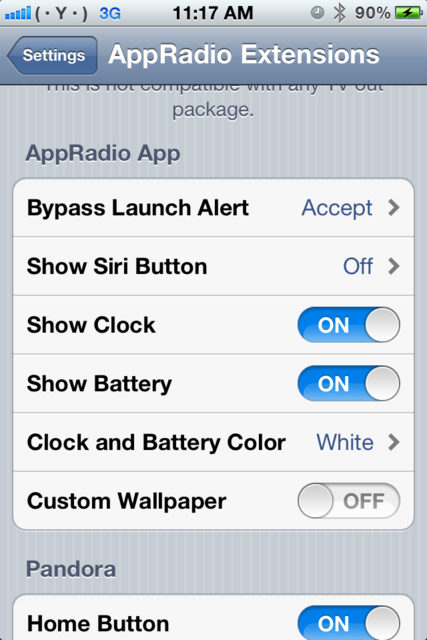
Ok, just read every page of the thread to find this simple answer. Though I did breeze through it fast I still can find what I'm doing wrong...
I don't seem to have the "more apps" option in my AppEx Settings. Installed the newest .deb file 3 separate times, rebooted 3 separate times. On a 4s 5.1.1
What's in the section above "AppRadio App"? The setting may have been renamed to "AppRadio App Menu".
What's in the section above "AppRadio App"? The setting may have been renamed to "AppRadio App Menu".
I do have the AppRadio App Menu option above but as soon as I click on the icon the app crashes and goes right back to my home screen. Same crash with the "force single display" icon. Is that an easy fix?
Thanks!!
I do have the AppRadio App Menu option above but as soon as I click on the icon the app crashes and goes right back to my home screen. Same crash with the "force single display" icon. Is that an easy fix?
Do you have Applist installed from Cydia? Check the first post for a list of dependencies.
Oh yeah, I got all three installed and I didn't have a backgrounder in cydia so I didn't have that to remove.
I've just resprung and rebooted without any luck
Just posted RC2 RC3. I changed the way apps are launched to hopefully speed things up a bit. If no one finds any major issues, this version should be the one I push to Cydia.
Edit: Found a small bug in RC2 so I bumped the version to RC3. If you already installed RC2, please update.
Hi, bit of info for you.
I'm running jailbroken iOS 6 and installed rc2. I noticed that when I tried to select or deselect an app in the menu the phone would crash and I had to respring. This happened every time. I hoped that rc3 would solve it but I'm afraid it's still happening. Hope this is of some interest to you.
I'm running jailbroken iOS 6 and installed rc2. I noticed that when I tried to select or deselect an app in the menu the phone would crash and I had to respring. This happened every time. I hoped that rc3 would solve it but I'm afraid it's still happening.
Do you mean the list in the settings? Can you try reinstalling Applist in Cydia? Someone else just had a similar issue with the app settings and a reinstall fixed it.
This is a known issue with the AppRadio and non-supported apps: http://avic411.com/index.php?/topic/34810-use-the-gps-antenna-or-not/
I may have accidently fixed this with the "Force Single Display" setting in RC1. I haven't had a problem with Navigon since, though it may just be a coincidence. Can you upgrade to RC1 and select TomTom under the "Force Single Display" setting in the preferences? This basically tricks the app into thinking the phone isn't plugged into the radio.
Hi Mike
I can confirm this does not fix the GPS issues with Tomtom on RC1
Thanks