Is Beta 10 working for anyone with an iPhone 5? I lost touch control of non-supported apps.
I lost touch control when I first installed the updated version, but rebooting fixed it. I'm still trying to figure out why it stopped working on first try.
Is Beta 10 working for anyone with an iPhone 5? I lost touch control of non-supported apps.
I lost touch control when I first installed the updated version, but rebooting fixed it. I'm still trying to figure out why it stopped working on first try.
Because ya didn't reboot.
thanks for your great job, mike, it works for me , on x930bt/f930bt in app mode with iphone 4s 6.1.2
touch tontrol is perfect, but when i launch non supported applications, they don't load in full screen mode. Is it normal?
i have a problem with the last 2 betas of appradio extensions. supported apps work very well but when i start unsupported apps screen calibration is totally f*!%&ed up.
anyone else with the same problem?
here is a small video to show to all of you.Is it possible to eliminate the 2 blacks bars on left and right, and display on full screen?
There is a function to those black bars.
a
There is a function to those black bars.
a function on appradio ext ? or in pioneer radio? i didn't find anything...
a
a function on appradio ext ? or in pioneer radio? i didn't find anything...
They are used to return to the AppRado app menu. Like a home button.
oh i was thinking about it , thanks.So , no solutions for disappearing these bars...Anyway, thanks for this ENORMOUS work 
Is there any way to rotate apps like Spotify. Tried sbrotator but it doen't do anything for that app. Thanks in advanced
Is there any way to rotate apps like Spotify. Tried sbrotator but it doen't do anything for that app. Thanks in advanced
I really wish there was a way to run apps that were iPad compatible in iPad mode and have them display that way in Landscape. That would be awesome. 
hey mike love the work! Is it possible to get the time put in the car media play app?
here is a small video to show to all of you.Is it possible to eliminate the 2 blacks bars on left and right, and display on full screen?
Could you post what dock your using? I am looking for a dock that will pass through the signal from the pioneer cable, but the one I tried did not work. Thanks.
www.proclipusa.com is where you should look. And please get back on topic.
apologies in advance if this issue was brought up before. when i start Pandora app first, everything works fine (pandora controls to be exact). but if i jump on, lets say Waze, and go back to Pandora app, the HU only shows i5 mirror (Pandora connection scree). the sound is there but no control. i tried everything like restart appradio from phone and so on but no luck. if i jump back on Waze, everything works fine agian (Waze control from HU). Pandora only shows controls, album art, etc. only if i restart my car again, establish new connection between phone and HU and start Pandora first. the minute i start appmode, back to the same issue.
am i missing something here or is this a known issue?
btw, this is my first post. so, big thanks to Mike and whoever is helping him on this amazing project
Mike FYI, if a notification is displayed on the screen of the head unit while running an unsupported app, touch control is lost. Latest versions of all apps/firmware.
Could you post what dock your using? I am looking for a dock that will pass through the signal from the pioneer cable, but the one I tried did not work. Thanks.
i made it, in liquid resin, directly in the cupholder.i simply passed the pioneer cable and an iphone 4s apple dock through the cupholder and filled with resin.the cable and the dock are fixed in resin now very inexpensive mod
u need this : 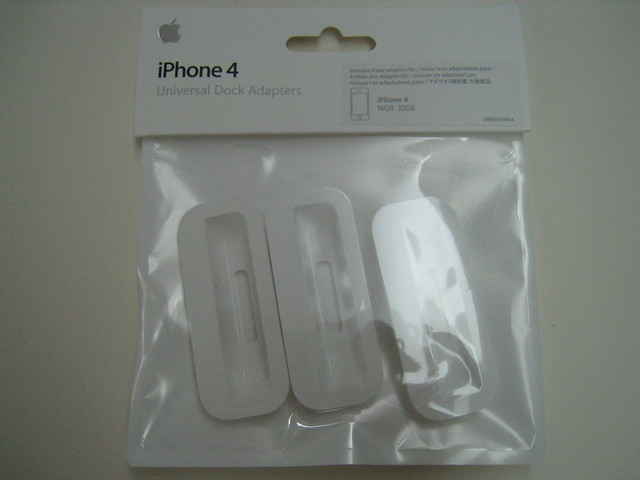
a lot of docks for iphone are not compatible with video signal delivered by pioneer.
--- END OF THE OFF-TOPIC --
Is there anyway I can force the Siri button to show up. I have a iPhone 4 jailbroken with ac1d Siri on it
Hi Mike.
First of all i would like to say a million thanks for the work you have done and hopefully continue to do. I have just purchased a SPH-DA100 and your app makes the head unit so much better.
I am running the latest version on the head unit and the latest version of your software (beta) Some applications open in landscape automatically but some dont. Is there any way to force all applications to go landscape?
Thanks again
For the most part if the app has a landscape it will landscape with AppEx. Other Cydia tweaks like SBRotator will force landscape to other apps like Settings and Facebook. But there is no way to force all apps to landscape.
Thanks mate. I will check out SBrotator and see if it helps me along.
I really feel the App Radio Extensions is so close to being perfect.
FYI guys later today I will be posting some demo vids of unsupported apps that I use and how they work with AppEx and the i5. Stay tuned.
Hey guys, is there any way to have the screen off on unsupported app and videos?
No.
FYI guys later today I will be posting some demo vids of unsupported apps that I use and how they work with AppEx and the i5. Stay tuned.
Demo vids are up.
http://avic411.com/index.php?/topic/36694-favorite-app-radio-apps-demo-vid/